1
F l e x S c a n
W i d e s c r e e n
M o n i t o r s
Ready for action …
F E A T U R E S
… ready for enjoyment.
EIZO ensures a brilliant performance.
I
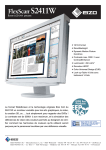
f your passion is creating, manipulating or simply enjoying movies or photos, the FlexScan S2411W and S2111W
Widescreen Format
Both monitors employ a 16:10 aspect ratio as opposed to the 4:3
ratio of conventional screens. This increased horizontal space means
you can keep tool palettes open without covering the window you’re
working on. And because the 16:10 aspect ratio is almost the same as
the 16:9 of many widescreen DVDs, you can enjoy movies with minimal black borders at the top and bottom of the screen.
are monitors made with you in mind. Utilizing EIZO’s new
OutlineEnhancer and ContrastEnhancer technologies developed
for high-quality TVs, and featuring fast response time
and high brightness, these 24.1" and 21.1" monitors provide a remarkably richer viewing experience. Touch-sensitive switches on the front
panel and an easy-to-position stand make them
convenient to use as well. Whether you’re a movie
maker or a movie buff, a graphic artist or music
composer, you’ll be inspired by
Conventional monitor: working
space and tool palettes overlap.
Widescreen monitor: full working space
and tool palettes are displayed
simultaneously with no overlap.
ContrastEnhancer Boosts Dynamic Contrast to 3000:1
Both models include a ContrastEnhancer function, which is built
into EIZO’s powerful new ASIC (Application Specific IC). Originally
developed for EIZO’s LCD TVs*, it adjusts brightness, gain, and
gamma for images that are too light or too dark to their ideal levels.
With moving images it produces a dynamic contrast ratio of 3000:1,
resulting in deeper blacks and more lifelike images.
*EIZO LCD TVs are available only in Japan.
the brilliant performance of
these FlexScan monitors.
ContrastEnhancer off
ContrastEnhancer on
OutlineEnhancer for Sharper Images
The ASIC also includes an OutlineEnhancer, which sharpens any
blurred areas in an image. Because the filtering is done inside the
monitor rather than by PC software, the OutlineEnhancer is effective
for both still and moving images. Seven degrees of adjustment from
soft to sharp are provided .
OutlineEnhancer off
schemes for things like maps, signage, indicator lights, etc. The
FlexScan S2411W instantly simulates how still and moving images
appear to people with color vision deficiency, and does so much faster
than software-based tools that slow down with larger files.
OutlineEnhancer on
Fast Response Time
Original mode
Protanope mode
Deuteranope mode
To ensure that movies and other moving images look clean and
sharp, with an absolute minimum of blurring and ghosting, both
monitors include an overdrive circuit. Commonly used in LCD TVs,
overdrive improves the time required to transmit gray levels to 6 ms
for the S2411W and 8 ms for the S2111W.
While the S2411W simulation is very close, it is not exact — people with
color vision deficiency are more sensitive to differing levels of luminance and
saturation than those with normal color vision, so some unavoidable perceptual differences will remain. Switching between simulation modes is done
with the bundled UniColor Pro software which is currently compatible with
Windows XP/2000 only.
14-Bit Processing
Without overdrive circuit
With overdrive circuit
The EIZO-developed ASIC used in both monitors features
14-bit color processing capability. This allows a larger number of
grayscale increments, for smooth grayscale rendering. The result is
a much greater degree of color detail, especially in dark areas and
shadows.
450 cd/m2 Brightness
Fine Contrast Mode Selection
With high brightness of 450 cd/m 2 , the same as high quality
LCD TVs, these monitors present a clear view even in bright environments. This performance is made possible by a direct backlighting system, which also provides higher power efficiency and better
uniformity.
For optimum viewing of all types of content, the Fine Contrast
function allows the selection of five imaging modes: Text, Picture,
Movie, Custom, and sRGB. You can navigate between the modes
by pressing a button, or assign a mode to any application with the
bundled ScreenManager ® Pro for LCD utility software so that when
the application is opened, the screen automatically changes to its
assigned mode.
High Definition Digital Signal Support
The FlexScan S2411W supports 1080p high definition digital signal at the actual screen resolution of 1920 × 1080 (16:9 aspect ratio).
(Black borders are displayed on the top and bottom of the screen.)
Color Vision Deficiency Simulation
To accommodate people with red-green color vision deficiency
(protanopia and deuteranopia), care must be taken in choosing color
Detailed Color Control
Gamma, saturation, hue, gain, and color temperature from 4,000 K
to 10,000 K can all be adjusted for accurate, display of color. For finetuning of even a single color, the hue and saturation settings for RGB
and CMY can be adjusted independently.
F E A T U R E S
&
S P E C I F I C A T I O N S
ArcSwing 2 Stand
Panel
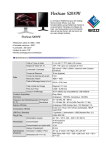
Size and Type
61 cm (24.1") TFT color LCD panel
Viewing Angles (H, V)
178°, 178° (at contrast ratio of 10:1)
178°, 178° (at contrast ratio of 10:1)
Brightness / Contrast
450 cd/m2 / 1000:1 (3000:1 dynamic contrast)
450 cd/m2 / 1000:1 (3000:1 dynamic contrast)
On/Off Response Time
16 ms (typical)
16 ms (typical)
Midtone Response Time 1
6 ms
8 ms
Native Resolution
1920 × 1200
1680 × 1050
Active Display Size (H × V)
518.4 × 324 mm
453.6 × 283.5 mm
Viewable Image Size
Diagonal: 611 mm
Diagonal: 534 mm
Pixel Pitch
0.270 × 0.270 mm
0.270 × 0.270 mm
Display Colors
16.77 million from a palette of 1.06 billion
16.77 million from a palette of 1.06 billion
Available Cabinet Colors
White, Black
White, Black
Dot Clock
Analog: 202.5 MHz, Digital: 162 MHz
Analog: 150 MHz, Digital: 120 MHz
The two DVI-I input terminals can accept both digital and analog
inputs for greater freedom in connecting other equipment. If both types
are connected, you can switch between them via a front panel button.
Scanning Frequency (H, V)
Analog: 24 – 94 kHz, 49 – 86 Hz
Digital: 31 – 76 kHz, 59 – 61 Hz (VGA Text: 69 – 71 Hz)
Analog: 24 – 82 kHz, 49 – 86 Hz
Digital: 31 – 65 kHz, 59 – 61 Hz (VGA Text: 69 – 71 Hz)
Input Signals
Analog: RGB Analog, Digital: DVI Standard 1.0
Analog: RGB Analog, Digital: DVI Standard 1.0
Input Terminals
DVI-I 29 pin × 2 (switchable)
DVI-I 29 pin × 2 (switchable)
USB 2.0 Hub
USB Ports / Standard
1 upstream, 2 downstream / USB Standard Rev. 2.0
1 upstream, 2 downstream / USB Standard Rev. 2.0
Power
Power Requirements
AC 100 – 120 V, 200 – 240 V: 50 / 60 Hz
AC 100 – 120 V, 200 – 240 V: 50 / 60 Hz
Power Consumption
110 W (maximum)
90 W (maximum)
Power Save Mode
Less than 2 W
Less than 2 W
Height Adjustment Range
95 mm
95 mm
Tilt / Swivel / Pivot
60° Up, 5° Down / 172° Right, 172° Left / –
60° Up, 5° Down / 172° Right, 172° Left / –
Dimensions (W × H × D)
With Stand: 566 × 358.7 – 480 × 230 mm
Without Stand: 566 × 396 × 85 mm
With Stand: 501 × 341.1 – 459.5 × 230 mm
Without Stand: 501 × 355 × 85 mm
Net Weight
With Stand: 10.2 kg, Without Stand: 7.8 kg
With Stand: 8.2 kg, Without Stand: 5.8 kg
This innovative stand offers a curved range of movement
so you can position it at eye level or at a low angle akin to
reading a book. In addition, it features a sturdy base and a
compartment for cable management.
Touch Sensitive Switches
Sensitive electrostatic “touch” switches on the front
panel present a sophisticated appearance and are easier
to engage than the small buttons of most LCD monitors.
Dual DVI-I Inputs
Both monitors provide a high speed (480 Mb/s) USB 2.0 hub with
two downstream ports which are conveniently located on the side of
the monitor for quick connection of peripherals.
Accessories
Accessories also available include mounting arms, panel protectors, monitor hoods, and client management software. For detailed
information, please see www.eizo.com/products/accessories/
Customer Assurance
Both models come with a five-year warranty, comply with leading industry standards including TCO’03 and TÜV Ergonomics, and
carry the EIZO Eco Products 2006 label indicating they meet strict
internal requirements for design, manufacturing, etc. The S2111W is
TCO’06 Media Displays certified, and the S2411W is certified by the
Color Universal Design Organization of Tokyo, Japan.
Physical
Specifications
53 cm (21.1") TFT color LCD panel
Display Mode Options
Fine Contrast (Text, Picture, Movie, sRGB, Custom, WindowMovie2 ), Auto Fine Contrast 3
ScreenManager OSD
Adjustment
Functions
Screen Adjustment
Clock, Phase, Position, Resolution, Range, Signal Filter, Screen Size (full screen, enlarge, normal), Smoothing (5
stages), Border Intensity
Color Adjustment
Brightness, Independent 6-Color Control, Gamma, Temperature (in 500 K increments from 4,000 K – 10,000 K),
Saturation, Hue, Gain, Reset
Power Save Settings
Analog: PowerManager (VESA DPMS), Off Timer, Digital: PowerManager (DVI DMPM), Off Timer
Other Settings
Signal Settings, Input Priority, Product Information (product name, serial number, resolution, operating time), OSD Menu
Settings, Adjustment Lock, Languages (English, French, German, Italian, Japanese, Simplified Chinese, Spanish, Swedish, Traditional Chinese), Reset, Enhancer (Contrast, Outline)
Certifications and Standards
TCO’06 (S2111W only), TCO’03, TÜV/Ergonomics (including ISO 13406-2), TÜV/GS, c-Tick, CE, CB, UL (cTÜVus), CSA
(cTÜVus), FCC-B, Canadian ICES-003-B, TÜV/S, VCCI-B, EPA ENERGY STAR®, EIZO Eco Products 2006
Warranty
Five Years 4
Five Years 4
1
S2111W
S2411W
All Product names and logos are trademarks or registered trademarks of their respective companies. SlimEdge, FlexScan,
ScreenManager, and EIZO are registered trademarks of Eizo Nanao Corporation.
Specifications are subject to change without notice.
© 2007 Eizo Nanao Corporation. All rights reserved.
Average response time measured between each grayscale level of 31, 63, 95, 127, 159, 191, and 223. 2 WindowMovie mode is selectable only when Auto Fine Contrast is active. 3 Bundled ScreenManager Pro for
LCD is necessary to activate Auto Fine Contrast. Support for this function varies with the graphics board used. ScreenManager Pro for LCD is compatible with the Microsoft® Windows® 98SE/Me/2000/XP operating
systems only. 4 The usage time is limited to 30,000 hours or less, and the warranty period of the LCD panel and backlight is limited to three years from the date of purchase.
With current LCD technology, a panel may contain a limited number of missing or flickering pixels.
153 Shimokashiwano, Hakusan, Ishikawa 924-8566 Japan
Phone: +81-76-277-6792 Fax: +81-76-277-6793
www.eizo.com