1
• Virtual Routers (VR): Supported on all products, virtual routers enable administrators
to partition a single device so it functions like multiple physical routers. Each VR can
support its own domains, ensuring that no routing information is exchanged with
domains established on other VRs. This enables a single device to support multiple
customer environments, lowering total cost of ownership.
• Virtual LANs (VLAN): Supported on all platforms, VLANs are a logical—not physical—
division of a subnetwork that enables administrators to identify and segment traffic
at a very granular level. Security policies can specify how traffic is routed from each
VLAN to a security zone, virtual system or physical interface. This makes it easy for
administrators to identify and organize traffic from multiple departments and define
what resources each can access.
Comprehensive High Availability Solutions
Ensure Uptime
A security system is only as good as its reliability and uptime. Juniper Networks security
solutions include reliable, high availability systems based Juniper Services Redundancy
Protocol (JSRP) to run on Junos operating system-based products. Firewall, VPN, and IPS
flows can be synchronized between high availability pairs to provide subsecond failover to
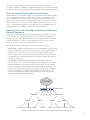
a backup device. Configuration options include:
Active/Active
Active/Active
• Active/Passive: Master device shares all network,
configuration setting, and current session information
INTERNET
with the backup so that, in the event of a failure, the
INTERNET
backup can take over in a seamless manner. Juniper
Networks Network and Security Manager provides
Active
SRX Series
EX Series
Active Failure
SRX Series
EX Series
SRX Series
EX Series
Active
SRX Series
EX Series
centralized, policy-based control.
• Active/Active: Both devices are configured to be active,
with traffic flowing through each. Should one device fail,
the other device becomes the master and continues
to handle 100 percent of the traffic. The redundant
physical paths provide maximum resiliency and uptime.
High availability configurations maintain
service despite device or link failures.
Device Integration Made Easy
Networks are never static. Potentially costly and time-consuming changes and additions
occur all the time. When the network topology changes, or as new offices, business
partners, and customers are added to the network, network interoperability becomes
especially important. To simplify network integration and help minimize administrative
effort when changes are required, Juniper Networks integrated security solutions can
operate in three different modes:
• Transparent mode affords the simplest way to add security to the network. In
transparent mode, organizations can deploy a Juniper Networks firewall/VPN appliance
without making any other changes to the network: firewall, VPN, IPS, and denial-ofservice (DoS) mitigation functions work without an IP address, making the device
“invisible” to the user.
• Route mode enables the security device to actively participate in network routing by
supporting both static and dynamic routing protocols, including BGP, OSPF, RIPv1,
RIPv2, and ECMP. Route mode enables administrators to quickly deploy multilayer
security solutions with a minimum of manual configuration.
• NAT mode automatically translates an IP address or a group of IP addresses to a single
address to hide an organization’s private addresses from public view.
Juniper Networks integrated security devices support both static and dynamic address
assignment through DHCP or PPPoE, enabling Juniper Networks solutions to operate in
any network environment.
6