1
QuickSpecs
HP MultiSeat Computing Solution
HP MultiSeat ms6200/ms6005 Series Desktop – Technical Specifications
ROM BIOS Information
Key features of the HP
BIOS include
Additional HP BIOS
Features
Serviceability Features
System
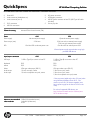
Diagnostic LED
Explanation Table
Deployment and manageability: HP BIOS provides several technologies that help integrate the HP
Business desktop computer into the enterprise, such as PXE, remote configuration, remote control,
and F10 Setup support for 12 languages.
Security: HP BIOS offers a robust and flexible set of security features to help the system
administrator secure their systems from removal of sensitive data, and help prevent access by
unauthorized users. Ability to disable USB ports
Tracking and tracing capabilities in case of theft available in select countries (subscription sold
separately).
Thermal and power management - The HP BIOS provides and enables thermal and power
management technologies to assist in operating the HP Business Desktop computer in any
enterprise environment.
Serviceability - HP BIOS provides diagnostic and detailed service information.
Administrator password - Also known as the setup password, this helps prevent unauthorized
changes to the system configuration. If the administrator password is not known, the BIOS version
cannot be changed and changes cannot be made to BIOS settings using F10 setup or under the
OS.
Advanced Configuration and Power Interface (ACPI) - Represents a significant innovation in power
and configuration management, allowing operating systems and applications to manage power
based on activity and usage.
Mute internal speaker
Disable USB ports
System/Emergency ROM
Flash ROM
CMOS Battery Holder for easy Replacement
Flash Recovery with Video
5 Aux Power LED on System PCA
Processor ZIF Socket for easy Upgrade
Over-Temp Warning on Screen (Requires IM Agents)
Clear Password Jumper
DIMM Connectors for easy Upgrade
Restore CD
Clear CMOS Switch
NIC LEDs (integrated) (Green & Amber)
Dual Color Power LED on Front of Computer (Indicates Normal Operations and Fault Conditions)
Number of 1--second red LED blinks followed by 2-second pause, then repeats:
2-processor thermal protection activated
3-processor not installed
4-power supply failure
5-memory error
6-video error
7-PCA failure (ROM detected failure prior to video)
8-invalid ROM, bootblock recover mode
DA - 13526
North America — Version 11 — July 22, 2011
Page 9