1
Dell 3130cn
colour laser printer
Printer management
Compatible printer
management software
Dell Printer Configuration Web Tool; Dell Colour Track™ 2.1 and Dell Toner Management System™
Printer options and accessories
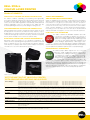
Duplexer unitA duplexer unit enables the printer to print on both sides of the paper (where supported by the application software). This
enables saving on paper costs and document bulk. The duplexer unit is fitted internally (no additional footprint) and can be
quickly and easily fitted without tools.
Duplexer dimensions WxDxH - 283 mm x 290 mm x 134 mm: weight 1 kg
Additional paper capacityAn additional 550 sheet paper drawer is available for this printer, enabling less frequent paper refills or easy access to different
types of media (for example, plain paper in the standard drawer, preprinted notepaper in the second drawer) where supported
by application.
Additional 550 sheet paper drawer dimensions WxDxH - unpacked 386 mm x 507 mm x 135 mm: weight 7.9 kg. Stacked with
printer - 400 mm x 507 mm x 605 mm
Network protocol adaptorThe network protocol adaptor is required only where the following network protocols are in use: IPP, SMB, NetWare, WINS,
DDNS, Bonjour (mDNS) 6, NetBEUI (SMB), NetWare, IPX P-server, AppleTalk. This option is not required for most users. Unit
dimensions - 32 mm x 46 mm x 14 mm, weight 10 g approx.
Local disk Depending upon application and network support, the optional 40 GB printer disk supports stored, delayed, secure and proof
printing, print spooling and collated printing. Print spooling can speed print jobs and reduce network congestion, particularly
with large, complex or multiple-copy documents. Collation can be accomplished more efficiently and with greatly reduced
network traffic impact. Printer job management is improved, with an embedded Job Management System. Data on the disk are
secure and there is a secure erase function available.
2
Wireless options Optional Dell 2130cn/3130cn Wireless Printer Adapter - connectivity: IEEE 802.11b/g, Security protocols: WPA - PSK (TKIP
or AES), WPA2-PSK (AES), WEP (64 bit and 128 bit) - dimensions 87 mm x 52 mm x 37 mm, weight 50 g approx
Additional memoryAn optional 1028 MB memory module is available for this printer. Additional memory may speed the processing of
large/complex print files, or networked print files
Service options
Standard Service24 x 7 online Technical Support for the life of the product
12 months access to Dell’s telephone technical printer support queue
12 months Next Business Day onsite service5
Fuser maintenanceDell Laser Printer next business day service includes fuser maintenance parts and part replacement for the duration of the
service contract
Service OptionsTwo, three, four and five-year extended service options available
Upgrades available to one, two, three, four and five-year Dell Business Support
Optional installation service available
Physical specifications
What’s included in the boxDell 3130cn colour laser printer, Drivers and Utilities CD (Printer Driver files, user guide in various languages, Easy Setup
Navigator and Dell Toner Management Software), Dell 3130cn ship-with black toner cartridge (4000 page yield3), Dell 3130cn
ship-with colour toner cartridges (3000 page yield3), User setup information placemat, Product Information Guide
Dimensions (mm)Printer: 400 mm W x 504 mm D x 470 mm H
Shipping carton: 560 mm W x 650 mm D x 600 mm H
Weight24.3 kg including standard toner cartridges; shipping weight 29.7 kg
Operating environmentOperating: air temperature 5°C to 32°C, Relative Humidity 15-85% non-condensing, altitude 3100 m or less
Storage (unpackaged): air temperature 0°C to 35°C, Relative Humidity 15-80%, altitude 3100 m or less
Storage (packaged): air temperature -20°C to 40°C, Relative Humidity 5-80%, altitude 3100 m or less
AcousticsPrinting (Simplex Mode):
Sound Pressure, Operator position (LpAm)7 56 dBA
Sound Pressure, Bystander position (LpAm)7 52 dBA
Average Sound Power (LWAm), declared7 6.4 Bels (64 dB)
Standby Mode:
Average Sound Power (LWAm), declared7 4.1 Bels (41 dB)
Voltage220-240 v AC, 50 Hz ± 3 Hz / 60 Hz ± 3 Hz nominal. Power cord included with shipped printer.
Power consumptionContinuous printing - 460 W average: Standby mode 95 W average: Powersaver mode 9 W: Off 0 W
Typical electricity consumption
2.47 kWh per week8. Energy Star®-compliant - see http://www.energystar.gov/ia/products
Maximum current while printing4 A at 220 v AC
Power Save optionsUser-definable - 5-60 minutes (default 5 min)
NOTES
1 Print speed quoted refers to A4 page using default print mode (600 x 600 dpi simplex). Actual print speed may vary depending upon system configuration, software
application and document complexity. Duplex print speed (600 x 600 dpi) is up to 17 ppm colour, 20 ppm monochrome
2 Ethernet mode is disabled when wireless mode is in use. Dell 2130cn/3130cn Wireless Printer Adapter is Wi-Fi CERTIFIED
3 Black and colour toner yield based on testing in accordance with ISO/IEC 19798. Yields vary with usage and environmental conditions.
4 Meets the requirement of the EU Directive on the restriction of use of certain hazardous substances in electrical and electronic equipment dated 27 January 2003
5 Service may be provided by third party. Technician will be dispatched if necessary following phone-based troubleshooting. Subject to parts availability, geographical
restrictions and terms of service contract. Service timing dependent upon time of day call placed to Dell. Defective unit must be returned. Replacements may be
refurbished.
6 Measurements based on ISO 7779
7 Tested in accordance with ISO 7779 and reported in accordance with ISO 9296, Acoustics.
8 The Typical Energy Consumption value is derived from printer energy consumption specifications combined with typical business printing usage for this model.
The midpoint of the Typical Monthly Print Volume is assumed to be printed at 30 minute intervals across a 10 hour business day (0800-1800), 5 days per week
A mixture of 50% mono: colour print is assumed. The printer enters standby mode when the print job is complete, and enters sleep mode after the default period.
The printer is assumed to remain in sleep mode at all other times including two weekend days. Energy consumption will be further reduced if the printer is powered
down when not in use for long periods. Actual energy consumption will vary according to print volume and usage patterns.
©2008 Dell Corporation Limited. Dell, the Dell logo and Dell Toner Management System are registered trademarks or trademarks of Dell Inc. Other trademarks
and trade names may be used in this document to refer to either the entities claiming the marks and names or their products. Dell disclaims proprietary interest
in the marks and names of others.
Microsoft, Windows and Windows NT are registered trademarks or trademarks of Microsoft Corporation.
Dell Products, Dell House, The Boulevard, Cain Road, Bracknell, Berkshire, RG12 1LF, UK.
v 1.0 September 2008 -- 3130cn EN