1
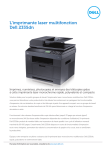
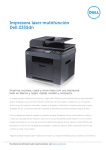
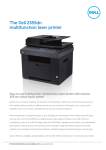
Dell 2335dn multifUnction
laser printer
PRODUCT benefits
Professional printing at high speed
With high 600 x 600 dpi native resolution and up to 1200 dpi
effective output, the 2335dn delivers crisp, professionally looking
documents. With its high print speed of up to 33 pages per minute
and monthly capacity of up to 35 000 copies, the 2335dn will
easily handle the requirements of a small workgroup today and
accommodate the growth of your business in the future.
Optimised productivity
and rich network connectivity
The 2335dn lets you perform multiple tasks that previously required
separate devices – offering the same or better functionality for each
of the tasks. The powerful 600 x 1200 dpi optical resolution scanner,
combined with the PaperPort 11 software, lets you archive office
documents in digital format (in mono or colour). The high-speed fax can
be used standalone or via the network. The printer can be shared by the
workgroup members easily thanks to the standard Ethernet connectivity
and the optional wireless network adapter.
Ease of use
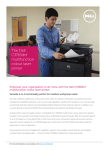
Operating the 2335dn is simple using the large LCD display and its
intuitive interface, as well as the dedicated keypad, useful during
copying and faxing. Handling double-sided documents is greatly
facilitated by the duplex automatic document feeder. Replacing
cartridges in the easy-to-access front toner compartment is easy
and takes less than 30 seconds.
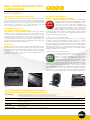
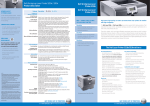
Front View
Effortless maintenance
and rock-solid technical support
Using the familiar browser interface, the Dell Printer
Configuration Web Tool makes managing the 2335dn
order
straightforward. The Dell Toner Management System
SUPPLIES
alerts you of low toner levels whilst reordering toner
online
is as simple as a few clicks at the dedicated Dell
website www.dell.com/supplies, and consumables
are also available through selected reseller partners. The
robust design and high reliability of the 2335dn help keep the printer
up and running. Should a problem occur, Dell support experts will help
solve it rapidly, with on-site service where required, to minimise business
disruption and maximise productivity.
Low total cost of printing
The 2335dn multifunction printer eliminates the costs of purchasing,
powering, operating and maintaining separate devices to perform
the various document related tasks. It can also eliminate the costs of
outsourced copying and scanning. Users choosing the high-capacity
cartridges (6 000 pages) will reduce the frequency of toner replacement
and further optimise their cost per printed page. Unlike other printer
vendors, Dell also includes fuser replacement in the standard warranty,
bringing you significant cost savings.
Environmental friendliness
The 2335dn’s paper drawer supports the use of
recycled paper and the re-use of freshly printed
The “N-Up” multiple-sheet feature reduces
DELL is paper.
paper consumption by enabling the printing of
GREEN! multiple pages on a single sheet of paper. The 2335dn
has received both Blue Angel and Energy Star eco-label
certifications. On average, Energy Star qualified imaging
equipment is 25% more efficient than conventional models according
to the US Environmental Protection Agency (source: www.energystar.
gov). As all Dell printers, it has also been designed to eliminate hazardous
materials. Dell printer owners can return toner cartridges to Dell for
recycling at no cost. Dell also helps customers dispose of old printers
and other computer equipment in an environmentally friendly manner.
Control panel view
Unit with optional second drawer
Easy front-loading toner
replacement
Get the most out of your Dell printer
with genuine Dell options and supplies
Toner cartridgesDell 2335dn standard capacity black toner cartridge (approximately 3000 pages)
Dell 2335dn high capacity black toner cartridge (approximately 6000 pages)
Toner yield based on testing in accordance with ISO/IEC 19752. Yields vary with usage and environmental conditions.
Additional paper drawerAn additional 250 sheet paper drawer is available for this printer, enabling less frequent paper refills or easy access to different types of
media (for example, plain paper in the standard drawer, preprinted notepaper in the second drawer) where supported by application.
Additional memoryAdditional memory is required for 600 dpi duplex scanning and may also speed the processing of large/complex print files,
or networked print files
Wireless network adapterInternal USB Wireless Network Adapter that provides wireless printing to Dell 2335dn when installed
Connectivity
Dell 3 m Ethernet cable
Dell 3 m USB cable
Service and support2 - 5 Years Next Business Day On Site Repair (parts and labour)
1 - 5 Years Printer Business Support