1
Install System in Rack
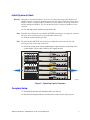
Warning: Lifting the system and attaching it to the rack is a three-person operation. Remove all
modules from the system prior to lifting system into rack. This includes all compute server
modules, all power supply modules, all Ethernet switch modules, all storage controllers
and the management module. Use of a mechanical assist is required if modules are not
removed.
14. Lift and align system with the mounted rack rails.
Note: If handles are installed, the rear handles MUST BE removed prior to setting the system on
the rack rails to avoid interference of the handles with the rack.
15. Slide the system onto the rack rails.
Note: The front handles MUST BE removed prior to sliding the system into the rack and
securing the front chassis tabs to the rack.
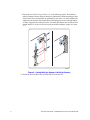
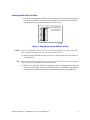
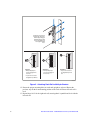
16. Secure the system to the rack by tightening the captive fasteners on the front of the
system flanges. These captive fasteners also engage the rails.
AF002467
Figure 6. Tightening Captive Fasteners
Complete Setup
17. Re-install all modules and controllers that were removed.
18. Reconnect all peripheral devices and the power cord(s). Power up the system.
Rail Kit Install Guide: Intel® Modular Server System MFSYS25
7