1
Features
6.2.3.1
Stop-Grant State
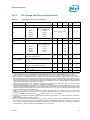
When the STPCLK# signal is asserted, the Stop Grant state of the processor is entered
20 bus clocks after the response phase of the processor-issued Stop Grant
Acknowledge special bus cycle.
Since the GTL+ signals receive power from the FSB, these signals should not be driven
(allowing the level to return to VTT) for minimum power drawn by the termination
resistors in this state. In addition, all other input signals on the FSB should be driven to
the inactive state.
RESET# will cause the processor to immediately initialize itself, but the processor will
stay in Stop-Grant state. A transition back to the Normal state will occur with the deassertion of the STPCLK# signal.
A transition to the Grant Snoop state will occur when the processor detects a snoop on
the FSB (see Section 6.2.4).
While in the Stop-Grant State, SMI#, INIT#, and LINT[1:0] will be latched by the
processor, and only serviced when the processor returns to the Normal State. Only one
occurrence of each event will be recognized upon return to the Normal state.
While in Stop-Grant state, the processor will process a FSB snoop.
6.2.3.2
Extended Stop Grant State
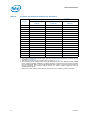
Extended Stop Grant is a low power state entered when the STPCLK# signal is asserted
and Extended Stop Grant has been enabled via the BIOS.
The processor will automatically transition to a lower frequency and voltage operating
point before entering the Extended Stop Grant state. When entering the low power
state, the processor will first switch to the lower bus ratio and then transition to the
lower VID.
The processor exits the Extended Stop Grant state when a break event occurs. When
the processor exits the Extended Stop Grant state, it will resume operation at the lower
frequency, transition the VID to the original value, and then change the bus ratio back
to the original value.
6.2.4
Extended HALT Snoop State, HALT Snoop State, Extended
Stop Grant Snoop State, and Stop Grant Snoop State
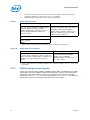
The Extended HALT Snoop State is used in conjunction with the new Extended HALT
state. If Extended HALT state is not enabled in the BIOS, the default Snoop State
entered will be the HALT Snoop State. Refer to the following sections for details on
HALT Snoop State, Stop Grant Snoop State, Extended HALT Snoop State, and Extended
Stop Grant Snoop State.
6.2.4.1
HALT Snoop State, Stop Grant Snoop State
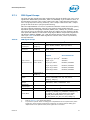
The processor will respond to snoop transactions on the FSB while in Stop-Grant state
or in HALT powerdown state. During a snoop transaction, the processor enters the HALT
Snoop State:Stop Grant Snoop state. The processor will stay in this state until the
snoop on the FSB has been serviced (whether by the processor or another agent on the
FSB). After the snoop is serviced, the processor will return to the Stop Grant state or
HALT powerdown state, as appropriate.
90
Datasheet