1
Manual_Page 3
1. Introduction
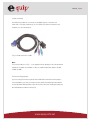
Thank you for your purchase of Combo KVM Switch! You now have a high quality, durable
system that will enable you to control 2/4 Host computers and/or servers by using PS/2
and/or USB Connectors from one console (PS/2 Mouse & PS/2 Keyboard, and Monitor).
2. Features
1. Complex connections with PCs via either way of PS/2 and/or USB arbitrarily.
2. Controls 2 / 4 computers from a single console PS/2 (Keyboard/Mouse) over PS/2
and/or USB connections.
3. Supports Windows, Linux, Mac OS9/OSX, Sun Microsystems.
4. Emulates a keyboard on each PC to allow your computers to boot normally without a
keyboard error.
5. Supports hot-swap. All devices connected to the KVM can be added or removed at any
time, without shutting the unit down.
6. Supports 2 types of switching:
(1) Hardware Push Button,
(2) Hot-Keys on PS/2 keyboard
7. Supports Auto-Scan function to alternate video between computers in preset intervals.
8. Supports LED display for PC status monitoring.
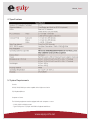
9. Supports VGA resolutions up to 2048 x 1536 @ 85HZ.
10. Supports Beeper during switching enabled.
11. Self powered through PS/2 and/or USB connection.
12. Fully compliant with the USB 1.1/ 2.0 specification.
3. Package Contents
The product you purchased should contain the following equipment and accessories:
1. 2-Port or 4-Port Combo KVM Switch
2. User Manual
www.equip-info.net