1
,
.
0
/
,
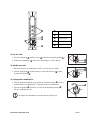
Combination dials
-
Unlocked position
.
Indicator arrow
/
Locked position
0
Wing knob
To set the lock:
1. Turn the wing knob(0) until the arrow(.) points down (locked position /).
0
.
/
2. Jumble the combination (, in the above illustration) or remove the key.
To disable the lock:
1. Dial in the factory-set combination (“000”) or use the key (provided).
2. Turn the wing knob(0) counterclockwise 180° until the arrow(.) points
up (unlocked position -).
.
0
180°
To change the combination:
1. Turn the wing knob until the arrow points up (unlocked position -). Turn it
counterclockwise an additional 15°, and enter your new combination.
2. Turn the wing knob(0) clockwise 15° back to the unlocked position (-).
The new combination is set.
15°
180°
0
To change the combination you must know the existing one.
Note
NetShelter Combination Lock
3 of 4