1
ENGLISH
9
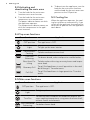
6. CLOCK FUNCTIONS
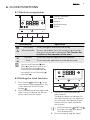
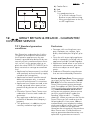
6.1 Electronic programmer
1
2
1
1 Function indicators
2 Time display
3 Button +
4 Selection button
5 Button -
5
4
3
Clock function
Time of day
Minute Minder
Duration
End
Application
To set, change or check the time of day.
To set a countdown time. An acoustic signal sounds
after the time period is completed. This function has
no effect on the operation of the oven.
To set how long the appliance must operate.
To set when the appliance must be deactivated.
You can use Duration
and
End
at the same time to set
the time when the appliance
must be activated and then deactivated. First set Duration
,
then End
.
6.2 Setting the clock functions
1.
For Duration
and End
, set an
oven function and temperature. This
is not necessary for the Minute
Minder
.
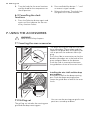
2. Press the Selection button again and
again until the indicator for the necessary clock function flashes.
3.
Press + or - to set the necessary
clock function.
The display shows the indicator for
the clock function you set. When the
set time ends, the indicator flashes
and an acoustic signal sounds for
two minutes.
With the Duration
and End
functions, the appliance deactivates automatically.
4. Press a button to stop the signal.