1
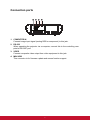
Connection ports
1
2
RS-232
3
4
VIDEO
MINI
USB
COMPUTER IN
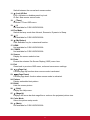
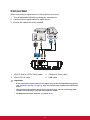
1. COMPUTER IN
Connect image input signal (analog RGB or component) to this jack.
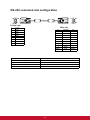
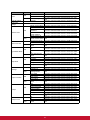
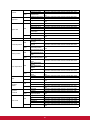
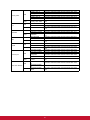
2. RS-232
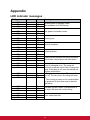
When operating the projector via a computer, connect this to the controlling computer's RS-232C port.
3. VIDEO
Connect composite video output from video equipment to this jack.
4. MINI USB
This connector is for firmware update and mouse function support.
7