1
ENFORCER Wireless Extender for HDMI®
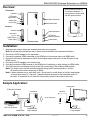
Overview:
Base included for attractive,
convenient installations. If
using the base, always install
with the antenna end up.
Transmitter:
Antenna
IR Remote
signal output
Status indicators
HDMI Input
Power input
Reset button
Receiver:
Antenna
Status indicators
USB Input
IR Remote
receiving window
(Not used)
HDMI Output
Power input
Base
Reset button
Installation:
1. Determine the location where the wireless HDMI units will be placed.
Note: Do not place the transmitter near a device that would affect the transmission distance.
2. Connect the 5VDC adapter to the transmitter.
3. Connect the wireless HDMI transmitter to the HDMI port of the source device via HDMI cable.
4. Connect the IR remote extension to the IR remote signal output and point it at the IR sensor of the
HDMI source.
5. Connect the 5VDC adapter to the receiver unit.
6. Connect the wireless HDMI receiver to the HDMI port of the display or other device via HDMI cable.
7. Turn ON the source and display devices to test the functionality of the wireless HDMI system.
Note: The video source can be controlled remotely using the IR remote extension. Use any
IR remote control with a frequency of 38kHz.
Note: If video problems occur, reset both units. Use a pencil or small object to hold the reset button
of the receiver down for 3 seconds. Repeat the same process for the transmitter within 30
seconds. If transmitter is not reset with 30 seconds, power off and reboot both units.
Sample Application:
HDMI cable
IR Remote extension
Receiver
Transmitter
Up to 98ft (30m)
HDTV Display
Remote
DVR or HD Source
HDMI Cable
Included 5VDC
Power adapter
SECO-LARM U.S.A., Inc.
Included 5VDC
Power adapter
3