1
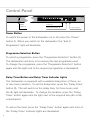
Control Panel
Power
button (1)
Programme selection
button (2)
Delay timer button (3)
Indicator lights
Power Button
To switch the power to the dishwasher on or off, press the “Power”
button (1). When you switch on the dishwasher, the “End of
Programme” light will illuminate.
Programme Selection Button
To select a programme, press the “Programme Selection” button (2).
The dishwasher will store in its memory the last programme used.
To change the programme, press the “Programme Selection” button
again until the light next to the required programme is illuminated.
Delay Timer Button and Delay Timer Indicator Lights
The dishwasher is equipped with a variable delay timer of three, six
or nine hours duration. To set the delay timer, press the “Delay Timer”
button (3). This will switch on the delay timer for three hours, and
the 3h light will illuminate. To change the duration, press the “Delay
Timer” button again until the light next to the required time (6h or 9h)
is illuminated.
To cancel the timer, press the “Delay Timer” button again until none of
the “Delay Timer” indicator lights are illuminated.
6