1
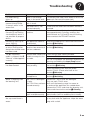
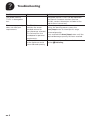
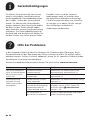
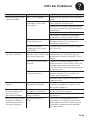
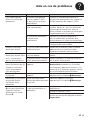
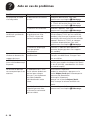
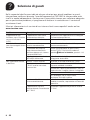
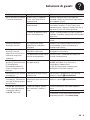
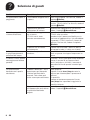
h Troubleshooting The following table contains solutions to problems or faults which may occur d uring operation of the appliance and that can be easily rectified at home. If you are not satisfied with the solutions provided here, please contact our Customer Service department. Further customer service information can also be found online: www.tassimo.com Problem Cause Solution The appliance is not working and none of the display elements (LEDs) are lighting. The appliance has no power supply. Check to see whether the appliance is connected to the mains. The appliance is not switched on. Make sure the appliance has been switched on. The water tank is not inserted correctly. Check that the water tank is correctly inserted. The brewing starts, however there is no beverage dispensed. The brewing will not start. The water tank was Start the cleaning process with the yellow removed during the Service T DISC. Please refer here to the section brewing stage or there is â First Time Use, Steps 2 – 14. air in the system. The float in the water tank is stuck. Clean the water tank and free the float. No T DISC inserted. Check that a T DISC has been inserted. The appliance does not Clean the T DISC reading window with a soft, recognise the T DISC bar damp cloth. code. Smooth out the foil of the T DISC with your finger so that the bar code can be read. Use a new T DISC. If the problem persists, contact the TASSIMO careline. The brewing unit is not closed properly. Clean the brewing unit with a soft, damp cloth, paying particular attention to the lid area. The appliance was not switched on when inserting the T DISC. Switch on the appliance before inserting the T DISC The brewing unit cannot The piercing unit and/ be closed. or the T DISC support have not been correctly inserted. Press the piercing unit into its holder using both thumbs and check the position of the T DISC support. The T DISC has not been Replace the damaged T DISC with a new one. correctly inserted. Place the T DISC with the printed side facing downwards so that the tab is resting in the intended slot. The brewing unit is not closed properly. Clean the brewing unit with a soft, damp cloth, paying particular attention to the lid area. Press the lid down until it audibly clicks into place. en 4