1
Removing the Coin-Cell Battery..............................................................................................................................26
Installing the Coin-Cell Battery...............................................................................................................................27
Removing the Heat Sink Assembly......................................................................................................................... 27
Installing the Heat Sink Assembly.......................................................................................................................... 28
Removing the Processor.........................................................................................................................................28
Installing the Processor..........................................................................................................................................29
System Board Components.................................................................................................................................... 29
Removing the System Board...................................................................................................................................30
Installing the System Board....................................................................................................................................30
3 System Setup............................................................................................................................. 32
Boot Sequence....................................................................................................................................................... 32
Navigation Keys......................................................................................................................................................32
System Setup Options.............................................................................................................................................33
Updating the BIOS ................................................................................................................................................. 40
Jumper Settings......................................................................................................................................................40
System and Setup Password..................................................................................................................................41
Assigning a System Password and Setup Password...................................................................................... 41
Deleting or Changing an Existing System and/or Setup Password..................................................................42
Disabling a System Password..........................................................................................................................42
4 Diagnostics.................................................................................................................................43
Enhanced Pre-Boot System Assessment (ePSA) Diagnostics...............................................................................43
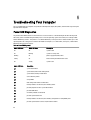
5 Troubleshooting Your Computer.............................................................................................44
Power LED Diagnostics.......................................................................................................................................... 44
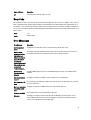
Beep Code.............................................................................................................................................................. 45
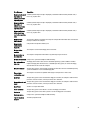
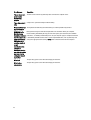
Error Messages...................................................................................................................................................... 45
6 Specifications............................................................................................................................ 49
7 Contacting Dell ......................................................................................................................... 54