1
Dell OptiPlex XE2 Mini Tower
Owner's Manual
Regulatory Model: D13M
Regulatory Type: D13M001
Notes, Cautions, and Warnings
NOTE: A NOTE indicates important information that helps you make better use of your computer.
CAUTION: A CAUTION indicates either potential damage to hardware or loss of data and tells you how to avoid the
problem.
WARNING: A WARNING indicates a potential for property damage, personal injury, or death.
Copyright © 2014 Dell Inc. All rights reserved. This product is protected by U.S. and international copyright and intellectual property
laws. Dell™ and the Dell logo are trademarks of Dell Inc. in the United States and/or other jurisdictions. All other marks and names
mentioned herein may be trademarks of their respective companies.
2013 - 06
Rev. A00
Contents
1 Working on Your Computer....................................................................................................... 5
Before Working Inside Your Computer.....................................................................................................................5
Turning Off Your Computer....................................................................................................................................... 6
After Working Inside Your Computer........................................................................................................................6
2 Removing and Installing Components..................................................................................... 7
Recommended Tools................................................................................................................................................ 7
Removing the Cover..................................................................................................................................................7
Installing the Cover................................................................................................................................................... 7
Removing the Intrusion Switch.................................................................................................................................8
Installing the Intrusion Switch..................................................................................................................................8
Removing the Wireless Local Area Network (WLAN) Card..................................................................................... 8
Installing the Wireless Local Area Network (WLAN) Card...................................................................................... 9
Removing the Front Bezel......................................................................................................................................... 9
Installing the Front Bezel........................................................................................................................................ 10
Removing the Expansion Card................................................................................................................................ 10
Installing the Expansion Card................................................................................................................................. 13
Memory Module Guidelines................................................................................................................................... 13
Removing the Memory............................................................................................................................................13
Installing the Memory.............................................................................................................................................14
Removing the Coin-Cell Battery..............................................................................................................................14
Installing the Coin-Cell Battery...............................................................................................................................15
Removing the Hard Drive........................................................................................................................................ 15
Installing the Hard Drive......................................................................................................................................... 16
Removing the Optical Drive.................................................................................................................................... 16
Installing the Optical Drive..................................................................................................................................... 17
Removing the Speaker............................................................................................................................................17
Installing the Speaker.............................................................................................................................................18
Removing the Power Supply...................................................................................................................................18
Installing the Power Supply....................................................................................................................................20
Removing the Heat Sink Assembly......................................................................................................................... 20
Installing the Heat Sink Assembly.......................................................................................................................... 20
Removing the Processor.........................................................................................................................................20
Installing the Processor..........................................................................................................................................21
Removing the System Fan.......................................................................................................................................21
Installing the System Fan........................................................................................................................................22
Removing the Thermal Sensor................................................................................................................................22
Installing the Thermal Sensor.................................................................................................................................24
Removing the Power Switch...................................................................................................................................24
Installing the Power Switch....................................................................................................................................25
Removing the Input/Output (I/O) Panel................................................................................................................... 26
Installing the Input/Output (I/O) Panel.................................................................................................................... 27
Removing the System Board...................................................................................................................................27
Installing the System Board....................................................................................................................................28
System Board Components.................................................................................................................................... 29
3 System Setup............................................................................................................................. 30
Boot Sequence....................................................................................................................................................... 30
Navigation Keys......................................................................................................................................................30
System Setup Options.............................................................................................................................................31
Updating the BIOS ................................................................................................................................................. 39
Jumper Settings......................................................................................................................................................40
System and Setup Password..................................................................................................................................40
Assigning a System Password and Setup Password...................................................................................... 40
Deleting or Changing an Existing System and/or Setup Password..................................................................41
Disabling a System Password..........................................................................................................................41
4 Diagnostics.................................................................................................................................43
Enhanced Pre-Boot System Assessment (ePSA) Diagnostics...............................................................................43
5 Troubleshooting Your Computer.............................................................................................44
Power LED Diagnostics.......................................................................................................................................... 44
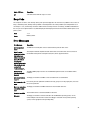
Beep Code.............................................................................................................................................................. 45
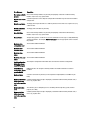
Error Messages...................................................................................................................................................... 45
6 Specifications............................................................................................................................ 49
7 Contacting Dell ......................................................................................................................... 54
Working on Your Computer
1
Before Working Inside Your Computer
Use the following safety guidelines to help protect your computer from potential damage and to help to ensure your
personal safety. Unless otherwise noted, each procedure included in this document assumes that the following
conditions exist:
•
You have read the safety information that shipped with your computer.
•
A component can be replaced or--if purchased separately--installed by performing the removal procedure in
reverse order.
WARNING: Before working inside your computer, read the safety information that shipped with your computer. For
additional safety best practices information, see the Regulatory Compliance Homepage at www.dell.com/
regulatory_compliance
CAUTION: Many repairs may only be done by a certified service technician. You should only perform
troubleshooting and simple repairs as authorized in your product documentation, or as directed by the online or
telephone service and support team. Damage due to servicing that is not authorized by Dell is not covered by your
warranty. Read and follow the safety instructions that came with the product.
CAUTION: To avoid electrostatic discharge, ground yourself by using a wrist grounding strap or by periodically
touching an unpainted metal surface, such as a connector on the back of the computer.
CAUTION: Handle components and cards with care. Do not touch the components or contacts on a card. Hold a
card by its edges or by its metal mounting bracket. Hold a component such as a processor by its edges, not by its
pins.
CAUTION: When you disconnect a cable, pull on its connector or on its pull-tab, not on the cable itself. Some
cables have connectors with locking tabs; if you are disconnecting this type of cable, press in on the locking tabs
before you disconnect the cable. As you pull connectors apart, keep them evenly aligned to avoid bending any
connector pins. Also, before you connect a cable, ensure that both connectors are correctly oriented and aligned.
NOTE: The color of your computer and certain components may appear differently than shown in this document.
To avoid damaging your computer, perform the following steps before you begin working inside the computer.
1.
Ensure that your work surface is flat and clean to prevent the computer cover from being scratched.
2.
Turn off your computer (see Turning Off Your Computer).
CAUTION: To disconnect a network cable, first unplug the cable from your computer and then unplug the
cable from the network device.
3.
Disconnect all network cables from the computer.
4.
Disconnect your computer and all attached devices from their electrical outlets.
5.
Press and hold the power button while the computer is unplugged to ground the system board.
6.
Remove the cover.
5
CAUTION: Before touching anything inside your computer, ground yourself by touching an unpainted metal
surface, such as the metal at the back of the computer. While you work, periodically touch an unpainted
metal surface to dissipate static electricity, which could harm internal components.
Turning Off Your Computer
CAUTION: To avoid losing data, save and close all open files and exit all open programs before you turn off your
computer.
1.
Shut down the operating system:
•
In Windows 8:
–
–
•
Using a touch-enabled device:
a.
Swipe in from the right edge of the screen, opening the Charms menu and select Settings.
b.
Select the
and then select Shut down
Using a mouse:
a.
Point to upper-right corner of the screen and click Settings.
b.
Click the
and select Shut down.
In Windows 7:
1.
Click Start
2.
Click Shut Down.
.
or
2.
1.
Click Start
.
2.
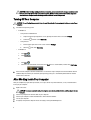
Click the arrow in the lower-right corner of the Start menu as shown below, and then click Shut Down..
Ensure that the computer and all attached devices are turned off. If your computer and attached devices did not
automatically turn off when you shut down your operating system, press and hold the power button for about 6
seconds to turn them off.
After Working Inside Your Computer
After you complete any replacement procedure, ensure you connect any external devices, cards, and cables before
turning on your computer.
1.
Replace the cover.
CAUTION: To connect a network cable, first plug the cable into the network device and then plug it into the
computer.
2.
Connect any telephone or network cables to your computer.
3.
Connect your computer and all attached devices to their electrical outlets.
4.
Turn on your computer.
5.
If required, verify that the computer works correctly by running the Dell Diagnostics.
6
Removing and Installing Components
2
This section provides detailed information on how to remove or install the components from your computer.
Recommended Tools
The procedures in this document may require the following tools:
•
Small flat-blade screwdriver
•
Phillips screwdriver
•
Small plastic scribe
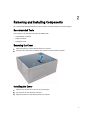
Removing the Cover
1.
Follow the procedures in Before Working Inside Your Computer.
2.
Pull up the cover release latch, and lift the cover upwards to remove it from the computer.
Installing the Cover
1.
Align the cover along its tabs on the chassis of the computer.
2.
Press down on the cover till it clicks into place.
3.
Follow the procedures in After Working Inside Your Computer.
7
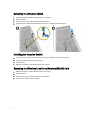
Removing the Intrusion Switch
1.
Follow the procedures in Before Working Inside Your Computer.
2.
Remove the cover.
3.
Disconnect the intrusion-switch cable from the system board.
4.
Slide the intrusion switch toward the bottom of the chassis and remove it from the computer.
Installing the Intrusion Switch
1.
Insert the intrusion switch into its place in the chassis rear and slide it towards the top to secure it.
2.
Connect the intrusion cable to the system board.
3.
Install the cover.
4.
Follow the procedures in After Working Inside Your Computer.
Removing the Wireless Local Area Network (WLAN) Card
1.
Follow the procedures in Before Working Inside Your Computer.
2.
Remove the cover.
3.
Remove the screws that secure the antenna to the computer.
4.
Disconnect the antenna from the computer.
8
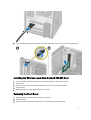
5.
Press the blue tab and lift the latch outwards and remove the WLAN card from the connector on the system board.
Installing the Wireless Local Area Network (WLAN) Card
1.
Insert the WLAN card into the connector on the system board and press down until it is secured.
2.
Affix the latch.
3.
Place the antenna puck on the connector and tighten the screws to secure it to the computer.
4.
Install the cover.
5.
Follow the procedures in After Working Inside Your Computer.
Removing the Front Bezel
1.
Follow the procedures in Before Working Inside Your Computer.
2.
Remove the cover.
3.
Pry the front bezel retention clips away from the chassis located at the edge of front bezel.
9
4.
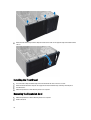
Rotate the front bezel away from the computer to release the hooks on the opposite edge of the bezel from the
chassis.
Installing the Front Bezel
1.
Insert the hooks along the bottom edge of the front bezel into the slots on the chassis front.
2.
Rotate the bezel toward the computer to engage the front-bezel retention clips until they click into place.
3.
Install the cover.
4.
Follow the procedures in After Working Inside Your Computer.
Removing the Expansion Card
1.
Follow the procedures in Before Working Inside Your Computer.
2.
Remove the cover
10
NOTE: If your computer has a powered expansion card perform step 3 and step 4, else move to step 5.
3.
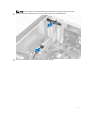
Disconnect the power cable from the card. Press the tab to release the card-retention latch.
4.
Ease the card up from its connector and remove it from the computer.
11
5.
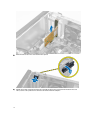
Rotate the release tab on the card-retention latch upward.
6.
Pull the release lever away from the expansion card until you release the securing tab from the dent in the card.
Then, ease the card up and out of its connector and remove it from the computer.
12
Installing the Expansion Card
1.
Insert the expansion card into it's connector on the system board and press down until it is securely in place.
NOTE: If your computer has a powered expansion connect the power cable to the card.
2.
Rotate the release tab on the card-retention latch downward.
3.
Install the cover.
4.
Follow the procedures in After Working Inside Your Computer.
Memory Module Guidelines
To ensure optimal performance of your computer, observe the following general guidelines when configuring your
system memory:
•
Memory modules of different sizes can be mixed (for example, 2 GB and 4 GB). But, all populated channels must
have identical configurations.
•
Memory modules must be installed beginning with the first socket.
NOTE: The memory sockets in your computer may be labeled differently depending on the hardware
configuration. For example, A1, A2 or 1,2,3.
•
If the quad-rank memory modules are mixed with single or dual-rank modules, the quad-rank modules must be
installed in the sockets with the white release levers.
•
If memory modules with different speeds are installed, they operate at the speed of the slowest installed memory
modules.
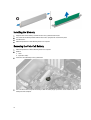
Removing the Memory
1.
Follow the procedures in Before Working Inside Your Computer.
2.
Remove the cover.
3.
Press down on the memory retaining tabs on each side of the memory modules, and lift the memory modules out of
the connectors on the system board.
13
Installing the Memory
1.
Align the notch on the memory-card with the tab in the system-board connector.
2.
Press down on the memory module until the release tabs spring back to secure them in place.
3.
Install the cover.
4.
Follow the procedures in After Working Inside Your Computer.
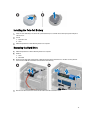
Removing the Coin-Cell Battery
1.
Follow the procedures in Before Working Inside Your Computer.
2.
Remove:
a. cover
b. expansion card(s)
3.
Locate the coin-cell battery on the system board.
4.
Press the release latch away from the battery to allow the battery to pop-up from the socket and lift the coin-cell
battery out of the computer.
14
Installing the Coin-Cell Battery
1.
Place the coin cell battery in its slot on the system board and press until the release latch springs back into place
and secures it.
2.
Install:
a. expansion card
b. cover
3.
Follow the procedures in After Working Inside Your Computer.
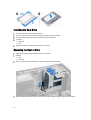
Removing the Hard Drive
1.
Follow the procedures in Before Working Inside Your Computer.
2.
Remove:
a. cover
b. front bezel
3.
Disconnect the data cable and the power cable from the back of the hard drive. Press the blue securing-bracket
tabs inwards and lift the hard-drive bracket out of the hard-drive bay.
4.
Flex the hard-drive bracket and remove the hard drive from the hard-drive bracket.
15
Installing the Hard Drive
1.
Insert the hard drive into the hard-drive bracket.
2.
Press the securing brackets inward and slide the hard-drive bracket into the bay.
3.
Connect the data cable and the power cable to the back of the hard-drive.
4.
Install the:
a. front bezel
b. cover
5.
Follow the procedures in After Working Inside Your Computer.
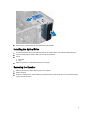
Removing the Optical Drive
1.
Follow the procedures in Before Working Inside Your Computer.
2.
Remove:
a. cover
b. front bezel
3.
Disconnect the data cable and the power cable from the back of the optical drive.
4.
Slide and hold the optical-drive latch to unlock the optical drive and pull the optical drive out of the computer.
16
5.
Repeat steps 3 and 4 to remove the second optical drive (if available).
Installing the Optical Drive
1.
Push the optical drive from the front toward the back of the computer till it is secured by the optical-drive latch.
2.
Connect the data cable and power cable to the back of the optical drive.
3.
Install:
a. front bezel
b. cover
4.
Follow the procedures in After Working Inside Your Computer.
Removing the Speaker
1.
Follow the procedures in Before Working Inside Your Computer.
2.
Remove the cover.
3.
Disconnect and release the speaker cable from system board. Press down the speaker-securing tab and slide the
speaker upwards to remove.
17
Installing the Speaker
1.
Slide the speaker downwards into its slot to secure it.
2.
Thread the speaker cable into the chassis clip and connect the speaker cable to the system board.
3.
Install the cover.
4.
Follow the procedures in After Working Inside Your Computer.
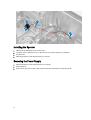
Removing the Power Supply
1.
Follow the procedures in Before Working Inside Your Computer.
2.
Remove the cover.
3.
Disconnect the 4-pin and 8-in power cables from the system board and release the cable from the tab.
18
4.
Remove the screws that secure the power supply to the back of the computer.
5.
Push in on the blue release tab beside the power supply, and slide the power supply towards the front of the
computer. Lift and remove the power supply out of the computer.
19
Installing the Power Supply
1.
Place the power supply in the chassis and slide towards the back of the system to secure it.
2.
Tighten the screws to secure the power supply to the back of the computer.
3.
Connect the 4-pin and 8-pin power cables to the system board.
4.
Thread the power cables through the chassis clips.
5.
Install the cover.
6.
Follow the procedures in After Working Inside Your Computer.
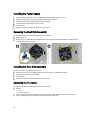
Removing the Heat Sink Assembly
1.
Follow the procedures in Before Working Inside Your Computer.
2.
Remove the cover.
3.
Disconnect the fan cable from the system board. Loosen the captive screws in diagonal order and lift the heat-sink
assembly away from the computer.
Installing the Heat Sink Assembly
1.
Place the heat sink assembly into the chassis.
2.
Tighten the captive screws in diagonal order to secure the heat sink assembly to the computer.
3.
Connect the fan cable to the system board.
4.
Install the cover.
5.
Follow the procedures in After Working Inside Your Computer.
Removing the Processor
1.
Follow the procedures in Before Working Inside Your Computer.
2.
Remove:
a. cover
b. heat-sink assembly
3.
20
Press the release lever down and then move it outward to release it from the retention hook. Lift the processor
cover and remove the processor from the socket. Place it in an antistatic bag.
Installing the Processor
1.
Insert the processor in the processor socket. Ensure the processor is properly seated.
2.
Lower the processor cover.
3.
Press the release lever down and then move it inward to secure it with the retention hook.
4.
Install:
a. heat-sink assembly
b. cover
5.
Follow the procedures in After Working Inside Your Computer.
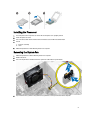
Removing the System Fan
1.
Follow the procedures in Before Working Inside Your Computer.
2.
Remove the cover.
3.
Press the clip to release and disconnect the system-fan cable from the system board.
4.
Pry and remove the system fan away from the four grommets securing it to the back of the computer.
21
Installing the System Fan
1.
Place the system fan in the chassis.
2.
Pass the four grommets through the chassis and slide outward along the groove to secure in place.
3.
Connect the system-fan cable to the system board.
4.
Install the cover.
5.
Follow the procedures in After Working Inside Your Computer.
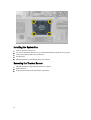
Removing the Thermal Sensor
1.
Follow the procedures in Before Working Inside Your Computer.
2.
Remove the cover.
3.
Disconnect the thermal-sensor cable from the system board.
22
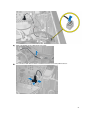
4.
Release the thermal-sensor cable from the chassis clip.
5.
Press the tabs on both sides to release and remove the thermal sensor away from the chassis.
23
Installing the Thermal Sensor
1.
Secure the thermal sensor to the chassis.
2.
Thread the thermal-sensor cable into the chassis clips.
3.
Connect the thermal-sensor cable to the system board.
4.
Install the cover.
5.
Follow the procedures in After Working Inside Your Computer.
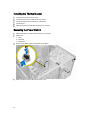
Removing the Power Switch
1.
Follow the procedures in Before Working Inside Your Computer.
2.
Remove the:
a. cover
b. front bezel
c. optical drive
3.
Disconnect the power-switch cable from the system board.
4.
Release the power-switch cable from the chassis clips.
24
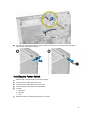
5.
Press the clips on both side of the power switch to release it from the chassis and, slide to remove the power
switch along its cable from the computer.
Installing the Power Switch
1.
Slide the power switch in through the front of the computer.
2.
Secure the power-switch cable to the chassis.
3.
Thread the power-switch cable into the chassis clips.
4.
Connect the power-switch cable to the system board.
5.
Install the:
a. optical drive
b. front bezel
c. cover
6.
Follow the procedures in After Working Inside Your Computer.
25
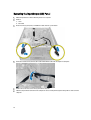
Removing the Input/Output (I/O) Panel
1.
Follow the procedures in Before Working Inside Your Computer.
2.
Remove:
a. cover
b. front bezel
3.
Disconnect the I/O panel, data, and USB data cables from the system board.
4.
Unthread and release the I/O Panel, data cable and USB data cable from the clip on the computer.
5.
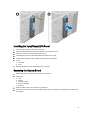
Remove the screw that secures the I/O panel to the computer.
6.
Slide the I/O panel towards the left of the computer to release it and pull the I/O panel along with its cable out of the
computer.
26
Installing the Input/Output (I/O) Panel
1.
Insert the I/O panel into the slot on the chassis front.
2.
Slide the I/O panel towards the right of the computer to secure to the chassis.
3.
Tighten the screw to secure the I/O panel to the chassis.
4.
Thread the I/O panel, data cable and USB data cable into the chassis clip.
5.
Connect the I/O panel, data cable and USB data cable to the system board.
6.
Install :
a. front bezel
b. cover
7.
Follow the procedures in After Working Inside Your Computer.
Removing the System Board
1.
Follow the procedures in Before Working Inside Your Computer.
2.
Remove the:
a.
b.
c.
d.
e.
cover
memory
expansion card(s)
heat-sink assembly
processor
3.
Disconnect all the cables connected to the system board.
4.
Remove the screws that secure the system board to the computer and slide the system board towards the front of
the computer.
27
5.
Tilt the system board at 45–degrees, and then lift the system board out of the computer.
Installing the System Board
1.
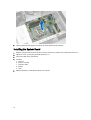
Align the system board to the port connectors on the rear of the chassis and place the system board in the chassis.
2.
Tighten the screws securing the system board to the chassis.
3.
Connect the cables to the system board.
4.
Install the:
a.
b.
c.
d.
e.
5.
28
processor
heat-sink assembly
expansion card(s)
memory
cover
Follow the procedures in After Working Inside Your Computer.
System Board Components
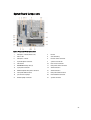
Figure 1. Components Of The System Board
1.
PCI Express x16 slot (wired as x4)
2.
PCI slot
3.
PCIe x1 slot
4.
coin-cell battery
5.
PCI Express x16 slot
6.
intrusion switch connector
7.
4-pin CPU power connecter
8.
system fan connector
9.
CPU Socket
10.
heat-sink fan connector
11.
DDR DIMM memory slots (4)
12.
front power-switch connector
13.
8-pin power connector
14.
SATA connectors
15.
HDD and optical drive power connector
16.
SATA connectors
17.
front panel USB connector
18.
front panel audio connector
19.
password reset jumper
20.
internal USB 2.0 connector
21.
RTCRST jumper connector
22.
speaker connector
29
System Setup
3
System Setup enables you to manage your computer hardware and specify BIOS‐level options. From the System Setup,
you can:
•
Change the NVRAM settings after you add or remove hardware
•
View the system hardware configuration
•
Enable or disable integrated devices
•
Set performance and power management thresholds
•
Manage your computer security
Boot Sequence
Boot Sequence allows you to bypass the System Setup‐defined boot device order and boot directly to a specific device
(for example: optical drive or hard drive). During the Power-on Self Test (POST), when the Dell logo appears, you can:
•
Access System Setup by pressing <F2> key
•
Bring up the one-time boot menu by pressing <F12> key
The one-time boot menu displays the devices that you can boot from including the diagnostic option. The boot-menu
options are:
•
Removable Drive (if available)
•
STXXXX Drive
NOTE: XXX denotes the SATA drive number.
•
Optical Drive
•
Diagnostics
NOTE: Choosing Diagnostics, will display the ePSA diagnostics screen.
The boot sequence screen also displays the option to access the System Setup screen.
Navigation Keys
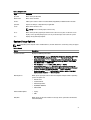
The following table displays the system setup navigation keys.
NOTE: For most of the system setup options, changes that you make are recorded but do not take effect until you
re-start the system.
30
Table 1. Navigation Keys
Keys
Navigation
Up arrow
Moves to the previous field.
Down arrow
Moves to the next field.
<Enter>
Allows you to select a value in the selected field (if applicable) or follow the link in the field.
Spacebar
Expands or collapses a drop‐down list, if applicable.
<Tab>
Moves to the next focus area.
NOTE: For the standard graphics browser only.
<Esc>
Moves to the previous page till you view the main screen. Pressing <Esc> in the main screen
displays a message that prompts you to save any unsaved changes and restarts the system.
<F1>
Displays the System Setup help file.
System Setup Options
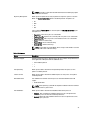
NOTE: Depending on the computer and its installed devices, the items listed in this section may or may not appear
Table 2. General
Option
Description
System Information
Displays the following information:
•
•
•
•
•
Boot Sequence
Advanced Boot Options
Date/Time
System Information - Displays BIOS Version, Service Tag, Asset Tag, Ownership
Tag, Ownership Date, Manufacture Date, and the Express Service Code.
Memory Information - Displays Memory Installed, Memory Available, Memory
Speed, Memory Channels Mode, Memory Technology, DIMM 1 Size, DIMM 2
Size, DIMM 3 Size and DIMM 4 Size.
PCI Information - Displays SLOT1, SLOT2, SLOT3,and SLOT4.
Processor Information - Displays Processor Type, Core Count, Processor ID,
Current Clock Speed, Minimum Clock Speed, Maximum Clock Speed, Processor
L2 Cache, Processor L3 Cache, HT Capable, and 64-Bit Technology.
Device Information - Displays SATA-0, SATA-1, SATA-2 , SATA-3, LOM MAC
Address, Audio Controller and Video Controller.
Allows you to specify the order in which the computer attempts to find an operating
system. The options are:
•
•
•
•
•
Diskette drive
Local Hard Drive
USB Storage Device
CD/DVD/CD-RW Drive
Onboard NIC
•
•
Legacy
UEFI
Allows you to set the date and time. The changes to the system date and time takes
effect immediately.
31
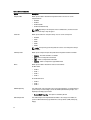
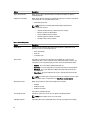
Table 3. System Configuration
Option
Description
Integrated NIC
Allows you to enable or disable the integrated network card. You can set the
integrated NIC to:
•
•
•
•
Disabled
Enabled
Enabled w/PXE
Enabled w/Cloud Desktop
NOTE: Depending on the computer and its installed devices, the items listed in
this section may or may not appear.
Serial Port
Allows you to define the serial port settings. You can set the serial port to:
•
•
•
•
•
Disabled
COM1
COM2
COM3
COM4
NOTE: The operating system may allocate resources even though the setting is
disabled.
SATA Operation
Allows you to configure the operating mode of the integrated hard drive controller.
•
•
•
•
Drives
Disabled - The SATA controllers are hidden.
ATA - SATA is configured for ATA mode.
AHCI - SATA is configured for AHCI mode.
RAID ON - SATA is configured to support RAID mode.
Allows you to enable or disable the various on-board drives:
For Mini Tower
•
•
•
•
SATA-0
SATA-1
SATA-2
SATA-3
For Small Form Factor
•
•
•
SMART Reporting
This field controls if the hard drive errors for the integrated drives are reported during
system startup. This technology is part of the SMART (Self Monitoring Analysis and
Reporting Technology) specification.
•
USB Configuration
32
SATA-0
SATA-1
SATA-2
Enable SMART Reporting - This option is disabled by default.
This field configures the integrated USB controller. If Boot Support is enabled, the
system is allowed to boot any type of USB mass storage devices (HDD, memory key,
floppy).
Option
Description
If USB port is enabled, device attached to this port is enabled and available for
operation system.
If USB port is disabled, the operation system cannot see any device attached to this
port.
The options for USB configuration differ based on the form factors:
For Mini-Tower, Desktop, Small Form Factor the options are:
•
•
•
•
Enable Boot Support
Enable Rear Dual USB Ports
Enable Rear Quad USB Ports
Enable Front USB Ports
NOTE: USB keyboard and mouse always work in the BIOS setup irrespective of
these settings.
Audio
Allows you to enable or disable the intergrated audio controller.
•
Miscellaneous Devices
Enable Audio
Allows you to enable or disable various on-board devices. (For Mini Tower and Ultra
Small Form Factor)
•
Enable PCI Slot - This option is enabled by default.
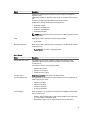
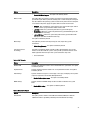
Table 4. Security
Option
Description
Internal HDD_O Password
This field lets you set, change, or delete the administrator (admin) password
(sometimes called the setup password). The admin password enables several
security features.
The drive does not have a password set by default.
•
•
•
Enter the old password
Enter the new password
Confirm the new password
Strong Password
Enable strong password - This option is disabled by default.
Password Configuration
This field controls the minimum and maximum number of characters allowed for the
admin and system passwords.
•
•
•
•
Password Bypass
Admin Password Min
Admin Password Max
System Password Min
System Password Max
Allows you to bypass the System Password and the internal HDD password prompts
during a system restart.
•
•
Disabled - Always prompt for the system and internal HDD password when they
are set. This option is disabled by default.
Reboot Bypass - Bypass the password prompts on restarts (warm boots).
33
Option
Description
NOTE: The system will always prompt for the system and internal HDD
passwords when powered on from the off state (a cold boot). Also, the system
will always prompt for passwords on any module bay HDDs that may be present.
Password Change
Allows you to determine whether changes to the system and hard disk passwords are
permitted when an administrator password is set.
•
TPM Security
Allow Non-Admin Password Changes - This option is enabled by default.
This option lets you control whether the Trusted Platform Module (TPM) in the system
is enabled and visible to the operating system.
TPM Security - This option is disabled by default.
TPM ACPI Support
TPM PPI Deprovision Override
Clear
TPM PPI Provision Override
NOTE: Activation, deactivation, and clear options are not affected if you load the
setup program's default values. Changes to this option take effect immediately.
Computrace
This field lets you activate or disable the BIOS module interface of the optional
Computrace Service from Absolute Software.
•
•
•
CPU XD Support
Allows you to enable or disable the execute disable mode of the processor.
•
OROM Keyboard Access
Deactivate - This option is disabled by default.
Disable
Activate
Enable CPU XD Support - This option is enabled by default.
Allows you to determine if you access the Option Read Only Memory (OROM)
configuration screens via hotkeys during boot. These settings prenvent access to the
Intel RAID (CTRL+I) or Intel Management Engine BIOS Extension (CTRL+P/F12).
•
•
•
Enable - User may enter OROM configuration screens via the hotkey.
One-Time Enable - User can enter the OROM configuration screens via the
hotkeys during the next boot. After the boot, the setting will revert to disabled.
Disable - User can not enter the OROM configuration screens via the hotkey.
This option is set to Enable by default.
Admin Setup Lockout
Allows you to enable or disable the option to enter setup when an admin password is
set.
•
Enable Admin Setup Lockout - This option is not set by default.
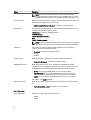
Table 5. Secure Boot
Secure Boot Enable
Allows you to enable or disable Secure Boot featur
•
•
34
Disable
Enable
NOTE: For enable system need to be UEFI boot mode and enable legacy option
ROMs to be turned off.
Expert key Management
Allows you to manipulate the security key databases only if the system is in Custom
Mode. The Enable Custom Mode option is disabled by default. The options are:
•
•
•
•
PK
KEK
db
dbx
If you enable the Custom Mode, the relevant options for PK, KEK, db, and dbx appear.
The options are:
•
•
•
•
•
•
Save to File- Saves the key to a user-selected file
Replace from File- Replaces the current key with a key from a user-selected file
Append from File- Adds a key to the current database from a user-selected file
Delete- Deletes the selected key
Reset All Keys- Resets to default setting
Delete All Keys- Deletes all the keys
NOTE: If you disable the Custom Mode, all the changes made will be erased and
the keys will restore to default settings.
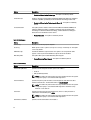
Table 6. Performance
Option
Description
Multi Core Support
Specifies whether the process will have one or all cores enabled. The performance of
some applications will improve with the additional cores.
•
•
•
All - Enabled by default
1
2
Intel SpeedStep
Allows you to enable or disable the Intel SpeedStep mode of the processor. This
option is enabled by default.
C States Control
Allows you to enable or disable the additional processor sleep states. This option is
enabled by default.
Limit CPUID Value
This field limits the maximum value the processor Standard CPUID Function will
support
•
Enable CPUID Limit
NOTE: Some Operating system will not complete installation when the maximum
CPUID Function is greater than 3
Intel TurboBoost
Allows you to enable or disable Intel TurboBoost mode of the processor.
•
•
Disabled - Does not allow the TurboBoost driver to increase the performance
state of the processor above the standard performance.
Enabled - Allows the Intel TurboBoost driver to increase the performance of the
CPU or graphics processor.
35
Option
Description
Hyper-Thread Control
Allows you to enable or disable the Hyper-Threading technology. This option is
enabled by default.
Rapid Start Technology
Allows you to improve batter life by automatically putting the system into a low power
status during after user specified amount of time.
•
Intel Rapid Start feature
NOTE: Rapid Start Technology will automatically be disabled due to
configuration changes:
•
•
•
•
•
Hard Disk Confirguration or partition have been changed
Memory capcity over 8GB installed.
System or HDD pasword is enabled
A Dell Encryption Accelerator is installed
The Block Sleep setting is enabled
Table 7. Power Management
Option
Description
AC Recovery
Specifies how the computer will respond when AC power is applied after an AC
power loss. You can set the AC Recovery to:
•
•
•
Auto On Time
Power Off (default)
Power On
Last Power State
This option sets the time of the day when you would like the system to turn on
automatically. Time is kept in standard 12-hour format (hour:minutes:seconds). The
startup time can be changed by typing the values in the time and A.M./P.M. fields.
•
•
•
•
Disabled - The system will not automatically power up.
Every Day - The system will power up every day at the time you specified above .
Weekdays - The system will power up Monday through Friday at the time you
specified above.
Select Days - The system will power up on days selected above at the time you
specified above.
NOTE: This feature does not work if you turn off your computer using the switch
on a power strip or surge protector or if Auto Power is set to disabled.
Deep Sleep Control
Allows you to define the controls when Deep Sleep is enabled.
•
•
•
Disabled
Enabled in S5 only
Enabled in S4 and S5
This option is disabled by default.
Fan Control Override
Controls the speed of the system fan. This option is disabled by default.
NOTE: When enabled, the fan runs at full speed.
USB Wake Support
36
This option allows you to enable USB devices to wake the computer from standby.
Option
Description
•
Wake on LAN
Enable USB Wake Support - This option is disabled by default.
This option allows the computer to power up from the off state when triggered by a
special LAN signal. Wake-up from the Standby state is unaffected by this setting and
must be enabled in the operating system. This feature only works when the computer
is connected to AC power supply. The options differ based on the form factor.
•
•
•
•
Disabled - Does not allow the system to power on by special LAN signals when it
receives a wake-up signal from the LAN or wireless LAN.
LAN Only - Allows the system to be powered on by special LAN signals.
WLAN Only - Allows the system to be powered on by special WLAN signals. (For
Ultra Small Form Factor only)
LAN or PXE Boot - Allows the system to be powered on by special LAN or PXE
Bootsignals. (For Ultra Small Form Factor only)
This option is Disabled by default.
Block Sleep
This option lets you block entering to sleep (S3 state) in operating system
environment.
•
Intel Smart Connect
Technology
Block Sleep (S3 state) - This option is disabled by default.
The option is disabled by default. If option enables will periodically sense nearby
wireless connection while the system is asleep. It will synchronize emails or social
media application that were open when system entered the sleep state.
•
Smart Connection
Table 8. POST Behavior
Option
Description
Numlock LED
Specifies if the NumLock function can be enabled when the system boots. This option
is enabled by default.
Keyboard Errors
Specifies whether keyboard related errors are reported when it boots. This option is
enabled by default.
POST Hotkeys
Specifies whether the sign-on screen displays a message, that displays the keystroke
sequence required to enter the BIOS Boot Option Menu.
•
MEBx Hotkeys
Enable F12 Boot Option menu - This option is enabled by default.
Specifies whether the MEBx Hotkey function should be enable when the system
boots.
•
Enable MEBx Hotkey — This option is enabled by default
Table 9. Virtualization Support
Option
Description
Virtualization
This option specifies whether a Virtual Machine Monitor (VMM) can utilize the
additional hardware capabilities provided by Intel Virtualization technology.
37
Option
Description
•
VT for Direct I/O
Enables or disables the Virtual Machine Monitor (VMM) from utilizing the additional
hardware capabilities provided by Intel® Virtualization technology for direct I/O.
•
Trusted Execution
Enable Intel Virtualization Technology - This option is enabled by default.
Enable Intel Virtualization Technology for Direct I/O - This option is enabled by
default.
This option specifies whether a Measured Virtual Machine Monitor (MVMM) can
utilize the additional hardware capabilities provided by Intel Trusted Execution
technology. The TPM virtualization technology, and Virtualization technology for
direct I/O must be enabled to use this feature.
•
Trusted Execution - This option is disabled by default.
Table 10. Maintenance
Option
Description
Service Tag
Displays the service tag of your computer.
Asset Tag
Allows you to create a system asset tag if an asset tag is not already set. This option
is not set by default.
SERR Messages
Controls the SERR message mechanism. This option is not set by default. Some
graphics cards require that the SERR message mechanism be disabled.
Watchdog Timer
This option allows you to enable Watchdog Timer Support.
•
Enable Watchdog Timer Support - This option is disabled by default.
Table 11. Cloud Desktop
Option
Description
Server Lookup Method
Specifies how the ImageServer looks up the server address.
•
•
Static IP
DNS (enabled by default)
NOTE: This field is only relevant when the Integrated NIC control in the System
Configuration group is set to Enabled with ImageServer.
Server IP Address
Specifies the primary static IP address of the ImageServer with which the client
software communicates. The default IP address is 255.255.255.255.
NOTE: This field is only relevant when the Integrated NIC control in the System
Configuration group is set to Enabled with ImageServer and when Lookup
Method is set to Static IP.
Server Port
Specifies the primary IP port of the ImageServer, which is used by the client to
communicate. The default IP port is 06910.
NOTE: This field is only relevant when the Integrated NIC control in the System
Configuration group is set to Enabled with ImageServer.
Client Address Method
38
Specifies how the client obtains the IP address.
Option
Description
•
•
Static IP
DHCP (enabled by default)
NOTE: This field is only relevant when the Integrated NIC control in the System
Configuration group is set to Enabled with ImageServer.
Client IP Address
Specifies the static IP address of the client. The default IP address is 255.255.255.255.
NOTE: This field is only relevant when the Integrated NIC control in the System
Configuration group is set to Enabled with ImageServer and when Client DHCP
is set to Static IP.
Client SubnetMask
Specifies the subnet mask of the client. The default setting is 255.255.255.255.
NOTE: This field is only relevant when the Integrated NIC control in the System
Configuration group is set to Enabled with ImageServer and when Client DHCP
is set to Static IP.
Client Gateway
Specifies the gateway IP address for the client. The default setting is 255.255.255.255.
NOTE: This field is only relevant when the Integrated NIC control in the System
Configuration group is set to Enabled with ImageServer and when Client DHCP
is set to Static IP.
Advanced
Specifies for Advanced debugging
•
Verbose Mode
NOTE: This Option is only relevant when the integrated NIC control in the
System Configuration group is set to enable with Cloud Desktop.
Table 12. System Logs
Option
Description
BIOS events
Displays the system event log and allows you to clear the log.
•
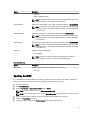
Clear Log
Updating the BIOS
It is recommended to update your BIOS (system setup), on replacing the system board or if an update is available. For
laptops, ensure that your computer battery is fully charged and connected to a power outlet
1.
Re-start the computer.
2.
Go to dell.com/support.
3.
Enter the Service Tag or Express Service Code and click Submit.
NOTE: To locate the Service Tag, click Where is my Service Tag?
NOTE: If you cannot find your Service Tag, click Detect My Product. Proceed with the instructions on screen.
4.
If you are unable to locate or find the Service Tag, click the Product Category of your computer.
5.
Choose the Product Type from the list.
6.
Select your computer model and the Product Support page of your computer appears.
39
7.
Click Get drivers and click View All Drivers.
The Drivers and Downloads page opens.
8.
On the Drivers and Downloads screen, under the Operating System drop-down list, select BIOS.
9.
Identify the latest BIOS file and click Download File.
You can also analyze which drivers need an update. To do this for your product, click Analyze System for Updates
and follow the instructions on the screen.
10. Select your preferred download method in the Please select your download method below window; click Download
File.
The File Download window appears.
11. Click Save to save the file on your computer.
12. Click Run to install the updated BIOS settings on your computer.
Follow the instructions on the screen.
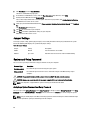
Jumper Settings
To change a jumper setting, pull the plug off its pin(s) and carefully fit it down onto the pin(s) indicated on the system
board. The following table displays the system board jumper settings.
Table 13. Jumper Settings
Jumper
Setting
Description
PSWD
Default
Password features are enabled
RTCRST
pin 1 and 2
Real-time clock reset. Can be used for troubleshooting.
System and Setup Password
You can create a system password and a setup password to secure your computer.
Password Type
Description
System password
Password that you must enter to log on to your system.
Setup password
Password that you must enter to access and make changes to the BIOS settings of your
computer.
CAUTION: The password features provide a basic level of security for the data on your computer.
CAUTION: Anyone can access the data stored on your computer if it is not locked and left unattended.
NOTE: Your computer is shipped with the system and setup password feature disabled.
Assigning a System Password and Setup Password
You can assign a new System Password and/or Setup Password or change an existing System Password and/or Setup
Password only when Password Status is Unlocked. If the Password Status is Locked, you cannot change the System
Password.
NOTE: If the password jumper is disabled, the existing System Password and Setup Password is deleted and you
need not provide the system password to log on to the computer.
40
To enter a system setup, press <F2> immediately after a power-on or re-boot.
1.
In the System BIOS or System Setup screen, select System Security and press <Enter>.
The System Security screen appears.
2.
In the System Security screen, verify that Password Status is Unlocked.
3.
Select System Password , enter your system password, and press <Enter> or <Tab>.
Use the following guidelines to assign the system password:
•
A password can have up to 32 characters.
•
The password can contain the numbers 0 through 9.
•
Only lower case letters are valid, upper case letters are not allowed.
•
Only the following special characters are allowed: space, (”), (+), (,), (-), (.), (/), (;), ([), (\), (]), (`).
Re-enter the system password when prompted.
4.
Type the system password that you entered earlier and click OK.
5.
Select Setup Password, type your system password and press <Enter> or <Tab>.
6.
Type the setup password that you entered earlier and click OK.
7.
Press <Esc> and a message prompts you to save the changes.
8.
Press <Y> to save the changes.
A message prompts you to re-type the setup password.
The computer reboots.
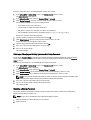
Deleting or Changing an Existing System and/or Setup Password
Ensure that the Password Status is Unlocked (in the System Setup) before attempting to delete or change the existing
System and/or Setup password. You cannot delete or change an existing System or Setup password, if the Password
Status is Locked.
To enter the System Setup, press <F2> immediately after a power-on or reboot.
1.
In the System BIOS or System Setup screen, select System Security and press <Enter>.
The System Security screen is displayed.
2.
In the System Security screen, verify that Password Status is Unlocked.
3.
Select System Password, alter or delete the existing system password and press <Enter> or <Tab>.
4.
Select Setup Password, alter or delete the existing setup password and press <Enter> or <Tab>.
NOTE: If you change the System and/or Setup password, re-enter the new password when promoted. If you
delete the System and/or Setup password, confirm the deletion when promoted.
5.
Press <Esc> and a message prompts you to save the changes.
6.
Press <Y> to save the changes and exit from the System Setup.
The computer reboots.
Disabling a System Password
The system's software security features include a system password and a setup password. The password jumper
disables any password(s) currently in use.
NOTE: You can also use the following steps to disable a forgotten password.
1.
Follow the procedures in Before Working on Your Computer.
2.
Remove the cover.
41
3.
Identify the PSWD jumper on the system board.
4.
Remove the PSWD jumper from the system board.
NOTE: The existing passwords are not disabled (erased) until the computer boots without the jumper.
5.
Install the cover.
NOTE: If you assign a new system and/or setup password with the PSWD jumper installed, the system
disables the new password(s) the next time it boots.
6.
Connect the computer to the electrical outlet and power-on the computer.
7.
Power-off the computer and disconnect the power cable from the electrical outlet.
8.
Remove the cover.
9.
Replace the PSWD jumper on the system board.
10. Install the cover.
11. Follow the procedures in After Working on Your Computer.
12. Power-on the computer.
13. Go to the system setup, and assign a new system or setup password. See Setting up a System Password.
42
Diagnostics
4
If you experience a problem with your computer, run the ePSA diagnostics before contacting Dell for technical
assistance. The purpose of running diagnostics is to test your computer's hardware without requiring additional
equipment or risking data loss. If you are unable to fix the problem yourself, service and support personnel can use the
diagnostics results to help you solve the problem.
Enhanced Pre-Boot System Assessment (ePSA) Diagnostics
The ePSA diagnostics (also known as system diagnostics) performs a complete check of your hardware. The ePSA is
embedded with the BIOS and is launched by the BIOS internally. The embedded system diagnostics provides a set of
options for particular devices or device groups allowing you to:
•
Run tests automatically or in an interactive mode
•
Repeat tests
•
Display or save test results
•
Run thorough tests to introduce additional test options to provide extra information about the failed device(s)
•
View status messages that inform you if tests are completed successfully
•
View error messages that inform you of problems encountered during testing
CAUTION: Use the system diagnostics to test only your computer. Using this program with other computers may
cause invalid results or error messages.
NOTE: Some tests for specific devices require user interaction. Always ensure that you are present at the
computer terminal when the diagnostic tests are performed.
1.
Power-on the computer.
2.
As the computer boots, press the <F12> key as the Dell logo appears.
3.
On the boot menu screen, select the Diagnostics option.
The Enhanced Pre-boot System Assessment window is displayed, listing all devices detected in the computer. The
diagnostics starts running the tests on all the detected devices.
4.
If you wish to run a diagnostic test on a specific device, press <Esc> and click Yes to stop the diagnostic test.
5.
Select the device from the left pane and click Run Tests.
6.
If there are any issues, error codes are displayed.
Note the error code and contact Dell.
43
Troubleshooting Your Computer
5
You can troubleshoot your computer using indicators like Diagnostic Lights, Beep Codes, and Error Messages during the
operation of the computer.
Power LED Diagnostics
The power button LED located on the front of the chassis also functions as a bicolored diagnostic LED. The diagnostic
LED is only active and visible during the POST process. Once the operating system starts to load, it is no longer visible.
Amber LED blinking scheme – The pattern is 2 or 3 blinks followed by a short pause then x number of blinks up to 7. The
repeated pattern has a long pause inserted in the middle. For example 2,3 = 2 amber blinks, short pause, 3 amber blinks
followed by long pause then repeats.
Table 14. Power LED Diagnostics
Amber LED State
White LED State
Description
off
off
system is OFF
off
blinking
system is in sleep state
blinking
off
power supply unit (PSU) failure
steady
off
PSU is working but failed to fetch code
off
steady
system is ON
Amber LED State
Description
2,1
system board failure
2,2
system board, PSU or PSU cabling failure
2,3
system board, memory or CPU failure
2, 4
coin-cell battery failure
2,5
corrupt BIOS
2,6
CPU configuration failure or CPU failure
2,7
memory modules are detected, but a memory failure
3,1
possible peripheral card or system board failure
3,2
possible USB failure
3,3
no memory modules are detected
3,4
possible system board error
3,5
memory modules are detected, but a memory configuration or compatibility error
3,6
possible system board resource and/or hardware failure
44
Amber LED State
Description
3,7
some other failure with messages on screen
Beep Code
The computer can emit a series of beeps during start-up if the display does not show errors or problems. These series of
beeps, called beep codes, identify various problems. The delay between each beep is 300 ms, the delay between each
set of beeps is 3 sec, and the beep sound lasts 300 ms. After each beep and each set of beeps, the BIOS should detect if
the user presses the power button. If so, BIOS will jump out from looping and execute the normal shutdown process and
power system.
Code
1-3-2
Cause
Memory failure
Error Messages
Error Message
Description
Address mark not
found
The BIOS found a faulty disk sector or could not find a particular disk sector.
Alert! Previous
attempts at booting
this system have
failed at checkpoint
[nnnn]. For help in
resolving this
problem, please note
this checkpoint and
contact Dell
Technical Support.
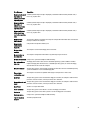
The computer failed to complete the boot routine three consecutive times for the same error.
Contact Dell and report the checkpoint code (nnnn) to the support technician
Alert! Security
override Jumper is
installed.
The MFG_MODE jumper has been set and AMT Management features are disabled until it is
removed.
Attachment failed to
respond
The floppy or hard drive controller cannot send data to the associated drive.
Bad command or file
name
Ensure that you have spelled the command correctly, put spaces in the proper place, and used
the correct pathname.
Bad error-correction
code (ECC) on disk
read
The floppy or hard drive controller detected an uncorrectable read error.
Controller has failed
The hard drive or the associated controller is defective.
Data error
The floppy or hard drive cannot read the data. For the Windows operating system, run the
chkdsk utility to check the file structure of the floppy or hard drive. For any other operating
system, run the appropriate corresponding utility.
45
Error Message
Description
Decreasing available
memory
One or more memory modules may be faulty or improperly seated. Re-install the memory
modules and, if necessary, replace them.
Diskette drive 0 seek
failure
A cable may be loose or the computer configuration information may not match the hardware
configuration.
Diskette read failure
The floppy disk may be defective or a cable may be loose. If the drive access light turns on, try
a different disk.
Diskette subsystem
reset failed
The floppy drive controller may be faulty.
Gate A20 failure
One or more memory modules may be faulty or improperly seated. Reinstall the memory
modules and, if necessary, replace them.
General failure
The operating system is unable to carry out the command. This message is usually followed by
specific information—for example, Printer out of paper. Take the appropriate action to resolve
the problem.
Hard-disk drive
configuration error
The hard drive failed initialization.
Hard-disk drive
controller failure
The hard drive failed initialization.
Hard-disk drive
failure
The hard drive failed initialization.
Hard-disk drive read
failure
The hard drive failed initialization.
Invalid configuration
information-please
run SETUP program
The computer configuration information does not match the hardware configuration.
Invalid Memory
configuration, please
populate DIMM1
DIMM1 slot does not recognize a memory module. The module should be re-seated or
installed.
Keyboard failure
A cable or connector may be loose, or the keyboard or keyboard/mouse controller may be
faulty.
Memory address line
failure at address,
read value expecting
value
A memory module may be faulty or improperly seated. Reinstall the memory modules and, if
necessary, replace them.
Memory allocation
error
The software you are attempting to run is conflicting with the operating system, another
program, or a utility.
Memory data line
failure at address,
read value expecting
value
A memory module may be faulty or improperly seated. Reinstall the memory modules and, if
necessary, replace them.
46
Error Message
Description
Memory double word A memory module may be faulty or improperly seated. Reinstall the memory modules and, if
logic failure at
necessary, replace them.
address, read value
expecting value
Memory odd/even
logic failure at
address, read value
expecting value
A memory module may be faulty or improperly seated. Reinstall the memory modules and, if
necessary, replace them
Memory write/read
failure at address,
read value expecting
value
A memory module may be faulty or improperly seated. Reinstall the memory modules and, if
necessary, replace them.
Memory size in
CMOS invalid
The amount of memory recorded in the computer configuration information does not match the
memory installed in the computer.
Memory tests
terminated by
keystroke
A keystroke interrupted the memory test.
No boot device
available
The computer cannot find the floppy disk or hard drive.
No boot sector on
hard-disk drive
The computer configuration information in System Setup may be incorrect.
No timer tick interrupt A chip on the system board might be malfunctioning.
Non-system disk or
disk error
The floppy disk in drive A does not have a bootable operating system installed on it. Either
replace the floppy disk with one that has a bootable operating system, or remove the floppy
disk from drive A and restart the computer.
Not a boot diskette
The operating system is trying to boot to a floppy disk that does not have a bootable operating
system installed on it. Insert a bootable floppy disk.
Plug and play
configuration error
The computer encountered a problem while trying to configure one or more cards.
Read fault
The operating system cannot read from the floppy or hard drive, the computer could not find a
particular sector on the disk, or the requested sector is defective.
Requested sector not The operating system cannot read from the floppy or hard drive, the computer could not find a
found
particular sector on the disk, or the requested sector is defective.
Reset failed
The disk re-set operation failed.
Sector not found
The operating system cannot locate a sector on the floppy or hard drive.
Seek error
The operating system cannot find a specific track on the floppy disk or hard drive.
Shutdown failure
A chip on the system board might be malfunctioning.
Time-of-day clock
stopped
The battery might be dead.
47
Error Message
Description
Time-of-day not setplease run the
System Setup
program
The time or date stored in System Setup does not match the computer clock.
Timer chip counter 2
failed
A chip on the system board may be malfunctioning.
Unexpected interrupt The keyboard controller may be malfunctioning or a memory module may be loose.
in protected mode
WARNING: Dell's
Disk Monitoring
System has detected
that drive [0/1] on the
[primary/secondary]
EIDE controller is
operating outside of
normal
specifications. It is
advisable to
immediately back up
your data and replace
your hard drive by
calling your support
desk or Dell.
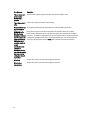
During initial startup, the drive detected possible error conditions. When your computer
finishes booting, immediately back up your data and replace your hard drive (for installation
procedures, see "Adding and Removing Parts" for your computer type). If no replacement drive
is immediately available and the drive is not the only bootable drive, enter System Setup and
change the appropriate drive setting to None. Then remove the drive from the computer.
Write fault
The operating system cannot write to the floppy or hard drive.
Write fault on
selected drive
The operating system cannot write to the floppy or hard drive.
48
6
Specifications
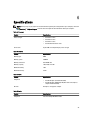
NOTE: Offerings may vary by region. For more information regarding the configuration of your computer, click Start
(Start icon) → Help and Support, and then select the option to view information about your computer.
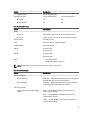
Table 15. Processor
Feature
Processor type
Total cache
Specification
•
•
•
•
Intel Core i3 series
Intel Core i5 series
Intel Core i7 series
Intel Pentium Dual Core series
Up to 8 MB cache depending on processor type
Table 16. Memory
Feature
Specification
Memory type
DDR3
Memory speed
1600MHz
Memory connectors
four DIMM slots
Memory capacity
2 GB, 4 GB, and 8 GB
Minimum memory
2 GB
Maximum memory
32 GB
Table 17. Video
Feature
Specification
Integrated
•
•
Discrete
PCI Express x16 graphics adapter
Intel HD Graphics (Pentium CPU-GPU)
Intel HD Graphics 4600 (i3/i5/i7 DC/QC Intel 8 Series Express
chipset CPU-GPU Combo)
Table 18. Audio
Feature
Specification
Integrated
two Channel High Definition Audio
49
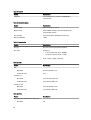
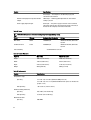
Table 19. Network
Feature
Specification
Integrated
Intel 1217LM Ethernet capable of 10/100/1000 Mb/s
communication
Table 20. System Information
Feature
Specification
System chipset
Intel 8 Series Express chipset
DMA channels
two 8237 DMA controllers with seven independently
programmable channels
Interrupt levels
Integrated I/O APIC capability with 24 interrupts
BIOS chip (NVRAM)
12 MB
Table 21. Expansion Bus
Feature
Specification
Bus type
PCIe gen2, gen3 (x16), USB 2.0, and USB 3.0
Bus speed
PCI Express:
•
•
x1-slot each direction speed – 500 MB/s
x16-slot each direction speed – 16 GB/s
SATA: 1.5 Gbps, 3.0 Gbps, and 6 Gbps
Table 22. Cards
Feature
Specification
PCI:
Mini Tower
up to one full-height card
Small Form Factor
none
PCI Express x1:
Mini Tower
up to three full-height cards
Small Form Factor
up to two low-profile cards
PCI-Express x16:
Mini Tower
up to two full-height cards
Small Form Factor
up to two low-profile cards
Table 23. Drives
Feature
Specification
Externally Accessible (5.25 inches drive bays):
Mini Tower
50
two
Feature
Small Form Factor
Internally Accessible:
Specification
one slim optical drive bay
3.5-inch SATA drive bays
2.5-inch SATA drive bays
Mini Tower
two
two
Small Form Factor
one
two
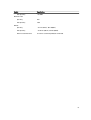
Table 24. External Connectors
Feature
Specification
Audio:
Front panel
one headphone connector and one microphone connector
Back panel
one line-out connector and one line-in/microphone connector
Network adapter
one RJ45 connector
Serial
one 9-pin connector, 16550 C compatible
Parallel (optional)
one 25-pin connector
USB 2.0
Front Panel: two
Back Panel: four
USB 3.0
Front Panel: two
Back Panel: two
Video
•
•
15-pin VGA connector
two 20-pin Display port connectors
NOTE: Available video connectors may vary based on the graphics card selected.
Table 25. Controls and Lights
Feature
Specification
Front of the computer:
Power button light
White light — Solid white light indicates power-on state; blinking
white light indicates sleep state of the computer.
Drive activity light
White light — Blinking white light indicates that the computer is
reading data from or writing data to the hard drive.
Back of the computer:
Link integrity light on integrated network
adapter
Green — A good 10 Mbps connection exists between the
network and the computer.
Green — A good 100 Mbps connection exists between the
network and the computer.
Orange — A good 1000 Mbps connection exists between the
network and the computer.
51
Feature
Specification
Off (no light) — The computer is not detecting a physical
connection to the network.
Network activity light on integrated network
adapter
Yellow light — A blinking yellow light indicates that network
activity is present.
Power supply diagnostic light
Green light — The power supply is turned on and is functional.
The power cable must be connected to the power connector (at
the back of the computer) and the electrical outlet.
Table 26. Power
NOTE: Heat dissipation is calculated by using the power supply wattage rating.
Power
Wattage
Maximum Heat Dissipation
Voltage
Mini Tower
365 W
1245.00 BTU/hr
100 VAC to 240 VAC, 50 Hz to 60
Hz, 5.0 A
Small Form Factor
315 W
1075.00 BTU/hr
100 VAC to 240 VAC, 50 Hz to 60
Hz, 4.4 A
Coin-cell battery
3 V CR2032 lithium coin cell
Table 27. Physical Dimension
Physical
Mini Tower
Small Form Factor
Height
36.00 cm (14.17 inches)
29.00 cm (11.42 inches)
Width
17.50 cm (6.89 inches)
9.30 cm (3.66 inches)
Depth
41.70 cm (16.42 inches)
31.20 cm (12.28 inches)
Weight
9.40 kg (20.72 lb)
6.00 kg (13.22 lb)
Table 28. Environmental
Feature
Specification
Temperature range:
Operating
5 °C to 35 °C (41 °F to 95 °F) (limited to 90W processor)
5 °C to 45 °C (41 °F to 113 °F) (limited to 65W or lower processor. No discrete
graphics card.)
Non-Operating
–40 °C to 65 °C (–40 °F to 149 °F)
Relative humidity (maximum):
Operating
20% to 80% (non-condensing)
Non-Operating
5% to 95% (non-condensing)
Maximum vibration:
Operating
52
0.66 GRMS
Feature
Non-Operating
Specification
1.37 GRMS
Maximum shock:
Operating
40 G
Non-Operating
105 G
Altitude:
Operating
–15.2 m to 3048 m (–50 to 10,000 ft)
Non-Operating
–15.20 m to 10,668 m (–50 ft to 35,000 ft)
Airborne contaminant level
G1 or lower as defined by ANSI/ISA-S71.04-1985
53
Contacting Dell
To contact Dell for sales, technical support, or customer service issues:
1.
Visit support.dell.com.
2.
Verify your country or region in the Choose a Country/Region drop-down menu at the bottom of the page.
3.
Click Contact Us on the left side of the page.
4.
Select the appropriate service or support link based on your need.
5.
Choose the method of contacting Dell that is convenient for you.
54
7