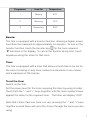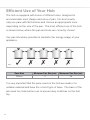
1
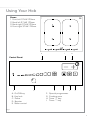
To increase the power level for a zone, slide your finger along its
slider (E) toward the right.
To reduce the power level for a zone, slide your finger along its slider
(E) toward the left.
To turn the power off
To switch off a single zone, touch the left hand end of the slider (E)
for the zone no longer required. This will set the power level to zero.
When all the zones are at zero, the hob will switch off automatically
after approximately ten seconds.
Alternatively, to switch off the hob immediately, touch and hold the
“On/Off” key
for approximately two seconds.
Bridge function
This feature allows you to connect the front and back heating zones
on the left or the right side of the hob together thus merging 2 zones
into one larger one. This is particularly useful for cooking with large
pans.
To set the bridge function
Touch the booster keys
for the 2 adjacent zones at the same time.
The symbols “ ” and “ ” will show against the power level displays
for the 2 zones. The heating level of the bridged zone is controlled
just by the left hand slider of the 2 connected zones.
To cancel the bridge function
Touch the booster keys
for the 2 adjacent zones at the same time.
9