1
5. Power Management
5. Power Management
• Color temperature: 6500k with full white
pattern
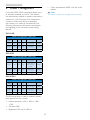
If you have VESA DPM compliance display card
or software installed in your PC, the monitor
can automatically reduce its power consumption
when not in use. If an input from a keyboard,
mouse or other input device is detected,
the monitor will 'wake up' automatically. The
following table shows the power consumption
and signaling of this automatic power saving
feature:
Note
This data is subject to change without notice.
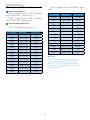
200V4LAB:
Power Management Definition
VESA
Mode
Video H-sync V-sync
Power Used
LED Color
Active
ON
Yes
Yes
17.34 W (typ.)
White
Sleep
(Standby)
OFF
No
No
0.5W (typ.)
White
(blink)
Switch Off
OFF
-
-
0.5W (typ.)
OFF
200V4LSB:
Power Management Definition
VESA
Mode
Video H-sync V-sync
Power Used
LED Color
Active
ON
Yes
Yes
17.1 W (typ.) or
18.2W (typ.) for
200nits
White
Sleep
(Standby)
OFF
No
No
0.5W (typ.)
White
(blink)
Switch Off
OFF
-
-
0.5W (typ.)
OFF
200V4LSB21:
Power Management Definition
VESA
Mode
Power Used
LED Color
Active
Video H-sync V-sync
ON
Yes
Yes
12.42W (typ.)
White
Sleep
(Standby)
OFF
No
No
0.5W (typ.)
White
(blink)
Switch Off
OFF
-
-
0.5W (typ.)
OFF
The following setup is used to measure power
consumption on this monitor.
• Native resolution: 1600 × 900 or 1366
×768
• Contrast: 50%
• Brightness: 250 nits or 200 nits
19