1
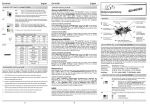
EX-42378
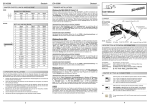
Inhaltsverzeichnis
1.
Beschreibung ······················································································ 3
2.
Lieferumfang ······················································································ 3
3.
Aufbau und Anschlüsse ········································································ 4
3.1
3.2
4.
Aufbau······································································································ 4
Anschlüsse································································································ 4
EX-42378
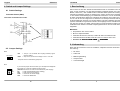
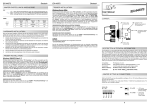
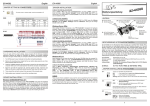
4. Switch and Jumper Settings
4.2 Jumper Settings
JP3:
ENA | DIS
Switch und Jumper Einstellungen ·························································· 5-8
4.1
4.2
5.
Hardware Installation ············································································ 8
Treiber Installation ··············································································· 9
DIS
= The function PME is disable (Factory Setting)
ENA
= The function PME is enable. Now the card can be activate
the computer through the serial ports.
But this should not be adjusted for standard applications.
Switch Einstellungen ················································································· 5-7
Jumper Einstellungen ················································································ 7-8
6.
English
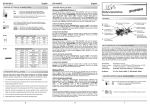
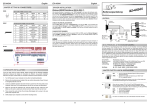
5. Hardware Installation
If you are ready with the jumper settings, please proceed with the following installation
instructions. Because there are large differences between PC’s, we can give you only a
general installation guide for the EX-42378. Please refer to your computer’s reference
manual whenever in doubt.
1. Turn off the power to your computer and any other connected peripherals.
2. Remove the mounting screws located at the rear and/or sides panels of your Computer and gently slide the cover off.
Index
1.
Description ························································································ 10
2.
Extent of Delivery ··············································································· 10
3.
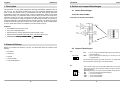
Layout and Connections ······································································· 11
3.1
3.2
4.
Layout ····································································································· 11
Connections ····························································································· 11
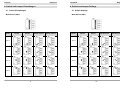
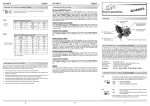
Switch and Jumper Settings ····························································· 12-15
4.1
4.2
3. Locate an available expansion slot and remove its covers from the rear panel of
your computer. Make sure it is the right expansion slot for the card (see card description)
4. Align the card with the PCI slot and then gently but firmly, insert the card. Make sure
the card is seated and oriented correctly. Never insert the card by force!
5. Then connect the card with a screw to the rear panel of the computer case.
6. Gently replace your computer’s cover and the mounting screws.
Switch Settings ···················································································· 12-14
Jumper Settings ··················································································· 14-15
5.
Hardware Installation ··········································································· 15
6.
Driver Installation ················································································ 16
2
19