1
XTi2 Series Power Amplifiers
Get Started
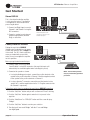
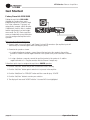
Factory Preset #3: XOVER
Putting the amplifier in XOVER mode
enables a 1.2kHz 4th order (24dB/
octave) filter that sends frequencies of
1.2kHz and below to Channel 1 output
and frequencies of 1.2kHz and above
to Channel 2 output. The XTi2 Series
amplifiers come pre-loaded with a
preset that makes it easy to configure the
amplifier for this operation.
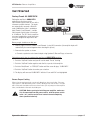
HIGH 2+/–
LOW 1+/–
Before you get started ensure that you:
1. C
onnect signal source to Channel
1 ONLY using an XLR connector (the amplifier inputs will automatically be put into Y
mode when selecting this preset).
2. C
onnector the speaker as shown.
a. C
onnect the speaker you wish to receive the low and mid frequencies (1.2kHz and below) to Channel 1
output using Speakon®, Banana Plugs, or bare wire.
b. C
onnect the speaker you wish to receive the high frequencies (1.2kHz and above) to Channel 2 output
using Speakon®, Banana Plugs, or bare wire.
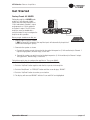
Follow these quick steps to configure the amplifier for “Crossover Mode”:
1. Push the “Set/Enter” button and you will see the word “Preset” flashing.
2. Push the “Set/Enter” button again to enter the list of presets in the amplifier.
3. Push the “Next/Down” or “PREV/UP” button until the screen displays “BIAMP”.
4. Push the “Set/Enter” button to confirm your selection.
5. The display will now read “BIAMP” with the Y icon and XOV icon highlighted.
Operation Manual
page 5