1
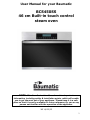
BCS450SS
46 cm Built-in
compact touch control
steam oven.
I
1
User Manual for your Baumatic
BCS450SS
46 cm Built-in touch control
steam oven
NOTE: This User Instruction Manual contains important
information, including safety & installation points, which will enable
you to get the most out of your appliance. Please keep it in a safe
place so that it is easily available for future reference; for you or any
person not familiar with the operation of the appliance.
JW 14/02/13
2
Contents
Environmental note
Important safety information
4
5–7
Specifications
Product and aperture dimensions
Product specifications
Cooling fan
Standard accessories
Electrical details
Description of the oven and accessories
Control panel
8 – 11
8
8
9
9
9
10
11
Using your oven
Initial start up and setting the time of day
Cleaning your oven before first use
Before first use – useful information
Using your appliance for the fist time
Cooking with steam
Oven function selection
Oven functions
Setting the timer
Setting the oven temperature
Setting the delay start timer
Preset resipes
Preset recipes cooking table
Preset recipes with delay start timer
11-22
11
12-13
12
13
13
14
14
14
15-16
16
17
18
19
Cooking guidelines
19-20
Warnings
Accessories
Locking the keypad
20
20-21
Cleaning and maintenance
Oven cavity cleaning cycle
Boiler descaling
Removing the side racks
Replacing the oven bulb
Removing the oven door for cleaning
22-27
23
24
25
26
27
Installation
Electrical connection
Installing the oven into the kitchen cabinet
Positioning the appliance
Ventilation requirements
28-31
28
29
30
31
My appliance isn’t working correctly
Error codes chart
General troubleshooting
31-32
32
32
Baumatic consumables
Contact details
33
35
3
Environmental note
o The packaging materials that Baumatic uses are environmentally
friendly and can be recycled.
o Please discard all packaging material with due regard for the
environment.
4
IMPORTANT SAFETY INFORMATION
Your safety is of the utmost importance to Baumatic.
Please make sure that you read this instruction booklet
before attempting to install or use the appliance. If you
are unsure of any of the information contained in this
booklet, please contact the Baumatic Customer Care
Department.
General Information
o This appliance is designed for domestic household use and can be
built into a standard kitchen cabinet or housing unit.
o IMPORTANT: You must not install the appliance in a location
where the ambient temperature will fall below 5°C.
o IMPORTANT: The adjacent furniture or housing and all materials
used in the installation must be able to withstand a minimum
temperature of 85°C above the ambient temperature of the room it
is located in, whilst in use.
o Certain types of vinyl or laminate kitchen furniture are particularly
prone to heat damage or discolouration at temperatures below the
guidelines given above.
o Any damage caused by the appliance being installed in
contravention of this temperature limit, or by placing adjacent
cabinet materials closer than 4mm to the appliance, will be the
liability of the owner.
o For use in leisure accommodation vehicles, please refer to the
appropriate information given in the installation instructions for this
appliance.
o The use of this appliance for any other purpose or in any other
environment without the express agreement of Baumatic Ltd. will
invalidate any warranty or liability claim.
o Your new appliance is guaranteed against electrical or mechanical
defects, subject to certain exclusions that are noted in Baumatic’s
Conditions Of Guarantee. The foregoing does not affect your
statutory rights.
o Repairs may only be carried out by Baumatic Service
Engineers or their authorised service agents.
5
Warning and safety instructions
o This appliance complies with all current European safety legislation.
Baumatic do wish to emphasise that this compliance does not
remove the fact that the appliance surfaces will become hot
during use and retain heat after operation.
Child Safety
o Baumatic strongly recommend that babies and young children are
prevented from being near to the appliance and not allowed to
touch the appliance at any time.
o If it is necessary for younger family members to be in the kitchen,
please ensure that they are kept under close supervision at all
times.
General Safety
o Do not place heavy objects on the oven door or lean on the oven
door when it is open, as this can cause damage to the oven door
hinges.
o Do not leave heated oil or fat unattended, as this is a fire risk.
o Do not place pans or baking trays directly on the base of the oven
cavity, or line it with aluminium foil.
o Do not allow electrical fittings or cables to come into contact with
areas on the appliance that get hot.
o Do not use the appliance to heat the room it is located in or to dry
clothing.
o Do not install the appliance next to curtains or soft furnishings.
o Do not attempt to lift or move cooking appliances by using the
oven door or handle, as this may cause damage to the appliance or
result in injury to the person lifting the appliance.
6
Cleaning
o Cleaning of the oven should be carried out on a regular basis.
o Great care should be taken whilst using this appliance and when
following the cleaning procedure.
o IMPORTANT: The appliance must be disconnected from the mains
before following the cleaning procedure.
Installation
This appliance must be correctly installed by a
suitably qualified person, strictly in accordance with
the manufacturer’s instructions.
o Baumatic Ltd. declines any responsibility for injury or
damage, to person or property, as a result of improper use
or installation of this appliance.
o Heat, steam and moisture will be created during use of the
appliance, take care to avoid injury and ensure that the room is
adequately ventilated. If the appliance is going to be used for
prolonged periods of time, then additional ventilation may be
required.
o Please consult with your qualified installer if you are in any doubt
about the amount of ventilation that you will require.
Declaration of conformity
This appliance complies with the following European Regulations:
-
2006/95/EC regarding “low voltage”
2004/108/EC regarding “electromagnetic disturbances”
Regulation (EC) N° 1935/2004 regarding “materials in contact with
food”
o The above directives comply with 93/68/EEC regarding CE marking.
o The manufacturer declares that the oven is built using certified
materials and requires the appliance to be installed in accordance
with the standards currently in force. This appliance must be used
by a trained person for domestic purposes only.
7
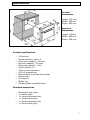
Specifications
Product
dimensions
Height: 450 mm
Width: 595 mm
Depth: 560 mm
Aperture
dimensions
Height: 445mm
Width: 560 mm
Depth: 565 mm
Product specifications
o
o
o
o
o
o
o
o
o
o
o
o
o
4 Functions
Energy efficiency class: A
Gross oven capacity: 34 litres
Net oven capacity: 30 litres
Water jug capacity: 1 litre
Preset recipes: 14
Touch control operation
LCD full programmer
Electronically controlled thermostat
Steam clean
Cooling fan
Safety lock
Double-glazed removable door
Standard accessories
o
o
o
o
o
o
Removable side racks
1 x Safety shelf
1 x Large perforated tray
1 x Large baking tray
1 x Small perforated tray
1 x Small baking tray
8
Cooling fan
o A tangential cooling fan is fitted inside of this appliance, to make
the internal temperature of the oven stable and the external surface
temperature lower.
Electrical details
Rated Voltage:
Supply Connection:
Max Rated Inputs:
Mains Supply Lead:
Oven Light Bulb:
220 - 240 Vac 50 - 60 Hz
13 A (double pole switched fused
outlet with 3mm contact gap)
1.90 kW
3 x 1.5mm²
25 W/ E14 300°C screw type pygmy
For future reference please record the following information which can be
found on the Rating Plate and the date of purchase which can be found on
your sales invoice. The rating plate for your oven can be located by
opening the oven door and looking on the right hand side of the oven
chassis.
Model Number
……………………………….
Serial Number
……………………………….
Date of Purchase
……………………………….
9
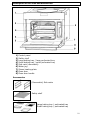
Description of the oven and accessories
1)
2)
3)
4)
5)
6)
7)
8)
9)
Control panel
Safety shelf
Large baking tray / large perforated tray
Small baking tray / small perforated tray
Side rack (removable)
Water jug
Steam heating plate
Oven door
Oven door handle
Accessories
(Removable) Side racks
Safety shelf
Large baking tray / perforated tray
Small baking tray / perforated tray
10
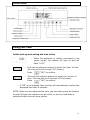
Control Panel
Using your oven
Initial start up and setting the time of day
o When the appliance is initially connected to the
power supply, the display will light up and will
flash “0:00”.
o First use the selection buttons to select the ‘hour’ of time.
The time will scroll through 0-23 (hours).
Press
(“OK”) to confirm.
o Then use the selection buttons to select the ‘minute’ of
time. The time will scroll through 0-59 (minutes).
Press
(“OK”) to confirm.
o If “OK” is not pressed, then the time will automatically confirm the
displayed time after 6 seconds.
NOTE: When you are adjusting the time, you can either press the buttons
to scroll through the numbers one at a time, or you can hold down a
selection button to scroll more quickly.
11
Before first use
This oven should be cleaned before first use and after each use
thereafter. See pages 22 – 27 for full cleaning and maintenance
instructions.
o IMPORTANT: Before use, this appliance must have water put
into its water jug. Do not use distilled water, or any other
fluids. Do not fill past the ‘MAX’ mark.
o Open the oven door and remove the water jug, which is located on the
right of the appliance.
o Remove the jug cover and pour in clean cold water.
o Re-fasten the water jug cover and re-insert the jug into the water jug
slot to the right of the oven cavity.
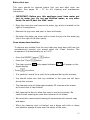
Oven steam clean function
To remove any residue from the oven that may have been left from the
manufacturing process, you should select the ‘Clean’ function. The
temperature is automatically set to 100°C.
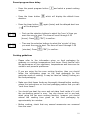
o Press the ON/OFF (power)
button.
o Press the “Clean”
button.
o The clean symbol
digital display.
and a speed indicator
o Press
will appear on the
to confirm.
o It is perfectly normal for a smell to be produced during this process.
o You should make sure that any windows in the room are left open
during this process.
o The cleaning cycle will take approximately 30 minutes and a buzzer
will sound once it has finished.
o Half opening the door to allow the oven to cool more quickly. Be
careful when opening the oven door because of hot steam.
o We would also recommend cleaning all accessories with normal soap
and water.
o When the cleaning cycle is finished, use a damp soft cloth or damp
non-abrasive sponge to wipe over the cavity of the oven.
12
Cooking with steam
IMPORTANT: This process MUST be followed when you are using a
cooking function that involves steam.
o Remove the water jug from the oven and fill it with clean (tap)
water, or if this is unavailable, bottled water.
o Fill the water jug up to the MAX mark. DO NOT fill the jug right to
the top, otherwise the water that is pumped back into the jug at the
end of a cooking cycle may overflow.
o Reattach the jug cover and insert the jug back into the water jug
compartment.
o Push the water jug in completely, this ensures a perfect seal
between the tube located in the jug and the hydraulic circuit inside
of the oven.
o ALWAYS ensure that the NON perforated tray (also called the drip
pan or baking tray) is inserted underneath the perforated tray. This
will catch any condensation, juice or food that falls from the
perforated tray.
o If you are using a cooking function that doesn’t involve steam, then
you can leave the water jug inside of the water jug compartment. It
will not affect the cooking abilities of the oven.
Using your appliance for the first time
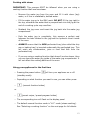
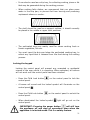
o Pressing the power button
(standby mode).
will turn your appliance on or off
o Depending on what function you want to use, you can either press:
o
(manual function button)
or
o
(preset recipe / preset program button)
o The corresponding icon will flash on the display panel.
o The default manual function mode is “H-1” mode (steam cooking).
See “Selecting a cooking function” on the next page for full details.
13
Selecting a cooking function
Manual Oven functions
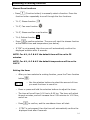
o Press
(Function button) to manually select a function. Press the
function button repeatedly to scroll through the four functions.
o “H-1”, Steam function
o “H-2”, Fan oven function
o “H-3”, Steam and fan oven function
o “H-4, Defrost function
to confirm selection. The oven will start the chosen function
o Press
at the default time and temperature (see below).
o If “OK” is not pressed, then the oven will automatically confirm the
displayed selection after 6 seconds.
NOTE: For H-1, H-2 & H-3 the default time will be set to 20
minutes.
NOTE: For H-1, H-2 & H-3 the default temperature will be set to
100°C.
Setting the timer
o After you have selected a cooking function, press the Timer function
button
.
o Use the selection buttons to select the amount of time
you want the timer to count for.
o Press or press and hold the selection buttons to adjust the timer.
o The time will scroll from 0:00 hrs to 6:00 hrs. The timer will adjust
through minutes, and will increase from 0:59 minutes to 1:00 hour,
and so on.
o Press
o
to confirm, and the countdown timer will start.
If “OK” is not pressed, then the time will automatically confirm the
displayed time after 6 seconds.
14
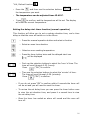
o Once the countdown timer has ended an alarm will sound for two
minutes.
IMPORTANT: The oven will continue to heat until it is turned off or
another function is selected.
Setting the temperature
Once you have selected an oven function and timer duration,
you can then select your desired oven temperature.
“H-1”, Steam function
o Press the
.
and then use the selection buttons
to select
the temperature you want.
o The temperature can be adjusted from 35-100°C.
o
Press
to confirm, and the temperature will be set. The display
will show the current temperature.
NOTE: When the oven reaches the set temperature, the oven
buzzer will sound twice (steam function only).
“H-2”, Fan oven function
o Press the
and then use the selection buttons
to select
the temperature you want.
o The temperature can be adjusted from 30-230°C.
o
to confirm, and the temperature will be set. The display
Press
will show the current temperature.
“H-3”, Steam and fan oven function
o Press the
and then use the selection buttons
to select
the temperature you want.
o The temperature can be adjusted from 120-230°C.
o
Press
to confirm, and the temperature will be set. The display
will show the current temperature.
15
“H-4, Defrost function
o Press the
and then use the selection buttons
to select
the temperature you want.
o The temperature can be adjusted from 45-60°C.
o
Press
to confirm, and the temperature will be set. The display
will show the current temperature.
Setting the delay start timer function (manual operation)
This function will allow you to set a cooking duration time, and a time
delay so that the oven will switch on in the future.
o Press the manual operation button and select a function
o Select an oven time duration
o Select an oven cooking temperature
o Press the timer button twice and the delayed start icon
will be displayed
o First use the selection buttons to select the ‘hour’ of time. The
time will scroll through 0-23 (hours).
Press
(“OK”) to confirm.
o Then use the selection buttons to select the ‘minute’ of time.
The time will scroll through 0-59 (minutes).
Press
(“OK”) to confirm.
o If you do not press “OK” to confirm within 6 seconds the timer will
not be set and you will need to reset the timer.
o To review the set delay timer you can press the timer button once
to view the set duration time, and press it a second time to view
the set delay time.
o Once the timer has ended an alarm will sound and the oven will
turn off.
16
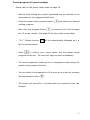
Preset program (14 preset recipes)
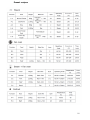
Please refer to the preset recipe table on page 18.
o Add the food, baking tray and/or perforated tray as outlined on the
recipe table to the suggested shelf level.
o Press the preset recipe program button
cooking program.
o Each time the program button
and select your desired
is pressed it will scroll through
the 14 preset recipes. (See page 18 for the preset recipe table).
o
“A-1”, Steam function
will be automatically displayed as it is
the first preset recipe.
o Press
to confirm your recipe choice and the preset recipe
program will be set. The oven will begin to work immediately.
o You cannot adjust the cooking time or temperature when using the
preset recipe program function.
o You can check the temperature of the oven at any time by pressing
the temperature button
.
o The buzzer will sound for 2 minutes after the operation timer has
finished.
17
Preset recipes
18
Preset program timer delay
o Press the preset program button
recipe.
o Press the timer button
duration.
o Press the timer button
will be displayed
and select a preset cooking
which will display the default timer
again (twice) and the delayed start icon
o First use the selection buttons to select the ‘hour’ of time you
want the oven to start. The time will scroll through 0-23
(hours). Press
(“OK”) to confirm.
o Then use the selection buttons to select the ‘minute’ of time
you want the oven to start. The time will scroll through 0-59
(minutes). Press
(“OK”) to confirm.
Cooking guidelines
o Please refer to the information given on food packaging for
guidance on cooking temperatures and times. Once familiar with
the performance of your appliance, temperatures and times can be
varied to suit personal preference.
o If you are using the fan oven cooking function, then you should
follow the information given on the food packaging for this
particular mode of cooking. It may be listed as ‘baking’ cooking on
the food packaging.
o Make sure that frozen foods are thoroughly thawed before cooking,
unless the instructions on the food packaging advise that you can
“cook from frozen”.
o You should pre-heat the oven and not place food inside of it until
the pre-heating period is over. You can choose not to pre-heat
when using the fan oven cooking function; however you should
extend the cooking time given on the food packaging by
approximately ten minutes.
o Before cooking, check that any unused accessories are removed
from the oven.
19
o Place baking trays in the centre of the oven (unless otherwise
stated) and leave gaps between the trays to allow air to circulate.
o Try to open the door as little as possible to view the dishes.
o The oven light will remain on during cooking.
Warnings
o Keep the oven door closed when using any oven function.
o Do not use aluminium foil to cover the trays supplied with the oven.
o You should also never line the base of your oven with aluminium
foil.
o During cooking, never place trays or cookware directly onto the
bottom of your oven. They should always be placed on the shelves
provided.
o Important: Be careful when opening the door, to avoid contact
with hot parts and steam.
o When removing a tray, you should ALWAYS use an oven glove.
Accessories
The accessories supplied with the oven, allow you to get the optimum
performance from your appliance on the various cooking modes that are
available.
o The trays and shelf accessories can be
placed on various levels by positioning
them in the side racks located inside of
the oven.
o This allows you to select the most suitable
level for cooking, depending on what you
are cooking and what cooking mode you
are using. The cooking charts will give
some guidance on this.
o The baking tray is a tray with raised edges, which can be used as a
support surface for any single level cooking container.
20
o It can also be used as a drip tray, for collecting cooking juices or fat
that may be generated during the cooking process.
o When cooking fatty dishes, we recommend that you place some
water in the drip pan, to prevent fat from burning and producing
unpleasant odours or smoke.
o The shelf should be used as a support surface; it should normally
be placed in the middle or upper level positions.
o The perforated trays are mainly used for steam cooking fresh or
frozen vegetables, fish etc.
o You must insert the drip pan below the perforated cooking tray, to
collect any liquid that is released from the food during the cooking
process.
Locking the keypad
Locking the control panel will prevent any unwanted or accidental
misuse of the oven whilst it is operating. When activated, all buttons
will not work until the control panel has been unlocked.
o Press the Child Lock button
control panel.
on the control panel to lock the
o A buzzer will sound and the locked symbol will illuminate on the
control panel
o Press the Child Lock button
control panel.
on the control panel to unlock the
o When deactivated the locked symbol
control panel.
light will go out on the
IMPORTANT: Pressing the power button
will still turn
the appliance off and stop all operations even when the
appliance is in locked mode. This is a safety feature.
21
Cleaning and maintenance
Cleaning operations must only be carried out when
the oven is cool.
The appliance should be disconnected from your
mains supply before commencing any cleaning
process.
o The oven should be thoroughly cleaned before it is operated for the
first time and after each use. This will avoid residual food stuffs
becoming baked on the oven cavity. After residues have been
baked on several times, they are far more difficult to remove.
o The oven cavity should be cleaned using a damp soft cloth or damp
non-abrasive sponge. No abrasive cleaners should be used. You
should only clean the cavity after the cooking chamber cleaning
cycle has been completed (see next page).
o Any stains that may appear on the bottom of the oven will have
originated from food splashes or spilt food, these splashes occur
during the cooking process. These could possibly be a result of the
food being cooked at an excessively high temperature or being
placed in cookware that is too small.
o You should make sure that the cooking temperature that is selected
is appropriate for the food that you are cooking. You should also
ensure that the food is placed in an adequately sized dish and use
the drip trays where appropriate.
o Outer parts of the oven should only be cleaned with warm soapy
water, using either a sponge or soft cloth. No abrasive cleaners
should be used.
o If you use any form of oven cleaner on your appliance, then you
must check with the manufacturer of the cleaner that it is suitable
for use on your appliance.
o Any damage that is caused to the appliance by a cleaning
product will not be fixed by Baumatic free of charge, even if
the appliance is within the guarantee period.
22
Oven cavity steam-cleaning cycle
The purpose of this feature is to facilitate the removal of food and grease
from the oven cavity after cooking.
o Fill the water jug with clean water, either cold drinking water or
bottled (softened) water.
o Fill the water jug up to the mark. DO NOT fill the jug right to the
top. Otherwise the water that is pumped back into the jug at the
end of the cleaning cycle may overflow.
o Reattach the jug cover and insert the jug into the water jug
compartment.
o Push the jug in completely to ensure a perfect seal between the
tube located in the jug and the hydraulic circuit inside of the oven.
o Switch the oven on using the oven ON/OFF button.
o Press the Clean button on the control panel.
o The cleaning function symbol will light on the control panel
o A speed indicator will appear on the digital display.
o Press OK to confirm.
o The cavity will fill with a quantity of steam for approximately 30
minutes.
o The steam will heat to 100°C
o When the cleaning cycle is finished, use a damp soft cloth or damp
non-abrasive sponge to wipe over the cavity of the oven.
23
Boiler descaling
The purpose of this feature is to remove any limescale that may have
built up in the steam heating dish.
o If you do use your household water supply to fill the water jug with,
then over a period of time, limescale may start to build in the
steam heating dish.
o Fill the water jug to the mark with water but DO NOT fill the jug
right to the top, otherwise the water that is pumped back into the
jug at the end of a cooking cycle may overflow.
o Add calcium removal solution to the heating plate. Please follow the
manufacturer’s instructions.
o IMPORTANT: Do not use vinegar or any vinegar based products to
descale the heating dish.
o Insert the water jug into the water jug compartment.
o Push the water jug down completely, this ensures a perfect seal
between the tube located in the jug and the hydraulic circuit inside
of the oven.
o Switch the oven on using the oven ON/OFF button.
o Press the Clean button on the control panel.
o The cleaning function symbol will light on the control panel
o A speed indicator will appear on the digital display.
o Using the selection buttons, select H-2
o Press OK to confirm.
o When the cleaning cycle is finished, use a damp soft cloth or damp
non-abrasive sponge to wipe over the cavity of the oven.
NOTE: The internal light will be off when the descaling clean operation is
in progress
24
Removing the side racks
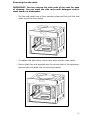
IMPORTANT: You can remove the side racks of the oven for ease
of cleaning. You can wash the side racks with detergent and/or
wash them in a dishwasher.
o Pull the side racks free of their securing clips and then pull the side
racks out of the oven cavity.
o To replace the side racks, insert them back into the oven cavity.
o Ensure that they are inserted into the correct side of the appliance,
and securely slot back into the securing clamps.
25
Replacing the oven bulb
IMPORTANT: The oven must be disconnected from your
mains supply before you attempt to either remove or
replace the oven bulb.
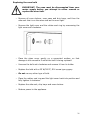
o Remove all oven shelves, oven pans and drip trays, and then the
side rack that is on the same side as the oven light.
o Remove the light cover and the rubber seal ring by unscrewing the
light cover anti-clockwise.
o Place the glass cover gently on a supported surface, so that
damage is not caused to it whilst the bulb is being replaced.
o Unscrew the bulb anti-clockwise and remove it from its holder.
o Replace the bulb with a 25 W/300°C, E14 screw type pygmy.
o Do not use any other type of bulb.
o Place the rubber seal ring and the light cover back into position and
fully tighten it clockwise.
o Replace the side rack, drip trays and oven shelves.
o Restore power to the appliance.
26
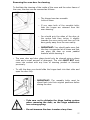
Removing the oven door for cleaning
To facilitate the cleaning of the inside of the oven and the outer frame of
the oven, the door can be removed as follows:-
o The hinges have two movable
bolts on them.
o If you raise both of the movable bolts,
then the hinges are released from the
oven housing.
o You should grip the sides of the door at
the centre and then incline it slightly
towards the oven cavity and then pull the
door gently away from the oven cavity.
o IMPORTANT: You should make sure that
the door is supported at all times and that
you place the door on some padded
material whilst cleaning it.
o The oven door and door glass should only be cleaned using a damp
cloth and a small amount of detergent. The cloth MUST NOT have
come into contact with any form of cleaning product or chemical
previously.
o To refit the door you should slide the hinges back into their slots and
open the door fully.
o IMPORTANT: The movable bolts must be
closed back into their original positions before
closing the door.
o Take care not to dislodge the hinge locking system
when removing the door, as the hinge mechanism
has a strong spring.
o Do not immerse the door in water at any time.
27
INSTALLATION
The installation must be carried out by a suitably
qualified person, in accordance with the current version
of the following.
o UK Regulations and Safety Standards or their European
Norm Replacements.
o Building Regulations (issued by the Department of the
Environment).
o Building Standards (issued by the Scottish Development
Department).
o IEE Wiring Regulations.
o Electricity At Work Regulations.
Before connecting the appliance, make sure that the supply voltage
marked on the Rating Plate corresponds with your mains supply voltage.
WARNING: THIS APPLIANCE MUST BE EARTHED.
o This appliance should be wired into a 13A double pole switched
fused spur outlet, having 3 mm contact separation and placed in an
easily accessible position adjacent to the appliance. The spur outlet
must still be accessible even when your oven is located in its
housing.
o To connect the oven power cord, loosen and remove the cover on
the terminal block, in order to gain access to the contacts inside.
Make the connection, securing the cord in place with the cable
clamp provided and then immediately close the terminal block cover
again.
o If you have to change the oven power cord, the earthing
(yellow/green) conductor must always be 10 mm longer than the
line conductors.
o Care must be taken to ensure that the temperature of the mains
supply cable does not exceed 50°C.
o If the mains supply cable is damaged, then it must be replaced by
an appropriate replacement which can be obtained from the
Baumatic Spares Department.
28
Installing the oven into the kitchen cabinet
Positioning the appliance
o Ensure that the aperture that you will be fitting the oven into is of
the size given in the above diagram.
o The oven must be fitted into an oven housing with the ventilation
cut-outs shown in the “Ventilation requirements” section on the
next page.
o Ensure that the rear panel of the furniture housing unit has been
removed.
o IMPORTANT: You must not install the appliance in a location
where the ambient temperature will fall below 5°C.
29
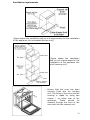
Ventilation requirements
(Figure shows the ventilation and cut-out requirements for the installation
of the appliance into a standard kitchen unit).
(Figure shows the ventilation
and cut-out requirements for the
installation of the appliance into
a tall housing unit).
o Ensure that the oven has been
securely fixed into the housing
unit. The fixing of the oven into the
housing is made by using two
screws – on either side of the
should
be
appliance.
These
screwed through the front of the
oven and into the housing unit.
30
My appliance isn’t working correctly
o The oven isn’t coming on.
* Check that you have selected a cooking function and a cooking
temperature.
o There appears to be no power to the oven.
* Check that the appliance has been connected to the electrical mains
supply correctly.
* Check that the mains fuses are in working order.
* Check that the operating instructions for setting the time of day have
been followed.
o The oven light is not working
* Refer to the “Replacing the oven bulb” section on page 26.
o The display shows an error code
* The appliance has generated an error code, see the next page for
more information on error codes and what they mean.
o Steam comes out of the oven during operation
* Check that the oven door is completely shut.
* Check whether the oven door seal is damaged or cracked. If it is, then
contact the Baumatic Service Department.
o What happens if power is cut to the appliance
* It may be necessary to set the time of day again.
* The stored settings and recipes would not be lost.
* If the power cut occurred whilst the oven was cooking, then you will
need to reselect the cooking function and temperature.
31
Error Codes:
Error codes occur when there is a fault with the appliance. The oven will
stop working and a buzzer will sound.
Error code
Cause of Error
E001
The water jug is empty
E002
Electrical fault.
E003
Oven door not closed
properly.
Action required
Refill water jug.
If water jug is full, ensure it is inserted
properly into the cavity.
Disconnect from electrical supply and
check electrical connections. Turn on
power and see if it has solved the
problem. If error code still showing
disconnect from power supply and
contact Customer Service.
Check the door is closed properly.
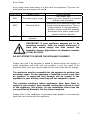
IMPORTANT: If your appliance appears not to be
operating correctly, then you should disconnect it
from your mains supply and then contact the
Baumatic Service Department on telephone number
(0118) 933 6911.
DO NOT ATTEMPT TO REPAIR THE APPLIANCE YOURSELF.
Please note that if an engineer is asked to attend whilst the product is
under guarantee and finds that the problem is not the result of an
appliance fault, then you may be liable for the cost of the call out charge.
The appliance must be accessible for the engineer to perform any
necessary repair. If your appliance is installed in such a way that
an engineer is concerned that damage will be caused to the
appliance or your kitchen, then they will not complete a repair.
This includes situations where appliances have been tiled in,
sealed in with sealant, have wooden obstructions placed in front
of the appliance, like plinths. Or any installation other than the
one specified by Baumatic Ltd. has been completed.
Please refer to the conditions of guarantee that appear on the warranty
card that you receive with the appliance.
32
Baumatic Consumables
o BC001 Degreaser for Dishwashers (200 g)
o BC002 Descaler for Washing Machines and Dishwashers (200 g)
o BC003 Ceramic Hob Cleaner (250 ml)
o BC004 Oven Cleaner (250 ml)
o BC005 Stainless Steel Cleaner and Protector (250 ml)
o BC007 E-Cloth – General Purpose Cloth
o BC008 Microwave Cover
To order a Baumatic consumable product please call 0123 5437 244 and
quote the product code. You can also order online from
eshop.baumatic.co.uk
33
34
United Kingdom
Baumatic Ltd.,
Baumatic Buildings,
6 Bennet Road,
Reading, Berkshire
RG2 0QX
United Kingdom
Sales Telephone
(0118) 933 6900
Sales Fax
(0118) 931 0035
Customer Care Telephone
(0118) 933 6911
Customer Care Fax
(0118) 986 9124
Spares Telephone
(01235) 437244
Advice Line Telephone
(0118) 933 6933
E-mail:
[email protected]
[email protected]
[email protected]
[email protected]
Website:
www.baumatic.co.uk
Facebook:
www.facebook.com/baumatic.uk
Republic of Ireland
Service Telephone
1-890 812 724
Spares Telephone
091 756 771
Czech Republic
Baumatic CR spol s.r.o.
Lípovà 665
460 01 Liberec 4
Czech Republic
+420 483 577 200
www.baumatic.cz
Slovakia
Baumatic Slovakia, s.r.o.
Panenská 34
811 03 Bratislava - Staré Mesto
Slovakia
+421 255 640 618
www.baumatic.sk
Germany
Baumatic Gmbh
Bachstr.10-12
D-32 257 Bünde
Deutschland
+49 (0) 5223 99408 0
www.baumatic.de
Italy
Baumatic Italia S.R.L.
Via Galvani N.3
35011 Campodarsego (PD)
+3904 9920 2297
www.baumatic.it
Holland
Baumatic Benelux B.V.
Dukdalfweg 15d
1332 BH ALMERE
Nederland
+31(0)36 549 1553
www.baumatic.nl
35
46