1
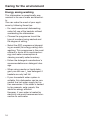
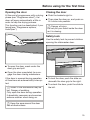
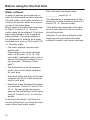
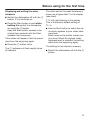
Operating instructions
for dishwashers
To avoid the risk of accidents or damage to the appliance, it is essential
to read these instructions as well as the installation plan before it is in‐
stalled and used for the first time.
en-GB
HG05
M.-Nr. 09 953 510
2
Contents
Guide to the appliance........................................................................................... 6
Appliance overview.................................................................................................. 6
Control panel............................................................................................................ 7
Warning and Safety instructions .......................................................................... 8
Caring for the environment ................................................................................. 17
Disposal of the packing material............................................................................ 17
Disposing of your old appliance ............................................................................ 17
Energy saving washing .......................................................................................... 18
Before using for the first time............................................................................. 19
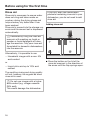
Opening the door ................................................................................................... 19
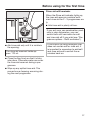
Closing the door .................................................................................................... 19
Safety lock ............................................................................................................. 19
Water softener........................................................................................................ 20
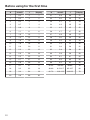
Displaying and setting the water hardness....................................................... 21
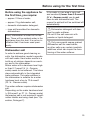
Before using the appliance for the first time, you require: ..................................... 23
Dishwasher salt...................................................................................................... 23
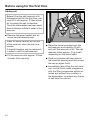
Adding salt ........................................................................................................ 24
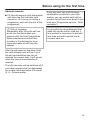
Add salt reminder.............................................................................................. 25
Rinse aid ................................................................................................................ 26
Adding rinse aid ................................................................................................ 26
Rinse aid refill reminder .................................................................................... 27
Setting the rinse aid dosage ............................................................................. 28
Loading the dishwasher ...................................................................................... 29
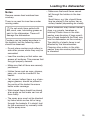
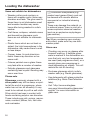
Notes...................................................................................................................... 29
Upper basket ......................................................................................................... 31
Adjusting the upper basket............................................................................... 32
Lower basket ......................................................................................................... 33
Cutlery.................................................................................................................... 35
3D cutlery tray (depending on model)............................................................... 35
Cutlery basket (depending on model)............................................................... 36
Loading examples.................................................................................................. 37
Dishwashers with cutlery tray ........................................................................... 37
Dishwashers with cutlery basket ..................................................................... 39
Operation .............................................................................................................. 41
Detergent ............................................................................................................... 41
Adding detergent .............................................................................................. 43
Switching on .......................................................................................................... 44
Selecting a programme.......................................................................................... 44
Starting the programme ......................................................................................... 45
3
Contents
Time display........................................................................................................... 45
Energy management .............................................................................................. 46
At the end of a programme .................................................................................... 46
Switching off .......................................................................................................... 47
Unloading the dishwasher ..................................................................................... 47
Interrupting a programme ...................................................................................... 48
Changing a programme ......................................................................................... 48
Programme options ............................................................................................. 49
Short ................................................................................................................ 49
DetergentAgent ...................................................................................................... 49
Refill reminders ...................................................................................................... 50
Delay start .............................................................................................................. 51
Adjust Sensor wash ............................................................................................... 53
Memory .................................................................................................................. 54
AutoOpen............................................................................................................... 55
Optimise standby................................................................................................... 56
Factory default ....................................................................................................... 57
Programme chart ................................................................................................. 58
Cleaning and care ................................................................................................ 62
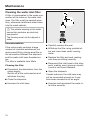
Cleaning the wash cabinet..................................................................................... 62
Cleaning the door and the door seal ..................................................................... 62
Cleaning the door front .......................................................................................... 63
Checking the filters in the wash cabinet ................................................................ 64
Cleaning the filters ................................................................................................. 64
Cleaning the spray arms ........................................................................................ 66
Problem solving guide ......................................................................................... 67
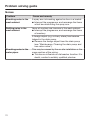
Technical problems ................................................................................................ 67
Water inlet fault ...................................................................................................... 69
Water drainage fault............................................................................................... 70
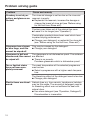
General problems................................................................................................... 71
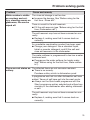
Noises .................................................................................................................... 72
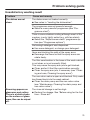
Unsatisfactory washing result................................................................................ 73
Maintenance ......................................................................................................... 76
Cleaning the water inlet filter ................................................................................. 76
Cleaning the drain pump and non-return valve ..................................................... 77
After sales service ............................................................................................... 78
Repairs ................................................................................................................... 78
Guarantee: U.K....................................................................................................... 78
4
Contents
Guarantee: Other countries.................................................................................... 78
Note for test institutes............................................................................................ 78
Optional accessories ........................................................................................... 79
Electrical connection ........................................................................................... 81
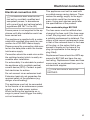
Electrical connection U.K....................................................................................... 81
Plumbing ............................................................................................................... 82
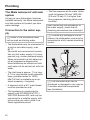
The Miele waterproof anti-leak system .................................................................. 82
Connection to the water supply............................................................................. 82
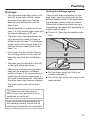
Drainage................................................................................................................. 83
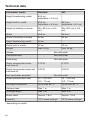
Technical data ...................................................................................................... 84
5
Guide to the appliance
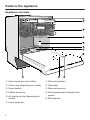
Appliance overview
a Upper spray arm (not visible)
g Filter combination
b Cutlery tray (depending on model)
h Data plate
c Upper basket
i Rinse aid reservoir
d Middle spray arm
j Dual compartment detergent dis‐
penser
e Air inlet for drying (depending on
model)
f Lower spray arm
6
k Salt reservoir
Guide to the appliance
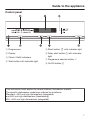
Control panel
a Programmes
e Short button with indicator light
b Display
f Delay start button with indicator
light
c Check / Refill indicators
d Start button with indicator light
g Programme selector button
h On/Off button
This instruction book applies to several different dishwasher models.
The specific dishwasher models are referred to as follows:
Standard = 80.5 cm high dishwashers (integrated)
and 84.5 cm high dishwashers (freestanding)
XXL = 84.5 cm high dishwashers (integrated).
7
Warning and Safety instructions
This dishwasher complies with current safety requirements. Inap‐
propriate use can, however, lead to personal injury and damage to
property.
To avoid the risk of accidents and damage to the dishwasher,
please read the installation plan and the operating instructions
carefully before it is installed and used for the first time. They con‐
tain important information on its installation, safety, use and main‐
tenance.
Keep the installation plan and the operating instructions in a safe
place and pass them on to any future owner.
Miele cannot be held liable for damage caused by non-compli‐
ance with this information.
8
Warning and Safety instructions
Correct application
This dishwasher is intended for use in domestic households and
similar working and residential environments.
The dishwasher is not intended for outdoor use.
It must only be used as a domestic appliance as specified in
these operating instructions, for cleaning domestic crockery and
cutlery. Any other usage is not supported by the manufacturer and
could be dangerous.
The appliance can only be used by people with reduced physical,
sensory or mental capabilities, or lack of experience and knowledge,
if they are supervised whilst using it, or have been shown how to use
it in a safe way and recognise and understand the consequences of
incorrect operation.
9
Warning and Safety instructions
Safety with children
Children under 8 years of age must be kept away from the appli‐
ance unless they are constantly supervised.
Children 8 years and older may only use the dishwasher unsuper‐
vised if they have been shown how to use it safely and recognise
and understand the consequences of incorrect operation.
Children must not be allowed to clean or maintain the appliance
unsupervised.
Please supervise children in the vicinity of the dishwasher and do
not let them play with it. There is a danger that children playing
might shut themselves in the dishwasher.
If the automatic door opening mechanism (depending on model)
is active keep young children away from the area in which the door
opens. Danger of injury in the unlikely event of a fault with the open‐
ing mechanism.
Danger of suffocation. Packaging, e.g. plastic wrappings, must be
kept out of the reach of babies and children. Whilst playing, children
could become entangled in packaging or pull it over their head and
suffocate.
Keep children away from detergents. Dishwasher detergents can
cause burning in the mouth, nose and throat if swallowed, or inhibit
breathing. Keep children away from the dishwasher when the door is
open. There could still be detergent residues in the cabinet. Seek
medical attention immediately if your child has swallowed or inhaled
detergent.
10
Warning and Safety instructions
Technical safety
Unauthorised installation, maintenance and repairs can cause
considerable danger for the user. Installation, maintenance and re‐
pairs must only be carried out by a Miele authorised technician.
A damaged dishwasher is dangerous. Check it for any recognisa‐
ble damage. Never install or attempt to use a damaged appliance.
The electrical safety of this appliance can only be guaranteed
when correctly earthed. It is essential that this standard safety re‐
quirement is met. If in any doubt, please have the electrical installa‐
tion tested by a qualified electrician.
Miele cannot be held liable for the consequences of an inadequate
earthing system (e.g. electric shock).
Reliable and safe operation of this dishwasher can only be assur‐
ed if it has been connected to the mains electricity supply.
The dishwasher must only be plugged into the electricity supply
via a suitable switched socket using a fused 3-pin plug (it must not
be hard-wired). The electrical socket must be easily accessible after
the dishwasher is installed so that it can be disconnected from the
electricity supply at any time.
There must be no electrical sockets behind the dishwasher. Dan‐
ger of overheating and fire risk if the dishwasher were to be pushed
up against a plug.
The dishwasher must not be installed under a hob. The high radi‐
ant temperatures which are sometimes generated by a hob could
damage the dishwasher. For the same reason it should not be instal‐
led next to open fires or other appliances which give off heat, such
as heaters etc.
To avoid the risk of damage to the dishwasher, make sure that the
connection data on the data plate (fuse rating, voltage and frequen‐
cy) match the mains electricity supply before connecting the dish‐
washer to the mains. Consult a qualified electrician if in doubt.
11
Warning and Safety instructions
Do not connect the dishwasher to the mains supply until it has
been fully installed and any adjustment has been made to the door
springs.
The dishwasher may only be operated if the door opening mecha‐
nism is working correctly. Otherwise there could be a risk of danger
whilst the automatic door opening mechanism (depending on model)
is active.
To check that the door opening mechanism is working correctly:
– the door springs must be adjusted equally on both sides. They
are correctly adjusted when the door remains stationary when left
half open (approx. 45° opening angle). It is also important that the
door cannot fall open.
– the door locking pins automatically retract when the door opens
at the end of the drying phase.
Do not connect the appliance to the mains electricity supply by a
multi-socket adapter or an extension lead. These do not guarantee
the required safety of the appliance (fire hazard).
The appliance must not be used in a non-stationary location (e.g.
on a ship).
Do not install the dishwasher in a room where there is a risk of
frost. Frozen hoses may burst or split. The reliability of the electronic
control unit may be impaired at temperatures below freezing point.
The plastic housing of the water connection contains an electrical
component. It must not be dipped in water.
There are electrical wires in the water inlet hose. Do not cut the
water inlet hose, even if it is too long.
12
Warning and Safety instructions
The integrated Waterproof system offers protection from water
damage, provided the following conditions are met:
– The dishwasher is correctly installed and plumbed in.
– The dishwasher is properly maintained and parts are replaced
where it can be seen that this is necessary.
– The stopcock has been turned off when the appliance is not used
for a longer period of time (e.g. during holidays).
The Waterproof system will work even if the appliance is switched
off. However, the appliance must remain connected to the electricity
supply.
The water pressure (flow pressure at the take-off point) must be
between 30 and 1000 kPa (0.3 and 10 bar).
If the dishwasher gets damaged, switch it off at the mains imme‐
diately and call your Miele Dealer or the Miele Service Department.
While the appliance is under guarantee, repairs should only be un‐
dertaken by a Miele authorised service technician. Otherwise the
guarantee is invalidated.
Miele can only guarantee the safety of the appliance when genu‐
ine original Miele replacement parts are used. Faulty components
must only be replaced by Miele spare parts.
During installation, maintenance and repair work, the appliance
must be disconnected from the mains electricity supply (switch it off
and withdraw the plug from the socket).
If the connection cable is damaged it must be replaced with a
special cable of the same type (available from Miele) by a Miele au‐
thorised service technician only.
13
Warning and Safety instructions
Correct installation
The dishwasher must be installed and connected in compliance
with the installation diagram supplied.
Take care, both before and during installation of the dish‐
washer, not to cut yourself on the metal parts. Danger of in‐
jury. Wear protective gloves.
The dishwasher must be correctly aligned to ensure problem-free
operation.
In order to ensure stability, built-under and integrated dishwash‐
ers must only be installed under a continuous worktop which is se‐
cured to adjacent cabinetry.
If you want to convert your freestanding dishwasher to a built-un‐
der ("U") model, you will need to order the appropriate conversion
kit. If you remove the existing plinth, you must replace it with a Umodel plinth. This is necessary to avoid the risk of injury caused by
protruding metal parts.
The door springs must be adjusted equally on both sides. They
are correctly adjusted when the door remains stationary when left
half open (approx. 45° opening angle). It is also important that the
door cannot fall open.
The appliance may only be used with correctly adjusted door
springs.
14
Warning and Safety instructions
Correct use
Do not use solvents in the dishwasher. Danger of explosion.
Do not inhale or ingest dishwasher detergent. Dishwasher deter‐
gents can cause burning in the nose, mouth and throat if swallowed,
or inhibit breathing. Seek medical attention immediately if detergent
has been swallowed or inhaled.
You could injure yourself on the open dishwasher door or trip over
it. Avoid leaving the door open unnecessarily.
Do not sit or lean on the opened door. This could cause the dish‐
washer to tip and be damaged, and you could get injured.
Dishes can be very hot at the end of the programme. Allow them
to cool until they are comfortable enough to handle before unload‐
ing.
Only use detergent and rinse aid formulated for domestic dish‐
washers. Do not use washing-up liquid.
Do not use commercial or industrial detergents as these may
cause damage, and there is a risk of a severe explosive chemical re‐
action (such as an explosive oxyhydrogen gas reaction).
Do not fill the rinse aid reservoir with powder or liquid detergent.
This will cause serious damage to the reservoir.
Inadvertently filling the salt reservoir with powder or liquid dish‐
washer detergent will damage the water softener. Make sure you
have picked up the correct packet of dishwasher salt before filling
the salt reservoir!
Only use special coarse grained dishwasher salt for reactivation.
Do not use other salts such as cooking salt, agricultural grade or
gritting salt. These may contain insoluble additives which can impair
the functioning of the water softener.
15
Warning and Safety instructions
In an appliance with a cutlery basket (depending on model), cut‐
lery is cleaned and dried more efficiently if placed in the basket with
the handles downwards. However, to avoid the risk of injury, place
knives and forks etc. with the handles upwards.
Plastic items which cannot withstand being washed in hot water,
such as disposable plastic containers or plastic cutlery should not
be cleaned in the dishwasher. The high temperatures in the dish‐
washer may cause them to melt or lose shape.
If you use the "FlexiTimer/Delay start" option (depending on mod‐
el), make sure that the dispenser is dry before adding detergent.
Wipe dry if necessary. Detergent will clog if poured into a damp dis‐
penser and may not be thoroughly dispersed.
Please observe the information given in "Technical data" regard‐
ing the capacity of the dishwasher.
Accessories
Only use genuine original Miele accessories and spare parts with
this dishwasher. Using accessories or spare parts from other manu‐
facturers will invalidate the guarantee, and Miele cannot accept lia‐
bility.
Disposal of your old dishwasher
Make the door lock inoperative so that children cannot acciden‐
tally shut themselves in. Make appropriate arrangements for the dis‐
posal of the appliance.
16
Caring for the environment
Disposal of the packing mate‐
rial
Disposing of your old appli‐
ance
The packaging is designed to protect
the appliance from damage during
transportation. The packaging materials
used are selected from materials which
are environmentally friendly for disposal
and should be recycled.
Electrical and electronic appliances of‐
ten contain valuable materials. They al‐
so contain materials which, if handled
or disposed of incorrectly, could be po‐
tentially hazardous to human health and
to the environment. They are, however,
essential for the correct functioning of
your appliance. Please do not therefore
dispose of it with your household
waste.
The packaging consists of the following
materials:
Outer packaging:
– Corrugated cardboard made from up
to 100% recyclable material:
or: Polyethylene (PE) shrink wrap
– Polypropylene (PP) strapping
Inner packaging:
– Chlorine and fluorine free expanded
polystyrene (EPS)
– Base, lid frame and support battens
made from untreated natural wood
from renewable forests
Please dispose of it at your local com‐
munity waste collection / recycling cen‐
tre or contact your dealer for advice.
– Polyethylene (PE) protective wrap
Ensure that it presents no danger to
children while being stored for disposal.
Recycling the packaging reduces the
use of raw materials in the manufactur‐
ing process and also reduces the
amount of waste in landfill sites.
To enable sorting by type of plastic for
recycling, all plastic parts of the appli‐
ance are labelled with international
standard symbols.
17
Caring for the environment
Energy saving washing
This dishwasher is exceptionally eco‐
nomical in its use of water and electrici‐
ty.
You can make the most of your appli‐
ance by following these tips:
– For most economical dishwashing,
make full use of the baskets without
overloading the dishwasher.
– Choose the programme to suit the
type of crockery being washed and
the degree of soiling.
– Select the ECO programme (depend‐
ing on model) for energy-saving dish‐
washing. This programme is the most
efficient in terms of its combined en‐
ergy and water consumption at
cleaning normally soiled crockery.
– Follow the detergent manufacturer's
recommendations on detergent dos‐
age.
– When using powder or liquid deter‐
gent you can use 1/3 less detergent if
baskets are only half full.
– If your household water system is
suitable, this dishwasher can be con‐
nected to a hot water supply for fur‐
ther economies. If the water is heated
by for example, solar panels, this
would be energy efficient.
However, if your water is heated by
electricity we would recommend con‐
nection to cold water.
18
Before using for the first time
Opening the door
Closing the door
At the end of programmes with a drying
phase (see "Programme chart"), the
door will open automatically a little in
order to help the drying process.
This function can be deactivated, if pre‐
ferred (see "Programme options,
AutoOpen").
Push the baskets right in.
Then raise the door up, and push un‐
til it clicks into position.
Danger of injury.
Do not put your hand inside the door
as it is closing.
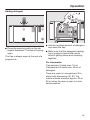
Safety lock
Use the safety lock to prevent children
opening the dishwasher door.
To open the door, reach under the
door grip and pull.
Open the door completely to re-en‐
gage the door closing mechanism.
If the door is opened during operation
all functions are automatically interrup‐
ted.
Water in the dishwasher may be
hot. Danger of scalding.
Only open the door during operation
if absolutely necessary and exercise
extreme caution when doing so.
To lock the door, push the slide un‐
derneath the door grip to the right.
To unlock the door, push the slide to
the left.
Keep the area around the door
free of obstructions.
19
Before using for the first time
Water softener
Enter the water hardness below:
In order to achieve good cleaning re‐
sults, the dishwasher needs to operate
with soft water. Hard water results in a
build-up of calcium deposits on crock‐
ery and in the dishwasher.
Mains water with a hardness level high‐
er than 0.7 mmol/l (4 °d - German
scale) needs to be softened. This takes
place automatically in the integrated
water softener. The water softener in
the dishwasher is suitable for a water
hardness level of up to 12.6 mmol/l (70
°d - German scale).
____________mmol/l or °d
– The water softener requires dish‐
washer salt.
Depending on the water hardness
level (< 3.8 mmol/l, or 21 °d - Ger‐
man scale), dishwasher salt is not re‐
quired if combination tablets are be‐
ing used (see "Operation, Deter‐
gent").
– The dishwasher must be program‐
med to the correct water hardness
for your area.
– Your local water authority will be able
to advise you of the water hardness
level in your area.
– Where the water hardness fluctuates
e.g. between 1.8 and 2.7 mmol/l (10 15 °d - German scale) always pro‐
gramme the dishwasher to the higher
value (2.7 mmol/l or 15 °d in this ex‐
ample).
In the event of a fault, it will help the
service technician if you know the hard‐
ness of your local water supply.
20
The dishwasher is programmed at the
factory for a water hardness level of 2.7
mmol/l (15 °d - German scale).
If this setting corresponds to the hard‐
ness of your water you do not need to
do anything more.
However, if you have a different water
hardness you must adjust the water
softener to match your water hardness.
Before using for the first time
Displaying and setting the water
hardness
Switch the dishwasher off with the
button, if it is switched on.
Press the Start button in and whilst
holding it in switch the dishwasher
on using the button
Keep the Start button pressed in for
at least four seconds until the Start
indicator light comes on.
If this does not happen, start the proce‐
dure from the beginning again.
Press the button twice.
The indicator will flash rapidly twice
at intervals.
The value set for the water hardness is
shown as a figure after in the display
(see chart).
will start flashing in the display.
This is the factory default setting of
15 °d.
Use the Start button to select the val‐
ue which equates to your water hard‐
ness level.
Each press on the button moves you
up a level. When the highest water
hardness level is reached, the setting
starts from the beginning again.
The setting is now stored in memory.
Switch the dishwasher off with the
button.
21
Before using for the first time
22
°d
mmol/l
°f
Display
°d
mmol/l
°f
Display
1
0.2
2
1
21
3.8
38
21
2
0.4
4
2
22
4.0
40
22
3
0.5
5
3
23
4.1
41
23
4
0.7
7
4
24
4.3
43
24
5
0.9
9
5
25
4.5
45
25
6
1.1
11
6
26
4.7
47
26
7
1.3
13
7
27
4.9
49
27
8
1.4
14
8
28
5.0
50
28
9
1.6
16
9
29
5.2
52
29
10
1.8
18
10
30
5.4
54
30
11
2.0
20
11
31
5.6
56
31
12
2.2
22
12
32
5.8
58
32
13
2.3
23
13
33
5.9
59
33
14
2.5
25
14
34
6.1
61
34
15
2.7
27
15
35
6.3
63
35
16
2.9
29
16
36
6.5
65
36
17
3.1
31
17
37-45
6.6-8.0
66-80
45
18
3.2
32
18
46-60
8.2-10.7
82-107
60
19
3.4
34
19
61-70
10.9-12.5
109-125
70
20
3.6
36
20
Before using for the first time
Before using the appliance for
the first time, you require:
– approx. 2 litres of water,
– approx. 2 kg dishwasher salt,
– domestic dishwasher detergent,
– rinse aid formulated for domestic
dishwashers.
Every dishwasher is tested at the fac‐
tory. There will be residual water in the
appliance from this test. It is not an in‐
dication that it has been used previ‐
ously.
Dishwasher salt
In order to achieve good cleaning re‐
sults, the dishwasher needs to operate
with soft water. Hard water results in a
build-up of calcium deposits on crock‐
ery and in the dishwasher.
Mains water with a hardness level high‐
er than 0.7 mmol/l (4 °d - German
scale) needs to be softened. This takes
place automatically in the integrated
water softener. The water softener in
the dishwasher is suitable for a water
hardness level of up to 12.6 mmol/l
(70 °d - German scale).
If the water in your area is very soft
and constantly lower than 0.9 mmol/l
(5 °d - German scale) you do not
have to add dishwasher salt. The
prompt to add salt will be switched off
automatically.
Dishwasher detergent will dam‐
age the water softener.
Do not fill the salt reservoir with
powder or liquid detergent.
Only use special coarse grained
dishwasher salt for reactivation,
as other salts may contain insoluble
additives which can impair the func‐
tioning of the water softener.
The water softener requires dishwasher
salt.
Depending on the water hardness level
(< 3.8 mmol/l, or 21 °d - German scale),
dishwasher salt is not required if combi‐
nation tablets are being used (see "Op‐
eration, Detergent").
23
Before using for the first time
Adding salt
Before filling the salt reservoir with
dishwasher salt for the first time, you
must fill it with approx. 2 litres of wa‐
ter to enable the salt to dissolve.
Once the dishwasher has been used,
there is always sufficient water in the
reservoir.
Remove the lower basket and un‐
screw the salt reservoir cap.
Water or saline solution will run out
of the reservoir when the cap is re‐
moved.
It should therefore only be removed
in order to refill the salt reservoir.
Fill the reservoir with approx. 2 litres
of water (first use only).
Place the funnel provided over the
salt reservoir and carefully fill with
salt until the reservoir is full. The salt
reservoir holds approx. 2 kg of salt
depending on the brand used.
Clean any excess salt from around
the reservoir opening and then screw
the cap on again firmly.
Immediately after filling the salt reser‐
voir, run the Quick wash programme
with the Short programme option se‐
lected and without any crockery in
the dishwasher, to remove any traces
of salt from the cabinet.
24
Before using for the first time
Add salt reminder
Fill the salt reservoir with dishwasher
salt when the Salt indicator light
comes on. (If it comes on during a
programme, wait until the end of the
programme).
Risk of corrosion.
Immediately after filling the salt res‐
ervoir, run the Quick wash pro‐
gramme with the Short programme
option selected and without any
crockery in the dishwasher to re‐
move any traces of salt from the
cabinet.
If you only ever use multi-function
combination products in your dish‐
washer, you can switch both refill re‐
minders for salt and rinse aid off if you
wish (see "Programme options - Refill
reminders").
If you switch to using detergent that
does not contain salt or rinse aid, it
is important to remember to add salt
and rinse aid and to switch the re‐
minders back on.
After the salt reservoir has been filled,
the refill indicator may still be lit up if
the salt concentration has not yet
reached the correct level. It will go out
when the correct concentration is
reached.
The refill reminder will be switched off if
you have programmed the dishwasher
for a water hardness below 0.9 mmol/l
(5 °d - German scale).
25
Before using for the first time
Rinse aid
Rinse aid is necessary to ensure water
does not cling and leave marks on
crockery during the drying phase and
helps crockery dry faster after it has
been washed.
Rinse aid is poured into the storage res‐
ervoir and the amount set is dispensed
automatically.
If you only ever use combination
products containing rinse aid in your
dishwasher, you do not need to add
rinse aid.
Adding rinse aid
Inadvertently filling the rinse aid
reservoir with washing-up liquid or
powder or liquid detergent will dam‐
age the reservoir. Only pour rinse aid
formulated for domestic dishwashers
into the reservoir.
Alternatively, it is possible to use
– Household vinegar with a max. 5%
acid content
or
– Liquid citric acid up to 10% acid
content
The resulting rinsing and drying quality
will not, however, be as good as when
rinse aid is used.
Do not use vinegar with a higher
acid content (e.g. vinegar essence
25% acid).
This would damage the dishwasher.
26
Press the button on the lid of the
rinse aid reservoir in the direction of
the arrow until the flap springs open.
Before using for the first time
Rinse aid refill reminder
When the Rinse aid indicator lights up,
the rinse aid reservoir contains suffi‐
cient rinse aid for 2 - 3 programmes on‐
ly.
Add rinse aid in plenty of time.
If you only ever use combination prod‐
ucts in your dishwasher, you can
switch both refill reminders for salt
and rinse aid off if you wish (see "Pro‐
gramme options - Refill reminders").
Add rinse aid only until it is visible in
the opening.
The rinse aid reservoir holds ap‐
prox. 110 ml.
If you switch to using detergent that
does not contain salt or rinse aid, it
is important to remember to add salt
and rinse aid and to switch the re‐
minders back on.
Close the flap firmly so that it clicks
into place. Otherwise water can enter
the rinse aid reservoir during a pro‐
gramme.
Wipe up any spilled rinse aid. This
prevents over-foaming occurring dur‐
ing the next programme.
27
Before using for the first time
Setting the rinse aid dosage
You can adjust the rinse aid dosage for
best results.
The rinse aid dosage is set in stages
from 0 to 6. It is set to 3 at the factory.
This is the recommended setting.
If the "Adjust Sensor wash" programme
function (depending on model) has
been activated, the amount of rinse aid
dispensed in the Sensor wash pro‐
gramme can be higher than that set.
Switch the dishwasher off with the
button, if it is switched on.
Press the Start button in and whilst
holding it in switch the dishwasher
on using the button.
Keep the Start button pressed in for
at least four seconds until the Start
indicator light comes on.
If this does not happen, start the proce‐
dure from the beginning again.
Press the button 3 times.
If spots appear on crockery and glass‐
ware:
The indicator will flash rapidly 3
times at intervals.
Increase the rinse aid dosage.
The dosage set will show in the display
after the symbol.
If clouding or smearing appears on
crockery and glassware:
Decrease the rinse aid dosage.
The flashing sequence will appear in
the display.
This indicates the factory default setting
3.
Use the Start button to select the set‐
ting required.
Each press on the button moves you
up a level. After reaching the highest
value the counter starts from the be‐
ginning again.
The setting is now stored in memory.
Switch the dishwasher off with the
button.
28
Loading the dishwasher
Notes
Remove coarse food residues from
crockery.
There is no need to rinse items under
running water.
Do not wash items soiled with
ash, sand, wax, lubricating grease or
paint in the dishwasher. These will
damage the dishwasher.
Crockery can be loaded anywhere in
the baskets, but the following notes
should be observed:
– Do not place crockery and cutlery in‐
side other pieces where they may be
concealed.
– Make sure that small items cannot
fall through the holders in the bas‐
kets.
Small items, e.g. lids, should there‐
fore be placed in the cutlery tray or
cutlery basket (depending on model).
Some foodstuffs may contain natural
dyes, e.g. carrots, tomatoes or
ketchup. Plastic items in the dish‐
washer may discolour if large quanti‐
ties of these foodstuffs find their way
into the dishwasher on the crockery.
The stability of plastic items is not
affected by this discolouration.
Cleaning silver cutlery in the dish‐
washer may also cause plastic items
to discolour.
– Load the crockery so that water can
access all surfaces. This ensures that
they get properly cleaned.
– Make sure that all items are securely
positioned.
– Hollow items such as cups, glasses,
pans, etc. must be inverted in the
basket.
– Tall, narrow, hollow items, e.g. cham‐
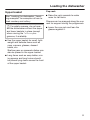
pagne glasses, should be placed in
the centre of the basket to ensure
better water coverage.
– Wide based items should be placed
at an angle so that water can run off
them freely.
– The spray arms must not be blocked
by items which are too tall or hang
through the baskets. If in doubt, test
for free movement by manually rotat‐
ing the spray arms.
29
Loading the dishwasher
Items not suitable for dishwashers:
– Wooden cutlery and crockery or
items with wooden parts: these may
discolour and fade. The glue used in
these items is not dishwasher-proof
and wooden handles may come
loose after being washed in a dish‐
washer.
– Craft items, antiques, valuable vases
and decorative glassware: such
items are not suitable for dishwash‐
ers.
– Plastic items which are not heat re‐
sistant: the high temperatures in the
dishwasher may cause them to melt
or lose shape.
– Copper, brass, tin and aluminium
items: these may discolour or be‐
come matt.
– Colours painted over a glaze: these
may fade after a number of washes.
– Delicate glassware and glassware
containing lead crystal: clouding may
occur over time.
Please note
Silverware previously cleaned with a
silver polish may still be damp or spot‐
ted at the end of a programme, where
water has not run off smoothly. It may
need to be rubbed dry with a soft cloth.
Silver which has been in contact with
foods containing sulphur can discolour.
These include egg yolk, onions, mayon‐
naise, mustard, pulses, fish, fish brine
and marinades.
30
Aluminium components (e.g.
cooker hood grease filters) must not
be cleaned with caustic alkaline
commercial or industrial cleaning
agents.
These may damage the material, or
in extreme cases, there is a risk of a
severe explosive chemical reaction
(such as an explosive oxyhydrogen
gas reaction).
Tip: When purchasing new crockery
and cutlery, make sure they are dish‐
washer-proof.
Glass care
– Clouding may occur on glasses after
frequent washing. If delicate glass‐
ware is washed in the dishwasher en‐
sure that only very low temperatures
are used (see programme chart), or a
special glass-care programme is
used (depending on model). This will
reduce the risk of clouding.
– Purchase glassware which is dish‐
washer safe (e.g. Riedel glassware).
– Use detergents with glass protective
additives (e.g. Miele CareCollection
tabs).
– Visit "http://www.mieleglass‐
care.com/international/en/glasscare/
english" for more information on
glass care.
Loading the dishwasher
Upper basket
See "Loading the dishwasher / Load‐
ing examples" for examples of how to
load crockery and cutlery.
For safety reasons, do not oper‐
ate the dishwasher without the upper
and lower baskets in place (except
when running the Tall items pro‐
gramme, if available).
Cup rack
Raise the rack upwards to make
room for tall items.
Glasses can be arranged along the cup
rack for support during the programme.
Lower the cup rack and lean the
glasses against it.
Use the upper basket for small, light‐
weight and delicate items such as
cups, saucers, glasses, dessert
bowls, etc.
Shallow pans or casserole dishes can
also be placed in the upper basket.
Long items such as soup ladles, mix‐
ing spoons and long knives should
be placed lying down across the front
of the upper basket.
31
Loading the dishwasher
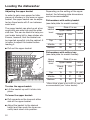
Adjusting the upper basket
In order to gain more space for taller
pieces of crockery in the lower or upper
basket, the upper basket can be adjus‐
ted on three levels with 2 cm between
each level.
The upper basket can also be set at an
angle with one side high and the other
side low. This can be useful to help pre‐
vent water being left in deep dishes etc.
Ensure, however, that the basket can
be inserted smoothly into the cabinet. It
is better to adjust the basket before
loading it.
Pull out the upper basket.
Depending on the setting of the upper
basket, the following plate dimensions
can be accommodated.
Dishwashers with cutlery basket
(see data plate for model number)
Upper
basket
level
Plate in cm
Upper basket
Lower
basket
Stand‐
ard
XXL
Top
20
24
31 (35*)
Middle
22
26
29
Bottom
24
28
27
Dishwashers with cutlery tray
(see data plate for model number)
Upper
basket
level
To raise the upper basket:
Lift the basket up until it clicks into
place.
To lower the upper basket:
Pull upwards on the levers at either
side of the upper basket.
Adjust the basket to the desired
height and then push the levers se‐
curely back down into position.
32
Plate in cm
Upper basket
Lower
basket
Stand‐
ard
XXL
Top
15
19
31 (35*)
Middle
17
21
29
Bottom
19
23
27
* When tilted, plates of up to 35 cm can be
accommodated (see "Lower basket).
Loading the dishwasher
Lower basket
See "Loading the dishwasher / Load‐
ing examples" for examples of how to
load crockery and cutlery.
For larger and heavier items such as
plates, serving platters, saucepans,
bowls, etc.
Glasses, cups and small items such
as saucers can also be placed in the
lower basket. Do not place thin, deli‐
cate glassware in the lower basket.
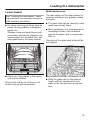
Place very large plates in the centre
of the lower basket.
When tilted, plates up to 35 cm in di‐
ameter can be accommodated.
MultiComfort zone
The rear section of the lower basket is
used for washing cups, glasses, plates
and pots.
The glass rack can be raised to make
more room for tall items.
Stem glassware, e.g. wine glasses or
champagne flutes, can be leaned
against the glass rack or suspended
from it.
You can set the glass rack at two differ‐
ent heights.
Slide the glass rack to the desired
height until the catches click into
place at the top and rest on the bot‐
tom.
33
Loading the dishwasher
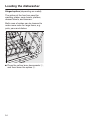
Hinged spikes (depending on model)
The spikes at the front are used for
washing plates, soup bowls, platters,
dessert bowls, and saucers.
Both rows of spikes can be lowered to
make more room for large items, e.g.
pots, pans and dishes.
Press the yellow lever downwards ,
and then lower the spikes .
34
Loading the dishwasher
Cutlery
3D cutlery tray (depending on model)
See "Loading the dishwasher / Load‐
ing examples" for examples of how to
load crockery and cutlery.
Arrange the cutlery in the tray as
shown.
To make unloading much easier, cutlery
should be grouped in zones, one for
knives, one for forks, one for spoons,
etc.
Spoon heads should be placed in con‐
tact with at least one of the serrated re‐
tainers on the base of the cutlery tray to
ensure that water runs off them freely.
If spoon handles do not fit between the
holders, then lay them the other way
round.
The upper spray arm must not be
blocked by items which are too big
(e.g. cake slices).
The side sections of the tray can be
moved into the middle to accommodate
tall items of crockery in the upper bas‐
ket.
You can use the yellow slide to adjust
the height of the middle section of the
cutlery tray to make more room for
large items of cutlery, such as serving
spoons and ladles.
35
Loading the dishwasher
Cutlery basket (depending on model)
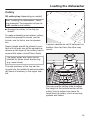
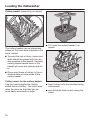
The cutlery basket can be placed any‐
where on the front rows of spikes in the
lower basket.
Fit it onto the cutlery basket if re‐
quired.
To avoid the risk of injury, knives and
forks should be placed with the han‐
dles upwards in the basket. However,
cutlery placed handle down in the
basket will come out cleaner and dri‐
er.
Place small items of cutlery in the in‐
dividual slots on three sides of the
cutlery basket.
Cutlery insert for the cutlery basket
Use the insert supplied for heavily
soiled items of cutlery. The insert sepa‐
rates the items so that they can be
more easily accessed by water.
36
Insert cutlery with the handles facing
downwards,
and distribute them evenly along the
insert.
Loading the dishwasher
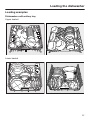
Loading examples
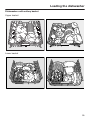
Dishwashers with cutlery tray
Upper basket
Lower basket
37
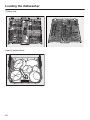
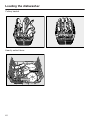
Loading the dishwasher
Cutlery tray
Heavily soiled items
38
Loading the dishwasher
Dishwashers with cutlery basket
Upper basket
Lower basket
39
Loading the dishwasher
Cutlery basket
Heavily soiled items
40
Operation
Detergent
Only use detergents formulated
for domestic dishwashers. Do not
use washing-up liquid.
Active ingredients
Modern detergents contain various ac‐
tive ingredients, the most important of
which are:
– Complexing agents to prevent calcifi‐
cation.
– Alkalis to aid removal of dried on soil‐
ing.
– Enzymes to break down starch and
loosen protein.
– Oxygen based bleaching agents to
remove coloured stains (e.g. tea, cof‐
fee, tomato sauce).
Most dishwasher detergents are mildly
alkaline and contain enzymes and oxy‐
gen based bleaching agents.
You can also buy combination products
(see "Programme options, Detergent‐
Agent", if applicable).
In addition to detergent, these products
contain rinse aid and salt substitutes.
They are available as "3 in 1" or when
they also contain other components
such as glass and stainless steel pro‐
tective additives and enhanced clean‐
ing power, as "5 in 1", "7 in 1", "All in 1"
etc.
Refer to the manufacturer's packaging
as to whether combination products are
suitable for the water hardness level in
your area.
Please note that the cleaning and dry‐
ing results of combination detergents
can vary greatly.
For optimum cleaning and drying re‐
sults, use Miele dishwasher detergent
and add Miele salt and Miele rinse aid
separately. See "Optional accesso‐
ries".
Types of detergent:
– Powder and liquid gel detergents.
These detergents allow you to adjust
the amount dispensed according to
the amount of load and level of soil‐
ing.
– Tab detergents. These are suitable
for most levels of soiling.
41
Operation
Detergent dosage
Follow the dosage recommended by
the manufacturer on the packaging.
Unless directed otherwise, use one
detergent tab or add 20 to 30 ml de‐
tergent to compartment II, depending
on the level of soiling. With very
heavy soiling you can also add a
small amount of detergent to com‐
partment l.
Tabs may not dissolve completely
when the Quick wash programme (if
available) is used.
Failure to dispense the recommen‐
ded amount of detergent may impair
cleaning results.
42
Dishwasher detergents can
cause burning in the nose, mouth
and throat if swallowed, or inhibit
breathing.
Avoid inhalation of powder deter‐
gents and do not ingest dishwasher
detergent. Seek medical attention
immediately if detergent has been
swallowed or inhaled.
Keep detergent out of the reach of
children at all times. Keep children
away from the dishwasher when the
door is open. There could still be de‐
tergent residues in the cabinet. Only
add detergent just before starting the
programme and close the door, acti‐
vating the safety lock (if your dish‐
washer is fitted with one).
Operation
Adding detergent
Press the opening catch on the de‐
tergent dispenser. The flap will spring
open.
The flap is always open at the end of a
programme.
Add the required amount of detergent
and close the flap.
Make sure that the detergent packag‐
ing is properly closed after use to
avoid it getting damp and clumping
together.
For information
Compartment I holds max. 10 ml,
Compartment II holds max. 50 ml of
detergent.
There are marks in compartment II to
assist with dispensing: 20, 30. The
marks indicate a level of approx. 20 or
30 ml when the door is open in a hori‐
zontal position.
43
Operation
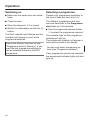
Switching on
Selecting a programme
Make sure the spray arms can rotate
freely.
Choose your programme according to
the type of load and how dirty it is.
Close the door.
The different programmes and their
uses are described in the Programme
chart later on in this booklet.
Open the stopcock, if it is closed.
Switch the dishwasher on with the
button.
The Start indicator light flashes and the
indicator light comes on next to the
programme selected.
Switch the Memory function on (see
"Programme options, Memory") if you
want the last programme selected to
remain selected instead of the ECO
programme.
44
Use the programme selector button
to select the programme required.
The indicator light for the programme
selected will light up.
The programme duration will appear in
hours and minutes in the display.
You can now select programme op‐
tions (see "Programme options").
If any programme options are selected,
the appropriate indicator lights will also
light up.
Operation
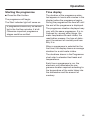
Starting the programme
Time display
Press the Start button.
The duration of the programme selec‐
ted appears in hours and minutes in the
display before the programme begins.
During the programme the time left until
the end of the programme is displayed.
The programme will begin.
The Start indicator light will come on.
A programme should only be cancel‐
led in the first few minutes, if at all.
Otherwise important programme
stages could be omitted.
The programme duration displayed may
vary with the same programme. It is in‐
fluenced by, among other things, the
water temperature at each intake, the
reactivation process, the type of deter‐
gent, the amount of crockery and how
dirty it is.
When a programme is selected for the
first time, the display shows an average
duration for a cold water intake.
The durations shown in the Programme
chart refer to standard test loads and
temperatures.
Each time a programme is run, the
electronic unit calculates the pro‐
gramme duration required according to
the temperature of the water taken into
the dishwasher and the amount of
crockery.
45
Operation
Energy management
At the end of a programme
To save energy, the dishwasher will
switch off automatically 10 minutes af‐
ter the last time a button has been
pressed or 10 minutes after the end of
the programme (see "Programme op‐
tions, Optimise standby").
The programme has finished when .
appears in the display and the door has
opened slightly (if applicable).
Press the button to switch the
dishwasher back on.
The dishwasher will not switch off
whilst a programme is running, during
the Delay start period or if there is a
fault.
46
The drying fan may continue to run for
a few minutes at the end of the pro‐
gramme.
Open the door completely to re-en‐
gage the door closing mechanism.
You can now empty the dishwasher.
If you have deactivated the auto‐
matic door opening function (see
"Programme options, AutoOpen"),
and would like to open the door as
soon as the programme has finished
make sure that you open the door
fully.
Otherwise steam from the dishwash‐
er could damage the edge of the
worktop because the fan is no longer
running.
Operation
Switching off
Unloading the dishwasher
At the end of a programme:
Dishes tend to break and chip more
easily when they are hot. Allow the
dishes to cool until they are comforta‐
ble enough to handle before unloading
them.
The dishwasher can be switched off
at any time using the button.
Switching the dishwasher off during a
programme stops the programme.
Switching the dishwasher off during the
run-up to a delay start time (FlexiTimer)
will also stop the process.
If the dishwasher is not going to be
used for a longer period of time, e.g.
whilst on holiday, the stopcock
should be closed.
If you open the door fully after switch‐
ing off, the dishes will cool much faster.
First unload the lower basket, then the
upper basket and finally the cutlery tray
(depending on model).
This will prevent water drops from the
upper basket and cutlery tray from fall‐
ing onto the dishes in the lower basket.
47
Operation
Interrupting a programme
A programme is interrupted as soon as
the door is opened.
If the door is closed again, the pro‐
gramme will continue from the point it
was at before the door was opened.
Water in the dishwasher may be
hot. Danger of scalding.
Only open the door if absolutely nec‐
essary and exercise extreme caution
when doing so. Before closing the
door again, leave it ajar for approx.
20 seconds. This will enable the tem‐
perature in the wash cabinet to set‐
tle. Then raise the door up and push
until the catch engages.
48
Changing a programme
If the detergent dispenser flap has
already opened, do not change the
programme.
If a programme has already started and
you wish to change it, proceed as fol‐
lows:
Switch the dishwasher off with the
button.
Switch the dishwasher on again with
the button.
Select the programme you want, and
then start it.
Programme options
Short
DetergentAgent
The Short option reduces the dura‐
tion of programmes in which this option
is available.
For optimum cleaning results, the dish‐
washer automatically adjusts the pro‐
gramme sequence to the type of deter‐
gent being used. Depending on the
programme, this can mean that the run‐
ning time and energy consumption vary
slightly.
In order to achieve optimum cleaning
results consumption rates are increased
with this option.
When used in combination with the
Quick wash programme, the Short
option results in a wash programme
without drying or automatic opening of
the door (if available).
Switch the dishwasher on with the
button.
The Start indicator light will flash.
Select a programme.
Press the button.
The indicator will light up.
Now you can start a programme.
The option selected will remain active
for that particular programme until the
setting is changed.
49
Programme options
Refill reminders
Press the button 9 times.
If you only ever use combination prod‐
ucts in your dishwasher, you can switch
the refill reminders for salt and rinse aid
off if you wish. Doing so will not affect
the DetergentAgent function.
The indicator will flash rapidly 9
times at intervals.
Switch the dishwasher off with the
button, if it is switched on.
Press the Start button in and whilst
holding it in switch the dishwasher
on using the button
Keep the Start button pressed in for
at least four seconds until the Start
indicator light comes on.
If this does not happen, start the proce‐
dure from the beginning again.
50
The flashing sequence in the display in‐
dicates whether the refill reminders
have been activated or not.
– : Refill reminders activated
– : Refill reminders deactivated
Press the Start button to change the
setting.
The setting is now stored in memory.
Switch the dishwasher off with the
button.
If you switch to using detergent that
does not contain salt or rinse aid, it
is important to remember to add salt
and rinse aid and to switch the re‐
minders back on.
Programme options
Delay start
You can set the start time for a pro‐
gramme, e.g. to take advantage of night
time electricity tariffs. The start time
can be delayed between 30 minutes
and 24 hours.
The delay period is shown in 30 mi‐
nutes increments for a delay period be‐
tween 30 minutes and 9 hours 30 mi‐
nutes. It is shown in hours for periods
longer than this.
When using the Delay start function,
make sure that the detergent com‐
partment is dry before adding deter‐
gent. Wipe dry with a cloth if neces‐
sary. If the compartment is wet,
powder detergent can become lum‐
py and stick to the dispenser, with
the result that it is not fully dis‐
pensed.
Do not use liquid detergent when se‐
lecting Delay start, as it can run into
the dishwasher before it is required.
Switch the dishwasher on with the
button.
The Start indicator light will flash.
Select the programme you want.
Press the button.
The last Delay start time used will ap‐
pear in the display. The indicator
light will come on.
Set the required time using the
button.
If you keep the button pressed in,
the time will increase automatically up
to hours. To get back to . hours,
press the button twice.
Press the Start button.
The Start indicator light will come on.
To prevent children coming into
contact with dishwasher detergent:
Add the detergent immediately be‐
fore starting the programme, i.e. be‐
fore activating Delay start with the
Start button. Then lock the door with
the safety lock.
51
Programme options
If optimise standby is switched on
(see "Programme options, Optimise
standby") the display will go out after
a few minutes, leaving just the Start
indicator flashing slowly.
Starting a programme before the De‐
lay start period has elapsed:
Press any button to switch the display
back on again for a few minutes.
Switch the dishwasher off with the
button.
The time up until the programme starts
will show counting down in the display
in hours for durations above 10 hours,
and in minutes for durations below this.
Switch the dishwasher on again with
the button.
When the set time is reached, the pro‐
gramme selected will start automatical‐
ly. The time remaining will appear in the
display and the indicator light will go
out.
How the Delay start time is shown in
the display:
up to 59 minutes:
e.g. 30 minutes = .
1 hour up to 9 hours 30 minutes:
e.g. 5 hours = .
over 10 hours:
e.g. 15 hours =
52
A programme can be started before the
Delay start period has elapsed.
Proceed as follows:
Select the programme you want.
Press the Start button.
The programme will begin and the Start
indicator light will light up.
Programme options
Adjust Sensor wash
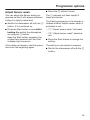
Press the button 5 times.
You can adjust the Sensor wash pro‐
gramme so that it will remove stubborn
soiling in a lightly soiled load.
The indicator will flash rapidly 5
times at intervals.
Switch the dishwasher off with the
button, if it is switched on.
Press the Start button in and whilst
holding it in switch the dishwasher
on using the button.
Keep the Start button pressed in for
at least four seconds until the Start
indicator light comes on.
If this does not happen, start the proce‐
dure from the beginning again.
The flashing sequence in the display in‐
dicates whether Adjust sensor wash is
activated or not.
– : "Adjust sensor wash" activated
– : "Adjust sensor wash" deactiva‐
ted
Press the Start button to change the
setting.
The setting is now stored in memory.
Switch the dishwasher off with the
button.
53
Programme options
Memory
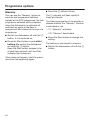
Press the button 6 times.
You can use the "Memory" option to
save the last programme selected.
Instead of the ECO programme, the last
programme selected will be selected
when the dishwasher is switched off
and back on again or the door is
opened and then closed at the end of a
programme.
The indicator will flash rapidly 6
times at intervals.
Switch the dishwasher off with the
button, if it is switched on.
Press the Start button in and whilst
holding it in switch the dishwasher
on using the button.
Keep the Start button pressed in for
at least four seconds until the Start
indicator light comes on.
If this does not happen, start the proce‐
dure from the beginning again.
54
The flashing sequence in the display in‐
dicates whether the "Memory" function
is activated or not.
– : "Memory" activated
– : "Memory" deactivated
Press the Start button to change the
setting.
The setting is now stored in memory.
Switch the dishwasher off with the
button.
Programme options
AutoOpen
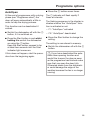
Press the button seven times.
At the end of programmes with a drying
phase (see "Programme chart") the
door will open automatically a little in
order to help the drying process.
The indicator will flash rapidly 7
times at intervals.
This function can be deactivated if
wished.
Switch the dishwasher off with the
button, if it is switched on.
Press the Start button in and whilst
holding it in switch the dishwasher
on using the button.
Keep the Start button pressed in for
at least four seconds until the Start
indicator light comes on.
If this does not happen, start the proce‐
dure from the beginning again.
The flashing sequence in the display in‐
dicates whether the "AutoOpen" func‐
tion is activated or not.
– : "AutoOpen" activated
– : "AutoOpen" deactivated
Press the Start button to change the
setting.
The setting is now stored in memory.
Switch the dishwasher off with the
button.
If you have deactivated the auto‐
matic door opening function and
would like to open the door as soon
as the programme has finished make
sure that you open the door fully.
Otherwise steam from the dishwash‐
er could damage the edge of the
worktop because the fan is no longer
running.
55
Programme options
Optimise standby
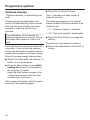
Press the button 8 times.
"Optimise standby" is activated by de‐
fault.
The indicator will flash rapidly 8
times at intervals.
To save energy the dishwasher will
switch off automatically a few minutes
after the last time a button has been
pressed or after the end of a pro‐
gramme.
The flashing sequence in the display
shows whether Optimise standby is ac‐
tivated or not.
The dishwasher will not switch off
whilst a programme is running, during
the Delay start period or if there is a
fault.
Optimise standby can be switched off if
you prefer. If you do this the duration
before the dishwasher switches off au‐
tomatically increases to 6 hours. Doing
this will increase energy consumption.
Switch the dishwasher off with the
button, if it is switched on.
Press the Start button in and whilst
holding it in switch the dishwasher
on using the button.
Keep the Start button pressed in for
at least four seconds until the Start
indicator light comes on.
If this does not happen, start the proce‐
dure from the beginning again.
56
– : "Optimise standby" activated
– : "Optimise standby" deactivated
Press the Start button to change the
setting.
The setting is now stored in memory.
Switch the dishwasher off with the
button.
Programme options
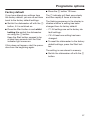
Factory default
Press the button 19 times.
If you have altered any settings from
the factory default, you can re-set them
back to the factory default settings.
The indicator will flash once slowly
and then rapidly 9 times at intervals.
Switch the dishwasher off with the
button, if it is switched on.
Press the Start button in and whilst
holding it in switch the dishwasher
on using the button.
Keep the Start button pressed in for
at least four seconds until the Start
indicator light comes on.
If this does not happen, start the proce‐
dure from the beginning again.
The flashing sequence in the display in‐
dicates whether a setting has been
changed from its factory default.
– : All settings are set to factory de‐
fault settings.
– : At least one setting has been
changed.
To reset the dishwasher to the factory
default settings, press the Start but‐
ton.
The setting is now stored in memory.
Switch the dishwasher off with the
button.
57
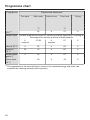
Programme chart
Programme
Programme sequence
Pre-wash
Main wash
Interim rinse
°C
52
ECO 1)
Sensor wash
Final rinse
Drying
°C
X
47
X
Variable programme sequence, sensor-controlled adjustment according to
the amount of crockery and level of food deposits
If
required
47-65
If
required
57
X
Normal 55 °C
X
55
X
60
X
Intensive
75 °C
2X
75
X
60
X
Sensor wash
gentle
X
44
X
57
X
40
X
45
X
Quick wash
40 °C
1)
This programme is the most efficient in terms of its combined energy and water con‐
sumption for cleaning normally soiled crockery.
58
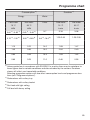
Programme chart
Consumption 2)
Energy
Duration 2)
Water
Cold water
Hot water
15 °C
kWh
0.84 3) / 0.83 4)
0.49 3) / 0.48 4)
0.70 5) -1.30 6)
Litres
Cold water
Hot water
55 °C
15 °C
55 °C
kWh
h:min
h:min
9.7
3:18
3:08
0.50 5) -0.85 6)
6.5 5) -16.0 6)
1:25-2:45
1:20-2:35
1.10
0.70
14.0
1:59
1:47
1.45
0.95
15.0
2:54
2:40
0.90
0.45
13.5
1:53
1:42
0.65
0.25
11.0
0:46
0:35
2)
Values quoted are in accordance with EN 50242. In practice there may be variations to
these figures due to variable conditions and data recorded by the sensors. Durations
shown will reflect your household conditions.
Selecting programme options will also affect consumption levels and programme dura‐
tions (see "Programme options").
3)
Dishwashers with cutlery tray
4)
Dishwashers with cutlery basket
5)
Part load with light soiling
6)
Full load with heavy soiling
59
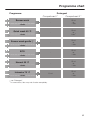
Programme chart
Crockery
Mixed,
everyday crockery
Food deposits
All normal food deposits
Action required
Variable, sensor-controlled
programme sequence
Shorter duration
This needs a short programme
Heat-sensitive glasses and
plastic
Fresh, easily removed food
deposits
Shorter duration
This needs a gentle
programme with glass care
Shorter duration
Mixed crockery
This needs a water and energy
saving programme
Normal food deposits which
have begun to dry on
Shorter duration
Average programme values
Shorter duration
Pots, pans, everyday porcelain
and cutlery
Burnt-on, stubborn, driedon food deposits containing
starch or protein 1)
Maximum cleaning power
Shorter duration
Food such as potatoes, pasta, rice or stews can leave starchy deposits. Deposits containing protein
can be left by food such as fried meat, fish or eggs and bakes.
1)
60
Programme chart
Programme
Detergent
Compartment I 2)
Compartment II 2)
Sensor wash
-
25 ml
or
1 tab
-
20 ml
or
1 tab 3)
-
20 ml
or
1 tab
-
25 ml
or
1 tab
-
25 ml
or
1 tab
10 ml
25 ml
or
1 tab
+short
Quick wash 40 °C
+short
Sensor wash gentle
+short
ECO
+short
Normal 55 °C
+short
Intensive 75 °C
+short
see "Detergent"
In some cases, tabs may not dissolve completely.
2)
3)
61
Cleaning and care
Check your dishwasher regularly (ap‐
prox. every 4 - 6 months). This way
faults and problems can be avoided.
The external surfaces of the
dishwasher are susceptible to
scratching.
Contact with unsuitable cleaning
agents can alter or discolour the ex‐
ternal surfaces.
Cleaning the wash cabinet
The wash cabinet is largely self-clean‐
ing, provided that the correct amount of
detergent is always used.
If, however, there are limescale or
grease deposits in the cabinet, these
can be removed with a special dish‐
washer cleaner (see "Optional accesso‐
ries"). Follow the instructions on the
packaging.
If you mainly use low temperature pro‐
grammes (below 50 °C), there is a risk
of bacteria and unpleasant odours
building up in the wash cabinet. To pre‐
vent this happening the dishwasher will
automatically increase the temperature
in the final rinse of the selected pro‐
gramme after several programmes us‐
ing low temperatures have been run.
Clean the filters in the wash cabinet
regularly.
62
Cleaning the door and the door
seal
Mould could build up on the door seal
and the sides of the dishwasher door
as these surfaces are outside the wash
cabinet and so not accessed and
cleaned by the spray arm jets.
Wipe the door seal regularly with a
damp cloth to remove food deposits.
Wipe off any food or drink residues
which may have dripped onto the
sides of dishwasher door before clos‐
ing it.
Cleaning and care
Cleaning the door front
Soiling that is left too long might
become impossible to remove and
could cause the external surfaces to
alter or discolour.
Remove any soiling immediately.
Clean the front with a clean sponge
and a solution of hot water and
washing-up liquid. After cleaning dry
with a soft cloth.
A clean, damp microfibre cloth with‐
out cleaning agent can also be used.
To avoid damaging the external sur‐
faces, do not use:
– cleaning agents containing soda,
ammonia, acids or chlorides,
– cleaning agents containing descaling
agents,
– abrasive cleaning agents, e.g. pow‐
der cleaners and cream cleaners,
– solvent-based cleaning agents,
– stainless steel cleaning agents,
– dishwasher cleaner,
– oven sprays,
– glass cleaning agents,
– hard, abrasive brushes or sponges,
e.g. pot scourers, brushes or spong‐
es which have been previously used
with abrasive cleaning agents,
– melamine eraser blocks,
– sharp metal scrapers.
– wire wool,
– steam cleaning appliances.
63
Cleaning and care
Checking the filters in the
wash cabinet
Cleaning the filters
Switch the dishwasher off.
The filter combination in the base of the
wash cabinet retains coarse soil from
the suds solution, preventing it access‐
ing the circulation system and re-enter‐
ing the cabinet through the spray arms.
This dishwasher must not be
used without all the filters in place.
Collection of coarse soil may cause the
filters to clog. The level of soiling and
time it takes before the filters need
cleaning will vary depending on use.
Check the condition of the filters reg‐
ularly and clean them if necessary.
Turn the handle anti-clockwise to re‐
lease the filter combination .
Lift the filter combination out of the
dishwasher . Remove any coarse
particles and rinse the filter well un‐
der running water.
Use a nylon brush if necessary.
Make sure that when cleaning
the filters, no coarse soil falls into the
circulation system, causing a block‐
age.
64
Cleaning and care
To clean the inside of the filter, the flap
must be opened:
Press catches together in the di‐
rection of the arrows as shown, and
open the filter .
Rinse all the filters under running wa‐
ter.
Then close the flap so that the catch
engages.
Replace the filter combination so that
it lies flat in the base of the wash
cabinet.
Then turn the handle clockwise to
lock the filter combination in place.
Take care when you are fitting
the filter combination that it is se‐
cured in position correctly.
Otherwise coarse soil could get into
the circulation system and cause a
blockage.
65
Cleaning and care
Cleaning the spray arms
Particles of food can get stuck in the
spray arm jets and bearings. The spray
arms should therefore be inspected and
cleaned regularly (approx. every 4 - 6
months).
Switch the dishwasher off.
Remove the spray arms as follows:
Take out the cutlery tray (if your dish‐
washer is fitted with one).
Push the top spray arm upwards to
engage the inner ratchet. Then un‐
screw the spray arm.
Push the middle spray arm upwards
to engage the ratchet. Then un‐
screw the spray arm .
Remove the lower basket.
Pull the lower spray arm firmly up‐
wards to remove it.
Use a pointed object to push food
particles into the spray arm jets.
Rinse thoroughly under running wa‐
ter.
Replace the spray arms and check
that they rotate freely.
66
Problem solving guide
Most minor faults in the performance of the appliance, some of which may result
from incorrect operation, can be put right without contacting the Service Depart‐
ment.
The following guide may help you to find the reason for a fault, and to correct it.
You should, however, note the following:
Unauthorised or incorrect repairs could cause personal injury or damage to
the appliance.
Repair work to electrical appliances should only be carried out by a suitably
qualified and trained person in strict accordance with current local and national
safety regulations. The manufacturer cannot be held liable for unauthorised
work.
Technical problems
Problem
Cause and remedy
The Start indicator does The appliance is not plugged in.
not flash after switching Insert the plug and switch on at the socket.
the dishwasher on with
The mains fuse has tripped.
the button.
Reset the trip switch in the mains fuse box or re‐
place the fuse in the plug (minimum fuse rating see data plate).
The dishwasher stops
during a programme.
The mains fuse has tripped.
Reset the trip switch in the mains fuse box or re‐
place the fuse in the plug (minimum fuse rating see data plate).
If the mains fuse trips again, call the Miele Service
Department.
The door locking pins
do not retract after the
door has opened auto‐
matically.
There is a fault with the door mechanism or the door
has not been correctly balanced.
Call Miele Service.
The AutoOpen function must be switched off be‐
fore the dishwasher is used again (see
"AutoOpen"). Danger of injury in the unlikely event
of another fault.
67
Problem solving guide
Problem
Cause and remedy
The Inlet/Drain and
Rinse aid indicators are
flashing at the same
time.
Fault number is
showing in the display.
There may be a technical fault.
Switch the dishwasher off with the button.
Switch the dishwasher back on after a few sec‐
onds.
Select the programme you want.
Press the Start button.
If the indicator lights flash again, there is a technical
fault.
Call the Miele Service Department.
Fault :
The drain pump is still
running, even with the
door open.
The Waterproof system has reacted.
Close the stopcock.
Call the Miele Service Department.
Fault :
A fault has occurred in the circulation pump.
Switch the dishwasher off for at least 30 seconds
with the button.
Switch the dishwasher back on.
If the fault message appears again, there is a techni‐
cal fault.
Call the Miele Service Department.
68
Problem solving guide
Water inlet fault
Problem
Cause and remedy
The Inlet/Drain indica‐
tor flashes on and off.
The stopcock is closed.
Open the stopcock fully.
The dishwasher stops
during a programme.
The Inlet/Drain indica‐
tor flashes.
Fault code or ap‐
pears in the display.
Before rectifying the problem:
Switch the dishwasher off with the button.
The water intake is restricted.
Open the stopcock fully and start the programme
again.
Clean the water inlet filter (see "Maintenance").
The water pressure at the intake is lower than 30
kPa (0.3 bar).
Seek professional advice.
69
Problem solving guide
Water drainage fault
Problem
Cause and remedy
The dishwasher stops
during a programme.
The Inlet/Drain indica‐
tor flashes.
Fault code shows in
the display.
Before rectifying the problem:
Switch the dishwasher off with the button.
70
The water outlet is restricted.
There might be water in the wash cabinet.
Clean the filter combination (see "Cleaning and
care, Cleaning the filters").
Clean the drain pump (see "Maintenance").
Clean the non-return valve (see "Maintenance").
Remove any kink or loop in the drain hose.
Problem solving guide
General problems
Problem
Cause and remedy
The indicator lights and The display has switched off automatically to save
display are dark.
energy.
Switch the dishwasher on again with the but‐
ton.
Detergent residue is left The dispenser was still damp when detergent was
in the dispenser at the
added.
end of a programme.
Make sure the dispenser is dry before adding de‐
tergent.
The detergent dispens‐
er lid cannot be closed
properly.
Clogged detergent residue is blocking the catch.
Clean the detergent from the catch.
At the end of a pro‐
This is caused by the drying system and does not in‐
gramme there is a film
dicate a fault. The moisture will dissipate after a
of moisture on the in‐
while.
side of the door and the
interior walls.
Water remains in the
Before rectifying the problem:
wash cabinet at the end Switch the dishwasher off with the button.
of a programme.
The filter combination in the wash cabinet is clogged.
Clean the filter combination (see "Cleaning and
care, Cleaning the filters").
The drain pump or non-return valve may be blocked.
Clean the drain pump or the non-return valve (see
"Maintenance").
The drain hose is kinked.
Remove any kink from the drain hose.
71
Problem solving guide
Noises
Problem
Cause and remedy
Knocking noise in the
wash cabinet.
A spray arm is knocking against an item in a basket.
Interrupt the programme, and rearrange the items
which are obstructing the spray arm.
Rattling noise in the
wash cabinet.
Items of crockery are insecure in the wash cabinet.
Interrupt the programme, and rearrange the items
of crockery.
A foreign object (e.g. a cherry stone) has become
lodged in the drain pump.
Remove the foreign object from the drain pump
(see "Maintenance, Cleaning the drain pump and
non-return valve").
Knocking noise in the
water pipes.
72
This may be caused by the on-site installation or the
cross-section of the piping.
This has no influence on dishwasher function. If in
doubt, contact a suitably qualified plumber.
Problem solving guide
Unsatisfactory washing result
Problem
Cause and remedy
The dishes are not
clean.
The dishes were not loaded correctly.
See notes in "Loading the dishwasher".
The programme was not powerful enough.
Select a more powerful programme (see "Pro‐
gramme chart").
There is some stubborn soiling although most of the
crockery is only lightly soiled (e.g. with tea stains).
Select the "Adjust sensor wash" programme op‐
tion (see "Programme options").
Not enough detergent was dispensed.
Use more detergent, or change your detergent.
Items are blocking the path of the spray arms.
Rearrange the items so that the spray arms can
rotate freely.
The filter combination in the base of the wash cabinet
is not clean or is not correctly fitted.
This may cause the spray arm jets to get blocked.
Clean and/or fit the filter combination correctly.
Clean the spray arm jets, if necessary (see "Clean‐
ing and care, Cleaning the spray arms").
The non-return valve is open and blocked. Dirty water
has flowed back into the wash cabinet.
Clean the drain pump and the non-return valve
(see "Maintenance, Cleaning the drain pump and
non-return valve").
Smearing appears on
The rinse aid dosage is set too high.
glassware and cutlery. Reduce the dosage. See "Before using for the first
There is a bluish sheen
time - Rinse aid".
on the surface of glass‐
ware; film can be wiped
off.
73
Problem solving guide
Problem
Cause and remedy
Crockery is not dry or
cutlery and glasses are
flecked.
The rinse aid dosage is set too low or the rinse aid
reservoir is empty.
Replenish the reservoir, increase the dosage or
change the brand of rinse aid (see "Before using
for the first time, Rinse aid").
Crockery was taken out of the cabinet too soon.
Leave it in for longer (see "Operation").
Combination products have been used which have
impaired drying performance.
Change your detergent, or replenish the rinse aid
(see "Before using for the first time, Rinse aid").
Glassware has a brown
or blue tinge, and film
cannot be wiped off.
This may be caused by the detergent.
Change your detergent.
Glassware is dull and
The glassware is not dishwasher-proof. The surfaces
discoloured; film cannot are affected.
be wiped off.
There is no remedy.
Purchase glassware which is dishwasher-proof.
Tea or lipstick stains
have not been com‐
pletely removed.
The wash temperature of the selected programme
was too low.
Select a programme with a higher wash tempera‐
ture.
The bleaching effect of the detergent used is too low.
Change your detergent.
Plastic items are discol‐ Natural dyes e.g. from carrots, tomatoes or ketchup
oured.
may be the cause. The amount of detergent used or
its bleaching effect was not sufficient to deal with
natural dyes.
Use more detergent (see "Operation, Detergent").
Discolouration is irreversible.
74
Problem solving guide
Problem
Cause and remedy
White residue is visible The rinse aid dosage is set too low.
on crockery and cut‐
Increase the dosage. See "Before using for the
lery, clouding occurs on
first time - Rinse aid".
glassware; film can be
There is no salt in the salt reservoir.
wiped off.
Fill the salt reservoir (see "Before using for the first
time, Dishwasher salt").
The salt reservoir cap has not been screwed on cor‐
rectly.
Replace it, making sure that it screws back on
correctly.
An unsuitable combination product has been used.
Change your detergent. Use a standard liquid,
tablet or powder detergent, and fill the salt and
rinse aid reservoirs in the dishwasher.
The water softener is programmed to too low a water
hardness level.
Programme the water softener for harder water
(see "Before using for the first time, Water soften‐
er").
There are rust stains on The affected items are not corrosion resistant.
cutlery.
There is no remedy.
Purchase cutlery which is dishwasher-proof.
A programme was not run after dishwasher salt was
added. Traces of salt have got into the wash cycle.
Always run the Quick wash programme with the
Short programme option selected and without any
crockery in the dishwasher after adding dishwash‐
er salt.
The salt reservoir cap has not been screwed on cor‐
rectly.
Replace it, making sure that it screws back on
correctly.
75
Maintenance
Cleaning the water inlet filter
A filter is incorporated in the screw con‐
nection of the valve on the water inlet
hose. The filter must be cleaned when
dirty, otherwise insufficient water flows
into the wash cabinet.
The plastic housing of the water
connection contains an electrical
component.
The housing must not be dipped in
water.
Recommendation
If the mains water contains a large
number of insoluble substances, we
recommend fitting a large-area filter in
the connection between the stopcock
and the water inlet hose threaded un‐
ion.
This filter is available from Miele.
Cleaning the filter:
Disconnect the dishwasher from the
mains supply.
Switch off at the mains socket and
withdraw the plug.
Close the stopcock.
Unscrew the inlet hose.
76
Carefully remove the seal.
Withdraw the filter using pointed pli‐
ers and rinse clean under running
water.
Replace the filter and seal, making
sure they are sitting correctly.
Reconnect the inlet hose to the stop‐
cock, making sure it goes on correct‐
ly and is not cross-threaded.
Open the stopcock.
If water leaks out, the inlet hose may
not be connected securely or it may
have been screwed on at an angle.
Unscrew and reconnect the water in‐
let valve correctly.
Maintenance
Cleaning the drain pump and
non-return valve
If the water has not been pumped away
at the end of a programme the drain
pump or the non-return valve might be
blocked. They are, however, easy to
clean.
Disconnect the dishwasher from the
mains supply. Switch off at the mains
socket and withdraw the plug.
Take the filter combination out of the
wash cabinet (see "Cleaning and
care", "Cleaning the filters").
Scoop the water out of the cabinet
using a suitable container or utensil.
The drain pump is situated under the
non-return valve (see arrow).
Remove all foreign objects from the
drain pump carefully (watch out for
glass splinters which are particularly
difficult to detect). Turn the drain
pump impeller by hand to check that
there are no more obstructions. You
will feel a little resistance when you
turn the impeller.
Carefully replace the non-return
valve.
Ensure that the catch engages
correctly.
Press the catch for the non-return
valve inwards .
Lift out the non-return valve and
rinse well under running water.
Be very careful not to damage
sensitive components when cleaning
the drain pump and the non-return
valve.
Remove all foreign objects from the
non-return valve.
77
After sales service
Repairs
Note for test institutes
In the event of any faults which you
cannot remedy yourself, please con‐
tact:
All information required regarding com‐
parison testing and measuring noise
levels is given in the "Comparison
tests".
The latest version of this leaflet can be
ordered by email from:
– your Miele Dealer, or
– the Miele Service Department
Contact details for Miele are given at
the back of this manual. N.B. A callout charge will be applied to service
visits where the problem could have
been resolved as described in these
instructions.
When contacting the Service Depart‐
ment or your Dealer, please quote the
model and serial number of your dish‐
washer, both of which are shown on the
data plate on the right hand side of the
door.
Guarantee: U.K.
In the U.K, the appliance is guaranteed
for 2 years from the date of purchase.
However, you must activate your cover
by calling 0330 160 6640 or registering
online at www.miele.co.uk.
Guarantee: Other countries
For information on the appliance guar‐
antee specific to your country please
contact Miele. See end of this booklet
for contact details.
78
– [email protected]
Please quote your postal address, as
well as the model and serial number of
your dishwasher (see data plate).
Optional accessories
Dishwasher detergent and rinse aid as
well as cleaning and care products are
available as optional accessories.
All the products are designed for use
with Miele dishwashers.
These and many other useful products
can be ordered via the internet at
www.miele-shop.com or from Miele
(see end of this booklet for contact de‐
tails).
Detergent tabs
– sparkling results even with stubborn
food deposits
– combination product with other com‐
ponents such as rinse aid, salt and
glass protection additives
– phosphate free - helps protect the
environment
– water-soluble wrapping - no need to
unwrap
Powder detergent
Dishwasher detergent, rinse
aid and salt
When you decided to buy a Miele dish‐
washer you chose excellent quality and
performance. However, ensuring that
your dishwasher always delivers the
best possible results will also depend
on your choice of dishwasher deter‐
gent, rinse aid and salt, as cleaning re‐
sults can vary depending on the brand
used.
With Miele CareCollection products,
you can be sure of optimum results as
these products have been specially de‐
signed for Miele dishwashers.
– with active oxygen for thorough
cleaning
– with enzymes which are effective
even in low temperature programmes
– with glass protection against corro‐
sion
Rinse aid
– for gleaming glasses
– helps crockery to dry
– with glass protection against corro‐
sion
– specially designed cap for precise,
easy dispensing
Dishwasher salt
– prevents limescale on crockery and
in the appliance
– extra coarse-grained
79
Optional accessories
Dishwasher care products
Accessories
Miele cleaning and care products pro‐
vide optimum care for your dishwasher.
Some accessories may be supplied as
standard, depending on model.
Dishwasher cleaner
Cappuccinatore insert
– cleans the dishwasher effectively and
thoroughly
The Cappuccinatore insert can be used
for cleaning the individual parts of the
Miele Cappuccinatore in the dishwash‐
er.
– removes grease, bacteria and un‐
pleasant odours
– ensures excellent dishwashing re‐
sults
Dishwasher descaler
– removes heavy limescale deposits
– mild and gentle with natural citric
acid
Dishwasher conditioner
– removes odours, limescale and light
deposits
– maintains the elasticity and leak
tightness of the seals
Dishwasher freshener
– neutralises unpleasant odours
– fresh, pleasant lime and green tea
scent
– easy to attach to the dishwasher
basket
– very economical, lasts for 60 wash
cycles
80
Cutlery basket
The cutlery basket is placed in the low‐
er basket and can be used to wash ad‐
ditional items of cutlery.
Glass rail
This rail is designed to hold glasses
with stems securely in the lower basket.
Electrical connection
Electrical connection U.K.
All electrical work must be car‐
ried out by a suitably qualified and
competent person, in accordance
with current local and national safety
regulations (BS 7671 in the UK).
Ensure power is not supplied to the ap‐
pliance until after installation work has
been carried out.
The appliance is supplied with a mains
cable with moulded plug ready for con‐
nection to a 230-240V mains supply.
Please ensure the connection data quo‐
ted on the data plate match the house‐
hold mains supply.
Connection should be made via a suita‐
ble switched socket which is easily ac‐
cessible after installation.
For extra safety it is advisable to protect
the appliance with a suitable residual
current device (RCD). Contact a quali‐
fied electrician for advice.
Do not connect via an extension lead.
Extension leads do not guarantee the
required safety of the appliance (e.g.
danger of overheating).
This appliance must not be used with
so-called energy saving devices. These
reduce the energy supply to the appli‐
ance which could then become too
warm. Using such devices could alter
the specification of the product
Non-rewireable plugs BS 1363
The fuse cover must be refitted when
changing the fuse, and if the fuse cover
is lost, the plug must not be used until
a suitable replacement is obtained. The
colour of the correct replacement cover
is that of the coloured insert in the base
of the plug, or the colour that is em‐
bossed in words on the base of the
plug (as applicable to the design of
plug fitted).
Replacement fuses should be ASTA ap‐
proved to BS 1362 and have the cor‐
rect rating. Replacement fuses and fuse
covers may be purchased from your lo‐
cal electrical supplier.
THIS APPLIANCE MUST BE
EARTHED
This appliance must not be connected
to the inverter of an autonomous power
supply, e.g. a solar power system.
When switching the appliance on, a
surge in power could trigger the safety
cut-out mechanism.
81
Plumbing
The Miele waterproof anti-leak
system
As long as your dishwasher has been
installed correctly, the Miele waterproof
anti-leak system will protect you from
water damage.
Connection to the water sup‐
ply
Water in the dishwasher must
not be used as drinking water.
– The dishwasher may be connected to
a cold or hot water supply, max.
60 °C.
We would only recommend connec‐
tion to a hot water supply if it is eco‐
nomical, e.g. a solar powered supply.
When connected to a hot water sup‐
ply all programme stages which
would otherwise be carried out with
cold water will be carried out with hot
water.
– The inlet hose is approx. 1.5 m long.
A 1.5 m long flexible metal extension
hose, pressure tested to 14000
kPa/140 bar) is available as an op‐
tional accessory, if required.
– A stopcock with a 3/4" male thread
must be provided on site.
– This appliance is constructed to
comply with IEC/EN/DIN 61770 //
VDE 0700 Section 600, and may be
connected to a suitable supply with‐
out an extra non-return valve if na‐
tional regulations permit.
82
– The flow pressure at the water intake
must lie between 30 and 1000 kPa
(0.3 and 10 bar). If it is higher than
this a pressure reducing valve must
be fitted.
After connecting the dishwasher to
the water supply, check that all
plumbing connections are watertight.
To avoid any damage to the ap‐
pliance, the dishwasher must only be
connected to a fully vented plumbing
system.
The inlet hose must not be
shortened or damaged in any way as
it contains electrical components
(see illustration).
Plumbing
Drainage
Venting the drainage system
– The appliance drainage system is fit‐
ted with a non-return valve, which
prevents dirty water from flowing
back into the dishwasher via the
drain hose.
If the on-site drain connection is situ‐
ated lower than the guide path for the
bottom basket rollers in the open door,
the drainage system must be vented.
Otherwise a siphoning effect during a
programme can cause the appliance to
empty itself of water.
– The dishwasher is supplied with ap‐
prox. 1.5 m of flexible drain hose with
an internal diameter of 22 mm.
– The drain hose can be extended us‐
ing a connection piece to attach a
further length of hose. The drainage
length must not be longer than 4 m,
and the delivery head must not ex‐
ceed 1 m.
To vent it: Open the dishwasher door
fully.
– If the hose is to be directly fitted to
the drainage outlet on site, use the
hose clip supplied (see installation
plan).
– The hose can be directed to the left
or the right of the appliance.
– The on-site connector for the drain
hose can be adapted to different
widths of hose. If the connector pro‐
trudes too far into the drain hose, it
will need to be shortened. Otherwise
the drain hose may become blocked.
Pull the lower spray arm firmly up‐
wards to remove it.
Cut off the top of the vent valve in the
wash cabinet.
– The drain hose must not be short‐
ened.
Make sure that there are no
kinks in the hose, and that it is not
squashed or stretched.
After connecting the dishwasher to
the drainage system, check that all
plumbing connections are watertight.
83
Technical data
Dishwasher model
Standard
XXL
Height freestanding model
84.5 cm
(adjustable + 3.5 cm)
-
Height built-in model
80.5 cm
(adjustable + 6.5 cm)
84.5 cm
(adjustable + 6.5 cm)
Height of building-in recess
Min. 80.5 cm (+ 6.5
cm)
Min. 84.5 cm (+ 6.5
cm)
Width
59.8 cm
59.8 cm
Width of building-in recess
60 cm
60 cm
Depth freestanding model
60 cm
-
Depth built-in model
57 cm
57 cm
Weight
max. 64 kg
max. 56 kg
Voltage
See data plate
Connected load
See data plate
Fuse rating
See data plate
Power consumption when
switched off
0.10 W
0.10 W
Power consumption when not
switched off
2.00 W
2.00 W
Test certificates awarded
See data plate
Water pressure (flow rate)
30 - 1000 kPa
(0.3 - 10 bar)
30 - 1000 kPa
(0.3 - 10 bar)
Hot water connection
Up to max. 60 °C
Up to max. 60 °C
Delivery head
Max. 1 m
Max. 1 m
Drainage length
Max. 4 m
Max. 4 m
Mains cable
Approx. 1.8 m
Approx. 1.8 m
Capacity
13/14 place settings*
13/14 place settings*
* depending on model
84
United Kingdom
Miele Co. Ltd.
Fairacres, Marcham Road
Abingdon, Oxon, OX14 1TW
Customer Contact Centre Tel: 0330 160 6600
E-mail: [email protected]
Internet: www.miele.co.uk
Australia
Miele Australia Pty. Ltd.
ABN 96 005 635 398
1 Gilbert Park Drive, Knoxfield, VIC 3180
Tel: 1300 464 353, Fax: (03) 9764 7149
Internet: www.miele.com.au
China
Miele (Shanghai) Trading Ltd.
1-3 Floor, No. 82 Shi Men Yi Road
Jing' an District
200040 Shanghai, PRC
Tel: +86 21 6157 3500, Fax: +86 21 6157 3511
E-mail: [email protected], Internet: www.miele.cn
Miele (Hong Kong) Limited
41/F - 4101, Manhattan Place
23 Wang Tai Road
Kowloon Bay, Hong Kong
Tel: (852) 2610 1331, Fax: (852)2610 1013
Email: [email protected]
India
Miele India Pvt. Ltd.
Ground Floor, Copia Corporate Suites
Plot No. 9, Jasola
New Delhi - 110025
Tel: 011-46 900 000, Fax: 011-46 900 001
E-mail: [email protected], Internet: www.miele.in
Ireland
Miele Ireland Ltd.
2024 Bianconi Avenue
Citywest Business Campus, Dublin 24
Tel: (01) 461 07 10, Fax: (01) 461 07 97
E-Mail: [email protected], Internet: www.miele.ie
Manufacturer: Miele & Cie. KG
Carl-Miele-Straße 29, 33332 Gütersloh, Germany
85
Malaysia
Miele Sdn Bhd
Suite 12-2, Level 12
Menara Sapura Kencana Petroleum
Solaris Dutamas No. 1, Jalan Dutamas 1
50480 Kuala Lumpur, Malaysia
Phone: +603-6209-0288
Fax: +603-6205-3768
New Zealand
Miele New Zealand Limited
8 College Hill
Freemans Bay, Auckland 1011, NZ
Tel: 0800 464 353, Fax: +64 9378 0146
Internet: www.miele.co.nz
Singapore
Miele Pte. Ltd.
163 Penang Road
# 04 - 03 Winsland House II
Singapore 238463
Tel: +65 6735 1191, Fax: +65 6735 1161
E-Mail: [email protected]
Internet: www.miele.sg
South Africa
Miele (Pty) Ltd
63 Peter Place, Bryanston 2194
P.O. Box 69434, Bryanston 2021
Tel: (011) 875 9000, Fax: (011) 875 9035
E-mail: [email protected]
Internet: www.miele.co.za
United Arab Emirates
Miele Appliances Ltd.
P.O. Box 11 47 82
Gold & Diamond Park
Sheikh Zayed Road
Building 6 / Offices Nos. 6-214 to 6-220
Dubai
Tel: +971-4-341 84 44
Fax: +971-4-341 88 52
E-Mail: [email protected]
Internet: www.miele.ae
G 6200 / G 6205
en-GB
M.-Nr. 09 953 510 / 01