1
Users Guide & Installation
Handbook
Belling
Electric Range
Our Warranty
Should you need it . . . .
Inside the paperwork which has come with this appliance,
there is a leaflet and card explaining the terms of our
extended warranty and guarantee.
In order to apply for a one year guarantee, simply fill in the
details on the card and post it off, this will register your
appliance.
Should you wish to take out extended warranty, please fill
in the details on the leaflet and post this off.
Alternatively, you can register, and apply for extended warranty on line at:
www.belling.co.uk/contact/warranty.
If your appliance is covered by the warranty and guarantee, you will not be billed for work undertaken should your
appliance be faulty, terms and conditions do apply, so
please read through the literature carefully.
Our Customer Care Centre can be called on:
0844 815 3746
We aim to answer calls as quickly as possible, and in strict
rotation as soon as one of our Customer Care team
becomes free.
Please ensure that you have available your appliances
model number and serial number, there is a space at the
back of this book for recording that information.
Alternatively visit the web site.
Outside the UK and Northern Ireland, please contact your
local supplier.
Contents
User’s Section . . . . . . . . . . . . . . . . . . . . . . . . . . . . . . . . . . . . . . . . . . . . . . . . . . . . . .
Before Using Your Cooker. . . . . . . . . . . . . . . . . . . . . . . . . . . . . . . . . . . . . . . . . . . . . .
About Your Cooker. . . . . . . . . . . . . . . . . . . . . . . . . . . . . . . . . . . . . . . . . . . . . . . . . . .
Hob & Cooker Safety . . . . . . . . . . . . . . . . . . . . . . . . . . . . . . . . . . . . . . . . . . . . . . . . .
Chip Pan Fires . . . . . . . . . . . . . . . . . . . . . . . . . . . . . . . . . . . . . . . . . . . . . . . . . . . . . .
Using The Clock / Programmer . . . . . . . . . . . . . . . . . . . . . . . . . . . . . . . . . . . . . . . . . .
Using Your Ceramic Hob. . . . . . . . . . . . . . . . . . . . . . . . . . . . . . . . . . . . . . . . . . . . . ..
Using Your Grill . . . . . . . . . . . . . . . . . . . . . . . . . . . . . . . . . . . . . . . . . . . . . . . . . . . .
Grilling Guide. . . . . . . . . . . . . . . . . . . . . . . . . . . . . . . . . . . . . . . . . . . . . . . . . . . . . .
Using Your Main Oven(s) . . . . . . . . . . . . . . . . . . . . . . . . . . . . . . . . . . . . . . . . . . . . .
Oven & Grill Functions . . . . . . . . . . . . . . . . . . . . . . . . . . . . . . . . . . . . . . . . . . . . . . .
Fanned Oven Guide . . . . . . . . . . . . . . . . . . . . . . . . . . . . . . . . . . . . . . . . . . . . . . . . .
Cooking Guide . . . . . . . . . . . . . . . . . . . . . . . . . . . . . . . . . . . . . . . . . . . . . . . . . . . . .
Using Your Slow Cook Oven . . . . . . . . . . . . . . . . . . . . . . . . . . . . . . . . . . . . . . . . . . .
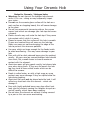
Cleaning Your Electric Hob . . . . . . . . . . . . . . . . . . . . . . . . . . . . . . . . . . . . . . . . . . . .
Cleaning Your Cavities . . . . . . . . . . . . . . . . . . . . . . . . . . . . . . . . . . . . . . . . . . . . . . .
Cleaning Your Appliance . . . . . . . . . . . . . . . . . . . . . . . . . . . . . . . . . . . . . . . . . . . . . .
Cook Shop. . . . . . . . . . . . . . . . . . . . . . . . . . . . . . . . . . . . . . . . . . . . . . . . . . . . . . . .
Trouble Shooting . . . . . . . . . . . . . . . . . . . . . . . . . . . . . . . . . . . . . . . . . . . . . . . . . . . .
Before You Call . . . . . . . . . . . . . . . . . . . . . . . . . . . . . . . . . . . . . . . . . . . . . . . . . . . . . .
Changing Light Bulbs . . . . . . . . . . . . . . . . . . . . . . . . . . . . . . . . . . . . . . . . . . . . . . . . . .
Installation Instructions . . . . . . . . . . . . . . . . . . . . . . . . . . . . . . . . . . . . . . . . . . . . . .
Technical Data . . . . . . . . . . . . . . . . . . . . . . . . . . . . . . . . . . . . . . . . . . . . . . . . . . . . . .
Customer Care . . . . . . . . . . . . . . . . . . . . . . . . . . . . . . . . . . . . . . . . . . . .. . . . . . . . . .
IMPORTANT NOTICE
Please note the cooling fan fitted to this appliance is an integral part of its safety and functionality.
When the appliance is installed care must be taken that the cooling fans performance is not
impeded by any objects coming into contact with it. (Installation pipes, leads etc)
Care must also be taken that there is sufficient air flow at the rear of the appliance for the
cooling fan to run at its optimum efficiency. (Particularly Built In appliances) See clearance
dimensions in the installation section of the booklet.
During use the Appliance must never be disconnected from the Mains supply as this will
seriously affect the safety and performance of the appliance, particularly in relation to surface temperatures becoming hot and gas operated parts not working efficiently.
The cooling fan is designed to run on after the control knob has been switched off to keep
the front of the appliance and the controls cool until the appliance has naturally cooled
itself.
Before Using Your Cooker
!
i
i
!
i
i
!
Before using this appliance please make sure that
you have removed all packaging and wrapping.
Some of the furniture inside this
appliance may have additional wrapping.
It is also advised that you turn the ovens and/or
grill on for a short while, this will burn off any
residues left from manufacturing. There may be a
smell which accompanies this process - but this is
nothing to worry about and is harmless.
We also recommend that you wash the oven
shelves, the baking tray, the grill pan, and the grill
pan trivet before their first use in hot soapy water,
this will remove the protective oil coating.
Although every care has been taken to ensure this
appliance has no burrs, or sharp edges, we
recommend that you wear protective gloves when
installing and moving this appliance.
This will prevent any injury.
Our policy is one of constant development and
improvement. Strict accuracy of illustrations and
specifications cannot be guaranteed. Modification
to design and material may be necessary
subsequent to publication.
Please bear in mind that not all the sections inside
this handbook are relevant to your appliance, but
you should read carefully the sections which are
relevant before installation and use. This will save
you time.
Always use a registered installer for this appliance.
Environmental protection:
Glen Dimplex Home Appliance brands are
committed to protecting the environment and
operates and Environmental Management System
which complies with BS EN ISO 14001.
All packaging with this appliance is recyclable.
Please recycle whenever possible - contact your
local authority for your nearest recycling centre.
Hob & Cooker Safety
Always ensure that pan bases are dry, and flat before
!
using them on the hob.
Always position pans over the centre of the element,
and turn the handles to a safe position so they cannot
be knocked or grabbed.
Always use pans which are no smaller than 100mm
(4”), or larger than 250mm (10”).
Always take care when removing food from the oven
as the area around the cavity may be hot.
Always use oven gloves when handling any utensils
which have been in the oven as they will be hot.
Always make sure that the oven shelves are resting in
the correct position in between two runners. Do not
place the oven shelves on top of the highest runner,
this will lead to spillage and injury if the baking tray, or
dish falls.
Never use double pans, rimbased pans, old or
misshapen pans, or any pan which is not stable on a
flat surface.
Never leave cooking fat, or oil, unattended.
Never use commercial simmering aids, or heat
diffusers, as they create excessive heat and can
damage the surface of the hob.
Never use the hob for any other purpose than cooking
food.
Plastic cooking utensils can melt if they come into
contact with a warm hob. Never leave them close to,
or on top of the hob.
Never leave the element alight without a pan covering
it. This causes a fire hazard.
Do not place items on the door while it is open.
Do not wrap foil around the oven shelves, or allow it to
block the flue.
Do not drape tea towels near the oven while it is on,
this will cause a fire hazard.
Do not pull heavy items, such as turkeys, or large
joints of meat, out from the oven on the shelf, as they
may overbalance and fall.
Do not use this appliance to heat anything other than
food items, and do not use it for heating the room.
i
if:
WARNING: Parts of
the appliance may
become hot while in
use, always make
sure that children
are supervised when
they are near to the
appliance.
Call Customer Care for
a service engineers visit
You find over a period of
time that the gas oven
becomes hotter at a
particular temperature - the
thermostat may need
replacing.
The cooling fan fails to
work.
Always use the Minute Minder
(if fitted) if you are leaving the
oven unattended, this reduces
the risk of food burning.
!
Warning (ceramic
glass): Never use the
hob if the ceramic
surface is cracked,
broken or shattered.
This creates a high risk
of injury. Switch off
the electric supply and
call for a service
engineer to come out.
!
Warning (ceramic
glass): Do not stare at
the halogen elements
(if fitted). This may
impair your vision!
Aluminium foil:
Do not leave foil on the hob
top, it reflects heat back into
the element which leads to
damage.
Slow cooking time?
Check the base of your pan.
Shiny pans can often reflect
heat back into the element
causing it to cycle on and off
more.
Chip Pan Fires
What causes a chip pan fire?
Chip pan fires start when oil of fat overheats and catches fire,
or when oil or fat spills on to the cooker because the pan has
been filled too high.
They can also start when wet chips are put into hot oil,
making it bubble up and overflow.
Preventing a chip pan fire
Never fill the pan more than a third full with oil or fat.
Never leave the pan alone with the heat on - even for a few
seconds.
Dry chips before putting them in the pan.
Never put chips in the pan if the oil has started smoking.
Turn off the heat and leave the oil to cool down, or else it
could catch fire.
In the event of a chip pan fire
If your chip pan does catch fire - don’t panic, and don’t move
the pan. Serious burns are often caused by picking up the
pan and running outside with it.
If it is safe to do so, and you don’t have to reach across the
pan, turn off the heat.
Never throw water, or use a fire extinguisher.
If you can, drape a damp cloth or towel over the pan to
smother the flames.
Leave the pan to cool down for at least half an hour.
If you can’t control the fire yourself, close the door, get out
and tell everybody else to get out.
Call the fire brigade. Don’t go back inside whatever the
reason.
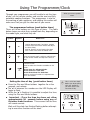
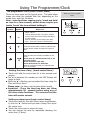
Using The Programmer/Clock
Through your programmer you will be able to set the time
of day, set the minute minder, and use the semi and fully
automatic cooking functions. The programmer is vital to
the working of your appliance, and reading this section will
make sure that you get the most out of your ovens.
What your timer symbols
mean.
Automatic
symbol
A
The programmer buttons (push button timer)
There are three buttons on this type of timer. The table
below shows you what their symbols look like, depending on
the model type, and what they do.
Symbol
Symbol
-
+
Down / Minus
Cook Pot
Minute Minder
symbol
What is it?
Used to decrease cook / end time, remove
minutes from the minute minder and adjust
the time of day.
Also for listening to and setting the alarm
tone. There are 3 tones to choose from.
Up / Plus
Used to increase cook / end time, add minutes
to the minute minder and adjust the time of
day.
Function button
Used to select the functions available on this
timer.
Press once for: Minute Minder.
Press twice for: Cook time
Press three times for: End time.
How to use these functions is explained later
on in this section.
Setting the time of day (push button timer)
Press the Plus and Minus buttons together for a few
seconds, and release.
The ‘’ in between the numbers on the LED Display will
begin to flash.
While the ‘’ is flashing it is possible to adjust the time
using the Plus and Minus buttons.
Important - Once the time has been set, allow
approximately 30 seconds before using any of
the other timer functions. This ensures that the time
will remain correct.
Wait until the clock has finished flashing before attempting to use other functions of the clock
This is a 24 hour clock.
Before you do anything
with your appliance you must set the correct time of day.
i
A
Using The Programmer/Clock
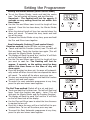
Setting an alarm tone (Push button timer)
Press and hold the minus button.
Once the minus button is released, the tone is selected.
You can change tone by repeatedly pressing the minus
button (3 tones)
Setting the minute minder (push button timer)
To set the Minute Minder, press the centre button once.
The bell symbol will appear and start flashing.
The flashing will last for approx. 5 seconds so the
time must be set within this time frame.
Use the Plus and Minus button to set the length of time
required. Once this has been done, the Minute Minder
is set.
When the desired length of time has counted down the
alarm will sound. To cancel the tone, press any of the
buttons.
To cancel the Minute Minder at any time, press the Plus
and Minus buttons together.
Semi Automatic Cooking (Push button timer)
Duration method (switch off after set time period)
Press the Function (centre) button twice (This will skip
past the Minute Minder function).
The display will flash the word ‘dur’, and the ‘A’ will flash
on the left hand side of the display.
Use the Plus and Minus buttons to set the length of time
you want to cook for. The flashing will last for
approx. 5 seconds, so the setting must be done
within this time frame or the time of day will
show again.
Once the duration has been set, the oven will automatically switch off.When the set time has elapsed the alarm
will sound. To switch off the alarm, press any button.
To view any remaining time press the function (centre)
button twice.
To cancel the semi automatic programme at any time,
press the plus and minus buttons together.
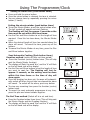
The End Time method (Switch off at a set end time)
Press the Function button three times (This will skip past
the Minute Minder and the Duration function)
The display will flash the word ‘End’ and the ‘A’ will flash
on the left hand side of the display.
A
A
A
A
Using The Programmer/Clock
Use the Plus and Minus buttons to select the time the
oven is required to turn off.
Once this is done the oven will turn itself off at the preselected time. To turn off the alarm press any button.
To cancel the Semi Automatic programme at any time,
press the plus and minus buttons together.
A
A
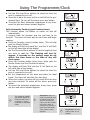
Fully Automatic Cooking (push button timer)
This function allows the cooker to switch on and off
automatically
It requires both the duration and the end time to be
entered. The timer will work out the start time and begin
cooking.
Press the Function (centre) button twice, (This will skip
past the Minute Minder).
The display will flash the word ‘dur’, and the ‘A’ will flash
on the left hand side of the display.
Use the Plus and Minus buttons to set the length of time
you want to cook for. The flashing will last for
approx. 5 seconds so the setting must be set
within this time frame or the time of day will
show again.
Press the Function button three times (skips past the
Minute Minder and the Duration functions)
The display will flash ‘End’ and the ‘A’ will flash on the
left hand side of the display.
Use the Plus and Minus buttons to select the time the
oven is required to turn off.
Set the temperature of the oven and place the food
inside. The timer will calculate the start time.
When this is done, the oven will turn itself off at the time
you have selected. To switch off the alarm, press any
button.
To cancel the automatic programme at any time, press
the plus and minus buttons together.
i
The automatic cooking
symbol will appear to
show that the oven is
no longer in manual
mode but in automatic
mode.
i
Important: Once the
oven has switched itself
off please make sure
you turn to oven controls to the ‘off’ position
and set the oven to
manual by pressing the
Cook Time and Ready
Time buttons / icons
together.
A
A
A
A
A
A
i
Important: Remove
food as soon as it is
cooked.
Using The Programmer/Clock
The programmer Icons (touch control timer)
There are three icons on this type of timer. The table below
shows you what the symbols look like, depending on the
model type, and their functions.
Note - some functions require you to ‘touch and hold’
an icon for a few seconds, whilst others require you
just to ‘touch’ the icon without holding it.
Symbol
Symbol
-
+
Down / Minus
What is it?
Used to decrease cook / end time, remove
minutes from the minute minder and adjust
the time of day.
Also for listening to and setting the alarm
tone. There are 3 tones to choose from.
Up / Plus
Used to increase cook / end time, add minutes
to the minute minder and adjust the time of
day.
Function icon
Used to select the functions available on this
timer.
Press once for: Minute Minder and to set
the time of day.
Press twice for: Cook time
Press three times for: End time.
How to use these functions is explained later
on in this section.
Setting the time of day (touch control timer)
Touch and hold the centre icon for a few seconds and
release.
The ‘’ in between the numbers on the LED Display will
begin to flash.
While the ‘’ is flashing you can adjust the time using the
Plus and Minus icons.
Please note: the hours and minutes adjust quickly
Important - Once the time has been set, allow
approximately 30 seconds before using any of
the other timer functions. This ensures that the
time will remain correct.
Setting an alarm tone (touch control timer)
Touch and hold the Plus and Minus icons simultaneously until the ‘’ flashes and you hear a beep.Then press
the centre icon.
Touch the minus icon to select the tone.
You can change the tone by repeatedly touching the
minus icon (3 tones)
What your timer symbols
mean.
Automatic
symbol
Cook Pot
A
Minute Minder
symbol
Setting the Programmer
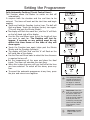
Setting the minute minder (touch control timer)
To set the Minute Minder, touch and hold the centre
icon. The bell symbol will appear and start flashing.
Important - The flashing will last for approx. 5
seconds so any setting must be set within this
time frame.
Use the Plus and Minus icons to set the length of time
required. Once this has been done, the Minute Minder
is set.
When the desired length of time has counted down the
alarm will sound. To cancel the tone, touch and hold
any of the icons.
To cancel the Minute Minder at any time, press and hold
the Plus and Minus icons together.
Semi Automatic Cooking (Touch control timer)
Duration method (switch off after set time period)
Touch and hold the Function (centre) icon. The bell will
flash and beep. Touch the function icon again (This will
skip past the Minute Minder function).
The display will flash the word ‘dur’, and the ‘A’ will flash
on the left hand side of the display.
Use the Plus and Minus icons to set the length of time
you want to cook for. The flashing will last for
approx. 5 seconds, so the setting must be done
within this time frame or the time of day will
show again.
Once the duration has been set, the oven will automatically switch off.When the set time has elapsed the alarm
will sound. To switch off the alarm, press any icon.
To view any remaining time touch and hold the function
(centre) icon and touch again.
To cancel the semi automatic programme at any time,
press the plus and minus icons together.
The End Time method (Switch off at a set end time)
Touch and hold the Function icon. The bell will flash and
beep. Touch the function icon again - twice (This will
skip past the Minute Minder and the Duration function)
The display will flash the word ‘End’ and the ‘A’ will flash
on the left hand side of the display.
Use the Plus and Minus icons to select the time the oven
is required to turn off.
Once this is done the oven will turn itself off at the preselected time. To turn off the alarm press any icon.
To cancel the Semi Automatic programme at any time,
press the plus and minus icons together.
A
A
A
A
A
A
Setting the Programmer
Fully Automatic Cooking (Touch Control timer)
This function allows the cooker to switch on and off
automatically
It requires both the duration and the end time to be
entered. The timer will work out the start time and begin
cooking.
Touch and hold the Function (centre) icon. The bell will
flash and beep. Touch the function (centre) icon again.
(This will skip past the Minute Minder).
The display will flash the word ‘dur’, and the ‘A’ will flash
on the left hand side of the display.
Use the Plus and Minus icons to set the length of time
you want to cook for. The flashing will last for
approx. 5 seconds so any setting must be set
within this time frame or the time of day will
show again.
Touch the Function icon again (skips past the Minute
Minder and the Duration functions)
The display will flash ‘End’ and the ‘A’ will flash on the
left hand side of the display.
Use the Plus and Minus icons to select the time the oven
is required to turn off.
Set the temperature of the oven and place the food
inside. The timer will calculate the start time.
When this is done the oven will turn itself off at the time
you have selected. To switch off the alarm, press any
icon.
To cancel the automatic programme at any time, press
the plus and minus icons together.
A
A
A
A
A
A
i
i
i
The automatic cooking
symbol will appear to
show that the oven is
no longer in manual
mode but in automatic
mode.
Important: Once the
oven has switched itself
off please make sure
you turn to oven controls to the ‘off’ position
and set the oven to
manual by pressing the
Cook Time and Ready
Time buttons / icons
together.
Important: Remove
food as soon as it is
cooked.
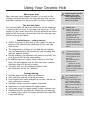
Using Your Ceramic Hob
About your hob
Your hob may have halogen element (s) as well as the
standard ceramic elements. In terms of care and use the
procedure remains the same as with the other elements.
The hot hob light
The hot hob light will come on when one of the hotplates
is switched on, or when it has begun to warm up. It will
remain on for a short time after the last element has been
switched off to serve as a reminder that the hob top may
still be warm to the touch.
Switching on - rotary control
Select the element you wish to use, place the pan on
and turn the control knob clockwise to the heat you
wish to use.
The temperature settings on the hob do not indicate
any set temperature and cannot be used to judge one
element against another.
During cooking, the elements will cycle on and off, this
is to prevent the hob for overheating.
In addition for your safety, there may be a ‘hot hob’
light, this will indicate that the hob has been recently
used and may still be hot to touch.
To switch off, turn the selected control knob
anti-clockwise to the ‘OFF’ position.
Energy Saving
Position pans centrally over the elements.
Only heat the amount of liquid you need.
Once liquids have been brought to the boil, reduce the
heat setting to a simmer.
Consider using a pressure cooker if possible.
Vegetables in small pieces will cook quicker.
Use a pan which is a close match to your element size.
Smaller elements are ideal for simmering and stewing
in smaller pans, while the larger elements are ideal for
frying and boiling.
!
i
i
!
Always make sure that
children are supervised when they are
near to the appliance
when it is in use.
Before use:
Apply a thin coat of
ceramic hob cleaner
to the hob to help
maintain and protect it.
Supplies can be
purchased from our
Customer Parts Centre.
The part number and
contact number are
towards the back of this
guide.
Use flat based pans
which are the correct
size for your burners
and suitable for your
hob type.
We recommend the
following sizes:
100mm or 4” min.
250mm or 10” max.
Smaller or larger pan
sizes may lead to slower
cooking times.
Try to avoid spillages of
salty substances or
sugary substances onto
your hotplate spillage
well, as this may cause
staining and damage your
hob.
Clean the hob top as
regularly as possible, this
will prevent any build up
of grease which may be a
fire hazard.
Using Your Ceramic Hob
Notes for Ceramic / Halogen hobs:
Warning: Do not stare at the halogen hob element
while it is in use - doing so may temporarily impair
your vision.
Do not use the ceramic glass surface of the hob as a
work surface or chopping board, this will cause damage
to the glass.
Do not use commercial simmering aids as they cause
excess heat which can damage your hob top and cause
a hazard.
Plastic utensils may melt onto the hob top if they come
into contact with it while it is warm.
Please be aware that the surface of this hob is smooth.
If pans are knocked they will move on the hob top.
Make sure pans are not overhanging the edge of the
hob to prevent this wherever possible.
Use pans which are large enough for the foods inside
to avoid overflowing - this may cause damage to your
hob.
Pans with dull or dark coloured bases give the quickest
results. All pans used on ceramic/halogen hobs should
have thick, flat, smooth bases to ensure maximum
contact with the element.
Aluminium pans will give goods results, but please take
care when using them. If they are slid across the hob
top they tend to leave visible marks which can be
difficult to remove.
Foods in salted water, or with a high sugar or syrup
content may cause damage if they are spilled onto the
hob during cooking.
Aluminium foil must not be placed onto the hob, it will
reflect any heat back into the element - which can
damage it.
Pans with highly polished bases may also reflect heat
back into the element causing the hotplate to cycle on
and off rapidly, which slows down cooking.
Do not leave the element on without it being covered
by a pan as this can cause overheating.
Using Your Grill
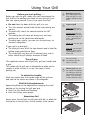
Before you start grilling. . . .
Before you use the grill, make sure you have placed the
grill shelf in the position you need as once the grill is on
you may injure yourself if you try to move the shelf.
Do not close the door while the grill is in use.
Turn the selector control knob to the heat setting you
require.
To switch off, return the control knob to the ‘off’
position.
The cooling fan will come on during use, and may
continue to run for some time afterwards.
To adjust your results, you can turn the grid over, or
remove it altogether.
i
i
Shelf & Grid adjustments
Speed of grilling can be adjusted by changing the shelf
position or the turning the grill pan grid.
High: For thin foods and toasting.
Low: For thicker meat pieces.
Aluminium Foil
Never cover the grill pan or grill grid with foil, or allow fat
to build up in the grill pan, as this creates a fire hazard.
Fixed rate grill: has a
full ‘on’ setting and ‘off’.
Single grill: has one grill
element.
If your grill is a dual grill:
The dual grill uses all of the top element and is ideal for
grilling large quantities of food.
The single grill uses part of the element only, and is
better suited to grill smaller amounts of food.
To attach the handle:
Place the handle over the narrow edge of the grill pan
and slide to the centre as shown in the diagrams.
Types of grill
Variable rate grill: has
adjustable heat settings
1 (low) to 8 (high) or 5
(high) - depending on
the model.
Dual grill: has two grill
elements which can be
used together, or as a
single grill.
The grill pan
This appliance comes with a grill pan, grill pan handle and
a grid.
The handle of the grill pan is detachable to allow you to
remove it while the pan is in use, this stops it from
getting hot.
Warning: Accessible
parts may become hot
when the grill is in use.
children should be kept
away.
i
i
For best results:
Pre-heat the grill for
about 3 minutes.
Please note: the grill
pan handle is designed
for sliding the grill pan
into and out of the grill
cavity. It is not to be
used for lifting the pan.
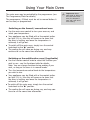
Using Your Main Oven
The main oven may be controlled by the programmer (see
The Programmer/Clock for details).
The programmer, if fitted, must be set to manual before it
can be used, or programmed.
Switching on the fanned / conventional oven
Use the main oven control to turn your oven on, and
select your temperature.
Your appliance may be fitted with a thermostat indicator light. If it is, then this will come on to show that
the oven is heating, and once the temperature is
achieved, it will go out.
To switch off the main oven, simply turn the control
knob back to the ‘ ‘ position.
The cooling fan will come on during use, and may
continue to run for some time afterwards.
Switching on the multifunction oven (if applicable)
Use the function control knob to select the function you
wish to use - see the functions table for details.
Note: You can change function during cooking if you
wish, as long as the oven is in manual mode.
Turn the temperature control knob to the temperature
you wish to use.
Your appliance may be fitted with a thermostat indicator light. If it is, then this will come on to show that
the oven is heating, and once the temperature is
achieved, it will go out.
To switch off the main oven, simply turn the control
knob back to the ‘ ‘ position.
The cooling fan will come on during use, and may continue to run for some time afterwards.
i
Important: Never
place food, or dishes on
the base of the main
oven, the element is
here and it will cause
over heating.
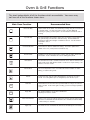
Oven & Grill Functions
The chart below details all of the functions which are available. Your oven may
not have all of the functions shown here.
Main Oven Function
Recommended Uses
Base Heat Only
Used to finish off the bases of food following cooking using the conventional
or fanned modes. The base heat can be used to provide additional
browning for pizzas, pies and quiche. Use this function towards the end of
cooking.
Top Heat Only
The heat is ideal from browning off the tops of food as it is not as fierce as
the grill following conventional or fanned cooking. Provides additional
browning for dishes like Lasagna or Cauliflower cheese. Use this function
towards the end of
cooking.
Conventional Oven
Intensive Bake
This function is ideal for traditional roasting. The meat is placed in the
middle of the oven, roast potatoes towards the top.
Suitable for food with a high moisture content, such as quiche, bread and
cheesecake. It also eliminates the need for baking pastry blind.
Fanned Grill
The fan allows the heat to circulate around the food. Ideal for thinner foods
such as bacon, fish and gammon steaks. Foods do not require turning. Use
with the oven door closed.
Fanned Oven
The even temperature in the oven makes this function suitable for batch
baking, or batch cooking foods.
Defrost
To defrost foods, such as cream cakes/gateaux, use with the oven door
closed. For cooling dishes prior to refrigeration, leave the door open.
Dual Grill
Single Grill
This function cooks food from the top and is ideal for a range of food from
toast to steaks. As the whole grill is working, you can cook larger quantities
of food.
For smaller quantities of food, but is still ideal for
anything from toast to steaks.
Base Heat with Fan
Used to cook open pies (such as mince pies) the base element ensures that
the base is cooked while the fan allows the air to circulate around the filling
- without being too intensive.
Lights only
Use when the oven is switched off and cold to aid cleaning the oven cavity.
Fanned Oven Guide
Some adjustment will have to be made to conventional
cooking temperatures.
The table below shows conventional cooking
temperatures, fanned temperatures and gas marks.
For optimum results using the fanned oven setting,
conventional temperatures need to be converted to the
fanned oven temperatures.
For example and item which would cook at 180˚C will
now cook at the fanned oven temperature of 160˚C.
This is a high efficiency oven, you may notice an
emission of steam when the door is opened.
When cooking chilled or frozen foods, use the
recommended cooking times and temperature on the
packaging. Always make sure the food is piping hot
throughout before serving.
There are no zones of heat, and no flavour transfer
when using a fanned oven - allowing you to cook a
greater variety of foods together.
If you are cooking on more than one shelf, you may
need to slightly increase the cooking time.
Always make sure that there is enough space between
dishes, to allow food to rise, and to air to circulate.
Conventional
temp (˚C)
‘A’ Efficiency oven Fanned (˚C)
Gas mark
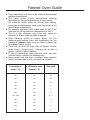
100
100
1/4
130
120
1/2
110
140
150
160
180 - 190
200
220
230
250
110
130
140
150
1/4
1
2
3
160
4-5
180
7
170
190
200
6
8
9
Cooking Guide
Pre-heating
To get the best results from your oven, we recommend
pre-heating for around 5 to 15 minutes before placing
your dishes in. This is especially important for items
which are chilled, frozen, batter based, yeast based or
whisked sponges.
If you are using a fanned function, you should still preheat but for a shorter time.
The items in the cooking guide below are based on a
pre-heated oven, but can be adjusted to take into account
personal taste.
Oven and bakeware
Always use high quality trays and tins for cooking. Poor
quality tins and trays can warp in the oven producing
uneven results.
Never use dishes which are cracked, damaged or not
oven proof as heating may lead to shattering inside the
oven.
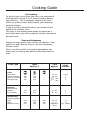
Food Type
Time
Approx.
Shelf
Position
Fanned
Intensive
190
180
150
150
160
160
125
125
-
15 - 25
20 - 30
21/2 - 3hrs
7 & 13
7
5
3
Puddings
Bread & butter
pudding
Fruit crumble
170
200
150
175
-
45 - 1hr
40 - 1hr
9
9
Miscellaneous
Yorkshire pudding:
large
small
Shortcrust pastry
220
220
200
200
200
180
200
200
180
40 - 45
15 - 20
depends on
filling
11
12
top - middle
Cakes
Small cakes
Victoria sandwich
Semi rich fruit cake
Christmas cake
Conv
Temp.
Setting ˙C
21/2 - 3hrs
Roasting Guide
Roasting times depend on the weight, shape and texture
of the meat and personal preference. In order to
calculate the roasting time, weigh the meat or poultry,
including the stuffing, and follow the times given
below.
Meat joints (including chicken) should be roasted at
180 - 200˚C Conventional/ 160 - 180˚C Fanned for
20 - 30 mins per 450g/1lb, plus 20 minutes on shelf
position 2.
Frozen meat must be thoroughly thawed before
cooking. For large joints, it is advisable to thaw
overnight.
Frozen poultry must be thoroughly thawed before
cooking. The time required depends on the size of the
bird - eg: a large turkey may take up to 48 hours to
thaw.
When cooking stuffed meat or poultry, calculate the
cooking time from the total weight of the meat plus the
stuffing.
Cooking joints in foil, covered roasters, lidded
casseroles, or roasting bags will help to reduce meat
shrinkage, give a more moist result and may reduce fat
splashing. However, a slightly longer cooking times will
be required, add 5 - 10 minutes per 450g (1lb) to the
calculated cooking time. When using roasting bags do
not exceed the temperatures recommended by the
manufacturer, and do not allow the roasting bag to
touch the sides or top of the oven.
Use of a trivet with the roasting tin will reduce fat
splashing during open roasting, and will help to keep the
oven interior clean.
The use of a roasting tin larger then that supplied is not
advised, as this may impair performance and lead to
extended cooking times.
Roasting Guide
Roast turkey
Roasting turkey perfectly involves cooking two different
types of meat - the delicate light breast meat, which
must not be allowed to dry out, and the darker leg meat,
which takes longer to cook.
The turkey must be roasted long enough for the legs to
cook, so frequent basting is necessary. The breast meat
can be covered once browned.
Turkey should be roasted at 180 - 200˚C
Conventional/ 160 - 180˚C Fanned for 20 - 30 mins
per 450g/1lb, plus 20 minutes.
The turkey can be open roasted, breast side down, for
half of the cook time, and then turned over for the
remainder of the cooking time.
If the turkey is stuffed, add 5 minutes per 1lb to the
cooking time.
If roasting turkey covered with foil, add 5 minutes per
1lb to the cooking time.
To test if the turkey is cooked, push a fine skewer into
the thickest part of the thigh. If the juices run clear, the
turkey is cooked. If the juices are still pink, the turkey
will need longer cooking. Always make sure that the
turkey is cooked properly before serving.
Turkey Roasting times.
Most Turkeys are measured by the kilogram. Timing should
be calculated in either of these ways:
40 minutes per 1kg plus 10 minutes per 1/4 kg.
or
20 minutes per 1lb, plus 20 minutes.
The maximum size Turkey for this appliance is: 20lbs
approximately 9kgs.
Please do not attempt to roast a Turkey larger than this, as
the results cannot be guaranteed.
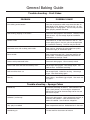
General Baking Guide
Trouble-shooting - Fruit Cakes
PROBLEM
POSSIBLE CAUSE
Fruit sinking to the bottom
Low oven temperature which may cause the cake to
take longer to set, allowing the fruit to sink. Or, too
much liquid, or raising agent. The fruit may not have
been properly washed and dried.
Cake sinking / dipping in the centre
Too much raising agent in the mixture. Too hot, or too
cool an oven. Or, not enough liquid or insufficient
creaming.
Surface cracks
Too small a tin, or too much mixture in the tin. Too
much raising agent in the mix, plus not enough liquid
or insufficient creaming. The oven may be too hot.
Hard outer crust with a damp patch inside
Oven too hot, therefore the cake baked too quickly.
Too much sugar, or insufficient liquid.
Burnt outside
Oven temperature too high. Oven too small for the
size of cake. Insufficient protection around the tin.
Cake baked on too high a shelf.
Texture with pronounced holes.
Too much raising agent. Flour unevenly mixed.
Texture too close and cake insufficiently risen.
Not enough raising agent. Not enough liquid. Too
cool an oven. Insufficient creaming.
Cake crumbles when cut
Not enough liquid. Baked for too long. Not enough
sugar. Too much baking agent.
Too dry
Over baking. Insufficient egg or liquid. Too much raising agent.
Domed top
Trouble-shooting - Sponge Cakes
Insufficient creaming of mixture. Cake baked on too
high a shelf position, or at too high a temperature.
Paper liners can cause the outer edge not to rise and
the centre to peak.
Hollowed / sunken top
Too much raising agent. Oven temperature too low, or
incorrect shelf position. Cake removed from oven
before it’s cooked. Use of soft tub margarine.
Very pale, but cooked
Oven temperature too low. Baked too low in the oven
Overflowing tin
Tin too small for the amount of mixture
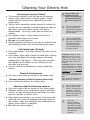
Cleaning Your Electric Hob
Ceramic glass hobs (if fitted)
The ceramic hotplates, and hob top can be cleaned
using a clean, damp cloth or kitchen paper. Please
ensure that the elements are cooled fully to avoid
steam burns.
You can use a specialist ceramic cleaner to restore the
surface, but use sparingly to avoid coating the hob top
too thickly, too much cream cleaner will lead to
discolouration. Use a dry, clean cloth to polish the
surface.
For stubborn marks, a little cream cleaner and a
specialist hob scraper can be used.
Do not use steam cleaners.
Regular cleaning will prevent any salts or minerals from
accumulating on your hob and discolouring the glass.
Solid plate hobs (if fitted)
Prime and Season - this helps maintain the finish of the
elements.
Use a damp, clean cloth to wipe the solid plate, making
sure that you follow the circular grooves and avoid
damaging the ‘red spot(s)’. Make sure that you allow
the hotplate to dry before use by switching on the
elements at a low heat.
You can restore the hotplates by using a solid plate
cleaner.
Plastic & Painted parts
Only use a clean cloth wrung out in hot soapy water.
Vitreous enamel surfaces (enamel hobs only)
Use a mild cream cleaner on a clean cloth.
Stainless steel & Aluminium surfaces
Only use a clean cloth wrung out in hot, soapy water.
Stubborn marks can be removed by using a specialist
cleaner, we also recommend that you clean the whole
area, to maintain a uniform finish.
Some foods are corrosive, eg: vinegar, fruit juices and
especially salt, these can damage and leave marks on
the surface. Wipe any spillage of these substances as
safely, and as quickly as possible.
Do not use steam cleaners
!
i
i
Always allow your
appliance to cool
down, and switch off
the electricity before
you clean any part of
it.
Take care when cleaning over symbols on
fascia panels, excessive
cleaning can lead to the
symbols fading.
Keep a separate cloth
aside for cleaning your
glass hob - this will prevent greases being
transferred which can
cause discolouration of
the glass surface.
To prime: Switch on each
element in turn for a short
while (with no pan on it) at a
medium - high setting. This
will harden and burn off the
coating.
To season: Heat the element
for 30 seconds at a medium
setting then switch off. Use a
minimum amount of unsalted
vegetable oil on a dry cloth or
paper towel, and apply a thin
coat of oil to the element surface.
Wipe off the excess and heat
the element for 1 minute.
i
i
Baby oil can be used to
restore stainless steel
finishes - but only use a
few drops. Don’t use
cooking oils as they can
contain salts which will
damage the metal.
Don’t use:
Abrasive powder
cleaners, wire wool,
soap filled wire pads,
detergents, bleaches,
bath stain remover or
chemical oven
cleaners.
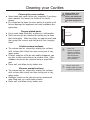
Cleaning your Cavities
Cleaning the oven cavities
Some foods can cause fat to spit, especially if you have
open roasted, this leaves the inside of the cavity
greasy.
It is important to clean the oven cavity as a build up of
fat can damage the appliance and may invalidate your
guarantee.
!
Chrome plated parts.
Use a moist soap filled pad, or place in a dishwasher.
Shelf runners can be removed to enable you to clean
then thoroughly. Make sure they are cool to touch and
then grasp the runners and slide out of their hanging
holes.
Pristine enamel surfaces
The enamel can be cleaned by wiping the surfaces
with a clean cloth which has been wrung out in hot,
soapy water.
If larger splashes of fat do not readily disappear, you
can use a mild cream cleaner to remove them. More
stubborn marks can be removed using a soap filled
pad.
Rinse well, and allow to dry before use.
Vitreous enamel surfaces
The enamel can be cleaned by wiping the surfaces
with a clean cloth which has been wrung out in hot,
soapy water.
Stubborn marks can be cleaned using a moistened
soap filled pad, or a mild cream cleaner.
Rinse well, and allow to dry before use.
Always allow your
appliance to cool
down, and switch off
the electricity before
you clean any part of
it.
Pull out to clean
i
i
Don’t use:
Caustic or abrasive
cleaners, bleaches,
coarse wire wool or
hard implements,
these will damage
your appliance.
Using a trivet while
roasting meat may help
to reduce fat splashes.
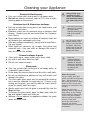
Cleaning your Appliance
Painted & Plastic parts
Only use a clean cloth wrung out in hot soapy water.
Do not use abrasive cleaners, such as “Cif”, wire or nylon
cleaning pads on these parts.
Stainless steel & Aluminium surfaces
Only use a clean cloth wrung out in hot soapy water, and
dry with a soft cloth.
Stubborn marks can be removed using a stainless steel
cleaner. Supplies can be purchased from the Customer
Care Centre.
Sharp objects can mark the surface of stainless steel, but
will become less noticeable with time.
Wipe any spillage immediately, taking care to avoid burning your hands.
Some foods are corrosive eg; vinegar, fruit juices and
especially salt - they can mark or damage the metal if
they are left on the surface.
Enamel surfaces & parts
Clean with warm, soapy water and a clean cloth.
Dry with a soft clean towel or cloth.
Do not use steam cleaners.
Glass parts
Only use a clean cloth wrung out in hot soapy water, or
a specialist glass cleaner.
Rinse away any excess cleaner and dry with a soft cloth.
Do not use abrasives or polishes as they will scratch and
damage the glass.
The inner door glass panel can be removed for cleaning
but it must be replaced the right way up. If there is any
writing on the glass, you must be able to read it clearly
when the cavity doors are open.
Always make sure that the glass is pushed fully into the
Stop position.
To remove the glass panel, open the door wide, hold the
top and bottom edges and slide out.
Warning: Do not operate the appliance without the glass
panel correctly fitted.
!
i
i
i
Always allow your
appliance to cool
down, and switch off
the electricity before
you clean any part of
it.
Take extra care when
cleaning over symbols
on fascia panels,
excessive cleaning can
lead to the symbols
fading.
Baby oil can be used to
restore stainless steel
finishes - but only use a
few drops. Don’t use
cooking oils as they can
contain salts which will
damage the metal.
Don’t use:
undiluted bleaches,
products containing
chlorides or abrasive
cleaners on aluminium
or stainless steel, they
can damage the
appliance.
Glass door panels
For your safety, glass door
panels are made of toughened
glass. This ensures that, in
the unlikely event that a panel
breaks, it does so into small
fragments to minimise the risk
of injury.
Please take care when
handling, using or cleaning all
glass panels, as any damage
to the surfaces or edges may
result in the glass breaking
without warning or apparent
cause at a later date.
Should any glass panel be
damaged, we strongly
recommend that it is replaced
immediately.
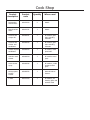
Cook Shop
Product
description
Product
code
Quantity
Where used
Rectangular
carbon filters
082612620
2
Hoods
Round carbon
filters
082611571
1
Hoods
Ceramic hob
scraper kit
082606781
1
All ceramic glass
hobs including
induction.
Ceramic hob
cleaner and
conditioner
082606780
1
Sealed hotplate
conditioner
082606783
1
All ceramic glass
hobs including
induction
Stainless steel
cleaner
082606764
1
All stainless steel
parts
Oven cleaner
spray
082606786
1
All cookers, inside
cavities and on
glass.
Multi-purpose
kitchen
cleaner
082606782
1
General kitchen
cleaner.
E-cloth
082813300
1
All cookers, for
cleaning glass and
stainless steel
All sealed / solid
plate hobs.
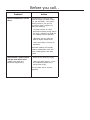
Before you call. .
Problem?
There’s condensation on the
doors.
Advice
Condensation is caused by hot,
moist air meeting a cooler surface
(i.e. the oven door). You cannot
always prevent it, but you can
minimise it when it happens by
doing the following:
Pre-heat the oven at a high
temperature before putting food in
the oven, and cover the food you
are cooking wherever possible.
Whenever you can, cook wet
foods at higher temperatures.
Don’t leave food in the oven to
cool down.
Automatic cooking will normally
produce condensation when the
oven is cooling down with food
inside.
There’s been a power failure
and the oven won’t work.
(models with clocks and
automatic programmers)
Switch off the electricity supply.
When the power returns - re-set
the programmer/Clock to the
correct time of day.
This will allow you to use your
appliance.
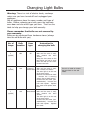
Changing Light Bulbs
Warning: There is a risk of electric shock, so always
make sure you have turned off and unplugged your
appliance.
Not all appliances have the same number and type of
bulbs. Before replacing your bulb, open the top/main
oven door and see which type you have. Then use the
table to help you change your bulb correctly.
Please remember that bulbs are not covered by
your warranty.
Bulbs can be purchased from hardware stores (always
take the old bulb with you).
No. of
lamps
Bulb
Location
Oven
type
Instruction for
changing the bulb
2
(@25W)
side
All
Wait until the oven is cool,
then remove the oven
shelves.
Grasp the lens cover on the
light fitting and pull it away
from the side of the oven.
Unscrew the bulb.
1
(@25W)
rear
Fanned /
Multifunction
Wait until the oven is cool,
then remove the shelves.
The oven light is at the rear
of the oven cavity.
Remove the loose oven back
- unscrew the 4 securing
screws (one at each corner).
Unscrew the lens cover (turn
anticlockwise). Unscrew the
bulb and replace. Replace
lens cover and replace oven
back.
1
(@25W)
rear
Conventional
Wait until the oven is cool,
then remove the oven
shelves.
The oven light is at the rear
of the oven cavity.
Unscrew the lens cover (turn
anticlockwise). Unscrew the
bulb and replace. Replace
lens cover.
There is no need to remove
the oven back on the 90E
model.
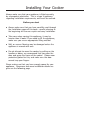
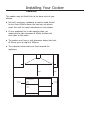
Installing Your Cooker
Always make sure that your appliance is fitted correctly,
by a competent electrician. This is a type X appliance
regarding installation requirements, and must be earthed.
Before you start
Always make sure that you have carefully read through
the installation pages of this book - careful planning at
the beginning will ensure a quick and easy installation.
Take care when moving this appliance, it may be
heavier than it looks! If you need to lift the appliance,
make sure you use an appropriate lifting method.
Soft, or uneven flooring may be damaged unless the
appliance is moved with care.
Do not attempt to move the cooker by pulling on the
handles or doors, we recommend that you open the
door and grasp the frame of the cooker. Please wear
protective gloves for this, and make sure the door
cannot trap your fingers.
Please make sure that you have enough space for your
appliance. Clearances and more installation details are
given on the following page.
Installing Your Cooker
Clearances
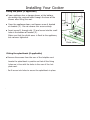
This cooker may be fitted flush to the base units of your
kitchen.
No shelf, overhang, cupboard, or cooker hood should
be less than 650mm above the hob top, but please
check this with the hood manufacturers instructions.
If your appliance has a side opening door, we
recommend a side clearance of 60mm to allow the
oven door to fully open.
The cooker must have a side clearance above hob level
of 90mm up to a height of 400mm.
The important dimensions are those around the
appliance.
90
mm
90
mm
650mm
minimum
400mm
clearance
For all appliance sizes:
700mm
Flush fit to
base units
800mm
900mm
1000mm
1100mm
1200mm
Flush fit to
base units
Installing Your Cooker
Fitting the plinth (if applicable)
If
your appliance has a storage drawer at the bottom,
you access the required holes through the base of the
drawer after lifting the mat.
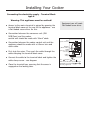
Open the appliance doors, and loosen screw A located
on bracket (2). Do not remove this screw entirely.
Insert screw B, through slot (3) and screw into the small
hole at the bottom of bracket (2).
Make sure that the plinth cover is flush to the appliance,
but not over tightened.
Door
Y
Oven cavity
A
(1)
(2)
B (3)
Plinth cover
Fitting the splashback (if applicable)
Remove the screws from the rear of the hotplate vent.
Locate the splashback in position so that all the fixing
holes are in line with the holes in the rear of the hotplate vent.
. Re-fit screw into holes to secure the splashback in place
.
Installing Your Cooker
Connecting the electricity supply - Terminal Block
type A
Warning: This appliance must be earthed!
Access to the mains terminal is gained by opening the
terminal block cover at the rear of the appliance - use
a flat bladed screw driver for this.
Equipment you will need:
Flat bladed screw driver
Connection between the consumer unit (45A
MCB/Fuse) and the cooker
control unit should be made with 10mm2 cable.
Connection between the cooker control unit and the
appliance should be made with a 6.0mm2 twin and
earth cable.
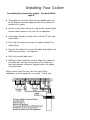
First strip the wires. Then push the cable through the
cable clamping the terminal block cover.
Connect the cable to the terminal block and tighten the
cable clamp screw - see diagram.
Close the terminal box, ensuring that the cover is
engaged on the locking tabs.
Live
1
(Red or Brown)
2
3
4
Neutral
(Black or Blue)
5
Earth
(Green / Yellow
or sleeving)
Cable
clamp
Live 1, Neutral 5, Earth .
Links to be fitted as shown. Ensure
terminal screw heads, 2 , 3 and 4
are fully tightened.
Installing Your Cooker
Connecting the electricity supply - Terminal Block
type B
This appliance must be fitted using a double pole unit
of 45 ampere minimum capacity with 3mm minimum
contact at all poles.
Access to the mains terminal is gained by removing the
terminal block cover at the rear of the appliance.
Connection should be made with a 10.0mm2 twin and
earth cable.
First strip the wires then push the cable through the
cable clamp.
Connect the cable to the terminal block and tighten the
cable clamp screws - see diagram.
Refit the terminal box cover.
Sufficient cable should be used to allow the cooker to
be pulled out, but must hang clear of the floor so it
does not become twisted or trapped when the cooker
is pushed back.
Please ensure that the user has this copy of the
handbook, and the appliance is in place. Thank you.
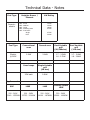
Technical Data - Notes
Fuel Type
Ceramic electric
Hotplate Burner /
Element
Hob
Hob
Hob
Hob
Hob
Fuel Type
Electric
@ 240V
-
Small
Medium
Large
Warming zone
Dual zone:
Single
Dual
kW Rating
1.2kW
1.5kW
1.8kW
0.1kW
0.7kW
2.2kW
Fanned oven
Dual Variable
grill
(90/100size)
Dual Variable
grill
(110 size)
2.1kW
2.0kW
1.7 - 2.5kW
1.8 - 2.7kW
1.7 - 2.6kW
1.8 - 2.8kW
Oven lamps
Single Variable
grill
(90 size)
25W each
1.8kW
Conventional
oven
Appliance size
90E
220 - 240V
13040 - 15520W
100E
220 - 240V
12755 - 15180W
110E
Country Classic
100E
220 - 240V
14100 - 16780W
220 - 240V
12000 - 14280W
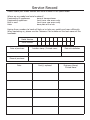
Service Record
Please record your model number and serial number in the space below.
Where are my model and serial numbers?
Freestanding HL appliances:
Freestanding appliances:
Built in oven:
Hobs:
base of storage drawer
front frame near oven cavity
front frame near oven cavity
base plate of the hob
Having these numbers to hand will help us to help you, quickly and more efficiently.
When contacting us, please use the Customer Care number on the back cover of this
handbook.
Model Number
Serial Number
Date of purchase
Installer stamp / Printed name
Date of installation
Place of purchase:
Date
Part(s) replaced
Engineers Stamp/
Printed Name
Contact Us
Should you need to get in touch with us (UK and Northern Ireland only), please call
Belling Customer Care Centre Helpline on:
0844 815 3746
For customers outside the UK and Northern Ireland, please contact your local supplier.
Glen Dimplex Home Appliances Limited is the owner of the Belling brand and is part of
the Glen Dimplex group of companies.
08 2749901 © 11.2010
Electric Range
Model Names: Country classic 100E, Classic 90E, 100E, 110E, DB4 90E.