1
Hardware Installation
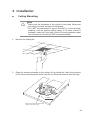
The EAP can be wall-mounted or ceiling-mounted. Please suitably arrange your
wire layout before mounting the EAP. We take EAP110 as example to explain the
installation. EAP110 can be powered via the provided PoE adapter, while EAP120
and EAP220 can be powered via a PoE switch or the provided power adapter.
1.Installation Requirements
Before installation, check the package contents for the following items:
EAP
Wing Nuts (3)
Mounting Bracket
Washers (3)
Plastic Wall
Anchors (3)
Installation Guide
Self-tapping
Screws (3)
Pan-head
Screws (3)
Other installation equipments may require, including a pencil, ruler, drill, drill bit,
screwdriver and a ladder.
2. Mounting Bracket
The following figure describes the layout of the mounting bracket.
ARROW 2 is used to align
with ARROW 1 under the
interface panel
Ceiling mounting slot
Wall mounting slot
Locking clip
05