1
Troubleshooting
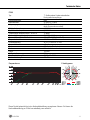
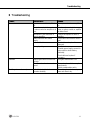
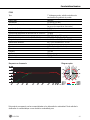
6 Troubleshooting
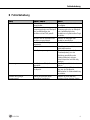
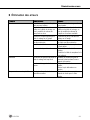
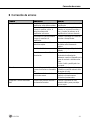
Problem
Possible Cause
Remedy
No sound
Power to mixer and/or amplifier is
off.
Channel or master fader on mixer,
or volume control on amplifier is at
zero.
Microphone is not connected to
mixer or amplifier.
Cable connectors are seated
loosely.
Cable is defective.
Switch power to mixer or amplifier
on.
Set channel or master fader on
mixer or volume control on amplifier
to desired level.
Connect microphone to mixer or
amplifier.
Check cable connectors for secure
seat.
Check cable and replace if
damaged.
Switch phantom power on.
Phantom power supply: connect to
power outlet or insert battery
(batteries).
Check cable and replace if
necessary.
Turn gain control down CCW.
No supply voltage
Distortion
Crackling noises or low output
P120 P220
Channel gain control on mixer set
too high.
Microphone too close to sound
source.
Partial short circuits due to
excessive humidity.
Move microphone further away from
sound source.
Switch preattenuation pad in.
Place microphone in warm, dry
room and allow to dry.
19