1
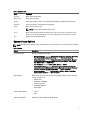
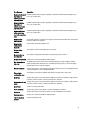
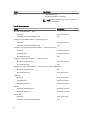
Option
Description
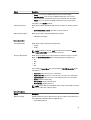
NOTE: This field is only relevant when the Integrated NIC control in the System
Configuration group is set to Enabled with ImageServer.
Server IP Address
Specifies the primary static IP address of the ImageServer with which the client
software communicates. The default IP address is 255.255.255.255.
NOTE: This field is only relevant when the Integrated NIC control in the System
Configuration group is set to Enabled with ImageServer and when Lookup
Method is set to Static IP.
Server Port
Specifies the primary IP port of the ImageServer, which is used by the client to
communicate. The default IP port is 06910.
NOTE: This field is only relevant when the Integrated NIC control in the System
Configuration group is set to Enabled with ImageServer.
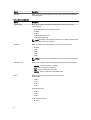
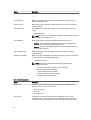
Client Address Method
Specifies how the client obtains the IP address.
•
•
Static IP
DHCP (enabled by default)
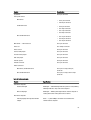
NOTE: This field is only relevant when the Integrated NIC control in the System
Configuration group is set to Enabled with ImageServer.
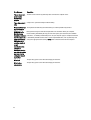
Client IP Address
Specifies the static IP address of the client. The default IP address is 255.255.255.255.
NOTE: This field is only relevant when the Integrated NIC control in the System
Configuration group is set to Enabled with ImageServer and when Client DHCP
is set to Static IP.
Client SubnetMask
Specifies the subnet mask of the client. The default setting is 255.255.255.255.
NOTE: This field is only relevant when the Integrated NIC control in the System
Configuration group is set to Enabled with ImageServer and when Client DHCP
is set to Static IP.
Client Gateway
Specifies the gateway IP address for the client. The default setting is 255.255.255.255.
NOTE: This field is only relevant when the Integrated NIC control in the System
Configuration group is set to Enabled with ImageServer and when Client DHCP
is set to Static IP.
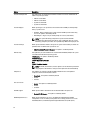
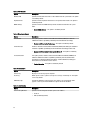
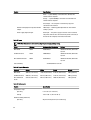
Advanced
Specifies for Advanced debugging
•
Verbose Mode
NOTE: This Option is only relevant when the integrated NIC control in the
System Configuration group is set to enable with Cloud Desktop.
Table 12. System Logs
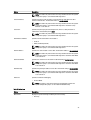
Option
Description
BIOS events
Displays the system event log and allows you to clear the log.
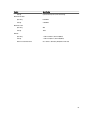
•
Clear Log
39