1
ST558
LCD Display
User Guide
The information contained in this document is subject to change without notice. This document
contains proprietary information that is protected by copyright. All rights are reserved. No part of this
document may be reproduced, translated to another language or stored in a retrieval system, or
transmitted by any means, electronic, mechanical, photocopying, recording, or otherwise, without
prior written permission.
Windows is a registered trademark of Microsoft, Inc.
Other brands or product names are trademarks of their respective holders.
Important Recycle Instruction:
This product may contain electronic waste that can be hazardous if not disposed of properly.
Recycle or dispose in accordance with local, state, or federal Laws. For more information, contact
the Electronic Industries Alliance at WWW.EIAE.ORG.
Table of Contents
Table of Contents
Safety warnings and precautions.................................................. 3
Important safety instructions ........................................................ 4
Notes on the LCD panel of this display ................................................... 5
Safety notice for remote control............................................................... 5
Battery safety notice ................................................................................ 5
Notes on moving the display ................................................................... 6
Package contents ........................................................................... 7
Setting up the display..................................................................... 8
Mounting the display................................................................................ 8
Installing the display on a wall ........................................................... 8
Parts of the display and their functions ....................................... 9
Rear panel .............................................................................................. 9
Input/output terminals .............................................................................. 10
Remote control ........................................................................................ 12
Using the remote control ......................................................................... 13
Installing remote control batteries ...................................................... 13
Remote control usage tips ................................................................. 13
Connection ...................................................................................... 14
Connecting audio/video signals............................................................... 14
Connecting the VGA input ................................................................. 14
Connecting the YPbPr component video input .................................. 15
Connecting the S-Video input ............................................................ 16
Connecting the composite video (AV) input....................................... 17
Connecting the DVI-D digital input..................................................... 18
Connecting the HDMI digital input ..................................................... 19
Connecting the DisplayPort (DP) digital input.................................... 20
Connecting external speakers ........................................................... 21
Connecting multiple displays ............................................................. 22
Connecting power.................................................................................... 23
Basic operations ............................................................................. 24
Turning the display on or off .................................................................... 24
Locking/unlocking the controls ................................................................ 24
Switching input signals ............................................................................ 24
Adjusting audio volume level ................................................................... 24
Network connection........................................................................ 25
Connecting the display to a local area network ....................................... 25
Remote network control........................................................................... 26
Information ......................................................................................... 26
Picture & Sound ................................................................................. 27
Screen................................................................................................ 27
Setting................................................................................................ 28
Schedule ............................................................................................28
1
2
Table of Contents
Mail Report ........................................................................................ 29
Network ............................................................................................. 33
RS232 commands over the network ....................................................... 34
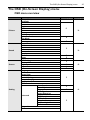
The OSD (On-Screen Display) menu ............................................. 35
OSD menu overview ............................................................................... 35
Operations in the OSD menu .................................................................. 37
Picture menu .......................................................................................... 38
Sound menu............................................................................................ 39
Screen menu........................................................................................... 40
Setting menu ........................................................................................... 42
Product information........................................................................ 44
Specifications .......................................................................................... 44
Dimensions ............................................................................................. 46
Remote control codes ............................................................................. 47
Supported input signal resolution............................................................ 48
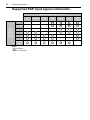
Supported PAP input signal combination................................................ 50
Troubleshooting.............................................................................. 51
Safety warnings and precautions
3
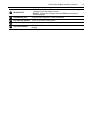
Safety warnings and precautions
The lightning flash with arrowhead
symbol, within an equilateral triangle, is
intended to alert the user to the presence
of uninsulated "dangerous voltage" within
the product's enclosure that may be of
sufficient magnitude to constitute a risk of
electric shock to persons.
The exclamation point within an
equilateral triangle is intended to alert the
user to the presence of important
operating and maintenance (servicing)
instructions in the literature accompanying
the appliance.
THIS EQUIPMENT MUST BE
GROUNDED
To ensure safe operation, the three-pin
plug must be inserted only into a
standard three-pin power outlet which is
effectively grounded through normal
household wiring. Extension cords used
with the equipment must have three
cores and be correctly wired to provide
connection to the ground. Wrongly
wired extension cords are a major
cause of fatalities.
The fact that the equipment operates
satisfactorily does not imply that the
power outlet is grounded or that the
installation is completely safe. For your
safety, if you are in any doubt about the
effective grounding of the power outlet,
please consult a qualified electrician.
• The mains plug of the power supply cord shall remain readily operable. The AC receptacle
(mains socket outlet) shall be installed near the equipment and shall be easily accessible.
To completely disconnect this equipment from the AC mains, disconnect the power cord
plug from the AC receptacle.
• Do not place this display on an uneven, sloping or unstable surface (such as a trolley)
where it may fall and cause damage to itself or others.
• Do not place this display near water, like a spa or pool, or in a position which will allow the
splashing or spraying of water onto the display, like in front of an open window where rain
water may enter.
• Do not install this display in a confined space without proper ventilation and air circulation,
such as in a closed cabinet. Allow proper space around the display for dissipating heat
inside. Do not block any openings and vents on the display. Overheating may result in
hazards and electric shock.
• Installation of this display should only be performed by a qualified technician. Failure to
install this display properly may cause injuries and damages to the personnels and the
display itself. Check the installation regularly and maintain the display periodically to
ensure the best working condition.
• Use only the accessories approved or recommended by the manufacturer to mount this
display. Using wrong or unsuitable accessories may cause the display to fall and result in
serious personal injuries. Make sure that the surface and fixing points are strong enough
to sustain the weight of the display.
• To reduce the risk of electric shock, do not remove covers. No user serviceable parts
inside. Refer servicing to qualified service personnel.
• To prevent personal injuries, mounting the display or installing desktop stands is required
before use.
4
Important safety instructions
Important safety instructions
1.
2.
3.
4.
5.
6.
7.
8.
9.
10.
11.
12.
13.
14.
Read these instructions.
Keep these instructions.
Heed all warnings.
Follow all instructions.
Do not use this apparatus near water.
Clean only with dry cloth.
Do not block any ventilation openings. Install in accordance with the manufacturer's
instructions.
Do not install near any heat sources such as radiators, heat registers, stoves, or other
apparatus (including amplifiers) that produce heat.
Do not defeat the safety purpose of the polarized or grounding-type plug. A polarized
plug has two blades with one wider than the other. A grounding-type plug has two
blades and a third grounding prong. The wide blade or the third prong are provided for
your safety. If the provided plug does not fit into your outlet, consult an electrician for
replacement of the obsolete outlet.
Protect the power cord from being walked on or pinched particularly at plugs,
convenience receptacles, and the point where they exit from the apparatus.
Only use attachments/accessories specified by the manufacturer.
Use only with the cart, stand, tripod, bracket, or table specified by the
manufacturer, or sold with the apparatus. When a cart is used, use caution
when moving the cart/apparatus combination to avoid injury from tip-over.
Unplug this apparatus during lightning storms or when unused for long
periods of time.
Refer all servicing to qualified service personnel. Servicing is required when the
apparatus has been damaged in any way, such as power-supply cord or plug is
damaged, liquid has been spilled or objects have fallen into the apparatus, the
apparatus has been exposed to rain or moisture, does not operate normally, or has
been dropped.
Important safety instructions
5
Notes on the LCD panel of this display
• The Liquid Crystal Display (LCD) panel of this display has a very thin protective layer of
glass which is liable to marking or scratching, and cracking if struck or pressured. The
liquid crystal substrate is also liable to damage under excessive force or extreme
temperatures. Please handle with care.
• The response time and brightness of the LCD panel may vary with the ambient
temperature.
• Avoid placing the display in direct sun or where direct sun or spot lighting will shine onto
the LCD panel, as the heat may damage the panel and the external casing of the display,
and the bright light will make viewing the display more difficult than necessary.
• The LCD panel consists of individual pixels to display images and is manufactured
according to the design specifications. While 99.9% of these pixels work normally, 0.01%
of the pixels may remain constantly lit (in red, blue or green) or unlit. This is a technical
limitation of the LCD technology and is not a defect.
• LCD screens, like plasma (PDP) and conventional CRT (Cathode Ray Tube) screens, are
also susceptible to 'screen burn-in' or 'image retention' which can be found on the screen
as visible fixed lines and shades. To avoid such damage to the screen, avoid displaying
still images (like On-Screen Display menus, TV station logos, fixed/inactive text or icons)
for more than two hours. Change the aspect ratio from time to time. Fill the entire screen
with the image and eliminate the black bars whenever possible. Avoid displaying images in
4:3 aspect ratio over a long period of time, otherwise there may be visible burn marks on
the screen as two vertical lines.
If display of a still image is required, it is recommended to enable Image Retention under
the Setting > Advanced menu.
Note:
• Under certain circumstances, condensation may occur on the inner side of the cover glass, it's a
natural phenomenon and will not affect the operation of the display. This condensation will usually
disappear after around 2 hours of normal operation.
Safety notice for remote control
• Do not put the remote control in the direct heat, humidity, and avoid fire.
• Do not drop the remote control.
• Do not expose the remote control to water or moisture. Failure to do so could result in
malfunction.
• Confirm there is no object between the remote control and the remote sensor of the
product.
• When the remote control will not be used for an extended period, remove the batteries.
Battery safety notice
The use of the wrong type of batteries may cause chemical leaks or explosion. Please note
the following:
• Always ensure that the batteries are inserted with the positive and negative terminals in
the correct direction as shown in the battery compartment.
• Different types of batteries have different characteristics. Do not mix different types.
• Do not mix old and new batteries. Mixing old and new batteries will shorten battery life or
cause chemical leaks from the old batteries.
• When batteries fail to function, replace them immediately.
• Chemicals which leak from batteries may cause skin irritation. If any chemical matter
seeps out of the batteries, wipe it up immediately using a dry cloth, and replace the
batteries as soon as possible.
• Due to varying storage conditions, the battery life for the batteries included with your
product may be shortened. Replace them within 3 months or as soon as you can after
initial use.
• There may be local restrictions on the disposal or recycling of batteries. Consult your local
regulations or waste disposal provider.
6
Important safety instructions
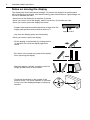
Notes on moving the display
The display has limited mechanical strength. To prevent the display from performance
failure caused by line defects, front bezel bending, glass scratch/broken, light leakage, etc,
it must be handled with care.
• Always move the display by at least two (2) adults.
• When you want to move the display, make sure the four (4) handles are held.
• When you want to place the display face down:
- Prepare a flat and horizontal surface that is larger than the
display and spread a thick protective sheet on it.
Support surface
- Lay down the display gently and horizontally.
• When you want to upturn the display:
- Lift the display up horizontally by holding the four
(4) handles. Do not lift the display against its
corner.
- Be careful not to scratch any parts of the display
when upturning the display.
- Stand the display vertically to make sure the its
weight spread evenly on the surface.
- Check the shock label on the outside of the
product carton. The shock indicator on the label
will turn red if the display/package is improperly
handled.
Package contents
7
Package contents
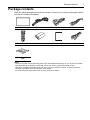
Open the sales package and check the contents. If any item is missing or damaged, please
contact your dealer immediately.
LCD display
Power cord
D-Sub (15-pin) cable
IR extender cable
Remote control
AAA batteries
Quick start guide
Audio cable
Gap inspection
pads
Notes:
• The type of power cord supplied may differ from that illustrated depending on your region of purchase.
• Before discarding the package, check that you haven't left any accessories inside the box.
• Dispose of packaging materials wisely. You can recycle the cardboard carton. Consider storing the
package (if possible) for future transport of the display.
• Do not leave plastic bags within reach of young children or babies.
8
Setting up the display
Setting up the display
Mounting the display
You can install the display on a vertical surface with a suitable wall mounting bracket or on a
horizontal surface with a table stand. Please pay attention to the following notes during
installation:
• This display should be installed by at least two adult persons. Attempting to install this
display by only one person may result in danger and injuries.
• Refer the installation to qualified technicians. Improper installation may cause the display
to fall or malfunction.
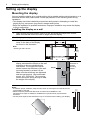
Installing the display on a wall
1. Place a clean, dry and lint-free cloth on a flat, horizontal and object-free surface.
Make sure that the size of the cloth is larger than the display.
2. Gently lay the display on the cloth with the LCD screen facing down.
3. Identify the wall mounting screw
holes on the back of the display
as shown in the illustration.
400mm
(15.75”)
Note:
• Screw type: M6 x 20 mm
400mm
(15.75”)
4. Install the wall mounting bracket on the
display and attach the display to the wall
according to the mounting bracket’s
instructions. The length of the screw
should exceed the thickness of the wall
mounting bracket by at least 10 mm.
Make sure that all screws are tightened
and secured properly. (Recommended
torque: 470 - 635N•cm). The mounting
means should be strong enough to bear
the weight of the display.
Thickness of
the wall
mounting
bracket
Display
10 mm
(0.39")
Notes:
• To maintain proper ventilation, keep at least 10 mm of clear space from the back cover
of the display to the wall.
• Please consult a professional technician for wall mount installations. The
manufacturer accepts no liability for installations not performed by a professional
technician.
• The AC power input socket should be on top of connectors when rotating your display.
10mm
(0.39")
Parts of the display and their functions
9
Parts of the display and their functions
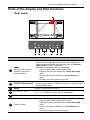
Rear panel
1
2
No.
1
2
Name
3
4
4
5
6
Description
• Receives command signals from the remote control.
• Detects ambient lighting conditions around the display and
adjusts screen brightness automatically when the Ambient
Light Sensor function is activated.
• Indicates the operating status of the display:
Remote control sensor /
- Lights up green when searching for inputs.
Ambient light sensor /
- Lights up red when the display is in Power Save High
Power indicator
mode.
- Flashes red when the display is in Power Save Low
mode.
- Off when the main power is turned off.
• Selects a video source.
ENTER/VIDEO SOURCE • Confirms your selection or enters a submenu in the On-Screen
Display (OSD) menu.
MENU
Opens or closes the OSD menu.
4
, , /-,/+
• Scrolls through settings and options in the OSD menu.
• /-,/+: Hot keys for audio volume adjustment.
5
Power button
Turns the display on or off.
Power indicator
Indicates the power status of the display:
- Lights up green when searching for inputs.
- Lights up red when the display is in Power Save High
mode.
- Flashes red when the display is in Power Save Low
mode.
- Off when the main power is turned off.
3
6
10
Parts of the display and their functions
Input/output terminals
1
2
No.
3
4
5
Name
6
7 8 9 10 11 12
13
14 15
16
17
18
19
20
Description
RJ-45
Connects to the RJ-45 port on a computer or Ethernet switch/router.
2
RS-232C IN/OUT
For external control and multi-display operation.
• RS-232C IN: receives control signals from a computer or another
display.
• RS-232C OUT: outputs control signals from the RS-232C IN input
to another display.
3
DISPLAY PORT
Connects to a DisplayPort compatible device.
4
DVI-OUT
Outputs DVI signals from the DVI-IN input socket to another display.
5
DVI-IN
1
6
HDMI-1/HDMI-2
7
VIDEO IN (YPbPr)
8
VIDEO IN (S-VIDEO)
9
AV OUT
10
AV IN
11
VGA OUT
12
VGA IN
13
AUDIO IN (AUDIO 1)
14
AUDIO IN (AUDIO 2)
15
AUDIO OUT (L/R)
Receives DVI signals from an external device (such as a computer).
Receives HDMI signals from an external device (such as a Blu-ray
disc player).
Receives component video (YPbPr) signals from an external device
(such as a DVD player, HDTV device or Laser disc player).
Receives S-Video signals from an external device (such as a VCR
or DVD player).
Outputs composite video signals from the AV IN input socket to
another display.
Receives composite video signals from an external device (such as
a VCR or DVD player).
Outputs analog RGB signals from the VGA IN input socket to
another display.
Receives analog RGB signals from an external device (such as a
computer).
Receives audio signals from an external device (such as a
computer).
Receives audio signals from an external device (such as a VCR or
DVD player).
Outputs audio signals to an external device.
Parts of the display and their functions
16
IR-IN/IR-OUT
• IR-IN: For use with an IR extender cable - to ensure better signal
reception from the remote control.
• IR-OUT: Outputs the IR signal from the IR-IN input socket to
another display.
17
SPEAKERS (R/L)
Outputs audio signals to external speakers.
18
AC SWITCH ON/OFF Turns on or off the main power.
19
AC power input
Connects to a power outlet via the supplied power cord.
20
AC power output
Relays the AC power from the AC power input socket to another
display.
11
12
Parts of the display and their functions
Remote control
6 INFO
Shows the current input source and resolution.
1
7 Numeric (1-9)/Input source buttons
2
3
6
• Functions as numeric buttons when the OSD menu
is on.
• Functions as direct input source selection buttons
when the OSD menu is off.
7
Note:
• The SDI and MULTI-MEDIA functions are not available
with this display.
8
9
4
10
5
8 MENU
Opens or closes the OSD menu.
9 Numeric button (0)/MUTE
• Performs as a numeric button when the OSD menu
is on.
• Turns on or off the mute function when the OSD
menu is off.
10 /
Scrolls through settings and options in the OSD
menu.
11
1 ON/OFF
Turns the display on or off.
2 INPUT
Opens the input source list for selecting an
input source.
3 EXIT
Returns to a previous OSD menu or closes
the OSD menu.
4
/ VOL- // VOL+
• Scrolls through settings and options in the
OSD menu.
• Turns down/up the volume.
5 ENTER
Confirms your selection or save changes in
the OSD menu.
11 MULTI-MEDIA buttons
These functions are not available with this display.
Parts of the display and their functions
13
Using the remote control
Installing remote control batteries
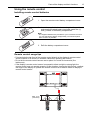
1. Open the remote control battery compartment cover.
2. Insert the supplied batteries ensuring that the positive
and negative marked battery terminals match the (+)
and (-) marks in the battery compartment.
Note:
• The supplied batteries are provided for your convenience so that
you can operate the display straight away. You should replace
them as soon as possible.
3. Refit the battery compartment cover.
Remote control usage tips
• Point and aim the top front of the remote control directly at the display's remote control
sensor window or IR sensor on extender cable when pressing the buttons.
• Do not let the remote control become wet or place it in humid environments (like
bathrooms).
• If the display’s remote control sensor is exposed to direct sunlight or strong light, the
remote control may not operate properly. In this situation, change the light source, readjust
the angle of the display or operate the remote control from a location closer to display’s
remote control sensor.
Max. 10 m
(32.8 feet)
14
Connection
Connection
Connecting audio/video signals
Pay attention to the following notes when you connect cables:
• Please turn off all devices.
• Familiarize yourself with the audio/video ports on the display and the devices you want to
use. Be aware that incorrect connections may adversely affect picture quality.
• Do not remove cables from the ports by pulling the cable itself. Always grasp and pull the
connectors at the end of the cable.
• Ensure that all cables are fully inserted and firmly seated.
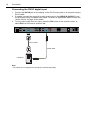
Connecting the VGA input
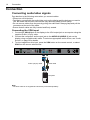
1. Connect the VGA IN jack on the display to the VGA output jack on a computer using the
supplied D-Sub (15-pin) cable.
2. Connect the computer’s audio output jack to the AUDIO IN (AUDIO 1) jack on the
display using a suitable audio cable. To select an appropriate audio source, see "Audio
Source" on page 39 for details.
3. To view images from this input, press the VGA button on the remote control, or select
VGA from the source selection bar.
D-Sub (15-pin) cable
Audio cable
Computer
Note:
• The audio cable is not supplied and should be purchased separately.
Connection
15
Connecting the YPbPr component video input
1. Connect the VIDEO IN (YPbPr) jacks on the display to the component output jacks on
an A/V device (such as a VCR or DVD player) using a component video cable.
2. Connect the A/V device’s audio output jacks to the AUDIO IN (AUDIO 2) jacks on the
display using a suitable audio cable. To select an appropriate audio source, see "Audio
Source" on page 39 for details.
3. To view video image from this input, press the YPbPr button on the remote control, or
select YPbPr from the source selection bar.
Component video cable
Audio cable
DVD player / VCR
Note:
• The cables are not supplied and should be purchased separately.
16
Connection
Connecting the S-Video input
1. Connect the VIDEO IN (S-VIDEO) jack on the display to the S-Video output jack on an
A/V device (such as a VCR or DVD player) using a composite video cable.
2. Connect the A/V device’s audio output jacks to the AUDIO IN (AUDIO 2) jacks on the
display using a suitable audio cable. To select an appropriate audio source, see "Audio
Source" on page 39 for details.
3. To view images from this input, press the INPUT button on the remote control and
select S-Video from the source selection bar.
S-Video cable
Audio cable
DVD player / VCR
Note:
• The cables are not supplied and should be purchased separately.
Connection
17
Connecting the composite video (AV) input
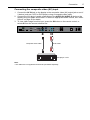
1. Connect the AV IN jack on the display to the composite video (AV) output jack on an A/
V device (such as a VCR or DVD player) using a composite video cable.
2. Connect the A/V device’s audio output jacks to the AUDIO IN (AUDIO 2) jacks on the
display using a suitable audio cable. To select an appropriate audio source, see "Audio
Source" on page 39 for details.
3. To view video image from this input, press the AV button on the remote control, or
select AV from the source selection bar.
Composite video cable
Audio cable
DVD player / VCR
Note:
• The cables are not supplied and should be purchased separately.
18
Connection
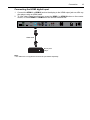
Connecting the DVI-D digital input
1. Connect the DVI-IN jack on the display to the DVI-D output jack on a computer using a
DVI-D cable.
2. If needed, connect the computer’s audio output jack to the AUDIO IN (AUDIO 1) jack
on the display using a suitable audio cable. To select an appropriate audio source, see
"Audio Source" on page 39 for details.
3. To view video image from this input, press the DVI button on the remote control, or
select DVI from the source selection bar.
DVI-D cable
Audio cable
Computer
Note:
• The cables are not supplied and should be purchased separately.
Connection
19
Connecting the HDMI digital input
1. Connect the HDMI-1 or HDMI-2 jack on the display to the HDMI output jack on a Blu-ray
disc player using an HDMI cable.
2. To view video image from this input, press the HDMI-1 or HDMI-2 button on the remote
control, or select HDMI1 or HDMI2 from the source selection bar.
HDMI cable
Blu-ray disc
player
Note:
• The cables are not supplied and should be purchased separately.
20
Connection
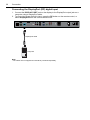
Connecting the DisplayPort (DP) digital input
1. Connect the DISPLAY PORT jack on the display to the DisplayPort output jack on a
computer using a DisplayPort cable.
2. To view video image from this input, press the DP button on the remote control, or
select DisplayPort from the source selection bar.
DisplayPort cable
Computer
Note:
• The cables are not supplied and should be purchased separately.
Connection
Connecting external speakers
The built-in amplifier on the display allows you to output audio signals through external
speakers. Connect external speakers to the SPEAKERS (R/L) jacks on the display.
External speakers
Note:
• You can use the remote control or the control panel on the display to adjust the volume.
21
22
Connection
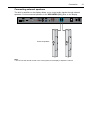
Connecting multiple displays
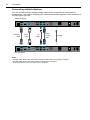
You can connect multiple displays serially (daisy chain connection) to a computer for
management. The number of displays you can connect serially depends on the resolution of
the input signal you use.
Additional display
RS-232C
cable
DVI-D
cable
AV
cable
D-Sub
(15-pin)
cable
IR cable
The first display
Notes:
• This RS-232C daisy chain connection requires an RS-232C port equipped computer.
• Use RS-232C serial null modem cables for daisy chain connection.
• Avoid using HDCP source for daisy chain connection.
Connection
23
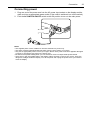
Connecting power
1. Plug one end of the power cord into the AC power input socket on the display and the
other end into an appropriate power outlet (if the outlet is switched, turn on the switch).
2. Flick the AC SWITCH ON/OFF switch to the ON position to turn on the main power.
2
1
Notes:
• The supplied power cord is suitable for use with 100-240V AC power only.
• The power cord and outlet illustrated may differ from the ones used in your region.
• Only use an appropriate power cord for your region. Never use a power cord which appears damaged
or frayed, or change the plug type on the power cord.
• Be aware of the power loading when you use extension cords or multiple outlet power boards.
• There are no user serviceable parts in this display. Never unscrew or remove any covers. There are
dangerous voltages inside the display. Turn off the power and unplug the power cord if you intend to
move the display.
24
Basic operations
Basic operations
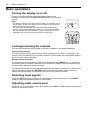
Turning the display on or off
To turn on or off the display, press the Power button on the
display’s control panel or the ON and OFF buttons on the remote
control.
Notes:
• The display’s standby mode still consumes power. To completely cut off
power supply, set the power switch to the off position or disconnect the
power cord from the power outlet.
• The display follows the VESA approved DPM Power Management
function. The power management function is an energy saving feature
that automatically reduces the display’s power consumption when the
keyboard or the mouse has not been used for a fixed period.
Locking/unlocking the controls
You can lock/unlock the control panel to prevent unwanted or accidental operations.
Control panel buttons
To lock/unlock the control panel buttons, press and hold the /- and /+ buttons on the
control panel simultaneously for at least 5 seconds. Once locked, the control panel buttons
do not function unless unlocked.
Remote control functions
To lock/unlock the remote control functions, press and hold the MENU and /- buttons on
the control panel for at least 5 seconds. Once locked, the display does not respond to any
remote control operations unless unlocked.
To lock/unlock both the control panel and remote control buttons, press the button for at
least 5 seconds, and then the ENTER button on the remote control. Once locked, the
control panel and remote control buttons do not function unless unlocked.
Switching input signals
Press the INPUT button or the input source buttons on the remote control, or the INPUT
button on the control panel to select an input signal.
Adjusting audio volume level
Press the /- or/+ button on the control panel, or the VOL+ or VOL- button on the remote
control to adjust the volume.
Network connection
25
Network connection
Connecting the display to a local area network
To set the display to connect to a local area network (LAN):
1. Connect a RJ45 cable to the corresponding ports on the display and your LAN switch or
router.
2. Open the OSD menu. Go to Setting > Control Setting and select LAN.
3. Go to Setting > Network Settings and perform either of the following settings
according to your network environment. You may need to contact your network
administrator for assistance on these settings.
- If you are in a DHCP environment (the IP address of the display will be automatically
assigned by a DHCP server), select DHCP > Execute and press the ENTER button
on the remote control. Once the display is successfully connected, the IP Address,
Subnet Mask, Default Gateway, Primary DNS, and Secondary DNS information
will be displayed.
- If you are not in a DHCP environment (the IP address of the display has to be
configured manually), select Manual > Execute and press the ENTER button on the
remote control. Contact your network administrator for information on the IP Address,
Subnet Mask, Default Gateway, Primary DNS, and Secondary DNS settings and
enter them accordingly using the numeric buttons on the remote control.
4. To save the settings and return to the previous menu, highlight Execute and press the
ENTER button on the remote control.
26
Network connection
Remote network control
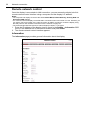
Once the display is connected via LAN connection, you can access the display’s built-in
remote network control interface using a computer and the display’s IP address.
Notes:
• The computer and display must have the same Subnet Mask, Default Gateway, Primary DNS and
Secondary DNS settings.
• You cannot control the display via the RS-232C connection when LAN control is in use. However, you
can set the TCP port number of the LAN connection to 4660 if you want to control the display using
RS-232 protocol. See "RS232 commands over the network" on page 34.
• The recommended Internet browser is Internet Explorer version 7.0 or higher.
1. Enter the IP address of the display (can be found in the Setting > Information OSD
menu) in the address bar of the Internet browser and press Enter.
2. The remote network control interface appears.
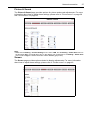
Information
The Information page provides general information about the display.
Network connection
27
Picture & Sound
The Picture & Sound page provides options for picture and sound adjustments. For more
information about how to adjust these settings, please refer to "Picture menu" on page 38
and "Sound menu" on page 39.
Note:
• Make sure the Setting > Control Setting menu is set to LAN, and the Setting > Power Save menu is
set to Low or Off if you would like to turn on the display from a web page. If the Setting > Power Save
menu is set to High, the Power ON button will be disabled (grayed out).
Screen
The Screen page provides options related to display adjustments. For more information
about how to adjust these settings, please refer to "Screen menu" on page 40.
28
Network connection
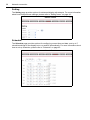
Setting
The Setting page provides options for advanced display adjustments. For more information
about how to adjust these settings, please refer to "Setting menu" on page 42.
Schedule
The Schedule page provides options for configuring current time and date, and up to 7
schedule settings for the display to turn on and off automatically. For more information about
how to set up schedules, please refer to "Schedule" on page 42.
Network connection
29
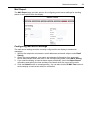
Mail Report
The Mail Report page provides options for configuring email server settings for sending
status or alert reports from the display.
Configuring mail server settings
The mail server settings must be correctly configured for the display to send email
messages.
1. Specify the recipient’s and sender’s email addresses and email subject under Email
Setting.
2. Obtain the server address, user name and password information from your email
server administrator and enter them in the corresponding fields under SMTP Setting.
3. If you want the display to send a status report periodically, check the Status Report
chceckbox and specify the time and day of the week when the report will be sent.
4. Click the Submit button to complete setup. You can also click the E-Mail Test button to
set the display to send a test email for verification.
30
Network connection
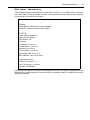
Status report
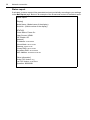
If activated, a status report will be generated and sent periodically according to your settings
in the Mail Report page. Below is an example of the format and content of the status report.
Status Report
[Display]
Model Name: (Model name of the display)
Serial No.: (Serial number of the display)
[STATUS]
Power Status: Power On
Video Source: HDMI1
PAP Enable: Off
[Network]
IP Address: xx.xx.xx.xx
Subnet Mask: xx.xx.xx.xx
Gateway: xx.xx.xx.xx
Primary DNS: xx.xx.xx.xx
Secondary DNS: xx.xx.xx.xx
MAC Address: xx:xx:xx:xx:xx:xx
[Other Information]
Scaler F/W Version: x.x
Lan F/W Version: x.xx Revx
Operation: 0000008H
Network connection
31
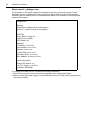
Alert report - thermal error
If the display’s ambient temperature exceeds 50oC (122oF) for over 30 seconds, a thermal
error alert report will be generated and sent to the specified recipient. Below is an example
of the format and content of the report.
Thermal Error
[Display]
Model Name: (Model name of the display)
Serial No.: (Serial number of the display)
[STATUS]
Power Status: Power On
Video Source: HDMI1
PAP Enable: Off
[Network]
IP Address: xx.xx.xx.xx
Subnet Mask: xx.xx.xx.xx
Gateway: xx.xx.xx.xx
Primary DNS: xx.xx.xx.xx
Secondary DNS: xx.xx.xx.xx
MAC Address: xx:xx:xx:xx:xx:xx
[Other Information]
Scaler F/W Version: x.x
Lan F/W Version: x.xx Revx
Operation: 0000008H
If a thermal error alert occurs, turn off the display and check if the space or passage around
the display for heat dissipation is blocked. Improve ventilation and air circulation around the
display if necessary.
32
Network connection
Alert report - voltage error
If a fluctuation in DC power supply to the display’s internal components (scaler IC and
backlight) occurs, a voltage error alert report will be generated and sent to the specified
recipient, and the display will turn off automatically. Below is an example of the format and
content of the report.
Voltage Error
[Display]
Model Name: (Model name of the display)
Serial No.: (Serial number of the display)
[STATUS]
Power Status: Power On
Video Source: HDMI1
PAP Enable: Off
[Network]
IP Address: xx.xx.xx.xx
Subnet Mask: xx.xx.xx.xx
Gateway: xx.xx.xx.xx
Primary DNS: xx.xx.xx.xx
Secondary DNS: xx.xx.xx.xx
MAC Address: xx:xx:xx:xx:xx:xx
[Other Information]
Scaler F/W Version: x.x
Lan F/W Version: x.xx Rev x
Operation: 0000008H
If a voltage error alert occurs, consider the following measures:
• Check if there are any loose connections between power cables and sockets.
• Make sure that the power supply is not accidentally turned off (if the power supply device/
outlet has a switch)
Network connection
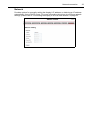
Network
Provides options for manually setting the display’s IP address or obtaining an IP address
automatically from a DHCP server. For more information about how to configure network
settings, please refer to "Connecting the display to a local area network" on page 25.
33
34
Network connection
RS232 commands over the network
The display also supports extending access to the RS232 commands over a network
connection. Below are the steps to follow for controlling the display over LAN through the
RJ45 connector.
1. Connect display & PC to hub or connect display to PC with LAN cable directly.
2. Set display IP address. (See "Connecting the display to a local area network" on page
25)
3. Commands are sent via TCP connection to port 4660. The commands are the same as
for the RS232 port.
4. You can test commands using any TCP utility program that allows you to enter binary
data in hexadecimal format.
The OSD (On-Screen Display) menu
35
The OSD (On-Screen Display) menu
OSD menu overview
Menu item
Picture
Sound
Screen
Function
Picture Mode
Backlight
Contrast
Brightness
Chroma
Phase
Sharpness
Color Temp.
Noise Reduction
Film Mode
Reset
Sound Mode
Treble
Bass
Balance
Surround
Speaker
Audio Source
Reset
PAP Setting
Display Wall
Aspect
Adjust Screen
Freeze
Language
Schedule
Power Save
Control Setting
Network Settings
Set Monitor ID
HDMI Control
Setting
Advanced
Information
All Reset
Category
See page
C
D
38
B
E
E
39
B
E
E
C
A
E
40
E
Auto Search
Auto Adjustment
Overscan
RGB Signal
Image Retention
OSD Rotation
OSD Info Box
Adaptive Contrast
Ambient Light Sensor
IR Out
E
B
E
42
36
The OSD (On-Screen Display) menu
Notes:
• Category A functions are only available when the signal is input from VGA IN.
• Category B functions allow for different settings for each input signal source.
• Category C functions allow for different settings for each input signal source and signal type (PC or
video).
• Category D functions allow for different settings for each input signal source, signal type (PC or video)
and Picture Mode.
• Settings of category E functions affect globally over all input signal sources, signal types and Picture
Modes.
The OSD (On-Screen Display) menu
37
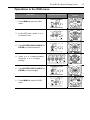
Operations in the OSD menu
Operation
1. Press MENU to open the OSD
menu.
2. In the OSD menu, press or to select an item.
3. Press ENTER/VIDEO SOURCE (or
ENTER) to confirm selection.
4. Press or to select a feature
and press or to adjust
settings.
5. Press ENTER/VIDEO SOURCE (or
ENTER) to save changes.
6. Press MENU to close the OSD
menu.
Using the control panel
Using the remote
control
38
The OSD (On-Screen Display) menu
Picture menu
Picture
Picture Mode
Backlight
Contrast
Brightness
Chroma
Phase
Sharpness
Color Temp.
Noise Reduction
Film Mode
Reset
:Move
Item
Picture Mode
Enter
Standard
80
50
50
25
25
10
Neutral
Off
Auto
:Enter
Exit
:Exit
Description
Provides preset picture modes (Vivid, Standard and Cinema) for using the
display in different environments, and one customizable picture mode
(Custom) for setting up a user preferred mode.
Adjusts the backlight intensity for the screen.
Backlight
Note:
• This feature is not available if the Ambient Light Sensor or Adaptive Contrast
function is set to On.
Contrast
Brightness
Chroma
Phase
Sharpness
Color Temp.
Noise
Reduction
Adjusts the contrast of the image.
Adjusts the brightness of the image.
Adjusts the color intensity of the image.
Adjusts the color tint of the image.
Adjusts the image sharpness.
Adjusts the color temperature.
Film Mode
Reduces electrical image noise caused by different media players.
If Auto is selected, the screen display will be automatically optimized by
detecting picture content and applying a reverse 3-2 or 2-2 pull-down process.
The picture will be clearer and more natural.
Notes:
• This function is not available when displaying Picture and Picture (PAP).
• This function may not be correctly processed depending on the input signal.
Reset
Resets all settings in the Picture menu.
The OSD (On-Screen Display) menu
Sound menu
Sound
Sound Mode
Treble
Bass
Balance
Surround
Speaker
Audio Source
Reset
:Move
Enter
Item
Sound Mode
Treble
Bass
Balance
Surround
Speaker
Standard
0
0
Center
Off
Internal
Audio1
:Enter
Exit
:Exit
Description
Adjusts the sound output from the speakers.
• Dynamic: Enhances treble and bass.
• Standard: Flat settings.
• Custom: Recalls the customized settings.
Adjusts the audio treble when Sound Mode is set to Custom.
Adjusts the audio bass when Sound Mode is set to Custom.
Adjusts the audio balance when Sound Mode is set to Custom.
Turns the surround mode on or off.
Sets the audio output source.
• Line-out: Selects the audio output source from AUDIO OUT (L/R) on the rear
connector panel.
• External: Selects the audio output source from SPEAKERS (R/L) on the rear
connector panel.
• Internal: Selects the audio output source from the internal speakers.
Sets the audio input source.
Audio Source
DisplayPort
Reset
HDMI1/HDMI2
Resets all settings in the Sound menu.
Audio1 Audio2
39
40
The OSD (On-Screen Display) menu
Screen menu
Screen
PAP Setting
Display Wall
Aspect
Adjust Screen
Freeze
:Move
Item
Enter
Full 2
Off
:Enter
Exit
:Exit
Description
• PAP: Turns on or off the PIP (Picture in Picture) and PBP (Picture by
Picture) functions.
• Active Picture: For the PIP, selects the main or sub picture to operate. For
the PBP, selects the left or right picture to operate. Swaps the main/ sub or
left/right pictures.
• Picture Size: Changes the size of the sub picture.
PAP Setting
(Picture and
Picture)
Notes:
• In PIP mode, when the aspect ratio of the sub picture’s source signal is 4:3 and its
Aspect setting is set to Full 1 or Real, the aspect ratio of the sub picture will be 4:3.
• In PBP mode, the aspect ratio of the sub picture is fixed as 16:9 regardless of the
Aspect setting.
• Picture Position: (PIP only) Changes the position of the sub picture.
Notes:
• PAP is not available for all signal source combinations. See "Supported PAP input
signal combination" on page 60 for more information on supported combinations.
• In PAP mode, only sound from the active picture will be available.
Display Wall
Aspect
• H. Monitors/V. Monitors: Sets the number of displays used in the
horizontal/vertical direction.
• H. Position/V. Position: Sets the horizontal/vertical position of the display
wall matrix.
• Frame Comp.: Adjusts images near the display edges for optimal
demonstration across the display wall.
• LED: Turns the power indicator on the display on or off.
• Power On Delay: Choose to enable or disable a sequence in turning on the
screen matrix. If enabled, the display will turn on with a maximum of 10second delay.
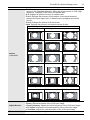
Sets the picture’s aspect ratio.
• Wide Zoom: Enlarges to fill screen with minimum distortion.
• Zoom: Enlarges the picture, keeping the same aspect ratio.
The OSD (On-Screen Display) menu
41
• Full: Enlarges the picture horizontally to fill the screen when the picture
source is 4:3 (Standard definition). When the picture source is 16:9 (High
definition), it displays in the same 16:9 aspect ratio.
• 4:3: Displays all picture source in 4:3 aspect ratio.
• Full 1: Enlarges the picture to fill the screen in the vertical direction,
keeping the same aspect ratio. A black frame may appear around the
picture.
• Full 2: Enlarges the picture to fill the screen.
• Real: Displays the picture in its original number of dots.
For video signal inputs
Aspect
(continued)
4:3 original source
16:9 Original source
Wide Zoom
Wide Zoom
Zoom
Zoom
Full
Full
4:3
4:3
For PC signal input
Real
Adjust Screen
Freeze
Full 1
Full 2
• Auto Adjustment: Sets whether to optimize image display for VGA input.
• Phase: Adjusts the phase of the VGA input image.
• Clock Frequency: Adjusts the clock frequency of the VGA input image.
• H. Position: Adjusts the horizontal position of the VGA input image.
• V. Position: Adjusts the vertical position of the VGA input image.
Freezes the displayed image.
42
The OSD (On-Screen Display) menu
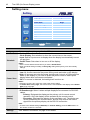
Setting menu
Setting
Language
Schedule
Power Save
Control Setting
Network Settings
Set Monitor ID
HDMI Control
Advanced
Information
All Reset
:Move
Item
Language
Schedule
Enter
:Enter
English
High
1
Off
Exit
:Exit
Description
Sets your preferred language for the OSD menu.
• Date and Time: Sets the current date and time.
• Clock Display: Sets whether to show the current time on the screen.
• Input: Sets an input source to display when the display is automatically turned
on next time.
• On/Off Timer: Sets when to turn on or off the display.
Notes:
• Set the current date and time before you set the On/Off Timer.
• When schedule settings overlap, the Everyday setting takes priority over other weekly
settings.
Power Save
Sets the display to enter the power saving mode when there is no signal detected.
• Low: All sources can enter the power saving mode and wake up the display.
• High: All sources can enter the power saving mode, but only a VGA signal can
wake up the display or you have to press the power button to wake up the
display when other sources are connected.
• Off: If no source is detected, the backlight will continue on.
Notes:
• RS-232C can bring any mode out of the power saving status.
• On Power Save setting High, the LAN function is not available if the display enters Power
Save or DC off mode.
Control
Setting
• RS-232C/LAN: Sets a terminal to control the display.
• IR Passthrough: Select it when multiple displays are connected via RS-232C
cables.
- Primary: Designate the display as the primary unit for remote control
operation. Only this display will be operated by the remote control.
- Secondary: Designate the display as the secondary unit. The display can
not be operated by the remote control, and will only receive the control
signal from the primary display via the RS-232 connection.
Note:
• To reset to the default settings (RS-232C) for Control Setting, press the INFO button on
the remote control for 5 seconds.
Network
Settings
See "Network connection" on page 25 for details.
The OSD (On-Screen Display) menu
Set Monitor
ID
HDMI
Control
43
Assigns an ID number for the current display when multiple displays are
connected.
Note:
• For use under the RS-232C control mode.
Uses the HDMI CEC (Consumer Electronics Control) industry standard protocol to
share functionality between connected devices and the display. To transfer system
commands, you need to use an HDMI cable to connect the display to a device
equipped with HDMI CEC. Select On in this menu and you can operate the main
functionalities on your display and the connected device with one remote control.
• Auto Search: Automatically detects available input sources.
• Auto Adjustment: Automatically optimizes image display for the VGA input.
• Overscan: Turns the overscan function on or off.
• RGB Signal: Sets the type of signal for a piece of video equipment or PC
connected to the HDMI of the display.
- If the color space of the input signal is YCbCr, the input range will be fixed as
16~235 regardless of your selection of PC or Video.
- If the color space of the input signal is RGB, the input range will be set to
0~255 if you select PC, and 16~235 if you select Video.
Note:
• This function is only available when the input source is HDMI at the following resolutions:
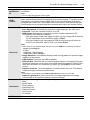
Advanced
- 480p60 (640x480@60)
- 576p50
- 720p50/60 (1280x720@60)
- 1080p50/60 (1920x1080@60)
• Image Retention: Automatically displays swift moving patterns to prevent image
retention on the screen.
• OSD Rotation: Changes the OSD orientation.
• OSD Info Box: When turned On, switching signal inputs, or changing timing, the
display will show the current input source and resolution onscreen. Select Off to
show the information box onscreen only when you press INFO on the remote
control.
• Adaptive Contrast: Turns the Adaptive Contrast function on or off. This feature
enhances image contrast for dark scenes.
Note:
• This feature is not available if the Ambient Light Sensor function is set to On.
Information
All Reset
• Ambient Light Sensor: When turned On, the image brightness will change
automatically as the ambient lighting conditions change.
Displays the following information of your display.
• Date
• Model Name
• Serial Number
• Operating Time
• Software Version
• LAN Version
• IP Address
Returns all settings to factory default values.
44
Product information
Product information
Specifications
Item
Backlight
Panel size
Pixel pitch (mm)
Native resolution (pixels)
LCD panel
Input
Output
Audio
Power
D-LED
55"
0.630 x 0.630
1920 x 1080
800
Brightness (cd/m2) (typical)
Contrast (typical)
1400:1
Adaptive Contrast
112000:1
Response time (ms) (typical)
10
Panel Bit
10-bit (8 bit + FRC), 1073.7M
Computer
VGA (D-Sub 15-pin), DVI (DVI-D), DisplayPort
Composite video (BNC jack), S-Video,YPbPr
Video
(RCA jacks), HDMI
Audio
L/R (RCA jacks), Line-in (3.5 mm Mini-jack)
IR
IR In (Jack Audio Green/Blue D3.6 ST)
Control
RS-232C (D-Sub 9-pin), LAN (RJ45 jack)
Computer
VGA (D-Sub 15-pin)
Video
DVI (DVI-D), Composite video (BNC jack)
Speaker
External speaker jacks (12W+12W, 8 Ohms)
Audio
L/R (RCA jacks)
IR
IR Out (Jack Audio Green/Blue D3.6 ST)
Control
RS-232C (D-Sub 9-pin)
Audio W (Amp)
12W x 2
Internal speaker
12W x 2
Supply
100 - 240V AC, 50/60 Hz
Consumption Max.
345W
Consumption Standby
< 0.5W
Operating Temperature
Operating Humidity
Environment Storage Temperature
Mechanical
Specifications
Storage Humidity
Display Orientation
Weight (kg)
Dimensions
(W x H x D) (mm)
Bezel Dimension T/B/L/R (mm)
0oC - 40oC, 32oF - 104oF
20% - 80% (without condensation)
-20oC - 60oC, 4oF - 140oF
5% - 95% (without condensation)
Landscape/Portrait
32
1215.2 x 686 x 115.25
3.4/1.9/3.4/1.9
Product information
Feature
VGA daisy chain
DVI daisy chain
RS232 control daisy chain
ID setting
Sharpness enhancement
Proof of image retention
Dimming control (Adaptive
Contrast)
Picture in Picture (PIP)
Picture by Picture (PBP)
10 Bit color processing
Built-in video wall support
Scheduling
Total turn-on time
Diagnostic DC voltage (12V/
5V)
Internal temperature Sensor
CEC control
45
O
O
O
O
O
O
O
O
O
O
O (10 x 10)
O
O
O
O
O
The terms HDMI and HDMI High-Definition Multimedia Interface, and the HDMI
Logo are trademarks or registered trademarks of HDMI Licensing LLC in the United
States and other countries.
Notes:
• Specifications and functions are subject to change without notice.
•
: supported, Blank: not supported
Product information
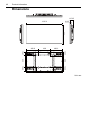
Dimensions
115.25
61.25
1215.2
686
46
406.9
400
408.3
143.7
126.7
400
433
142.3
126.3
322
569.8
323.4
Unit: mm
Product information
47
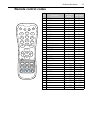
Remote control codes
No.
1
2
5
6
8
9
11
14
4
3
12
15
7
10
13
16
17
18
22
19
20
21
23
24
25
26
27
28
29 30 31 32
1
2
3
4
5
6
7
8
9
10
11
12
13
14
15
16
17
18
19
20
21
22
23
24
25
26
27
28
29
30
31
32
Function
OFF
INPUT
INFO
ON
1/VGA
2/DVI
3/DP
4/HDMI-1
5/HDMI-2
6/SDI
7/AV
8/YPbPr
9/MULTI-MEDIA
EXIT
0/MUTE
MENU
Up
Left/VOLENTER
Right/VOL+
Down
HOME
ESC
Up
ENTER
Left/Previous
Down
Right/Next
Reverse
Play/Pause
Stop
Forward
Customer
code
Hex code
00
00
00
00
00
00
00
00
00
00
00
00
00
00
00
00
00
00
00
00
00
0x41BE
0x41BE
0x41BE
0x41BE
0x41BE
0x41BE
0x41BE
0x41BE
0x41BE
0x41BE
0x41BE
0D
0B
22
0C
01
02
03
04
05
06
07
08
09
28
00
0F
20
11
0A
10
21
0x0BF4
0x01FE
0x0AF5
0x0FF0
0x13EC
0x0CF3
0x03FC
0x15EA
0x10EF
0x07F8
0x05FA
48
Product information
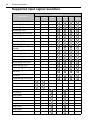
Supported input signal resolution
Input source
Resolution
640x480 @ 60Hz (VGA)
640x480 @ 72Hz
640x480 @ 75Hz
720x400 @ 70Hz
800x600 @ 60Hz (SVGA)
800x600 @ 75Hz
1024x768 @ 60Hz (XGA)
1024x768 @ 75Hz
1280x768 @ 60Hz
1280x800 @ 60Hz RB
(WXGA)
1280x800 @ 60Hz (WXGA)
1280x960 @ 60Hz
1280x1024 @ 60Hz (SXGA)
1360x768 @ 60Hz
1366x768 @ 60Hz (HD)
1400x1050 @ 60Hz
1600x1200 @ 60Hz
1680x1050 @ 60 Hz RB
(WSXGA)
1600x1050 @ 60Hz
(WSXGA)
1920x1080 @ 60Hz (FHD)
NTSC-M
NTSC-J
PAL-BDGHI
480i (60Hz)
576i (50Hz)
480p (60Hz)
576p (50Hz)
720p (25Hz)
720p (30Hz)
720p (50Hz)
720p (60Hz)
1080i (50Hz)
AV
S-Video
YPbPr
VGA
HDMI
DVI
Display
Port
Product information
1080i (60Hz)
1080p (24Hz)
1080p (50Hz)
1080p (60Hz)
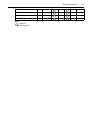
Notes:
•
: supported
• Blank: not supported
49
50
Product information
Supported PAP input signal combination
Main/Left picture signal source
AV
AV
S-Video
Sub/
Right
picture
signal
source
YPbPr
VGA
DVI
HDMI
Display
Port
Notes:
•
: supported
• Blank: not supported
S-Video
YPbPr
VGA
HDMI
DVI
Display
Port
Troubleshooting
51
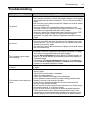
Troubleshooting
Problem
No picture
No sound
The computer input image
looks strange
The control panel buttons do
not work
The remote control does not
work
Solution
Check the following:
• Is the display turned on? Check the power indicator of the display.
• Is the signal source device turned on? Turn on the device and try
again.
• Are there any loose cable connections? Make sure that all cables
are connected firmly.
• Have you chosen an unsupported output resolution on the
computer? Refer to "Supported input signal resolution" on page
48 to select a supported resolution and try again.
• Have you chosen an unsupported output resolution on the DVD
or Blu-ray disc player? Refer to "Supported input signal
resolution" on page 48 to select a supported resolution and try
again.
Check the following:
• Have you turned on the mute function on the display or the input
source device? Turn off the mute function or increase the audio
volume level and try again.
• Are there any loose cable connections? Make sure that all cables
are connected firmly.
• Have you chosen an unsupported output resolution on the
computer? Refer to "Supported input signal resolution" on page
48 to select a supported resolution and try again.
• Use the Auto Adjustment function (Refer to "Adjust Screen" on
page 41) to let the display automatically optimize the display of
computer image.
• If the result of the Auto Adjustment function is not satisfactory,
use the Clock Frequency, Phase, H. Position and V. Position
functions to manually adjust the image.
Have you locked the control panel buttons? Unlock the buttons and
try again.
• Have you locked the remote control function? Unlock the function
and try again.
• Check for incorrect battery orientation.
• Check for dead batteries.
• Check your distance and angle from the display.
• Check whether remote control is properly being pointed at the
display’s remote control sensor window.
• Check for any obstacle between the remote control and the
remote control sensor window.
• Check that the remote control sensor window is not under strong
fluorescent lighting, or in direct sunlight.
• Check for any devices (computer or personal digital assistant,
PDA) nearby that transmit infrared signals which may cause
interference to signal transmission between the remote control
and the display. Turn off the infrared function of these devices.