1
22
Connection
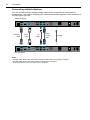
Connecting multiple displays
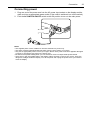
You can connect multiple displays serially (daisy chain connection) to a computer for
management. The number of displays you can connect serially depends on the resolution of
the input signal you use.
Additional display
RS-232C
cable
DVI-D
cable
AV
cable
D-Sub
(15-pin)
cable
IR cable
The first display
Notes:
• This RS-232C daisy chain connection requires an RS-232C port equipped computer.
• Use RS-232C serial null modem cables for daisy chain connection.
• Avoid using HDCP source for daisy chain connection.