1
•
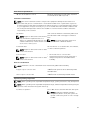
Standard Graphical Browser — This is enabled by default.
•
Text Browser — This is enabled using Console Redirection.
NOTE: By default, help text for the selected field is displayed in the graphical browser. To view the
help text in the text browser, press <F1>.
Entering System Setup
1.
Turn on or restart your system.
2.
Press <F2> immediately after you see the following message:
<F2> = System Setup
If your operating system begins to load before you press <F2>, allow the system to finish booting,
and then restart your system and try again.
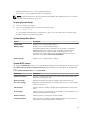
System Setup Main Menu
Option
Description
System BIOS
Enables you to configure BIOS settings.
iDRAC Settings
Enables you to configure iDRAC settings.
The iDRAC Settings utility is an interface to set up and configure the
iDRAC parameters by using UEFI. You can enable or disable various
iDRAC parameters by using the iDRAC Settings utility. For more
information about this utility, see the Integrated Dell Remote Access
Controller User’s Guide at dell.com/esmmanuals.
Device Settings
Enables you to configure device settings.
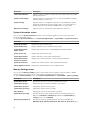
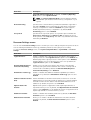
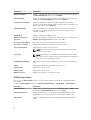
System BIOS screen
By using the System BIOS screen you can view the BIOS settings as well as edit specific functions such as
Boot Order, System Password, Setup Password, setting the RAID mode, and enabling or disabling USB
ports.
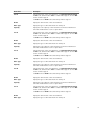
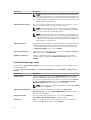
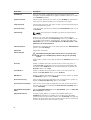
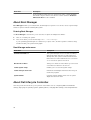
In the System Setup Main Menu, click System BIOS.
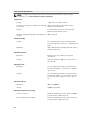
Menu Item
Description
System Information
Displays information about the system such as the system model name,
BIOS version and Service Tag.
Memory Settings
Displays information and options related to the installed memory.
Processor Settings
Displays information and options related to the processor such as speed,
cache size, and so on.
SATA Settings
Displays options to enable or disable the integrated SATA controller and
ports.
Boot Settings
Displays options to specify the boot mode (BIOS or UEFI). Enables you to
modify UEFI and BIOS boot settings.
Network Settings
Displays options to change the network settings.
Integrated Devices
Displays options to enable or disable integrated device controllers and
ports, and to specify related features and options.
25