1
EN
Transmitter Setup
IMPORTANT: Set up your transmitter before binding
your transmitter to the aircraft.
Before binding a non-computerized transmitter,
ensure all servo reversing is set to normal and trim
is at center.
Dual Rates and Expo
After first flights, you may adjust Dual Rates
and Expo in your transmitter or refer to the
AR6335 receiver manual for Dual Rates and Expo
adjustment.
Flight Modes
The installed AR6335 receiver has been
programmed for operation specifically in this
aircraft, providing the following selectable flight
modes.
The flight modes can be changed using the Gear/
Channel 5 Switch.
Selecting Flight Modes may vary depending on
your transmitter’s Gear / Channel 5 switch type (2
position or 3 position). Refer to the provided charts
to fully understand how your transmitter switches
will operate this aircraft.
IMPORTANT: It is recommended to take first flights
in Precision Mode (Low Rate).
Precision Mode
This mode uses low rates and low gains to deliver
precise response at high airspeeds. Use this mode
to trim the aircraft and fly fast precision maneuvers.
3D Mode
This mode uses high rates and high gains to deliver
extreme maneuverability with maximum stability at
low airspeeds. Use this mode for slow flying and 3D
maneuvers such as Hovers and Harriers. Flying at
high speed in this mode will cause oscillation.
NOTICE: If oscillation occurs at high speed, refer to
the Troubleshooting Guide for more information.
Computerized Transmitter Setup
(DX6i, DX6, DX7S, DX8, DX9, DX10t and DX18)
Start all transmitter programming with a blank
ACRO model (do a model reset), then name the
model. Leave all settings at default.
DX6i only: Reverse channel 5.
IMPORTANT: After you set up your model, always
rebind the transmitter and receiver to set the
desired failsafe positions.
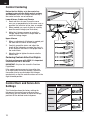
Quickstart
1. Set a Blank model. (DX6i only: reverse
channel 5)
2. Bind
3. Choose a Flight Mode = Gear / Ch 5
(Start with Precision Mode)
4. Go fly
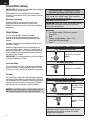
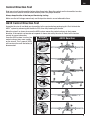
2 Position Gear/Ch 5 Switch Transmitters
Precision Mode (Low Rate)
Position 0 is Precision
Mode
3D Mode (High Rate)
Position 1 is 3D Mode
3 Position Gear/Ch 5 Switch Transmitters
Precision Mode (Low Rate)
Positions 0 and
1 are Precision
Mode
3D Mode (High Rate)
Position 2 is 3D
Mode
Tip: If desired, assign Gear / Channel 5 to a
2-position switch of your choice. Refer to your
computerized transmitter manual for switch
assignment instructions.
4