1
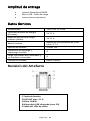
Operation 1. Function keys By briefly pressing, the LED lights will indicate the current battery status and the Powerbank is activated. If no device is connected to the Powerbank, or the connected device is fully charged, the Powerbank automatically switches to standby mode after a time interval of 5 seconds. 2. Status display LED The individual LEDs indicate the remaining energy of the Powerbank: LED light % - Energy 1 % - 25 % 26 % - 50 % 51 % - 75 % 76 % - 100% LED 1 LED 2 LED 3 LED 4 ● ● ● ● ○ ● ● ● ○ ○ ● ● ○ ○ ○ ● 3. Starting-Up / Powerbank Charge / Charging Connected Devices a) Charging the Powerbank Please connect the included Micro USB cable to the micro USB port of the Powerbank, and connect the other end of the USB cable to a standard USB port of a computer or USB power adapter. The charging process and current charging status is indicated by the LED status lights. If the Powerbank is fully charged, the LED status lights remain illuminated. The required charging time of the Powerbank depends on the selected charging source and the output power (max. 5V/ 2.1 A). Page 5 of 8 EN