1
Step 2: Mounting the Monitor Brackets
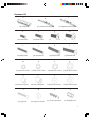
The hardware kit includes bolts of various diameters and lengths to ensure optimal installation.
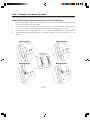
Step 2A - Mounting the Monitor Brackets to a TV with a Flat Back
1.
2.
3.
4.
Place your TV screen down on a soft, flat surface, and locate the threaded mounting holes that
are located on the back of the display.
Determine the depth of the mounting holes by inserting a straw or toothpick. Select the bolt
(e, f, g, h) with the correct depth and diameter of the mounting holes of your TV.
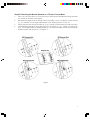
Please make sure the monitor brackets (b, c) are vertically centered and level with each other.
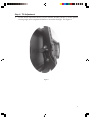
Thread the bolts into the TV using the correct lock washer (m, n, o, p) and washer (s, t). See
Figure 4.
Figure 4
6