1
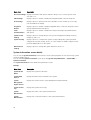
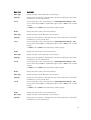
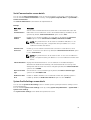
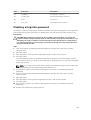
Menu Item
Description
Authorized
Signature
Database
Imports, exports, deletes, or restores entries in the Authorized Signature Database
(db).
Forbidden
Signature
Database
Imports, exports, deletes, or restores entries in the Forbidden Signature Database
(dbx).
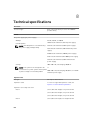
Miscellaneous Settings screen details
You can use the Miscellaneous Settings screen to perform specific functions such as updating the asset
tag, and changing the system date and time.
You can view the Miscellaneous Settings screen by clicking System Setup Main Menu → System BIOS →
Miscellaneous Settings.
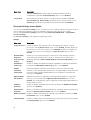
The Miscellaneous Settings screen details are explained as follows:
Example
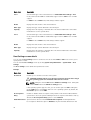
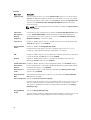
Menu Item
Description
System Time
Enables you to set the time on the system.
System Date
Enables you to set the date on the system.
Asset Tag
Displays the asset tag and enables you to modify it for security and tracking
purposes.
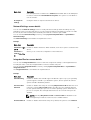
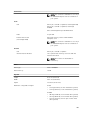
Keyboard
NumLock
Enables you to set whether the system boots with the NumLock enabled or
disabled. By default the Keyboard NumLock is set to On.
NOTE: This option does not apply to 84-key keyboards.
F1/F2 Prompt on
Error
Enables or disables the F1/F2 prompt on error. By default, F1/F2 Prompt on Error is
set to Enabled. The F1/F2 prompt also includes keyboard errors.
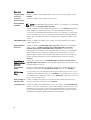
Load Legacy
Video Option
ROM
Enables you to determine whether the system BIOS loads the legacy video (INT
10H) option ROM from the video controller. Selecting Enabled in the operating
system does not support UEFI video output standards. This field is only for UEFI
boot mode. You cannot set this to Enabled if UEFI Secure Boot mode is enabled.
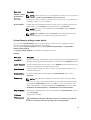
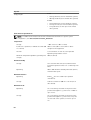
In-System
Characterization
This option enables or disables In-System Characterization. By default, In-System
Characterization is set to Disabled. The two other options are Enabled and
Enabled - No Reboot.
NOTE: The default setting for In-System Characterization is subject to change
in future BIOS releases.
When enabled, In-System Characterization (ISC) executes during POST upon
detecting relevant change(s) in system configuration to optimize system power and
performance. ISC takes about 20 seconds to execute, and system reset is required
for ISC results to be applied. The Enabled - No Reboot option executes ISC and
continues without applying ISC results until the next time system reset occurs. The
Enabled option executes ISC and forces an immediate system reset so that ISC
49