1
2. Setting up the monitor
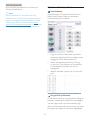
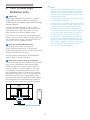
Connecting to your computer
2.2 Operating the monitor
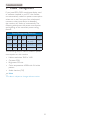
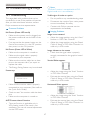
Description of the control buttons
1
2 3 4 5 6
8
7
1
1
2
3
4
5
6
7
8
7
6
5
4
3
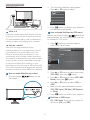
DC power input
DVI input
MHL-HDMI input
Display port input
VGA input
Audio input
Earphone jack
Kensington anti-theft lock
3
7
1
2
3
4
5
6
7
6
5
4
2
1
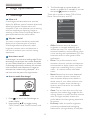
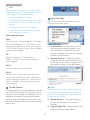
Switch monitor’s power ON and
OFF.
Access the OSD menu.
&RQÀUPWKH26'DGMXVWPHQW
Adjust the OSD menu.
User preference key. Customize
your own preference function
from OSD to become the “user
key”.
PIP/PBP/Off/Swap
Return to previous OSD layer.
SmartImage hot key. There are 6
PRGHVWRVHOHFW2IÀFH3KRWR
Movie, Game, Economy, Off.
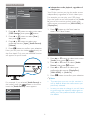
Customize your own ´8SERµ Ney
This hot key allows you to setup your favorite
function key.
1. Press
button on the front bezel to
enter OSD Menu Screen.
5