1
3 Get started
Always follow the instructions in this chapter in
sequence.
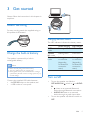
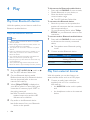
Attach the string
DC IN
For easy carrying, attach the supplied string to
this speaker as illustrated.
Charging indicator status
The LED indicator indicates the battery status.
Charge the built-in battery
The speaker is powered by a built-in
rechargeable battery.
"OFF"
mode
"AUDIO
IN" mode
"Bluetooth"
mode
Note
•• Before use, fully charge the built-in battery.
•• The micro USB socket is for charging only.
•• Rechargeable battery has a limited number of charge
cycles. Battery life and number of charge cycles vary by
use and settings.
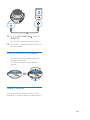
Connect the supplied USB cable between
• the DC IN socket on the speaker, and
• a USB socket of a computer.
Under charging
Flashing white
Fully charged
Off
Flashing white
Solid white
Flashing blue
or solid blue
(depending
on Bluetooth
connection
status)
Flashing blue
or solid blue
(depending
on Bluetooth
connection
status)
Turn on/off
•
•
To turn the speaker on, slide the
OFF/AUDIO IN/ switch to or AUDIO
IN.
•
: Listen to an external Bluetooth
device through Bluetooth connection.
• AUDIO IN: Listen to an external
device through an audio input cable.
To turn the speaker off, slide the switch to
OFF.
EN
5