1
BATTERY OPERATION
Disconnect the AC Cord Set completely. Open the Battery Compartment Door and insert 6 pieces
UM-2 "C" size batteries into the battery compartment with battery polarity as shown inside the
battery compartment.
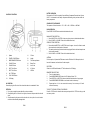
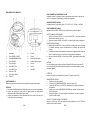
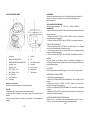
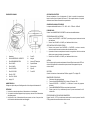
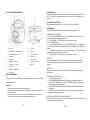
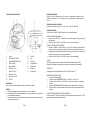
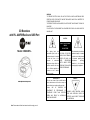
LOCATION OF CONTROLS
SEQUENCE OF FUNTION MODE
The sequence of the function mode is : “CD → USB → AUX → FM Radio → AM Radio”
RADIO OPERATION
Press POWER / SOURCE button and select the desired radio mode.
MANUAL STATION SELECTION
1. Press the SKIP/TUN > or SKIP/TUN < button step by step to tune to the desired radio stations
2. Press VOLUME + or VOLUME – Button for the desired volume level;
SEARCH STATION OPERATION
1.
2.
3.
1.
Speaker
11.
CD door
2.
POWER / SOURCE Button
12.
Handle
3.
MODE/MEMORY/PROG Button
13.
FM Telescope Antenna
4.
VOLUME – Button
14.
Battery Door
5.
VOLUME + Button
15.
Aux-in Jack
6.
SKIP / TUN < Button
16.
AC Socket
7.
SKIP / TUN > Button
17
USB Slot
8.
M+ / STOP Button
9.
PLAY / PAUSE Button
10.
LCD display
AC OPERATION
Connect the plug to the AC socket of the unit and the other end to a standard AC outlet.
ATTENTION
1. Do not plug or unplug the power cable while you have wet hands;
2. When planning not to use this unit for a long time, disconnect the power cable from the wall
outlet;
3. When disconnecting the power cord from the wall outlet, do not pull on the cord in order to
avoid shock risks caused by damaged cable.
Press and hold the SKIP/TUN > or SKIP/TUN < button for approx. 1 second, it will start to search
the next radio station in the direction of the search.
The search operation simply finds stations with strong signals. Stations with weak reception can
only be tuned in manually.
Press VOLUME + or VOLUME – Button for the desired volume level;
ANTENNA
For best reception, fully extend the FM Antenna to receive FM stations. For AM reception, the unit
has a built-in antenna, turn the whole unit for best reception.
FM STEREO
When turn to a FM Stereo Broadcast, “ST” will be shown on the LCD display.
MEMORIZE RADIO STATIONS
1.
Tune to the desired station.
2.
Press MODE/MEMORY/PROG button, the LCD display will show ‘ P01.
3.
Press SKIP/TUN > or SKIP/TUN < button and select the desired number of your program
4.
Press MODE/MEMORY/PROGRAM to store the radio station in the memory.
5.
Repeat steps from 1 to 3 to store more tracks in memory. You can store up to 20 radio
stations in the memory.
TO SELECT THE RADIO STATION IN THE MEMORY
Press M+ / STOP button for the radio station memory and press the M+ / STOP button skip up to the
next memory station.
ENG 1
ENG 2