1
respectively [H] is displayed for an optic warning for hot cooking
zone.
Switching Off all cooking zones:
Immediately switching off all cooking zones is always possible by
using the ON/OFF key.[H] possibly appears on all hot cooking
zones . All other cooking zone displays remain black.
Power Stages
The power of the cooking zone is adjustable in 9 different stages;
the respective stage is displayed ([1“] to [9]) via LED-sevensegment-displays.
Automatic Parboiling (selectable)
When Automatic parboiling is activated, the power of the
cooking zone is switched to 100 % for a period of time depending
on the selected onboiling stage. As soon as the parboiling time is
over, the preselected onboiling stage is valid again.
Procedure to start Automatic parboiling:
The control unit is switched on and a cooking zone is selected.
After setting cooking stage “9“ Automatic parboiling is activated
by pressing at the right slider sensor. “A” appears on the display
immidiately.
Now the required onboiling stage is selected via Slider area . The
“A” symbol appears after 3 sec upon releasing the key alternating with the onboiling stage (500 msec „A“ and 1.5 sec
onboiling stage).
The onboiling stage may be changed within 15 sec after
activation without switching off the parboiling boost. Therefore,
the cooking zone is to be selected and the relevant cooking zone
is to be set afterwards.
In case of a selection after 15 sec a lower cooking stage may be
set; automatic onbboiling is switsched of.
a higher onboiling stage may be selected; this leads to the
parboiling time being automatically brought in line with the
currently selected onboiling stage
Power function
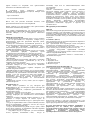
After selection of a respective cooking zone, the power function
can be selected directly via the power function key “3”. By
means of this function certain cooking zones are enabled to
receive power over the nominal. If the desired cooking zone has
the capacity to activate the booster, the display shows a “P“
symbol. The boosting time is limited to 8 min to protect cooking
utensils. After the booster is switched off automatically, the
cooking zone continues operation on power level “9”. The
booster can be reactivated after some minutes.
In case that the pan is removed from the cooking zone during boosting,
the boosting function remains active and boosting time continues.
Residual Heat
The determination of how long a cooking zone has residual heat
after operation and switch off – which may lead to burnings
when contacting – is calculated.
Status is calculated depending on:
Selected power stage („0“ bis „9“)
On/Off Time of the Relays
The residual heat indication of each cooking zone remains activated
until the calculated temperature is smaller than + 60 °C.
Automatic Switch-off (Operating Time Limitation)
For each activated cooking zone a max. operating time is
defined. The max. operating time is depending on the selected
cooking stage. After the expiration of the max. operating time
the cooking zone is automatically switched off.
Each actuation of the cooking zone status (changing the cooking
level etc.) resets the count-down timer to the initial starting
value.
Timer settings takes priority vs. operating time limitations for high
cooking stage setting.
Protection against unintentional activation
The electronic system cuts off automatically in case of an
identified permanent use of keys for about 10 seconds. The
control unit releases an audible signal for 10 sec of the
malfunction (period: 1000 msec, 500 msec ON) and the error
code “E R 0 3” flashes on the display (0.5 s ON 0.5s OFF). If the
permanant actuation exceeds 10sec, alone the error code “ER
03“ keeps flashing as long as the malfunction occurs and is
identified as such. In case the cooking zone is at stage “hot“ the
[H] symbol alternates with the error code (0.5 sec Symbol 0.5
sec “H“).
Water sprinkled on the glass surface does not always lead to a
key actuation and cannot be surely detected. ( After wiping the
glass covering the keys, all keys are ready for operation in no
time).
If no cooking zone is activated within 20 sec after pressing
POWER ON, the control unit is reset to Off-mode (black
displays).
Key Lock (Optional)
The actuation of the key lock key “4” in the wait or active mode
locks the keyboard and the assigned key-lock LED “7” is
statically illuminated. Here, the actuation times of the key-lock
key have to be taken into account. The control continues to work
in the set mode, but may no longer be operated with any key,
except the key-lock key itself or the on/off key “1”.
The switching OFF with the on/off key “1” is also possible in the
locked condition. The assigned key-lock LED “7” fades when
switching off the control The key-lock function included LED is
active again when switching on (in wait mode 10 s) until this is
deactivated by a repeated actuation of the key-lock key. The
activation/deactivation of the key-lock function in the off mode is
not possible.
When programmed timers expire the respective timer alarms
may be confirmed by actuating any key without needing to
unlock the control.
The repeated actuation of the key-lock key in the wait or active
mode unlocks the keyboard and the assigned key-lock LED
fades. All sensor keys may be operated as usual again.
Acoustic Feedback (Buzzer)
The following activities occurring during operation of the TC unit
are fed back audibly via a buzzer:
Short single tone for regular actuation of a key
Longer, intermittent tone for permanent use of keys over a
longer period of time (≥ 10 sec)
Expiry of the timer