1
EASYA
User manual
21
Remote learning
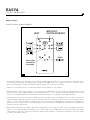
• In a process of ultimate simplification of the system, each of the functions of the Focal remote can be programmed
in an infrared remote control of your choice (TV, ADSL Box, CD player or universal) through the remote programming mode. The procedure is described below. Once your remote will be programmed, the keys saved by the user
will control the Hub.
Push and hold 3 seconds the up arrow
button on Focal remote control in
direction to the Hub
All LED flash
a couple of times
Displays the remote
learning mode ON
Push once the Focal
remote button to program
in direction to the Hub
To program
another button
Push once the button
you want to program
on the infrared remote,
in direction to the hub
To validate, push a second time
the button that you want
to program on the
infrared remote,
in direction to the Hub
When all the buttons are
programmed, press and hold 3 seconds
the up arrow button on Focal remote
in direction to the hub to go out
of the remote learning mode
Note : To erase programming on the Infrared remote control, press and hold for 10 seconds the up arrow
on the remote Focal. If no key is pressed for 1 minute then programming mode will become inactive.