1
Removing the Power Switch
1.
Follow the procedures in Before Working Inside Your Computer.
2.
Remove the:
a.
b.
c.
d.
cover
front bezel
optical drive
drive cage
3.
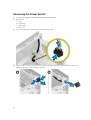
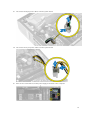
Disconnect the power-switch cable from the system board.
4.
Press the clips on both side of the power switch to release it from the chassis and remove the power
switch along with its cable from the computer.
22