1
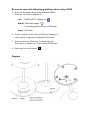
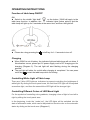
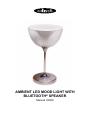
OPERATING INSTRUCTIONS Function of table lamp ON/OFF ON: Switch to the middle “light bulb” on the button, 33040 will apply to the table lamp function. In addition, the LED indicator lights (below picture) and the table lamp will light-up for 2 seconds at the same time, and then the lights off. OFF: Please do a long pressing the on/off key for 1~2 seconds to turn off. Charging When 33040 is out of battery, the indicator light and table lamp will not shine. If this situation occurs, please put 5V power supply cord to DC charging port for charging (Diagram 2). The red light will start flashing during the charging process. The red light will shine for a while after charging is completed. You can press on/off key to start the table lamp while it’s shining. Controlling White Light of Table Lamp There are 2 blue LED lights as indicators to present controlling the brightness of white light. By sliding the touch panel area, the first blue LED light will be adjusted as medium light, and then the second blue LED light will be stronger light. Controlling Different Colors of LED Mood Light For the symbols of controlling color gradients, changing colors of light is from left to right by sliding the touch panel area. In the beginning, touch the “mode key”, the LED lights will be switched into the state of automatic mode, which can be adjusted into favorite color on the automatic status by sliding on the touch area. (Diagram 1)