1
Early 2008 Model:
2
5. Remove the port access covers 2 from the slots in which you plan to install the card or
remove an existing graphics card if present (Figure 2).
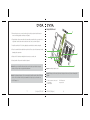
6. Plug both ends of the power cables 3 that came with your card into the connectors on the
logic board 5 and the other ends into the back of the card 1, as shown in Figure 3.
7. Install the card into the PCI slot 4 by aligning the card with the slot and the card guide.
8. Press the card until it is inserted all the way in the slot. Press only on the bare areas to avoid
damaging the components.
9. Replace the PCI brackets 2 and tighten the screws to secure the card.
1
4
3
10. Stand your Mac Pro up and re-install the side panel.
Note: When you re-install the side panel, make sure the latch is up. Hold the side panel
securely so it stays in place as you push the latch down.
Note: For optimum performance, it is recommended to install the card into either PCI Express
slot #1 or #2. On the Mac Pro Early 2008 and Mac Pro Early 2009, slots #1 and #2 are
x16 PCI Express 2.0.
7
(English) GTX 285
5
Figure 3. Installing the Graphics Card
Note: This image is of the early 2008 model, the layout for the early 2009 model may differ
slightly.
1. Power connectors on the card
2. PCI bracket
3. Power cables
GTX 285 (English)
4. PCI Express slot
5. Logic board
8