1
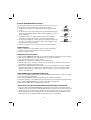
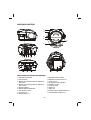
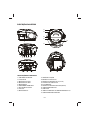
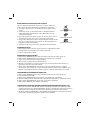
POWER SUPPLY BATTERY OPERATION 1. Remove the battery compartment cover gently. 2. Install 8 x 'C' size batteries (UM-2 or equivalent) while observing the correct polarities. 3. Replace the battery compartment cover. NOTE: The AC/DC adapter must be detached from the DC IN jack of the player for battery operation. Leaking batteries may damage the battery cabinet and the player as a whole, so they should be removed from the cabinet when becoming flat or when the player is not to be played on batteries for some time. DC INPUT OPERATION Plug the supplied adapter to the DC IN jack on the unit and to the main power. NOTE: If not any audio signal inputs to the unit in about 10 minutes, the unit will enter to standby mode automatically (except at FM radio mode). FM RADIO TUNING THE FM RADIO 1. The standby indicator will light once connect the main unit to the main power. Press the POWER button to turn the unit on (the standby indicator will be off ). 2. Press the SOURCE button repeatedly to switch the unit to the FM radio mode. 3. To launch the auto-searching, press and hold the SKIP DN/TUN- button or SKIP UP/TUN+ button several seconds and then release it. 4. Press the SKIP DN/TUN- button or SKIP UP/TUN+ button to tune the radio stations manually. 5. Adjust the volume level to a comfortable listening level. 6. Press the POWER button to turn off the unit. NOTE: When FM (stereo) station is received, the FM stereo icon will be displayed on the screen. The FM TELESCOPIC ANTENNA is directional. When you are receiving an FM broadcast, fully extend the TELESCOPIC ANTENNA and rotate it for the best reception. STORING YOUR FAVORITE RADIO STATION 1. Tune to your favorite station first; press the MODE/PROG/MEM button for storing the current station until memory cell number flashes on the screen. 2. Use the STOP/CH- button or the PLAY/PAUSE/CH+ button to select the corresponding memory cell among P01-P20 for storing the station. 3. Confirm your selection by pressing the MODE/PROG/MEM button. 4. During radio playback, press the STOP/CH- button or the PLAY/PAUSE/CH+ button repeatedly to recall the preset stations. GB-2