1
12.
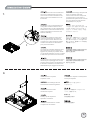
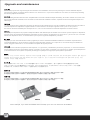
Please remove 5.25” drive bay cover
and insert the optical drive from the
front into the case.
Снимите крышку отсека дисковода 5,25
дюймов и вставьте оптический дисковод
с передней стороны корпуса.
Bitte entfernen Sie die Abdeckung
des 5,25 Zoll-Einschubs; stecken
Sie das optische Laufwerk von vorne
in das Gehäuse.
5.25” 드라이브 베이 커버를 제거한 후,
광드라이브를 케이스 전면으로 부터
삽입합니다.
Veuillez retirer le cache de la baie
5.25” et insérez le lecteur optique
par l'avant du boîtier.
5.25インチのドライブベイカバーを取
り外し、光学ドライブを正面からのケ
ースに入れます。
Por favor, quite la cubierta para la
bahía de dispositivos de 5,25” e
inserte el dispositivo óptico por la
parte frontal de la carcasa.
移除光碟機檔板,
將光碟機由前方插入機殼。
Rimuover il cover del bay da 5,25” ed
installare il drive ottico inserendolo nel
case dalla parte frontale.
移除光驱文件板,
将光驱由前方插入机壳。
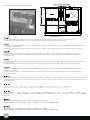
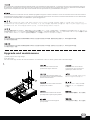
Connect the cables required by the
optical drive then push it into the case
further until it lines up with the front panel.
Due to limited space, please secure with
thumb screws.
Подсоедините кабели оптического
дисковода и вставьте его в корпус таким
образом, чтобы он совпадал с передней
панелью. Закрепите винтами. Из за
ограниченного пространства их
необходимо закрепить винтами.
Schließen Sie das optische Laufwerks
an; schieben Sie es dann tiefer in das
Gehäuse hinein, bis es bündig mit der
Frontblende abschließt. Befestigen Sie
es mit Schrauben. Aus Platzgründen mit
Rändelschrauben fixieren.
광드라이브에 필요한 케이블을 연결하고,
케이스에 밀어 넣어 전면 패널과 정렬되도록
맞춘 후 나사로 고정합니다. 공간의 제약이
있을 수 있으니 손나사로 고정 하시기
바랍니다.
Branchez les câbles du lecteur optique
et poussez le à l'intérieur du boîtier afin
de l'aligner avec la façade du boîtier.
Fixez le avec des vis. A cause de l'espace
limité, veuillez le fixer avec des vis à main.
光学ドライブに必要とされるケーブルを
接続し、フロントパネルの面に合うまで、
ケースに押し込みます。 ネジで固定しま
す。スペースが限られるので、サムスク
リューで固定します。
繁体中文
简体中文
13.
繁体中文
Conecte los cables que precise el dispositivo 先將光碟機連接線接上,之後才將光碟機推
óptico y luego empújelo hacia el fondo 至與前面板齊平。由於空間限制,請使用
de la carcasa hasta que se alinee con el 內附的手鎖螺絲。
panel frontal. Fíjelo con tornillos. Debido
al espacio limitado, por favor use tornillos
manuales.
简体中文
Connettere i cavi necessari al drive ottico, 先将光驱连接线接上,之后才将光驱推至与
quindi allinearlo al frontale del case, a questo 前面板齐平。由于空间限制,请使用内附
punto serratelo alla struttura con le viti. 的手锁螺丝。
A causa dello spazio limitato, si prega di
utilizzare le viti fornite a corredo.
11