1
USING THE SPEAKERPHONE
1. When a call is received, a ringtone will sound through the speakers.
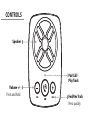
2. Press the Play/Pause/Speakerphone button to accept the call, or accept
the call with the native controls on the connected device.
3. The incoming call received through the device will now be heard through
the speakers.
4. To end the call, press the Play/Pause/Speakerphone button or end the call
using the native controls on the connected device.