1
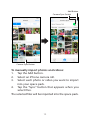
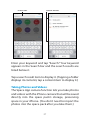
To automatically import new photos and videos:
Slide the Camera Sync switch to the right (green).
space pack will import all photos and videos from
the iPhone that have not already been imported.
If you leave the Camera Sync switch set to green,
every time you launch the Space App it will
automatically import any new photos and videos
you have saved in your iPhone since the last time
you imported photos and videos. Note: You cannot
manually import photos and videos when the
Camera Sync switch is set to green.
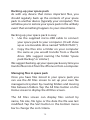
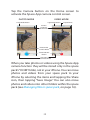
The first time you import photos or videos, space
pack will automatically create a folder named “DCIM”
containing a sub-folder named “0000SYNC,” where
all imported photos and videos will be stored. You
can move the photos and videos into other folders
(see Managing files in space pack, on page 16.)
IMPORTANT: Your space pack does not automatically
delete the original photos and videos from your
iPhone after it imports them. If you manually delete
the original photos and videos from your iPhone,
your space pack increases the amount of storage
space available on your iPhone for other files. If you
leave the original photos and videos on your iPhone,
your space pack acts like a back-up drive for them.
15