1
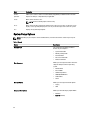
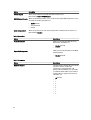
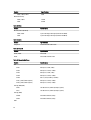
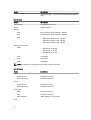
Option
Description
Date/Time
Allows you to set the date and time. The
changes to the system date and time takes
effect immediately.
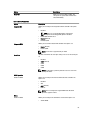
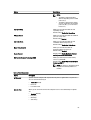
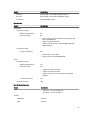
Table 3. System Configuration
Option
Description
Integrated NIC
Allows you to configure the integrated network controller. The options
are:
Integrated NIC 2
•
Disabled
•
•
•
NOTE: You can use the Disabled option, only if Active
Management Technology (AMT) option is disabled.
Enable UEFI Network Stack
Enabled (Default)
Enabled w/PXE
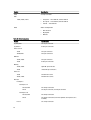
Allows you to control on-board LAN controller. The options are:
•
•
Enable (Default)
Enable w/PXE
NOTE: This feature is supported only on T7610
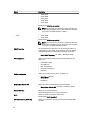
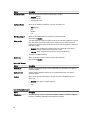
Serial Port
Identifies and defines the serial port settings. You can set the serial port
to:
•
•
•
•
•
Disabled
COM1 (Default)
COM2
COM3
COM4
NOTE: The operating system may allocate resources even if the
setting is disabled.
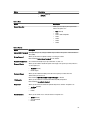
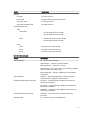
SATA Operation
T3610 and T5610
Allows you to configure the internal SATA hard-drive controller. The
options are:
•
•
•
•
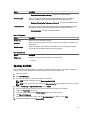
Disabled
ATA
AHCI (Default)
RAID On
NOTE: SATA is configured to support RAID mode. No SATA
operation support in T7610.
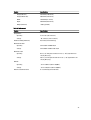
Drives
T3610 and T5610
Allows you to configure the SATA drives on board. The options are:
•
SATA3–HDD0
55