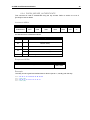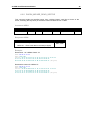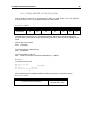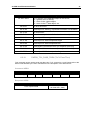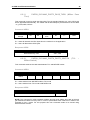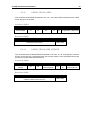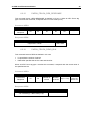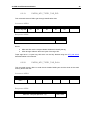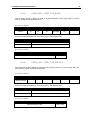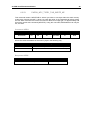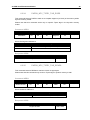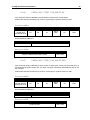
1
Identive Infrastructure Reference Manual – version 1.0 CLOUD 47x0 F Dual Interface Smartcard Readers Reference manual CLOUD 47x0 F Dual Interface Smartcard Readers © Identive GmbH Oskar-Messter-Strasse, 13 85737 Ismaning Germany Phone +49 89 9595 5000 • Fax +49 89 9595 5555 Document history Date Version Description of change 01/24/2013 1.0 Initial Version Contact information CLOUF 4700 F CLOUD 4710F For sales information, please email [email protected] Table of Contents 1. 2. 3. Legal information ................................................................................................................... 9 1.1. Disclaimers ..................................................................................................................... 9 1.2. Licenses ......................................................................................................................... 9 1.3. Trademarks .................................................................................................................... 9 Introduction to the manual ................................................................................................... 10 2.1. Objective of the manual ............................................................................................... 10 2.2. Target audience ........................................................................................................... 10 2.3. Product version corresponding to the manual ............................................................. 10 2.4. Definition of various terms and acronyms .................................................................... 11 2.5. References ................................................................................................................... 12 2.6. Conventions ................................................................................................................. 13 General information about CLOUD 47x0 F ......................................................................... 14 3.1. CLOUD 47x0 F key benefits ........................................................................................ 14 3.2. CLOUD 47x0 F key features ........................................................................................ 14 3.3. CLOUD 47x0 F ordering information ........................................................................... 15 3.4. Available options .......................................................................................................... 15 3.5. CLOUD 47x0 F customization options ......................................................................... 15 3.6. Contactless communication principles and CLOUD 47x0 F usage recommendations 16 3.6.1. Power supply......................................................................................................... 16 3.6.2. Data exchange ...................................................................................................... 16 3.6.3. Recommendations ................................................................................................ 17 3.7. Applications .................................................................................................................. 17 3.7.1. 3.7.2. 4. General ................................................................................................................. 17 Applications provided by Identive GmbH .............................................................. 18 CLOUD 47x0 F characteristics ............................................................................................ 19 4.1. CLOUD 47x0 F high level architecture ........................................................................ 19 4.1.1. Block diagram ....................................................................................................... 19 4.1.2. Software architecture ............................................................................................ 20 4.2. Quick reference data .................................................................................................... 21 4.2.1. 4.2.2. 4.2.3. 5. CLOUD 47x0 F dimensions .................................................................................. 21 LED behavior ........................................................................................................ 22 Other data ............................................................................................................. 22 4.2.3.1. General ...................................................................................................................... 22 4.2.3.2. USB ........................................................................................................................... 23 4.2.3.3. Contact card interface ................................................................................................ 23 4.2.3.4. Contactless interface ................................................................................................. 23 Software modules ................................................................................................................ 24 5.1. Installation .................................................................................................................... 24 5.2. Utilities .......................................................................................................................... 24 5.3. Driver ............................................................................................................................ 24 5.3.1. CLOUD 47x0 F listing ........................................................................................... 24 5.3.2. 5.3.3. 5.4. 5.3.3.1. ATR for contactless storage user tokens ................................................................... 25 5.3.3.2. ATR for ISO/IEC 14443-4 user tokens ....................................................................... 26 Firmware ...................................................................................................................... 27 5.4.1. 6. Supported operating systems ............................................................................... 24 PC/SC 2.0 compliant ATR for contactless interface ............................................. 25 CCID transport protocol ........................................................................................ 27 5.4.1.1. CCID class requests supported ................................................................................. 27 5.4.1.2. CCID messages supported ........................................................................................ 27 5.4.1.3. CCID Error Codes ...................................................................................................... 27 Commands description ........................................................................................................ 29 6.1. 6.2. Generic APDU .............................................................................................................. 29 6.1.1. Working with DESFire and MIFARE Plus tokens ........................................................... 29 6.1.2. PAPDU_GET_UID ......................................................................................................... 29 6.1.3. PAPDU_ESCAPE_CMD ................................................................................................ 29 Supported Pseudo APDU (Contactless Interface) ....................................................... 31 6.2.1. PAPDU_MIFARE_READ_BINARY ...................................................................... 31 6.2.2. PAPDU_MIFARE_UPDATE_BINARY .................................................................. 32 6.2.3. PAPDU_MIFARE_LOAD_KEYS .......................................................................... 33 6.2.4. PAPDU_MIFARE_AUTHENTICATE .................................................................... 35 6.2.5. PAPDU_MIFARE_READ_SECTOR ..................................................................... 36 6.2.6. PAPDU_MIFARE_READ_SECTOR_EX .............................................................. 37 6.2.7. PAPDU_MIFARE_WRITE_SECTOR ................................................................... 38 6.2.8. PAPDU_MIFARE_VALUE_BLK_OLD .................................................................. 38 6.2.9. PAPDU_MIFARE_VALUE_BLK_NEW ................................................................. 40 6.2.10. PAPDU_TCL_PASS_THRU (T=CL Pass Thru) ................................................... 41 6.2.11. PAPDU_ISO14443_PART3_PASS_THRU (Mifare Pass Thru) ........................... 42 6.2.12. PAPDU_ISO14443_PART4_PART3_SWITCH (TCL – Mifare Switch) ................ 42 6.2.13. PAPDU_FELICA_REQC....................................................................................... 43 6.2.14. PAPDU_FELICA_REQ_SERVICE ....................................................................... 43 6.2.15. PAPDU_FELICA_REQ_RESPONSE ................................................................... 44 6.2.16. PAPDU_FELICA_READ_BLK .............................................................................. 44 6.2.17. PAPDU_FELICA_WRITE_BLK............................................................................. 45 6.2.18. PAPDU_FELICA_SYS_CODE ............................................................................. 45 6.2.19. PAPDU_NFC_TYPE1_TAG_RID ......................................................................... 46 6.2.20. PAPDU_NFC_TYPE1_TAG_RALL ...................................................................... 46 6.2.21. PAPDU_NFC_TYPE1_TAG_READ ..................................................................... 47 6.2.22. PAPDU_NFC_TYPE1_TAG_WRITE_E ............................................................... 47 6.2.23. PAPDU_NFC_TYPE1_TAG_WRITE_NE ............................................................. 48 6.2.24. PAPDU_NFC_TYPE1_TAG_RSEG ..................................................................... 49 6.2.25. PAPDU_NFC_TYPE1_TAG_READ8 ................................................................... 49 6.2.26. PAPDU_NFC_TYPE1_TAG_WRITE_E8 ............................................................. 50 6.2.27. PAPDU_NFC_TYPE1_TAG_WRITE_NE8........................................................... 50 6.3. Escape commands for the CLOUD 47x0 F .................................................................. 51 6.3.1. 6.3.2. 6.3.3. Sending Escape commands to CLOUD 47x0 F ................................................... 51 Escape command codes....................................................................................... 52 Common for Contact and Contactless Interfaces ................................................. 52 6.3.3.1. READER_SETMODE ................................................................................................ 52 6.3.3.2. READER_GETMODE ................................................................................................ 53 6.3.3.3. READER_GET_IFDTYPE ......................................................................................... 54 6.3.3.4. READER_LED_CONTROL........................................................................................ 54 6.3.3.5. READER_GET_INFO_EXTENDED ........................................................................... 55 6.3.3.6. READER_LED_CONTROL_BY_FW ......................................................................... 56 6.3.3.7. READER_RD_WR_USER_AREA ............................................................................. 56 6.3.3.8. READER_GENERIC_ESCAPE ................................................................................. 57 6.3.3.9. READER _CONTROL_CONTACT_SLOT ................................................................. 58 6.3.4. CNTLESS_GET_CARD_INFO .................................................................................. 59 6.3.4.2. CNTLESS_GET_ATS_ATQB .................................................................................... 61 6.3.4.3. CNTLESS_CONTROL_PPS ...................................................................................... 61 6.3.4.4. CNTLESS_RF_SWITCH ........................................................................................... 62 6.3.4.5. CNTLESS_SWITCH_RF_ON_OFF ........................................................................... 62 6.3.4.6. CNTLESS_GET_BAUDRATE.................................................................................... 63 6.3.4.7. CNTLESS_CONTROL_RETRIES ............................................................................. 64 6.3.4.8. CNTLESS_CONTROL_POLLING ............................................................................. 65 6.3.4.9. CNTLESS_GET_CARD_DETAILS ............................................................................ 65 6.3.4.10. CNTLESS_SET_CONFIG_PARAMS ........................................................................ 67 6.3.4.11. CNTLESS_IS_COLLISION_DETECTED ................................................................... 68 6.3.4.12. CNTLESS_FELICA_PASS_THRU ............................................................................ 68 6.3.4.13. CNTLESS_P2P_SWITCH_MODES .......................................................................... 69 6.3.4.14. CNTLESS_P2P_TARGET_RECEIVE ....................................................................... 72 6.3.4.15. CNTLESS_P2P_TARGET_SEND ............................................................................. 73 6.3.4.16. CNTLESS_P2P_INITIATOR_DESELECT ................................................................. 73 6.3.4.17. CNTLESS_P2P_INITIATOR_TRANCEIVE ............................................................... 74 6.3.4.18. CNTLESS_NFC_SINGLESHOT ................................................................................ 75 6.3.4.19. CNTLESS_NFC_LOOPBACK ................................................................................... 75 6.3.4.20. CNTLESS_GET_SET_NFC_PARAMS ...................................................................... 76 6.3.4.21. CNTLESS_GET_P2P_EXTERNAL_RF_STATE ....................................................... 77 6.3.5. 7. Specific for Contactless Interface ......................................................................... 59 6.3.4.1. Specific for Contact Interface ................................................................................ 78 6.3.5.1. CONTACT_GET_SET_PWR_UP_SEQUENCE ........................................................ 79 6.3.5.2. CONTACT_EMV_LOOPBACK .................................................................................. 80 6.3.5.3. CONTACT_EMV_SINGLEMODE .............................................................................. 81 6.3.5.4. CONTACT_EMV_TIMERMODE ................................................................................ 81 6.3.5.5. CONTACT_APDU_TRANSFER ................................................................................ 82 6.3.5.6. CONTACT_DISABLE_PPS ....................................................................................... 82 6.3.5.7. CONTACT_EXCHANGE_RAW ................................................................................. 83 6.3.5.8. CONTACT_GET_SET_CLK_FREQUENCY .............................................................. 84 6.3.5.9. CONTACT_CONTROL_ATR_VALIDATION .............................................................. 85 6.3.5.10. CONTACT_GET_SET_MCARD_TIMEOUT .............................................................. 86 6.3.5.11. CONTACT_GET_SET_ETU ...................................................................................... 87 6.3.5.12. CONTACT_GET_SET_WAITTIME ............................................................................ 88 6.3.5.13. CONTACT_GET_SET_GUARDTIME ........................................................................ 89 6.3.5.14. CONTACT_READ_INSERTION_COUNTER............................................................. 90 Annexes............................................................................................................................... 91 7.1. Annex A – Status words table ...................................................................................... 91 7.2. Annex B – Sample code using escape commands...................................................... 92 7.3. Annex C – Mechanical drawings .................................................................................. 95 7.3.1. 7.3.2. 7.3.3. 7.3.4. Outline and cable positions ................................................................................... 95 Stand ..................................................................................................................... 96 Reader mounted to Stand ..................................................................................... 97 CLOUD 4710 F - SAM slot.................................................................................... 98 CLOUD 47X0 F REFERENCE MANUAL 1. Legal information 1.1. Disclaimers The content published in this document is believed to be accurate. Identive Gmbh does not, however, provide any representation or warranty regarding the accuracy or completeness of its content and regarding the consequences of the use of information contained herein. If this document has the status “Draft”, its content is still under internal review and yet to be formally validated. Identive GmbH reserves the right to change the content of this document without prior notice. The content of this document supersedes the content of previous versions of the same document. The document may contain application descriptions and/or source code examples, which are for illustrative purposes only. Identive GmbH gives no representation or warranty that such descriptions or examples are suitable for the application that the reader may want to use them for. Should you notice problems with the provided documentation, please provide your feedback to [email protected]. 1.2. Licenses If the document contains source code examples, they are provided for illustrative purposes only and subject to the following restrictions: You MAY at your own risk use or modify the source code provided in the document in applications you may develop. You MAY distribute those applications ONLY in form of compiled applications. You MAY NOT copy or distribute parts of or the entire source code without prior written consent from Identive GmbH. You MAY NOT combine or distribute the source code provided with Open Source Software or with software developed using Open Source Software in a manner that subjects the source code or any portion thereof to any license obligations of such Open Source Software. If the document contains technical drawings related to Identive GmbH products, they are provided for documentation purposes only. Identive GmbH does not grant you any license to its designs. 1.3. Trademarks MIFARETM is a registered trademark of NXP Semiconductors BV. Windows is a trademark of Microsoft Corporation. 9 CLOUD 47X0 F REFERENCE MANUAL 10 2. Introduction to the manual 2.1. Objective of the manual This manual provides an overview of the hardware and software features of the CLOUD 47x0 F dual interface smart card readers (CLOUD 4700 F and CLOUD 4710 F). This manual describes in detail interfaces and supported commands available for developers using CLOUD47x0 F in their applications. 2.2. Target audience This document describes the technical implementation of CLOUD 47x0 F. The manual targets software developers. It assumes knowledge about ISO 7816, 13.56 MHz contactless technologies like ISO/IEC 14443 and commonly used engineering terms. Should you have questions, you may send them to [email protected]. 2.3. Product version corresponding to the manual Item Version Hardware 0.3 Firmware 1.00 CLOUD 47X0 F REFERENCE MANUAL 2.4. Definition of various terms and acronyms Term Expansion APDU ATR ATS Byte CCID CID DFU DR DS LED MIFARE NA NAD Nibble Application Protocol Data Unit Answer to Reset, defined in ISO7816 Answer to select, defined in ISO/IEC 14443 Group of 8 bits Chip Card Interface Device Card Identifier Device Firmware Upgrade Divider receive: used to determine the baud rate between the reader to the card Divider send: used to determine the baud rate between the card to the reader Light emitting diode The ISO14443 Type A with extensions for security (NXP) Not applicable Node Address Group of 4 bits. 1 digit of the hexadecimal representation of a byte. Example: 0xA3 is represented in binary as (10100011)b. The least significant nibble is 0x3 or (0011)b and the most significant nibble is 0xA or (1010)b Proximity Coupling Device Personal Computer/Smart Card: software interface to communicate between a PC and a smart card Proximity Integrated Chip Card Product ID Distance coverage till ~10 cm. Pseudo unique PICC identifier Radio Frequency Reserved for future use Universal Serial Bus Vendor ID Binary notation of a number x, y, z 0,1 The byte value YY is represented in hexadecimal PCD PC/SC PICC PID Proximity PUPI RF RFU USB VID (xyz)b 0xYY 11 CLOUD 47X0 F REFERENCE MANUAL 2.5. 12 References Doc ref in the manual Description Issuer ISO/IEC 7816-3 Identification cards — Integrated circuit ISO / IEC ISO/IEC 7816-4 cards —Part 3:Cards with contacts — Electrical interface and transmission protocols Identification cards - Integrated circuit(s) cards with contacts Part 4: Interindustry commands for interchange ISO/IEC 7816-4: 1995 (E) ISO / IEC ISO/IEC 14443-3 ISO/IEC 14443-4 PC/SC PCSC3 PCSC3-AMD1 PCSC3-SUP PCSC3-SUP2 CCID USB AN337 AN338 Identification cards — Contactless integrated circuit(s) cards — Proximity cards —Part 3:Initialization and anticollision Identification cards — Contactless integrated circuit(s) cards — Proximity cards Part 4: Transmission protocol ISO/IEC 144434:2001(E) Interoperability Specification for ICCs and Personal Computer Systems v2.01 Interoperability Specification for ICCs and Personal Computer Systems Part 3. Requirements for PC-Connected Interface Devices Interoperability Specification for ICCs and Personal Computer Systems Part 3. Requirements for PC-Connected Interface Devices– Amendment 1 Interoperability Specification for ICCs and Personal Computer Systems Part 3. Supplemental Document Interoperability Specification for ICCs and Personal Computer Systems Part 3. Supplemental Document for Contactless ICCs Specification for Integrated Circuit(s) Cards Interface Devices 1.1 Universal Serial Bus Specification 2.0 Application Note describing handling of DESFire EV1 cards Application Note describing handling of MIFARE Plus cards ISO / IEC ISO / IEC PC/SC Workgroup PC/SC Workgroup PC/SC Workgroup PC/SC Workgroup PC/SC Workgroup USB-IF USB-IF Identive Identive CLOUD 47X0 F REFERENCE MANUAL 2.6. 13 Conventions Bits are represented by lower case ‘b’ where followed by a numbering digit. Bytes are represented by upper case ‘B’ where followed by a numbering digit. Bit number 5 b7 b6 Bit number 0 b5 b4 b3 Most significant nibble b2 b1 b0 Least significant nibble 1 Byte = 8 bits = 2 nibbles Byte number 2 B0 B1 Byte number 11 B2 B3 B4 B5 B6 B7 String of 12 bytes Example: 163 decimal number is represented in hexadecimal as 0xA3 in binary as (10100011)b The least significant nibble of 0xA3 is 0x3 in hexadecimal (0011)b in binary The most significant nibble of =xA3 is 0xA in hexadecimal (1010)b in binary B8 B9 B10 B11 CLOUD 47X0 F REFERENCE MANUAL 14 3. General information about CLOUD 47x0 F 3.1. CLOUD 47x0 F key benefits With its combination of a modern slim design and its state of the art feature set, CLOUD 4700 F is the perfect desktop reader choice for environments where both contact and contactless smart card support is required while CLOUD 4710 F perfectly fits environments where access to contactless cards with simultaneous access to a contact SAM card is required. As for all Identive GmbH products, CLOUD 47x0 F is designed to offer best in class interoperability. 3.2. CLOUD 47x0 F key features 13.56MHz contactless reader: o ISO14443 type A & B, o MIFARETM ISO7816 compliant contact smart card reader for ID-1 cards (CLOUD 4700 F) ISO7816 compliant contact smart card reader for ID-000 cards (CLOUD 4710 F) PC/SC v2.0 compliant Full CCID for both the contact and the contactless interfaces Secure in-field SmartOSTM firmware upgrade Unique reader serial number which enables that CLOUD 47x0 F can be plugged into any USB slot on a PC without having to re-install the driver. Additionally, the application S/W running on the host can check for exact readers 249 bytes of non-volatile user memory Cable exit in three directions to help you place the reader optimally Footstand for 40° angle available that could be used as wall-mount adapter, as well CLOUD 47X0 F REFERENCE MANUAL 3.3. 15 CLOUD 47x0 F ordering information Item Part number CLOUD 4700 F 905320 CLOUD 4710 F 905324 Standing Base Kit 905412 3.4. Available options The Standing Base Kit consists of a stand and a wireholder. It could be used to either place the reader on the desktop with an angle of 40° in regard to the desk or to mount it to a wall with a 40° angle in regard to that. The wireholder keeps the contactless token in place when using this option. 3.5. CLOUD 47x0 F customization options Upon request, Identive GmbH can consider customizing: The color of the casing The logo The product label The USB strings Terms and conditions apply, please contact your local Identive representative or send an email to [email protected]. CLOUD 47X0 F REFERENCE MANUAL 16 3.6. Contactless communication principles and CLOUD 47x0 F usage recommendations CLOUD 47x0 F is a dual interface reader capable of reading both contact smart cards and contactless user tokens. The following paragraph focuses on a few specifics of contactless communication to outline usage recommendations in order to ensure best user experience. CLOUD 47x0 F is a contactless reader1 designed to communicate with user credentials. User tokens 2 User credentials can take several form factors: Credit card sized smart card Key fob USB token NFC mobile phone etc… CL O 47 UD x0 F User credentials are made of a contactless integrated circuit chip connected to an antenna CLOUD 47x0 F Communication between CLOUD 47x0 F and user credentials uses magnetic field inductive coupling. The magnetic field generated by CLOUD 47x0 F has a carrier frequency of 13.56MHz. 3.6.1. Power supply When the user credential is put in the magnetic field of the reader, its antenna couples with the reader and an induction current appears in the antenna thus providing power to the integrated circuit. The generated current is proportional to the magnetic flux going through the antenna of the user credential. 3.6.2. Data exchange The carrier frequency of the magnetic field is used as a fundamental clock signal for the communication between the reader and the credential. It is also used as a fundamental clock input for the integrated circuit microprocessor to function. To send data to the user credential the reader modulates the amplitude of the field. There are several amplitude modulation and data encoding rules defined in ISO/IEC 14443. The reader should refer to the standard for further details. To answer the reader, the integrated circuit card of the user credential modulates its way of loading (impedance) the field generated by the reader. Here also further details can be found in ISO/IEC 14443. 1 2 In the ISO/IEC 14443 standard, the reader is called the proximity coupling device (PCD) In the ISO/IEC 14443 standard, the user credential is called proximity integrated chip card (PICC) CLOUD 47X0 F REFERENCE MANUAL 17 3.6.3. Recommendations The communication between the reader and the user credential is sensitive to the presence of material or objects interfering with the magnetic field generated by the reader. The presence of conductive materials like metal in the vicinity of the reader and the user credential can significantly degrade the communication and even make it impossible. The magnetic field of the reader generates Eddy or Foucault’s currents in the conductive materials; the field is literally absorbed by that kind of material. It is recommended for proper communication to avoid putting CLOUD 47x0 F in close proximity of conductive materials. The presence of multiple user credentials in the field also interferes with the communication. When several user credentials are in the field of the reader, load of the field increases which implies that less energy is available for each of them and that the system is detuned. For this reason, Identive has implemented in its driver only one slot. It is recommended to present only one user credential at a time in front of CLOUD 47x0 F. The communication between the reader and the credential is sensitive to the geometry of the system {reader, credential}. Parameters like the geometry and especially the relative size of the reader’s and credential’s antennas directly influence the inductive coupling and therefore the communication. CLOUD 47x0 F was designed and optimized to function with user credentials of various technologies and sizes. 3.7. It may happen, that CLOUD 47x0 F is not capable of communicating with extremely large or extremely small credentials. In order to optimize the coupling between the reader and the credential, it is recommended to put both antennas as parallel as possible to each other In order to optimize transaction speed between the reader and the card it is recommended to place the credential as close as possible to the reader. This will increase the amount of energy supplied to the user credential which will then be able to use its microprocessor at higher speeds Applications 3.7.1. General CLOUD 4700 F is a transparent reader designed to interface a personal computer host supporting PC/SC interface with 13.56MHz user tokens like public transport cards, contactless banking cards, electronic identification documents – e.g. e-passports, e-ID cards, driving licenses etc. and smartcards according to ISO7816 as well as synchronous memory cards like CAC and PKI cards and health insurance cards. User credentials can have several form factors like credit cards, key fobs, NFC mobile phones or USB dongles like our SCTxxxx or @MAXX products. CLOUD 4710 F incorporates a SAM slot for SIM-sized cards instead of the standard card slot for ID-1 sized cards of the CLOUD 4700 F. CLOUD 47X0 F REFERENCE MANUAL 18 Network ` RF link (13.56MHz) ISO14443 interface Smartcard contacts ISO7816 CL O 47 UD x0 F USB link PC/SC interface CLOUD 4700 CLOUD 4710 Host CLOUD 47x0 F Credentials/SAM Application logic Interface device Application logic + User personal data for given set of applications CLOUD 47x0 F itself handles the communication protocol but not the application related to the token or card. The application-specific logic has to be implemented by software developers on the host. 3.7.2. Applications provided by Identive GmbH Identive GmbH does not provide payment or transport applications or PKI or CAC applications. Identive GmbH provides a few applications for development and evaluation purposes that can function with CLOUD 47X0 F. There are many tools provided; here are two of them: The Simple NFC Tag Editor is part of our NFC-NDEF Editor Kit that enables the user to read and write NFC forum compliant records from/to NFC forum compatible tags. It is an easy to use tool to configure NFC forum tag demonstrations rapidly, available in our web shop. Smart card commander version 1.3 provides capabilities to identify most common cards in the field and display the content of them as well as scripting functionality, which can be very useful for developers to develop and debug their applications. This tool is as well part of all our SDKs and available as a stand-alone product. CLOUD 47X0 F REFERENCE MANUAL 19 4. CLOUD 47x0 F characteristics 4.1. CLOUD 47x0 F high level architecture 4.1.1. Block diagram The link between CLOUD 47x0 F and the host to which it is connected is the USB interface providing both the power and the communication channel. To host Device controller RF front-end EMC filter + Matching circuitry Antenna ISO7816 contact smart card interface text text text LED The device controller has several interfaces available. In the CLOUD 47x0 F implementation three peripherals are connected to the device controller: LED for reader status indication A contact smart card interface An RF front-end that handles the RF communication The controller embeds flash memory that contains the firmware developed by Identive to handle all the ISO7816 contact protocol, the RF communication protocols and the PC/SC communication protocol with the host. The flash can be upgraded once the device is deployed in the field, hence enabling firmware upgrades to add and potentially patch features. The RF front-end ensures the coding/decoding/framing modulation/demodulation required for the RF communication. It is controlled by the device controller through registers. The matching circuitry provides the transmission and receiver paths adaptation for the antenna to function properly. CLOUD 47X0 F REFERENCE MANUAL 20 4.1.2. Software architecture Applications can interface with the driver directly through the PC/SC interface. Contactless Reader Contact Reader PC/SC Layer Driver - Contact Smart Card Reader Driver - Contactless Card Reader T= 0 / T= 1 T = CL SLOT 0 FIRMWARE LAYER SLOT 1 CLOUD 47x0 F Reader ICC PICC The CLOUD 47x0 F leverages a PC/SC CCID driver that is freely available for all supported operating systems (Windows, MacOSX and Linux). With current Windows versions (starting with Windows Vista) and MacOSX, this driver is already included in the basic installation. With the diverse Linux derivatives, there may be distribution specific drivers that should get installed using the install mechanism of the used distribution. If there is none, the driver may always be downloaded from the webpage of the maintainer, Ludovic Rousseau, https://alioth.debian.org/frs/?group_id=30105. Additionally, Identive provides a proprietary driver for all the supported OSs. CLOUD 47X0 F REFERENCE MANUAL 4.2. 21 Quick reference data 4.2.1. CLOUD 47x0 F dimensions Item Characteristic Value Weight 143g without stand Stand: 52g External dimensions Cable length Default color 126 mm X 93 mm X 22 mm 1.5 meter long with USB type A connector White and grey CLOUD 4700 F Default label Weight External dimensions Cable length Default color 157g without stand Stand: 52g 113 mm X 93 mm X 22 mm 1.5 meter long with USB type A connector White and grey CLOUD 4710 F Default label Drawing with dimensions of the CLOUD 47X0 F and accessories can be found in annex. CLOUD 47X0 F REFERENCE MANUAL 22 4.2.2. LED behavior CLOUD 47X0 F is equipped with one bicolor LED. Its behavior is described in the table below. Reader states GREEN RED Just after plug-in (with drivers already installed) ON OFF Just after DFU operation ON OFF Suspend / standby OFF OFF Reader powered, Contact card IN, but not powered ON OFF Reader powered, Contactless card IN, but not powered ON ON Contact card powered / communication 500ms ON Contactless card powered / communication 500ms ON 500ms ON 500ms OFF 500ms OFF Reader / card errors OFF 500ms OFF OFF 100ms ON 100ms OFF Dual interface card powered in contact Slot 500ms ON Dual interface card powered using RF field 500ms ON 500ms ON 500ms OFF 500ms OFF 500ms OFF 4.2.3. Other data 4.2.3.1. Parameter Clock of the device controller API Operating temperature range Operating humidity range Certifications General Value/Description 8MHz PC/SC 2.0 0º to 50ºC Up to 95%RH non condensing USB CE FCC WEEE RoHS2 REACH WHQL OFF CLOUD 47X0 F REFERENCE MANUAL 4.2.3.2. 23 USB Parameter Value/Description DC characteristics High bus powered (CLOUD 47x0 F draws power from USB bus) Voltage: 5V Avg.. Current : 110mA (RF on, no cards present) Suspend Current: 400µA USB specification USB 2.0 FS Device USB Speed Device Class PID VID Full Speed Device (12Mbit/s) CCID 0x5720 0x04E6 4.2.3.3. Parameter Contact card interface Value/Description Smart card operating frequency Maximum supported card baud-rate Cards supported ISO-7816 compliant CT-API compliant Number of slots Ejection mechanism 4.2.3.4. up to 12MHz 600Kbps ISO/IEC 7816 smart cards - Class A, B and C Synchronous smart cards Yes Yes Single smart card slot Manual Contactless interface Parameter Value/Description RF carrier frequency 13.56MHz +/-50ppm Maximum supported card baud-rate 848Kbps Cards supported ISO-14443A and B compliant Number of slots Ejection mechanism 3 MIFARE: Classic 1K and 4K, DESFire, DESFire EV1, Ultralight, Ultralight C, MIFARE mini and MIFARE Plus FeliCa™ 212 and 424 Kbps support: FeliCa Standard/Lite NFC forum tag type 1, 2, 3, 4 iCLASS UID support my-d move – SLE 66RxxP, my-d move NFC – SLE 66RxxPN, SLE 66RxxS, SLE 55RxxE NFC enabled Smart Phones and Tablets3 Yes 1 Manual tested with available device during development & qualification phase CLOUD 47X0 F REFERENCE MANUAL 24 5. Software modules 5.1. Installation On Operating Systems with a CCID driver pre-installed, no installation is necessary. Where there’s no CCID driver pre-installed – e.g. Linux systems or old Windows systems – the driver has to be installed using distribution-specific measures or using the available source packages. Nevertheless, due to some limitations of the available CCID drivers under some circumstances, Identive does provide a dedicated driver for this reader, as well, which is available through Windows Update or on the Identive support pages. 5.2. Utilities The following utilities are available: A tool for testing the resource manager A tool called PCSCDiag capable of providing basic information about the reader and a card through PC/SC stack 5.3. Driver 5.3.1. CLOUD 47x0 F listing CLOUD 47X0 F is listed by PC/SC applications as Identive CLOUD 47X0 F Contact Reader Identive CLOUD 47X0 F Contactless Reader 5.3.2. Supported operating systems Windows XP (32 & 64 bit) Windows 2003 Server (32 & 64 bit) Windows Vista (32 & 64 bit) Windows Server 2008 (32 & 64 bit) Windows 7 (32 & 64 bit) Windows 8 (32 & 64 bit) MacOS X Linux CLOUD 47X0 F REFERENCE MANUAL 25 5.3.3. PC/SC 2.0 compliant ATR for contactless interface When a user credential is placed on the reader, initialization, anti-collision is done. The user credential is automatically activated and an ATR is built as defined in the PC/SC specification. For further information, please refer to section 3.1.3.2.3 of [PCSC3] and to [PCSC3-SUP] 5.3.3.1. ATR for contactless storage user tokens The ATR of the credential is composed as described in the table below. In order to allow the application to identify the storage card properly, it’s Standard and Card name describing bytes must be interpreted according to the Part 3 Supplemental Document, maintained by PC/SC. Credentials using technology like MIFARE are examples of this: Byte# Value Designation 0 1 0x3B 0x8n Initial header T0 2 0x80 TD1 upper nibble 8 indicates no TA2, TB2, TC2 lower nibble 0 means T=0 3 0x01 TD2 upper nibble 0 indicates no TA3, TB3, TC3 lower nibble 1 means T=1 4...3+n 0x80 0x4F Length RID PIX 0x00 0x000x000x00 4+n Description n indicates the number of historical bytes in following ATR A status indicator may be present in an optional TLV data object Optional TLV data object TCK Tag: Application identifier 1 byte Registered identifier on 5 bytes Proprietary identifier extension on 3 bytes 4 RFU bytes XOR of all previous bytes Example of the ATR built for contactless storage tokens: MIFARE Classic 4K MIFARE Ultralight CLOUD 47X0 F REFERENCE MANUAL 5.3.3.2. 26 ATR for ISO/IEC 14443-4 user tokens The credential exposes its ATS or application information which is mapped to an ATR. The table describes how this mapping is done. Byte# Value Designation 0 1 2 0x3B 0x8n 0x80 Initial header T0 TD1 3 0x01 TD2 upper nibble 0 indicates no TA3, TB3, TC3 lower nibble 1 means T=1 Historical bytes or application information Type A: the historical bytes from the ATS (up to 15 bytes) Type B (8 bytes): 4...3+n 4+n TCK Description n indicates the number of historical bytes in following ATR upper nibble 8 indicates no TA2, TB2, TC2 lower nibble 0 means T=0 Byte 0 through 3: application data from ATQB, Byte 4 through 6: protocol info byte from ATQB, Byte 7: highest nibble is the MBLI (maximum buffer length index) from ATTRIB, lowest nibble is 0x0 XOR of all previous bytes Example of the ATR built for an ISO14443-4 credential: Type A Type B CLOUD 47X0 F REFERENCE MANUAL 5.4. 27 Firmware 5.4.1. CCID transport protocol CLOUD 47x0 F implements a transport protocol that is compliant with USB Device Class: Smart Card CCID Specification for Integrated Circuit(s) Cards Interface Devices Revision 1.10. This paragraph describes the CCID specification features that are implemented. 5.4.1.1. CCID class requests supported Abort 5.4.1.2. CCID messages supported The following CCID messages are supported for the contact interface when received through bulk-out endpoint. PC_to_RDR_IccPowerOn PC_to_RDR_IccPowerOff PC_to_RDR_GetSlotStatus PC_to_RDR_XfrBlock PC_to_RDR_GetParameters PC_to_RDR_ResetParameters PC_to_RDR_SetParameters PC_to_RDR_Escape PC_to_RDR_ICCClock PC_to_RDR_T0APDU PC_to_RDR_Abort PC_to_RDR_SetDataRateAndClockFrequency 5.4.1.3. CCID Error Codes Extensive error codes are reported on many conditions during all CCID responses. Most of the error messages are reported by the CCID appropriately. Some of the main error codes for the contact interface are: HW_ERROR XFR_PARITY_ERROR ICC_PROTOCOL_NOT_SUPPORTED BAD_ATR_TS BAD_ATR_TCK ICC_MUTE CMD_ABORTED Command not supported CLOUD 47X0 F REFERENCE MANUAL 28 The following sub-sections discuss when and why these error codes are returned: 5.4.1.3.1. HW_ERROR This error code is returned when a hardware short circuit condition is detected, during application of power to the card or if any other internal hardware error is detected. 5.4.1.3.2. XFR_PARITY_ERROR This error code is returned when a parity error condition is detected. This error will be reported in the response to a PC_to_RDR_XfrBlock message. 5.4.1.3.3. ICC_PROTOCOL_NOT_SUPPORTED This error code is returned if the card is signaling to use a protocol other than T=0 or T=1 in its ATR. 5.4.1.3.4. BAD_ATR_TS This error code is returned if the initial character of the ATR contains invalid data. 5.4.1.3.5. BAD_ATR_TCK This error code is returned if the check character of the ATR contains is invalid. 5.4.1.3.6. ICC_MUTE This error code is returned when the card does not respond until the reader time out occurs. This error will be reported in the response to PC_to_RDR_XfrBlock message and PC_to_RDR_IccPowerOn messages. 5.4.1.3.7. CMD_ABORTED This error code is returned if the command issued has been aborted by the control pipe. 5.4.1.3.8. Command not supported This error would be returned, if the command would not be supported by the reader. CLOUD 47X0 F REFERENCE MANUAL 29 6. Commands description 6.1. Generic APDU 6.1.1. Working with DESFire and MIFARE Plus tokens To work with DESFire EV1 and MIFARE Plus tokens, please refer to the according application notes [AN337] and [AN338], respectively. Please note that, since these application notes contain information available only under NDA with NXP, you’d need to sign an NDA with NXP to be allowed to receive them. 6.1.2. PAPDU_GET_UID GET UID will retrieve the UID or SNR or PUPI of the user token. This command can be used for all supported technologies. Command APDU: CLA INS P1 P2 Lc Data in Le 0xFF 0xCA 0x00 0x00 - - XX Setting Le = 0x00 can be used to request the full UID or PUPI is sent back.(e.g. for ISO14443A single 4 bytes, double 7 bytes, triple 10 bytes, for ISO14443B 4 bytes PUPI). Response APDU: Data Status Word Requested bytes of UID SW1, SW2 6.1.3. PAPDU_ESCAPE_CMD Usually escape commands are transmitted through SCardControl as defined in PCSC API using IOCTL_CCID_ESCAPE. But on some environments, the driver will block this IOCTL unless the registry has been edited to allow it. Hence this vendor specific APDU was defined to transmit Escape commands to the reader as below Command APDU: CLA INS P1 P2 Lc Data in Le 0xFF 0xCC 0x00 0x00 Length of data Escape Command Buffer XX Response APDU: Data Status Word Reader Response SW1, SW2 CLOUD 47X0 F REFERENCE MANUAL 30 Example: 1) To issue the “READER_GETIFDTYPE (0x12)” escape command , this pseudo APDU would be used: Command APDU : FF CC 00 00 01 12 Response : 20 57 90 00 2) To issue the “READER_SETMODE (0X01)” escape command, this pseudo APDU would be used: Command APDU : FF CC 00 00 02 01 01 (to set to EMV mode) Response APDU : 90 00 Note: 1) To send Escape commands using this method, the reader should be connected in shared mode using T0 or T1 protocol. Only then would the resource manager allow SCardTransmit. 2) As the escape commands defined using “READER_GENERIC_ESCAPE” have ISO 7816 APDU format, they can be sent using SCardTransmit without having any need to prepend “FF CC 00 00 P3”. CLOUD 47X0 F REFERENCE MANUAL 6.2. 31 Supported Pseudo APDU (Contactless Interface) All Pseudo APDUs specific to Contactless Interface supported in the reader are explained in this section 6.2.1. PAPDU_MIFARE_READ_BINARY This command is used to read data from a Mifare card. Refer to section 3.2.2.1.8 of [PCSC3] for details. Command APDU: Command CLA INS P1 P2 Lc Data Le Read Binary 0xFF 0xB0 Addr MSB Addr LSB - - xx P1 and P2 represent the block number of the block to be read, starting with 0 for sector 0, block 0, continuing with 4 for sector 1, block 0 (sector no. x 4 + block no.) Regardless of the value given in Le, this command will always return the entire block content: 16 bytes for Mifare Classic 4 bytes for Mifare UL and UL C Response APDU: Data Status Word N bytes of block data SW1, SW2 Example: For a Mifare Classic 1K card with the following content: The following command will read the sixth block and yield the mentioned output: APDU: FF B0 00 05 02 SW12: 9000 (OK) DataOut: 00 01 02 03 04 05 06 07 08 09 0A 0B 0C 0D 0E 0F (16 bytes) CLOUD 47X0 F REFERENCE MANUAL 32 6.2.2. PAPDU_MIFARE_UPDATE_BINARY This command is used to update the non-volatile memory of a Mifare card. Refer to section 3.2.2.1.9 of [PCSC3] for further details. Command APDU: Command CLA INS P1 P2 Lc Data Le Update Binary 0xFF 0xD6 Addr MSB Addr LSB xx data - For a description of P1 and P2, see PAPDU_MIFARE_READ_BINARY Lc has got to match the block size of the used card 16 bytes for Mifare Classic 4 bytes for Mifare UL and UL C Response APDU: Data Status Word - SW1, SW2 Example: To write the bytes AA 55 AA 55 AA 55 AA 55 AA 55 AA 55 AA 55 AA 55 to block 7 of a Mifare Classic 1K, the following command has got to be issued: APDU: FF D6 00 06 10 AA 55 AA 55 AA 55 AA 55 AA 55 AA 55 AA 55 AA 55 SW12: 9000 (OK) Resulting in this content on the card: CLOUD 47X0 F REFERENCE MANUAL 33 6.2.3. PAPDU_MIFARE_LOAD_KEYS This command is used to load the key to the volatile memory of the reader. It can be used for all kinds of contactless cards. Refer to section 3.2.2.1.4 of [PCSC3] for further details. Command APDU: Command CLA INS P1 P2 Lc Data Le Load Keys 0xFF 0x82 Key Struct Key Num Key data Key - The Key Structure (P1) is defined as follows: b7 b6 b5 b4 b3 b2 b1 x b0 Description 0: Card Key; 1 Reader Key 0: Plain Transmission, 1: Secured Transmission 0: Keys are loaded into the volatile memory 1: Keys are loaded into the non-volatile memory. x x x xxxx RFU If b6 is set, it is the Reader Key number that has been used for the encryption, else it is ignored. Only one reader key (0x00) is supported by CLOUD 47x0 F Notes: 1) Card keys can be loaded in both “secure” and “non-secure” mode. Card keys can only be loaded to the Volatile memory of the reader. 2) To load the card keys in secure mode, the application developer has to know the 128 bit AES key of the reader. The default key is “00010203 05060708 0A0B0C0D 0F101112”. As a Mifare key is only 6 bytes in length, data needs to be padded as per pkcs7 padding scheme (see example below). 3) The Reader-key can only be loaded in the secure-mode to the non-volatile memory of the reader. The new key is first XORed with the old key and encrypted with the old key. In order to validate the integrity of the processed key data, a 2 byte CRC has got to be sent following the key data. Refer to the example Load Keys – Reader – Secure for details. 4) The CRC16 is calculated as defined in CRC-16-CCITT (polynomial 0x8408) with an initial value of 0x0000. Response APDU: Data Status Word - SW1, SW2 CLOUD 47X0 F REFERENCE MANUAL 34 Examples Load Keys – Card – Non-Secure The command to load Mifare key A “FF FFFFFFFFFF” is FF82006006 FFFFFFFFFFFF Load Keys – Card – Secure: If the default AES128 reader is key is 00010203 05060708 0A0B0C0D 0F101112 then the following explains the steps needed to calculate the key for secure mode. Default reader key : 00010203 05060708 0A0B0C0D 0F101112 Mifare Key to be loaded : FFFFFFFF FFFF Mifare key after padding : FFFFFFFF FFFF0A0A 0A0A0A0A 0A0A0A0A AES128 Encrypted : 10229E33 189403FD A9C14110 B1BB02B4 Load keys command : FF82406010 10229E33 189403FD A9C14110 B1BB02B4 Load Keys – Reader – Secure If the default AES128 reader is key is 00010203 05060708 0A0B0C0D 0F101112 then the following explains the steps needed to change the reader key to 10111213 15161718 1A1B1C1D 1F202122. Reader old-key : A: 00010203 05060708 0A0B0C0D 0F101112 Reader new-key : B: 10111213 15161718 1A1B1C1D 1F202122 C = XOR (A,B) : C: 10101010 10101010 10101010 10303030 D = CRC16(C) : D: 1C5F E = 0x00 - D : E: E3A1 (should be appended in LSB order) F = AES-Encrypt (C) : F: 886B0872 7BDA4996 D296FB46 09D2C75F Load-Keys Command : G: FF82E00012 886B0872 7BDA4996 D296FB46 09D2C75F A1E3 CLOUD 47X0 F REFERENCE MANUAL 35 6.2.4. PAPDU_MIFARE_AUTHENTICATE This command is used to authenticate using the key number. Refer to section 3.2.2.1.6 of [PCSC3] for further details. Command APDU: Command CLA INS P1 P2 Lc Data Le General Authenticate 0xFF 0x86 0x00 0x00 0x05 data xx the data structure is defined as follows: Byte # Value Description B0 0x01 Version B1 Block Number MSB (always 0x00 for Mifare Classic cards) B2 Block Number LSB B3 0x60 Mifare Classic Key A 0x61 Mifare Classic Key B Key number – shall be set to 0x01 B4 Response APDU: Data Status Word - SW1, SW2 Example: Load Key A unencrypted and authenticate for block 6 (sector 1, actually) with that key: APDU: SW12: APDU: SW12: FF 82 00 60 06 FF FF FF FF FF FF 9000 (OK) FF 86 00 00 05 01 00 06 60 01 9000 (OK) CLOUD 47X0 F REFERENCE MANUAL 36 6.2.5. PAPDU_MIFARE_READ_SECTOR This command reads the specified sector from a Mifare Classic card (first 3 blocks of the sector, excluding the Key block) or the entire content of Mifare UL/UL C cards. Command APDU: Command CLA INS P1 P2 P3 Data Read Sector FF B1 Addr MSB Addr LSB 0 - Response APDU: Data Status Word Mifare classic - 48 bytes of sector data read from card / Mifare UL – Entire card data is returned (64 bytes) SW1, SW2 Example: Read sector 1 of a Mifare Classic 1K APDU: FF B1 00 01 SW12: 9000 (OK) DataOut: 00 00 00 00 01 02 03 04 05 AA 55 AA 55 AA 55 00 00 00 00 00 00 00 00 00 00 00 00 00 00 06 07 08 09 0A 0B 0C 0D 0E 0F AA 55 AA 55 AA 55 AA 55 AA 55 (48 bytes) Read entire content of a Mifare UL: APDU: FF B1 00 01 SW12: 9000 (OK) DataOut: 04 6B 5D 00 01 02 03 1D 6E 74 01 00 11 67 9F 00 00 00 00 00 00 10 BA 6F 5F 00 09 6B B6 00 F8 69 04 00 01 61 06 00 80 2E 80 00 70 63 30 02 48 6F 30 42 00 6D 30 54 00 3A 30 FE E1 10 06 00 62 00 00 (64 bytes) CLOUD 47X0 F REFERENCE MANUAL 37 6.2.6. PAPDU_MIFARE_READ_SECTOR_EX This command read the specified sector from a Mifare Classic card (all the 4 blocks of the sector, including the Key block) or the entire content of Mifare UL/UL C cards. Command APDU: Command CLA INS P1 P2 P3 Data Read Sector Extended FF B3 Addr MSB Addr LSB 0 - Response APDU: Data Status Word Mifare classic - 64 bytes of sector data read from card / Mifare UL – Entire card data is returned (64 bytes) SW1, SW2 Example: Read sector 1 of a Mifare Classic 1K APDU: FF B3 00 01 SW12: 9000 (OK) DataOut: 00 00 00 00 01 02 03 04 05 AA 55 AA 55 AA 55 00 00 00 00 00 00 10 00 06 AA FF 00 07 55 07 00 08 AA 80 00 09 55 69 00 0A AA FF 00 0B 55 FF 00 0C AA FF 00 0D 55 FF 00 0E AA FF 00 00 00 00 0F 55 FF (64 bytes) CLOUD 47X0 F REFERENCE MANUAL 38 6.2.7. PAPDU_MIFARE_WRITE_SECTOR This command writes the contained data to the specified sector of a Mifare classic or Mifare UL/UL C card (first blocks of the sector, excluding the Key block are written in case of Mifare Classic). Command APDU: Command CLA INS P1 P2 P3 Data Write Sector FF D7 AddrMsb AddrLsb Lc Data Lc (P3) has got to be 0x30 when writing to the small sectors of a Mifare Classic and 0xF0 when writing to the large sectors of a Mifare Classic 4K. Lc has got to be 0x30 for Mifare UL and the data will get written from block 4 till the end of the memory. Response APDU: Data Status Word - SW1, SW2 6.2.8. PAPDU_MIFARE_VALUE_BLK_OLD This command increments or decrements the data in a Value Block on a Mifare Classic card. Command APDU: Command CLA INS P1 P2 P3 Data Increment/ Decrement OLD FF F0 00 Block Num Lc Data where P2 codes the block number. The data field is structured as follows Byte # B0 Value Description 0xC0 Decrement 0xC1 Increment B1 Block number B2-B5 Value (LSB first) CLOUD 47X0 F REFERENCE MANUAL 39 Response APDU: Data Status Word - SW1, SW2 Example: decrement block 4 by 1 (key loading and authentication not shown) (block 4 has got to be set up as value block prior to executing this command, see datasheet for Mifare Classic cards) APDU: FF B0 00 04 00 // Read Block 4 SW12: 9000 (OK) DataOut: A9 AA AA AA 56 55 55 55 A9 AA AA AA 05 FA 05 FA (16 bytes) APDU: FF F0 00 04 06 C0 04 01 00 00 00 // decrement block 4 by 1 SW12: 9000 (OK) APDU: FF B0 00 04 00 // Read Block 4 SW12: 9000 (OK) DataOut: A8 AA AA AA 57 55 55 55 A8 AA AA AA 05 FA 05 FA (16 bytes) CLOUD 47X0 F REFERENCE MANUAL 40 6.2.9. PAPDU_MIFARE_VALUE_BLK_NEW This command increments or decrements the value of a data object if the card supports it. Refer to section 3.2.2.1.10 of [PCSC3-AMD1] for further details. Command APDU: Command CLA INS P1 P2 Lc Data Le Increment/ Decrement FF C2 00 03 xx BERTLV 00 The data object consists of a TLV structure that defines, which action should be performed, which block the actions pertain to (the destination(s)) and which value should be applied for the action. Tags for the action include: 0xA0: Increment 0xA1: Decrement The Tag to define the destination is: 0x80: Destination The Tag to define the value is: 0x81: value to increment or decrement Destination by, LSB first Example: Increment block 5 by 100 FF A0 80 81 C2 00 03 0B 09 increment 01 05 block 5 04 64 00 00 00 by 100 00 This command returns a Response APDU according to section 2.2 of [PCSC3-SUP2]. Response APDU: Data Status Word C0 03 Error status, see below SW1, SW2 (card itself will send SW1, SW2) CLOUD 47X0 F REFERENCE MANUAL 41 Error Status Description XX SW1 SW2 XX = number of the bad data object in the APDU; 00 = general error of APDU; 01 = error in the 1stdata object; 02 = error in the 2nddata object; etc. 00 90 00 No error occurred XX 62 82 Data object XX warning, requested information not available XX 63 00 No information. XX 63 01 Execution stooped due to failure in other data object XX 6A 81 Data object XX not supported XX 67 00 Data object XX with unexpected length XX 6A 80 Data object XX with unexpected vale XX 64 00 Data Object XX execution error (no response from IFD) XX 64 01 Data Object XX execution error (no response from ICC) XX 6F 00 Data object XX failed, no precise diagnosis 6.2.10. PAPDU_TCL_PASS_THRU (T=CL Pass Thru) This command can be used to send raw data using T=CL protocol to a card. Please refer to the status words defined by the PICC manufacturer for a description of the status words Command APDU: Command CLA INS P1 P2 P3 Data Pass-through FF FE 00 00 Lc Data Response APDU: Data Status Word PICC response data SW1, SW2 (card itself will send SW1, SW2) CLOUD 47X0 F REFERENCE MANUAL 6.2.11. Thru) 42 PAPDU_ISO14443_PART3_PASS_THRU (Mifare Pass This command is used to send raw data using Type A standard framing to a card. CRC bytes will be appended automatically. The reader will not add transport protocol data to the raw data – e.g. PCB, NAD, CID etc. Command APDU: Command CLA INS P1 P2 P3 Data Part 3 Passthrough FF EF Transmit CRC 00 Lc Data P1 = 0x00 will transmit the CRC bytes form the card as is to the application. P1 = 0x01 will discard the CRC bytes. Response APDU: Data Status Word Data returned by card SW1, SW2 6.2.12. PAPDU_ISO14443_PART4_PART3_SWITCH Mifare Switch) (TCL – This command switches the card state between TCL and MIFARE modes Command APDU: Command CLA INS P1 P2 P3 Data Part 4-Part 3 Switch FF F8 P1 00 00 - P1 = 0x00 switches from MIFARE mode to TCL mode P1 = 0x01 switches from TCL mode to MIFARE mode Response APDU: Data Status Word - SW1, SW2 NOTE: This command is mainly targeted at Mifare plus S0 cards. Mifare plus card at S0 level get detected as Mifare memory card. In order to personalize these cards first it needs to be switched to Part 4 mode. For this purpose this user command needs to be issued using SCardTransmit function. CLOUD 47X0 F REFERENCE MANUAL 6.2.13. 43 PAPDU_FELICA_REQC This command Issues REQC as defined in JIS 7.5.1. It is used to detect the presence of a NFC Forum tag type 3 in the field Command APDU: Command CLA INS P1 P2 P3 Data FeliCa REQC FF 40 00 00 04 2 bytes of system code, 1 byte RFU, 1 byte TSN Response APDU: Data Status Word 16 bytes of NFCID2 + 2 bytes of System Code (sent only if the RFU byte is 0x01) SW1, SW2 6.2.14. PAPDU_FELICA_REQ_SERVICE This command issues a REQ SERVICE as defined in JIS 9.6.2. P1. On receiving this command an NFC Forum tag type 3 will respond with the area key version of the specified area and the service key version of the specified service. Command APDU: Command CLA INS P1 P2 P3 Data FeliCa REQ Service FF 42 Number of services/areas 00 2* P1 Service Code List / Area Code List Response APDU: Data Status Word 8 bytes IDm + No. of Service or areas(n) + Service version or area version list (2*n) SW1, SW2 CLOUD 47X0 F REFERENCE MANUAL 6.2.15. 44 PAPDU_FELICA_REQ_RESPONSE This command issues a REQ RESPONSE as defined in JIS 9.6.1. When an NFC Forum tag type 3 receives this command, it responds with its current mode (0/1/2). Command APDU: Command CLA INS P1 P2 P3 Data FeliCa REQ Response FF 44 00 00 00 - Response APDU: Data Status Word 8 bytes IDm + Mode SW1, SW2 6.2.16. PAPDU_FELICA_READ_BLK This command issues a READ as defined in JIS 9.6.3 P1 specifies the number of service P2 specifies the number of blocks Data buffer specifies the service code and block list When an NFC Forum tag type 3 receives this command, it responds with the record value of the specified service. Command APDU: Command CLA INS P1 P2 P3 Data FeliCa REQ Response FF 46 Number of service Number of blocks 2*(P1 + P2) Service Code List, Block List Response APDU: Data Status Word 8 bytes IDm + Status Flag 1 + Status Flag 2 + No. of blocks(n) + Block data (n*16) SW1, SW2 CLOUD 47X0 F REFERENCE MANUAL 6.2.17. 45 PAPDU_FELICA_WRITE_BLK This command issues a WRITE as defined in JIS 9.6.4 P1 specifies the number of service P2 specifies the number of blocks When an NFC Forum tag type 3 receives this command, it writes the records of the specified service. Command APDU: Command CLA INS P1 P2 P3 Data FeliCa Write Block 0xFF 0x48 Number of service Number of blocks 2*(P1 + P2) + (16 * P2) Service Code List, Block List, Block Data Response APDU: Data Status Word 8 bytes IDm + Status Flag 1 + Status Flag 2 SW1, SW2 6.2.18. PAPDU_FELICA_SYS_CODE This command issues a REQ SYSTEM CODE as defined in RC-S850 / 860 Command-RefManual Section 6.1.7 Command APDU: Command CLA INS P1 P2 P3 Data FeliCa REQ SYSTEM CODE FF 4A 00 00 00 - Response APDU: Data Status Word 8 bytes IDm + No. of System Codes (n) + System Code List (2n) SW1, SW2 CLOUD 47X0 F REFERENCE MANUAL 6.2.19. 46 PAPDU_NFC_TYPE1_TAG_RID This command issues a RID to get the tag’s identification data. Command APDU: Command CLA INS P1 P2 P3 Data TYPE1 Tag RID FF 50 00 00 00 - Response APDU: Data Status Word HR0 HR1 UID0 UID1 UID2 UID3 SW1, SW2 Where HR0 and HR1 are the 2 bytes Header ROM which identify the tag UID0 through UID3 are the first 3 bytes of the tag’s UID. Topaz tags have a 7 bytes long UID which can be fully fetched using the GET_UID APDU described earlier in this manual. 6.2.20. PAPDU_NFC_TYPE1_TAG_RALL This command issues a RALL to read the two header ROM bytes and the whole of the static memory blocks 0x0-0xE. Command APDU: Command CLA INS P1 P2 P3 Data TYPE1 Tag RALL FF 52 00 00 00 - Response APDU: Data Status Word HR0 HR1 120 bytes (Blocks 0 – E) SW1, SW2 CLOUD 47X0 F REFERENCE MANUAL 6.2.21. 47 PAPDU_NFC_TYPE1_TAG_READ This command issues a READ to read a single EEPROM memory byte within the static memory model area of blocks 0x0-0xE. Command APDU: Command CLA INS P1 P2 P3 Data TYPE1 Tag READ FF 54 00 Byte Addr 00 - Where P2 codes the address of the memory byte in the following way: Bit numbers Description b7 – b3 Block # (value between 0x0 and 0xE) b2 – b0 Byte # within the block (value between 0 and 7) Response APDU: Data Status Word Data returned by card SW1, SW2 6.2.22. PAPDU_NFC_TYPE1_TAG_WRITE_E This command issues a WRITE to erase and then write the value of 1 memory byte within the static memory model area of blocks 0x0-0xE. Command APDU: Command CLA INS P1 P2 P3 Data TYPE1 Tag WRITE ERASE FF 56 00 Byte Addr 01 Data Where P2 codes the address of the memory byte in the following way: Bit numbers Description b7 – b3 Block # (value between 0x0 and 0xE) b2 – b0 Byte # within the block (value between 0 and 7) Response APDU: Data Status Word Data returned by card SW1, SW2 CLOUD 47X0 F REFERENCE MANUAL 6.2.23. 48 PAPDU_NFC_TYPE1_TAG_WRITE_NE This command issues a WRITE-NE to write a byte value to one byte within the static memory model area of blocks 0x0-0xE. It does not erase the value of the targeted byte before writing the new data. Execution time of this command for NFC Forum tags type 1 is approximately half that of the normal write command (WRITE-E). Using this command, EEPROM bits can only be set, not reset. Command APDU: Command CLA INS P1 P2 P3 Data TYPE1 Tag WRITE No ERASE FF 58 00 Byte Addr 01 Data Where P2 codes the address of the memory byte in the following way: Bit numbers Description b7 – b3 Block # (value between 0x0 and 0xE) b2 – b0 Byte # within the block (value between 0 and 7) Response APDU: Data Status Word Data returned by card SW1, SW2 CLOUD 47X0 F REFERENCE MANUAL 6.2.24. 49 PAPDU_NFC_TYPE1_TAG_RSEG This command issues a RSEG to read out a complete segment (or block) of the memory within dynamic memory model. Please note that this command works only on specific Topaz tags in the dynamic memory model. Command APDU: Command CLA INS P1 P2 P3 Data TYPE1 Tag READ SEGMENT FF 5A 00 SegAddr 00 - Where P2 Segment Address is: Bit numbers Description b7 – b4 Segment (0x0 – 0xF) b2 – b0 0 Response APDU: Data Status Word 128 bytes of data SW1, SW2 6.2.25. PAPDU_NFC_TYPE1_TAG_READ8 This command issues a READ8 to read out a block of eight bytes. Please note that this command only works on Topaz tags in dynamic memory model. Command APDU: Command CLA INS P1 P2 P3 Data TYPE1 Tag READ BLOCK FF 5C 00 Block Addr 00 - Where P2 Block Address is: Bit numbers Description b7 – b0 General block (0x00 -0xFF) Response APDU: Data Status Word 8 bytes of data SW1, SW2 CLOUD 47X0 F REFERENCE MANUAL 6.2.26. 50 PAPDU_NFC_TYPE1_TAG_WRITE_E8 This command issues a WRITE8 to erase and then write a block of eight bytes. Please note that this command only works on Topaz tags in dynamic memory model. Command APDU: Command CLA INS P1 P2 P3 Data TYPE1 Tag WRITE and ERASE BLOCK FF 5E 00 Block Addr 08 Data Where P2 Block Address is: Bit numbers Description b7 – b0 General block (0x00 -0xFF) Response APDU: Data Status Word 8 bytes of data that have been written SW1, SW2 6.2.27. PAPDU_NFC_TYPE1_TAG_WRITE_NE8 This command issues a WRITE8 to write a block of eight bytes. It does not erase the value of the targeted byte before writing the new data. Using this command, EEPROM bits can be set but not reset. Please note that this command only works on Topaz tags in dynamic memory model. Command APDU: Command CLA INS P1 P2 P3 Data TYPE1 Tag WRITE and NO ERASE BLOCK FF 60 00 Block Addr 08 Data Where P2 Block Address is: Bit numbers Description b7 – b0 General block (0x00 -0xFF) Response APDU: Data Status Word 8 bytes of data SW1, SW2 CLOUD 47X0 F REFERENCE MANUAL 6.3. 51 Escape commands for the CLOUD 47x0 F With Amendment 1 of the PC/SC specification, Part 3, a method to define vendor specific commands has been introduced. CLOUD 47x0 F provides the command READER_GENERIC_ESCAPE to send commands using this method. However, most of the escape commands listed here are not defined according to this method because of backward compatibility reasons. All newly defined commands will adhere to this new standard. See the command CONTACT_READ_INSERTION_COUNTER as an example. 6.3.1. Sending Escape commands to CLOUD 47x0 F A developer can use the following methods to send Escape commands to CLOUD 47x0 F SCardControl method defined in PC/SC API SCardTransmit method defined in PC/SC API in conjunction with the Escape command APDU defined in this manual Please note, that SCardTransmit will only work when connected to a card. In Windows, in order to be able to send Escape commands for the CLOUD 47x0 F, the feature has got to be enabled by setting a REG_DWORD value named ‘EscapeCommandEnable’ in the registry to a value of ‘1’. For Windows XP and Windows Vista, the key to hold the value would be HKEY_LOCAL_MACHINE\SYSTEM\CurrentControlSet\Enum\USB\VID_04E6&PID_58 10\ Device-Instance-xxxx \Device Parameters For Windows 7 and Windows 8, that would be HKEY_LOCAL_MACHINE\SYSTEM\CurrentControlSet\Enum\USB\VID_04E6&PID_58 10\Device-Instance-xxxx \Device Parameters\WUDFUsbccidDriver Device-Instance-xxxx has got to be equal to the serial number of the reader used, so this modification has got to be made for every physical reader intended to be used on the machine in question. The reader has got to be plugged in at least once for the mentioned key to exist and the driver has got to be restarted for this setting to take effect. (Unplug and re-plug the reader). To be able to work with synchronous memory cards using our MCard API, the same setting will have to be established. See appendix B for some sample code sending Escape commands to the reader. CLOUD 47X0 F REFERENCE MANUAL 52 6.3.2. Escape command codes Escape commands can be used by an application to configure CLOUD 47x0 F to function in a mode that is not its default configured mode or to get specific information. To put the CLOUD 47x0 F back into its default mode, it either has to be unplugged and plugged again or the application can send the same Escape command again. The following Escape commands are supported by CLOUD 47x0 F: 6.3.3. Common for Contact and Contactless Interfaces ESCAPE COMMAND ESCAPE CODE READER_SETMODE 0x01 READER_GETMODE 0x02 READER_GETIFDTYPE 0x12 READER_LED_CONTROL 0x19 READER_GETINFO_EXTENDED 0x1E READER_LED_CONTROL_BY_FW 0xB2 READER_RDWR_USR_AREA 0xF0 READER_GENERIC_ESCAPE FF 70 04 E6 XX 6.3.3.1. READER_SETMODE This Escape command sets the current mode of the reader. Applications may call this function, to set the desired mode. Typically, this call is used to switch between the ISO7816, EMV, Memory card and NFC test mode operations. Upon power on the reader will reset to the default ISO7816 mode. Input: The first byte of the input buffer contains the escape code value and the second one contains the value for the desired mode of operation. The output buffer field shall be NULL. Byte0 Byte1 Escape code (0x01) Mode CLOUD 47X0 F REFERENCE MANUAL 53 The following table defines the values for the Mode parameter: Mode Value Remarks ISO 7816 0x00 ISO 7816 mode – Applicable for both contact slot and contactless slot EMV 0x01 EMV – Applicable only for contact slot and ignored by contactless interface Synchronous 0x02 Memory card mode (Synchronous) – Applicable only for contact slot and ignored by contactless interface NFC Test 0x04 NFC Test Mode – Applicable only for contactless interface ISO mode uses APDU mode of data transfer and is used for normal operation. This is the default mode of the reader on Power up. EMV mode also uses APDU mode of data transfer and is used for EMV test purposes. This mode has more stringent checks for Smartcard detection and Communication as per EMV4.2 spec. Synchronous mode is used for communicating only with Memory cards. NFC test mode is used to ignore deactivate-activate sequence during SCardConnect. (PC_TO_RDR_ICCPOWERON - 0x62, and PC_TO_RDR_ICCPOWEROFF – 0x63) Output: Output buffer NULL 6.3.3.2. READER_GETMODE This Escape command retrieves the current mode of the reader. Input: The input buffer contains the escape code value. Byte0 Escape code(0x02) Output: The currently active reader mode will be returned as a byte value Mode Value Remarks ISO 0x00 ISO 7816 mode EMV 0x01 EMV mode Synchronous 0x02 Memory card mode (synchronous) NFC Test 0x04 NFC Test Mode CLOUD 47X0 F REFERENCE MANUAL 6.3.3.3. 54 READER_GET_IFDTYPE This Escape command is used to get the current IFD type from the reader. Input: The first byte of the input buffer contains the escape code. Byte0 Escape code(0x12) Output: The reader returns its PID LSB first. PID value Description B0 B1 0x20 0x57 Identive CLOUD 4700 F Dual Interface Reader 0x21 0x57 Identive CLOUD 4710 F Contactless + SAM Reader 0x10 0x57 Identive CLOUD 2700 F Smart Card Reader 0x50 0x57 Identive CLOUD 2910 F Smart Card Keyboard Reader 6.3.3.4. READER_LED_CONTROL This Escape command is used to toggle the LED state. LED control by firmware should be disabled using the escape command READER_LED_CONTROL_BY_FW to see proper LED change when using this IOCTL. Input: The first byte of the input buffer contains the escape code, followed by LED number (if more than one LED is present, else set to 0) and then desired LED state. This will be required for production purpose. Byte0 Byte 1 Byte2 Escape code(0x19) LED number (0-RED,1-GREEN) LED state (0-OFF, 1-ON) Output: Output buffer NULL CLOUD 47X0 F REFERENCE MANUAL 6.3.3.5. 55 READER_GET_INFO_EXTENDED This Escape command is used to get the firmware version, reader capabilities, and Unicode serial number of the reader. Input: The first byte of the input buffer contains the escape code. Byte0 Escape code(0x1E) Output: The firmware will return data as per structure SCARD_READER_GETINFO_PARAMS_EX mentioned below. Field Size in Bytes Field Name Field Description 1 byMajorVersion Major Version in BCD 1 byMinorVersion Minor Version in BCD Value/Default Based on current firmware version Bit map indicating the supported modes of the reader. 1 bySupportedModes 0x01 => EMV mode 0x02 => Memory card mode 2 2 wSupportedProtocols winputDevice supported by 0x03 for Contact only readers Note: ISO mode is not indicated as it is always supported. 0x04 =>Nfc test mode Protocols Reader 0x07 for Contact + Contactless readers the Bit 0 – T0 0x0003 Bit 1 – T1 Received as LSB first IO_DEV_NONE IO_DEV_KEYPAD IO_DEV_BIOMETRIC 0x00 0x01 0x02 0x0000 Received as LSB first 1 byPersonality Reader Personality (Not Used ) 0x00 1 byMaxSlots Maximum number of slots 0x02 (contact and contactless) 1 bySerialNoLength Serial number length (0x1C) 0x1C 28 abySerialNumber Unicode serial number Reader number serial Received as MSB first CLOUD 47X0 F REFERENCE MANUAL 6.3.3.6. 56 READER_LED_CONTROL_BY_FW This Escape command is used to enable/disable LED control by firmware. Input: The first byte of the input buffer contains the escape code. The second byte specifies if LED control by firmware should be disabled or enabled. The output buffer is NULL. Byte0 Byte1 Value Escape code(0xB2) Description 0 Enable LED Control by firmware 1 Disable LED Control by firmware Get State: FF 0 -- LED control by firmware enabled 1 -- LED control by firmware disabled Output: No response is returned for set state. For Get State 1 byte response is received. Output buffer NULL or current state 6.3.3.7. READER_RD_WR_USER_AREA This Escape command is used to access the user data area in the reader. The user area is located in the non-volatile memory of the reader and hence data will be retained even after power cycle. Note: Frequent writes should be avoided (The non-volatile memory supports only 100K writing cycles). A maximum of 249 bytes can be read and written. The sector can be read and written only as a whole. If complete data (249 bytes) is not given during write operation then random data will be padded to the given data and then written. If you want to modify only part of the data, read the entire 249 bytes, modify the data you want to change and then write it back to the reader. CLOUD 47X0 F REFERENCE MANUAL 57 Input: The first byte of the input buffer contains the escape code. The second byte specifies if user area is to be read or written as described below. Byte1 Byte0 Byte2 to Byte251 Value Description 1 Read 249 bytes of user data None 2 Write 249 bytes of user data Data to be written Escape code(0xF0) Output: Operation Data (Byte0-BYTE248) Read 249 bytes of user data Write No bytes returned 6.3.3.8. READER_GENERIC_ESCAPE This Escape command is used to invoke newly defined escape functions and send proprietary commands to the reader. It is defined in line with vendor specific generic command defined in [PCSC3-AMD1]. Input: The first five bytes of the input buffer shall follow APDU structure as per [PCSC3-AMD1]. 6TH byte shall be the command code used to identify the specific command. Byte0 Byte1 Byte2 Byte3 Byte4 0xFF 0x70 0x04 0xE6 Lc (always > 0) From Byte5 (up to Lc bytes) Byte 5 Byte 6 onwards ByteLc+5 Cmd Opcode Command parameters or data Le (optional) Output: Depending on the command, the output shall be Le bytes of data + SW1 + SW2 or SW1+ SW2. The escape message shall at least return 2 bytes status word SW1, SW2. In case of success, SW1=0x90 and SW2=0x00 shall be returned. In error scenario, appropriate error status shall be returned (as defined in Error Code section 8.0). CLOUD 47X0 F REFERENCE MANUAL 6.3.3.9. 58 READER _CONTROL_CONTACT_SLOT This Escape command is supported through the READER_GENERIC_ESCAPE message. This command can be used to disable the contact slot until it is re-enabled through the same command or until the reader is re-plugged. When a dual interface card is placed in the contact slot it will get detected in both “contact” and “contactless” mode. To enable applications to actively switch the detection from contact-only mode to contactless-only mode this Escape command can be used along with CNTLESS_ SWITCH_RF_ON_OFF. Input To Enable / Disable / “Get-Current-Status” of Contact Slot Byte0 Byte1 Byte2 Byte3 Byte4 CLA INS P1 P2 Lc 0xFF 0x70 0x04 0xE6 0x03 0x05 (opcode) 0x01 0xFF 0x70 0x04 0xE6 0x02 0x05 (opcode) 0x00 - to get current contact status Byte5 Byte6 Byte7 0x01 – to enable 0x00 – to disable Le 00 00 Byte2 and Byte3 constitute the world wide unique vendor ID as assigned by the USB organization. For Identive based readers Byte2 = 0x04 and Byte3 = 0xE6 since it USB Vendor ID is 0x04E6 Output: If the command is successful, a single byte is returned. This byte indicates the status of contact slot which needs to be interpreted as below. Byte 0 Description 0x01 Contact slot is enabled 0x00 Contact slot is disabled CLOUD 47X0 F REFERENCE MANUAL 59 6.3.4. Specific for Contactless Interface ESCAPE COMMAND ESCAPE CODE CNTLESS_GETCARDINFO 0x11 CNTLESS_GET_ATS_ATQB 0x93 CNTLESS_CONTROL_PPS 0x99 CNTLESS_RF_SWITCH 0x96 CNTLESS_SWITCH_RF_ON_OFF 0x9C CNTLESS_GET_BAUDRATE 0x9E CNTLESS_CONTROL_RETRIES 0xA7 CNTLESS_CONTROL_POLLING 0xAC CNTLESS_GET_CARD_DETAILS 0xDA CNTLESS_SET_CONFIG_PARAMS 0xE1 CNTLESS_IS_COLLISION_DETECTED 0xE4 CNTLESS_FELICA_PASS_THRU 0xF3 CNTLESS_P2P_SWITCH_MODES 0xE9 CNTLESS_P2P_TARGET_RECEIVE 0xEA CNTLESS_P2P_TARGET_SEND 0xEB CNTLESS_P2P_INITIATOR_DESELECT 0xE6 CNTLESS_P2P_INITIATOR_TRANSCEIVE 0xE7 CNTLESS_NFC_SINGLESHOT 0xEC CNTLESS_NFC_LOOPBACK 0xED CNTLESS_GET_SET_NFC_PARAMS READER_ESCAPE_GENERIC (0x04) CNTLESS_GET_P2P_EXTERNAL_RF_STATE READER_ESCAPE_GENERIC (0x06) 6.3.4.1. CNTLESS_GET_CARD_INFO This Escape command is used to get information about the contactless card placed in the field of the reader. Input: The first byte of input buffer contains the escape code. Byte0 Escape code(0x11) CLOUD 47X0 F REFERENCE MANUAL Output: Byte0 Contactless card present (0x01) 60 Byte1 Byte2 Card to Reader communication baud rate (0xNN - see table below for details) Card Type Info (Upper nibble indicates memory card/T=CL/dual mode card; Lower nibble indicates Type A/ Type B card See Table below for values) Card to Reader communication baud rate BYTE is defined as follows: b0 – 212kbps supported (direction reader to card) b1 – 424kbps supported (direction reader to card) b2 – 848kbps supported (direction reader to card) b3 – always 0 b4 – 212kbps supported (direction card to reader) b5 – 424kbps supported (direction card to reader) b6 – 848kbps supported (direction card to reader) b7– 1 – indicates same baud rate in both directions 0 – indicates different baud rates in both directions Example: If 0xNN = 0x77, the card supports all baud rates namely 106, 212, 424 and 848 kbps in both directions. If 0xNN = 0xB3, the card supports 106, 212 and 424 kbps in both directions. Card Type Info: Upper Nibble Value Description 0 Memory card 1 T=CL card 2 Dual mode card Lower Nibble Value 0 Type A card 1 Type B card CLOUD 47X0 F REFERENCE MANUAL 6.3.4.2. 61 CNTLESS_GET_ATS_ATQB This Escape command retrieves the ATS for Type A T= CL or the ATQB for Type B cards. Input: The first byte of input buffer contains the escape code. Byte0 Escape code(0x93) Output: The output buffer contains the ATS bytes or the ATQB bytes depending on the type of PICC placed on the reader 6.3.4.3. CNTLESS_CONTROL_PPS This Escape command disables the automatic PPS done by the firmware/device for contactless cards. Input: The first byte of input buffer contains the escape code. The second byte either sets the mode or contains a code to retrieve the setting. Input Byte0 Escape code(0x99) Output Byte1 - PPS control byte Byte0 0 Enable No Output 1 Disable No Output FF Get current status 0 – PPS is enabled 1 – PPS is disabled Output: No response is returned for set state. For Get State 1 byte response is received. Output buffer NULL or current state CLOUD 47X0 F REFERENCE MANUAL 6.3.4.4. 62 CNTLESS_RF_SWITCH This Escape command can be used to switch the RF field ON or OFF. Input: The first byte of input buffer contains the escape code. The second byte either sets the mode or contains a code to retrieve the setting. Byte1 Byte0 Escape code(0x96) Output Value Description Byte0 0x00 Switch RF Field OFF No Output 0x01 Switch RF Field ON No Output 0xFF Get current field state 0 – RF field is ON 1 – RF field is OFF Output: No response is returned for set state. For Get State 1 byte response is received. Output buffer NULL or current state 6.3.4.5. CNTLESS_SWITCH_RF_ON_OFF This Escape command is used to switch the RF field ON or OFF when a contact smart card is inserted into the reader. By default, the RF field is always in the ON state and when a contact smart card is inserted in the reader, the RF field is turned OFF. Input: The first byte of input buffer contains the escape code. The second byte either sets the mode or contains a code to retrieve the setting. Byte0 Escape code(0x9C) Byte1 Value Description 0x00 Switch RF Field OFF when contact card is present in the reader Leave RF Field ON when contact card is present in the reader 0x01 0xFF Get current field state Output Byte 0 No Output No Output 0x00 - RF is OFF when contact card is present in the reader 0x01 - RF is ON when contact card is present in the reader After the RF is turned off, to turn the RF ON again, card connect has to be done in direct mode. CLOUD 47X0 F REFERENCE MANUAL 63 Output: No response is returned for set state. For Get State 1 byte response is received. Output buffer NULL or current state 6.3.4.6. CNTLESS_GET_BAUDRATE This Escape command is used to get the current baud rate of card-reader communication. Input: The first byte of input buffer contains the escape code. Byte0 Escape code(0x9E) Output: The output contains a byte with the following possible values Byte0 Description 0x00 106Kbps in both directions 0x01 106Kbps from PICC to PCD, 212Kbps from PCD to PICC 0x02 106Kbps from PICC to PCD, 424Kbps from PCD to PICC 0x03 106Kbps from PICC to PCD, 848Kbps from PCD to PICC 0x10 212Kbps from PICC to PCD, 106Kbps from PCD to PICC 0x11 212Kbps in both directions 0x12 212Kbps from PICC to PCD, 424Kbps from PCD to PICC 0x13 212Kbps from PICC to PCD, 848Kbps from PCD to PICC 0x20 424Kbps from PICC to PCD, 106Kbps from PCD to PICC 0x21 424Kbps from PICC to PCD, 212Kbps from PCD to PICC 0x22 424Kbps in both directions 0x23 424Kbps from PICC to PCD, 848Kbps from PCD to PICC 0x30 848Kbps from PICC to PCD, 106Kbps from PCD to PICC 0x31 848Kbps from PICC to PCD, 212Kbps from PCD to PICC 0x32 848Kbps from PICC to PCD, 424Kbps from PCD to PICC 0x33 848Kbps in both directions CLOUD 47X0 F REFERENCE MANUAL 6.3.4.7. 64 CNTLESS_CONTROL_RETRIES This Escape command is used to enable/disable CRC/PROTOCOL/TIMEOUT error retries which are enabled by default for contactless cards. Input: The first byte of input buffer contains the escape code. The second byte either sets the mode or contains a code to retrieve the setting. Byte0 Escape code(0xA7) Input Output Byte1- Description Byte 0 0x00 Enable RNAK retries No Output 0x01 Disable RNAK retries No Output 0xFF Get current state of retries 0x00 - Retries are enabled 0x01 - Retries are disabled Output: No response is returned for set state. For Get State 1 byte response is received. Output buffer NULL or current state CLOUD 47X0 F REFERENCE MANUAL 6.3.4.8. 65 CNTLESS_CONTROL_POLLING This Escape command is used to enable/disable firmware polling for contactless cards. Input: The first byte of input buffer contains the escape code. The second byte either sets the mode or contains a code to retrieve the setting. Input Byte0 Output Byte1 - Description Escape code(0xAC) Byte 0 0x00 Enable polling No output 0x01 Disable polling No output 0XFF Get current polling state of 0x00 – Polling enabled 0x01 – Polling disabled Output: No response is returned for set state. For Get State 1 byte response is received. Output buffer NULL or current state 6.3.4.9. CNTLESS_GET_CARD_DETAILS This Escape command is used to get details about the PICC placed in the field of the reader. Input: The first byte of input buffer contains the escape code. Byte0 Escape code(0xDA) CLOUD 47X0 F REFERENCE MANUAL 66 Output: Byte # B0 B1 B2 Value Description 0x00 Type A card 0x01 Type B card 0x04 FeliCa 212 0x08 FeliCa 424 0x00 Memory card 0x01 T-CL card 0x02 Dual interface card 0x43 FeliCa 0x44 Topaz 0x45 B-prime 0x46 i-Class ‘xx’ ‘xx’ is the PUPI / UID Length 0x08 For FeliCa cards THEN EITHER PUPI/UID bytes B3-B12 0x00 byte padding used if length smaller than 10 B13 B14 0x00 CID not supported 0x01 CID supported 0x00 NAD not supported 0x01 NAD supported B15 Bit Rate Capability B16 FWI B17 IFSC B18 MBLI B19 SAK B20 SFGI OR B3–B10 8 Bytes NFCID2 B11 Request service command response time parameter (see JIS-6319 specification) B12 Request response command response time parameter B13 Authentication command response time parameter B14 Read command response time parameter B15 Write command response time parameter CLOUD 47X0 F REFERENCE MANUAL 67 6.3.4.10. CNTLESS_SET_CONFIG_PARAMS This Escape command is used to configure RXGAIN and RXTHRESHOLD of the RF receiver for different baud rates and card types. All configured parameters are volatile. Input: The first byte of input buffer contains the escape code. The following 16 bytes contain the below defined parameters. Byte # Value Description B0 0XE1 Escape code B1 Type A RXGAIN for polling or 106Kbps B2 Type A RXGAIN for 212 Kbps B3 Type A RXGAIN for 424 Kbps B4 Type A RXGAIN for 848 Kbps B5 Type A RX THRESHOLD for polling or 106Kbps B6 Type A RX THRESHOLD for 212 Kbps B7 Type A RX THRESHOLD for 424 Kbps B8 Type A RX THRESHOLD for 848 Kbps B9 Type B RXGAIN for polling or 106Kbps B10 Type B RXGAIN for 212 Kbps B11 Type B RXGAIN for 424 Kbps B12 Type B RXGAIN for 848 Kbps B13 Type B RX THRESHOLD for polling or 106Kbps B14 Type B RX THRESHOLD for 212 Kbps B15 Type B RX THRESHOLD for 424 Kbps B16 Type B RX THRESHOLD for 848 Kbps Output: Output buffer NULL CLOUD 47X0 F REFERENCE MANUAL 68 6.3.4.11. CNTLESS_IS_COLLISION_DETECTED This Escape command is used to identify if multiple Type A cards are detected in the field. Input: The first byte of input buffer contains the escape code. Byte0 Escape code(0xE4) Output: Byte0 Value Description 0x00 Collision is not detected 0x01 Collision is detected 6.3.4.12. CNTLESS_FELICA_PASS_THRU This Escape command is used as a pass through to send FeliCa commands to FeliCa cards. Input: The first byte of input buffer contains the escape code followed by FeliCa command to be sent to the card. At least 1 byte of command is required to be sent to the card. Otherwise an error will be reported. Byte0 Byte1 onwards Escape code (0xF3) FeliCa command bytes Output: The response received from the FeliCa card is sent as output for this escape command. CLOUD 47X0 F REFERENCE MANUAL 69 6.3.4.13. CNTLESS_P2P_SWITCH_MODES This Escape command is used to switch the device between the reader/writer and P2P modes of operation and to query the current mode. By default, the device is in the reader/writer mode. Input: The first byte of input buffer contains the escape code. The second byte either sets the mode or contains a code to retrieve the setting. Additional data bytes will be needed for Initiator/Target mode. Offset 0 Description 0xE9 Detailed description Switch mode 0 – P2P Initiator mode 1 1 – P2P Target mode 2 – Reader / writer mode For the switch to Initiator / Target mode, the bytes from offset 0x02 give additional information as described below 0xFF – Get current mode Offset Initiator Mode Bytes Detailed description 2 RFU 3 RFU 4 Timeout Low Byte 5 Timeout High Byte 6 7 to N+7 N General bytes to be sent in ATR-REQUEST Number of General Bytes CLOUD 47X0 F REFERENCE MANUAL 70 Target Mode Bytes Offset Detailed description (Sample Values) 2 0x00 RFU 3 0x00 RFU 4 0x04 SENS_RES 5 0x03 SENS_RES 6 0x01 NFCID1 7 0xFE NFCID1 8 0x0F NFCID1 9 0x40 SEL_RES 10 0x01 NFCID2 11 0xFE NFCID2 12 0x0F NFCID2 13 0xBB NFCID2 14 0xBA NFCID2 15 0xA6 NFCID2 16 0xC9 NFCID2 17 0x89 NFCID2 18 C0 FeliCa Padding Bytes 19 C1 FeliCa Padding Bytes 20 C2 FeliCa Padding Bytes 21 C3 FeliCa Padding Bytes 22 C4 FeliCa Padding Bytes 23 C5 FeliCa Padding Bytes 24 C6 FeliCa Padding Bytes 25 C7 FeliCa Padding Bytes 26 FF FeliCa System Code 27 FF FeliCa System Code 28 0x00 NFCID3 ( XOR of 0x08 and 3 bytes of NFCID1) 29 0x88 Timeout Low Byte 30 0x13 Timeout High Byte 31 N Number of G bytes in ATR_RES 32 to N+32 General byte to be sent in ATR_RES CLOUD 47X0 F REFERENCE MANUAL Output Buffer: Initiator Mode : On successful detection of target, the entire ATR_RES buffer from the target device would be given to the host computer Target Mode : On successful detection by the initiator the entire ATR_REQ buffer from the initiator device would be given to the host computer Reader Mode : The output buffer would be empty Get Current Mode : A single byte response indicating the currently selected mode as described below o 0x00 => P2P Initiator mode o 0x01 => P2P Target mode o 0x02 => Reader / Writer mode 71 CLOUD 47X0 F REFERENCE MANUAL 72 6.3.4.14. CNTLESS_P2P_TARGET_RECEIVE This Escape command is used to receive data from the initiator device. Prior to using this command, the device should have been successfully switched to target mode using CNTLESS_P2P_SWITCH_MODES (E9). Input Buffer: Offset 0 Description 0xEA Detailed description Target Receive 1 RFU 2 RFU 3 RFU 4 0 - No Chaining 1 - Chaining Chaining byte 5 -- Timeout Low Byte 6 -- Timeout High Byte Output Buffer: On successful reception, the entire data from the initiator device would be returned from offset 0x04 Offset Description Detailed description 0 RFU 1 RFU 2 RFU 3 0 – No Chaining Chaining 1 – Chaining Offset 4 to offset 4+N N data bytes Bytes Received. CLOUD 47X0 F REFERENCE MANUAL 73 6.3.4.15. CNTLESS_P2P_TARGET_SEND This Escape command is used to send data to an initiator device. Prior to using this command, the device should have been successfully switched to target mode using CNTLESS_P2P_SWITCH_MODES (E9). Input: Offset Description Detailed description 0 0xEB Target Send 1 0x00 RFU 2 0x00 RFU 3 0x00 RFU 0 - No Chaining 4 1 - Chaining Chaining byte 5 Timeout Low Byte 6 Timeout High Byte Offset 7 to offset 7+N N data bytes Bytes to be sent to Initiator device Output: Once the data bytes are sent successfully, the firmware would indicate if it is ready to send more bytes through the chaining byte Offset Description Detailed description 0 RFU 1 RFU 2 RFU 3 0 – No Chaining Chaining 1 – Chaining 6.3.4.16. CNTLESS_P2P_INITIATOR_DESELECT This escape command is used by the application to deselect the target device towards the end of P2P communication. Input Byte0 Escape code(0xE6) Output The deselect response as received from the target will be sent in the response buffer from offset 0x00 CLOUD 47X0 F REFERENCE MANUAL 74 6.3.4.17. CNTLESS_P2P_INITIATOR_TRANCEIVE This Escape command is used to send data to a target device. Prior to using this command, the device should have been successfully switched to initiator mode using CNTLESS_P2P_SWITCH_MODES (E9). Input: Offset Description Detailed description 0 0xE7 Initiator transceive 1 0x00 RFU 2 0x00 RFU 3 0x00 RFU 0 – No Chaining Chaining 4 1 – Chaining 5 -- Timeout Low Byte 6 -- Timeout High Byte N bytes of data Bytes to be sent to target device Offset 7 to 7+N Output: On successful reception of data from the target, the entire data would be available from offset 0x04. Presence of additional data is indicated by the chaining byte. Offset Description Detailed description 0 RFU 1 RFU 2 RFU 3 0 – No Chaining Chaining 1 – Chaining Offset 4 to offset 4+N N data bytes Bytes Received. CLOUD 47X0 F REFERENCE MANUAL 75 6.3.4.18. CNTLESS_NFC_SINGLESHOT This Escape command is used to switch the device to Single-shot mode. Input: Offset Description 0 0xEC Detailed description NFC Single-shot NFC_DEP supported. 1 0x01 If a value other than 0x01 is given, NFC_DEP is not supported in the preceding I-Blocks. Output: Output buffer NULL 6.3.4.19. CNTLESS_NFC_LOOPBACK This Escape command is used to switch the device to Loop-back mode. Input: Offset 0 Description 0xED Detailed description NFC Loop-back NFC_DEP supported. 1 Output: Output buffer NULL 0x01 If a value other than 0x01 is given, NFC_DEP is not supported in the preceding I-Blocks. CLOUD 47X0 F REFERENCE MANUAL 76 6.3.4.20. CNTLESS_GET_SET_NFC_PARAMS This Escape command is supported through the READER_GENERIC_ESCAPE command. During NFC operation, number parameters like DID, LRi, PSL_REQ_BRS and PSL_REQ_FSL can be controlled from application. Input: To set the parameters the command syntax is: Byte0 Byte1 Byte2 Byte3 Byte4 CLA INS P1 P2 Lc 0xFF 0x70 0x04 0xE6 0x04 Byte5 0x04 (opcode) Byte6 0x01 SET Byte7 – NFC Parameter Byte 8 Value Le 00 To get the parameters the command syntax is: Byte0 Byte1 Byte2 Byte3 Byte4 CLA INS P1 P2 Lc 0xFF 0x70 0x04 0xE6 0x03 Byte5 0x04 (opcode) Byte6 0x00 – GET The value of byte 7 is interpreted from this table Byte 7 Value Description 0x00 – DID Device Identification Number 0x01 – LRi Length Reduction field 0x02 – PSL_REQ_BRS BRS used in PSL_REQ 0x03 – PS_REQ_FSL FSL used in PSL_REQ Byte7 NFC Parameter Le 00 CLOUD 47X0 F REFERENCE MANUAL 77 6.3.4.21. CNTLESS_GET_P2P_EXTERNAL_RF_STATE This Escape command is supported through the READER_GENERIC_ESCAPE message. This command is used to check if external RF is reset after the reader got detected in target mode. Input: Byte0 Byte1 Byte2 Byte3 Byte4 CLA INS P1 P2 Lc 0xFF 0x70 0x04 0xE6 0x01 Byte5 0x06 (opcode) Le 00 Output: If the command is successful, a single byte is returned. This byte indicates the value of parameter. Bit 0 => Set to logic 1, when a present external RF field is switched off Bit 1 => Set to logic 1, when an external RF field is detected. Bit 2 to Bit 7 => RFU bits always read as 0 CLOUD 47X0 F REFERENCE MANUAL 78 6.3.5. Specific for Contact Interface ESCAPE COMMAND Escape code CONTACT_GET_SET_PWR_UP_SEQUENCE 0x04 CONTACT_EMV_LOOPBACK 0x05 CONTACT_EMV_SINGLEMODE 0x06 CONTACT_EMV_TIMERMODE 0x07 CONTACT_APDU_TRANSFER 0x08 CONTACT_DISABLE_PPS 0x0F CONTACT_EXCHANGE_RAW 0x10 CONTACT_GET_SET_CLK_FREQUENCY 0x1F CONTACT_CONTROL_ATR_VALIDATION 0x88 CONTACT_GET_SET_MCARD_TIMEOUT 0x85 CONTACT_GET_SET_ETU 0x80 CONTACT_GET_SET_WAITTIME 0x81 CONTACT_GET_SET_GUARDTIME 0x82 CONTACT_READ_INSERTION_COUNTER READER_ESCAPE_GENERIC (0x00) CLOUD 47X0 F REFERENCE MANUAL 6.3.5.1. 79 CONTACT_GET_SET_PWR_UP_SEQUENCE This Escape command is used to get or set the following parameters: Smart card Power-on sequence Delay between successive Activation retires Enable/Disable any Voltage Class As soon as card insertion is detected and Power ON message is received from the host, the firmware will start Activation with the configured voltage sequence. If the Activation fails, it will wait for the configured Activation delay and then retry with the next enabled Voltage class. If power up succeeds at an operating voltage, the firmware will continue card communication at that voltage. If power up fails in all the enabled operating voltages, then the firmware will report an error. Input: The first byte of the input buffer will contain the escape code. The next byte shall contain the function to be performed. Third byte shall contain the parameter for the function. Byte0 Byte1 Byte2 Value Description 0x00 Starts with Class C voltage. (1.8V – 3V – 5V order) - 0x01 Starts with Class A voltage. (5V – 3V – 1.8V order) - 0x08 Time delay between resets Delay value in milliseconds Bit Map of all Voltage Classes Escape code(0x04) 0x09 Enable/Disable Class a Voltage [Bit0 – Class A; Bit1 – Class B; Bit2 – Class C] Set bit to enable the Voltage class Clear bit to disable the Voltage class 0xFE Retrieves all the Activation Configuration - 0xFF Retrieves the current Power up sequence - CLOUD 47X0 F REFERENCE MANUAL 80 Output: For retrieving all settings (0xFE), the output will be: Byte0 Byte 1 Value Description 0x00 Starts with Class C voltage. (1.8V – 3V – 5V order) 0x01 Starts with Class A voltage. (5V – 3V – 1.8V order) Byte2 Bit Map of all Voltage Classes Time delay between resets in milliseconds [Bit0 – Class A; Bit1 – Class B; Bit2 – Class C] For retrieving current Power up sequence (0xFF), the output will be: Byte0 Value 0x00 0x01 Description Starts with Class C voltage. (1.8V – 3V – 5V order) Starts with Class A voltage. (5V – 3V – 1.8V order) 6.3.5.2. CONTACT_EMV_LOOPBACK This Escape command lets the host force the firmware to perform an EMV Loop-back application. Input: The input buffer contains the escape code value. Byte0 Escape code(0x05) Output: Output buffer NULL CLOUD 47X0 F REFERENCE MANUAL 6.3.5.3. 81 CONTACT_EMV_SINGLEMODE This Escape command lets the host perform a one-shot EMV Loop-back application as specified in the EMV Level 1 Testing Requirements document. Input: Byte0 Escape code(0x06) Output: Output buffer NULL 6.3.5.4. CONTACT_EMV_TIMERMODE This Escape command lets the host perform a timer mode EMV Loop-back application as specified in the EMV Level 1 Testing Requirements document Input: The input buffer contains the escape code value. Byte0 Escape code(0x07) Output: Output buffer NULL CLOUD 47X0 F REFERENCE MANUAL 6.3.5.5. 82 CONTACT_APDU_TRANSFER This Escape command exchanges a short APDU with the smart card. The user has to ensure that a card is inserted and powered before issuing this Escape command. This Escape command mostly is used by the MCard API to access synchronous memory cards. Input: The input buffer contains the Escape code value followed by the short APDU to be sent to the card. Byte0 Byte1 onwards Escape code(0x08) Short APDU to be sent to card Output: Output buffer Response APDU 6.3.5.6. CONTACT_DISABLE_PPS This Escape command disables PPS done by the firmware/device for smart cards. This setting will take effect from the next card connect and remains effective till it is changed again or the next Reader power on. Default mode is PPS enabled. Input: The first byte of the input buffer contains the Escape code and the following byte, if 1 disables PPS and if 0 enables PPS. Byte0 Byte1 Escape code(0x0F) PPS control byte (1-DISABLES PPS, 0-ENABLES PPS) Output: Output buffer NULL CLOUD 47X0 F REFERENCE MANUAL 6.3.5.7. 83 CONTACT_EXCHANGE_RAW This Escape command can be used to perform raw exchange of data with the card. The user must ensure that a card is inserted and powered on before issuing this Escape command. The Card is deactivated upon any reception error. Input: The input buffer for this command contains the Escape code, low byte of the length of data to be sent, high byte of length of data to be sent, low byte of the length of expected data, high byte of length of expected data and the command. Byte0 Byte1 Byte2 Byte3 Byte4 Byte 5 onwards Escape code(0x10) LSB of send length MSB of send length LSB of expected length MSB of expected length Raw data to the card Output: Output buffer Response APDU CLOUD 47X0 F REFERENCE MANUAL 6.3.5.8. 84 CONTACT_GET_SET_CLK_FREQUENCY This Escape command is used to instruct the reader to change the clock for the smart card or to get the current Clock divisor used. Once set, the change in frequency will take effect immediately. Default divisor value is 10, that is 4.8MHz. Input: The first byte of the input buffer contains the Escape code; the next byte contains the clock divisor value to set the clock frequency or 0xFF to get the clock frequency. Byte0 Escape code(0x1F) Byte1 Value Description Clock divisor The value to be Set in the smartcard CLK divisor register 0xFF Get current Clock divisor value Output: Set clock frequency: None Get clock frequency: One byte value indicating the current Clock divisor. Output buffer NULL or current divisor Clock Divisor values: DIVISOR VALUE SCCLK Frequency 12 4 MHz 10 4.8 MHz 8 6 MHz 7 6.8 MHz 6 8 MHz 5 9.6 MHz 4 12 MHz 3 16 MHz CLOUD 47X0 F REFERENCE MANUAL 6.3.5.9. 85 CONTACT_CONTROL_ATR_VALIDATION This Escape command is used to enable or disable the ATR validation by the firmware in ISO/IEC 7816 mode. In case the card would emit an ATR that is not ISO/IEC 7816 compliant, the card reader may fail to power up the card. In these cases, disabling ATR validation will let you work with the card regardless of ISO conformity of the ATR. By default, ATR validation is enabled. Input: The first byte of the input buffer will contain the Escape code; the next byte will contain the control byte. Byte0 Escape code(0x88) Output: Output buffer NULL Byte1 Value Description 0x00 Enable ATR validation 0x01 Disable ATR validation CLOUD 47X0 F REFERENCE MANUAL 86 6.3.5.10. CONTACT_GET_SET_MCARD_TIMEOUT This Escape command is used to get or set the delay which is applied after a Write operation to memory cards. The delay is specified in milliseconds. Input: The first byte of the input buffer will contain the Escape code; the next byte will contain the memory card write delay in seconds. Byte0 Escape code(0x85) Byte1 Value Description 0x01 Delay in milliseconds for memory card Write Any value other than 1 Read the current applied delay for memory card Write Output: Write delay: No response byte Read delay value: A byte value specifying the current delay applied during memory card Write in milliseconds Byte0 Null or Delay in ms CLOUD 47X0 F REFERENCE MANUAL 87 6.3.5.11. CONTACT_GET_SET_ETU This Escape command is used by the HOST to get/set the current ETU for smart cards. Once set, the new ETU value will take effect immediately. Input: The input buffer contains the Escape code followed by an 8 bit GET/SET identifier. For SET ETU, a DWORD specifying the value to be set is following. Byte0 Escape code(0x80) Byte1 Byte2 Byte5 Description Wait time 0x01 SET ETU BIT31BIT24 BIT23BIT16 BIT15BIT8 BIT7BIT0 0x00 GET ETU - - - - For both Set and Get ETU, the output will be the following. Byte1 Byte2 Byte3 ETU value BIT31-BIT24 Byte4 Value Output: Byte0 Byte3 BIT23-BIT16 BIT15-BIT8 BIT7-BIT0 CLOUD 47X0 F REFERENCE MANUAL 88 6.3.5.12. CONTACT_GET_SET_WAITTIME This Escape command is used to get/set the Character/Block Waiting Time for smartcards. The wait time is specified in terms of ETU. Once set, the new Wait time will take effect from the next card communication. Input: The input buffer contains the Escape code followed by an 8 bit GET/SET identifier, an 8 bit Wait time identifier and a 32 bit Wait time value. BWT must be specified in units of 1.25ms and CWT in units of ETU. Byte0 Escape code(0x81) Byte1 Byte2 Byte3 Value Description Value Description 0x01 SET time 0x00 CWT 0x01 BWT 0x00 CWT 0x01 BWT 0x00 GET time Wait Wait Output: For both Get/Set Wait time, the output will be the following. Byte0 Byte1 Byte2 Byte3 Wait time in ETU BIT31-BIT24 BIT23-BIT16 BIT15-BIT8 BIT7-BIT0 Byte4 Byte5 Byte6 Wait time in ETU BIT31BIT24 BIT23BIT16 BIT15BIT8 BIT7BIT0 - - - - CLOUD 47X0 F REFERENCE MANUAL 89 6.3.5.13. CONTACT_GET_SET_GUARDTIME This Escape command is used to get/set the Character/Block Guard Time of the reader. The guard time is specified in terms of ETU. Once set, the new Guard time will take effect immediately. Input: The input buffer contains the Escape code followed by an 8 bit GET/SET identifier, an 8 bit guard time identifier and a 32 bit guard time value in ETU. Byte0 Byte1 Escape code(0x82) Byte2 Byte3 Value Description Value Description 0x01 SET Guard time 0x00 CGT 0x01 BGT 0x00 CGT 0x01 BGT 0x00 GET Guard time Byte4 BIT31BIT24 BIT23BIT16 BIT15BIT8 BIT7BIT0 - - - - For Get/Set guard time, the output will be the Character/Block Guard Time value. Byte1 Byte2 Byte3 Character Guard time in ETU BIT31-BIT24 BIT23-BIT16 BIT15-BIT8 BIT7-BIT0 Byte 6 Guard time in ETU Output: Byte0 Byte5 CLOUD 47X0 F REFERENCE MANUAL 90 6.3.5.14. CONTACT_READ_INSERTION_COUNTER This Escape command is supported through the READER_GENERIC_ESCAPE command and retrieves the number of times a contact smart card has been inserted into the reader. Input: The first five bytes of the input buffer follow APDU structure as per [PCSC3-AMD1]. The 6thbyte is the Escape code 0x00 to identify the command. Byte0 Byte1 Byte2 Byte3 Byte4 Byte5 Le 0xFF 0x70 0x04 0xE6 0x01 0x00 (Escape code) 4 (Insertion counter is a 4 byte value) Output: Byte0 Byte1 Byte2 Byte3 Insertion counter value BIT31-BIT24 BIT23-BIT16 BIT15-BIT8 BIT7-BIT0 Byte4 Byte5 SW1 SW2 0x90 0x00 In case of any error, only SW1 and SW2 set with error status will be returned. CLOUD 47X0 F REFERENCE MANUAL 7. Annexes 7.1. Annex A – Status words table SW1 SW2 Description 0x90 0x00 NO ERROR 0x63 0x00 NO INFORMATION GIVEN 0x65 0x81 MEMORY FAILURE 0x67 0x00 LENGTH INCORRECT 0x68 0x00 CLASS BYTE INCORRECT 0x6A 0x81 FUNCTION NOT SUPPORTED 0x6B 0x00 WRONG PARAMETER P1-P2 0x6D 0x00 INVALID INSTRUCTION BYTE 0x6E 0x00 CLASS NOT SUPPORTED 0x6F 0x00 UNKNOWN COMMAND 91 CLOUD 47X0 F REFERENCE MANUAL 7.2. 92 Annex B – Sample code using escape commands File Name: CLOUD 47x0 F Escape.h #ifndef _CLOUD_47x0F_ESCAPE_H_ #define _CLOUD_47x0F_ESCAPE_H_ #ifdef __cplusplus extern"C" { #endif # pragmapack (1) typedefstruct { BYTE byMajorVersion; BYTE byMinorVersion; BYTE bySupportedModes; WORD wSupportedProtocols; WORD winputDevice; BYTE byPersonality; BYTE byMaxSlots; BYTE bySerialNoLength; BYTE abySerialNumber [28]; } ReaderInfoExtended; # pragmapack () #define IOCTL_CCID_ESCAPE SCARD_CTL_CODE (0xDAC) #define #define #define #define #define #define #define READER_SET_MODE READER_GET_MODE READER_GETIFDTYPE READER_LED_CONTROL READER_LED_CONTROL_BY_FW READER_GETINFO_EXTENDED READER_RDWR_USR_AREA 0x01 0x02 0x12 0x19 0xB2 0x1E 0xF0 #define #define #define #define #define #define #define #define #define #define #define #define #define CONTACT_GET_SET_POWERUPSEQUENCE CONTACT_EMV_LOOPBACK CONTACT_EMV_SINGLEMODE CONTACT_EMV_TIMERMODE CONTACT_APDU_TRANSFER CONTACT_CONTROL_PPS CONTACT_EXCHANGE_RAW CONTACT_GET_SET_CLK_FREQUENCY CONTACT_GET_SET_ETU CONTACT_GET_SET_WAITTIME CONTACT_GET_SET_GUARDTIME CONTACT_GET_SET_MCARD_TIMEOUT CONTACT_CONTROL_ATR_VALIDATION 0x04 0x05 0x06 0x07 0x08 0x0F 0x10 0x1F 0x80 0x81 0x82 0x85 0x88 #define #define #define #define #define #define #define #define #define #define #define #define #define #define #define #define #define #define CNTLESS_GETCARDINFO CNTLESS_GET_ATS_ATQB CNTLESS_CONTROL_PPS CNTLESS_RF_SWITCH CNTLESS_SWITCH_RF_ON_OFF CNTLESS_GET_BAUDRATE CNTLESS_CONTROL_RETRIES CNTLESS_CONTROL_POLLING CNTLESS_GET_CARD_DETAILS CNTLESS_SET_CONFIG_PARAMS CNTLESS_IS_COLLISION_DETECTED CNTLESS_FELICA_PASS_THRU CNTLESS_P2P_SWITCH_MODES CNTLESS_P2P_TARGET_RECEIVE CNTLESS_P2P_TARGET_SEND CNTLESS_P2P_INITIATOR_TRANSCEIVE CNTLESS_NFC_SINGLESHOT CNTLESS_NFC_LOOPBACK 0x11 0x93 0x99 0x96 0x9C 0x9E 0xA7 0xAC 0xDA 0xE1 0xE4 0xF3 0xE9 0xEA 0xEB 0xE7 0xEC 0xED #ifdef __cplusplus } #endif #endif CLOUD 47X0 F REFERENCE MANUAL 93 File Name: CLOUD 47x0 F Escape.c #include #include #include #include #include #include #include <windows.h> <winbase.h> <stdio.h> <conio.h> "winscard.h" "winerror.h" "CLOUD 47x0F Escape.h" VOID main(VOID) { SCARDCONTEXT SCARDHANDLE ReaderInfoExtended BYTE DWORD ULONG char char ContextHandle; CardHandle; strReaderInfo; InByte, i; BytesRead, ActiveProtocol; ret; *s; *ReaderName[] = {"Identive CLOUD 4700 F Contact Reader 0", "Identive CLOUD 4700 F Contactless Reader 0", NULL}; /*************************************************************************************** *****************/ ContextHandle = -1; ret = SCardEstablishContext(SCARD_SCOPE_USER, NULL, NULL, &ContextHandle); if (ret == SCARD_S_SUCCESS) { s = ReaderName[0]; printf("Connecting to reader %s\n", s); ret = SCardConnect( ContextHandle, s, SCARD_SHARE_DIRECT, SCARD_PROTOCOL_UNDEFINED, &CardHandle, &ActiveProtocol); if (ret == SCARD_S_SUCCESS) { InByte = 0x1E; ret = SCardControl( CardHandle, IOCTL_CCID_ESCAPE, &InByte, 1, &strReaderInfo, sizeof(strReaderInfo), &BytesRead); if (SCARD_S_SUCCESS == ret) { printf("major version:\t\t%d%d\n", (strReaderInfo.byMajorVersion& 0xF0)>> 4, (strReaderInfo.byMajorVersion& 0x0F)); printf("minor version:\t\t%d%d\n", (strReaderInfo.byMinorVersion& 0xF0)>> 4, (strReaderInfo.byMinorVersion& 0x0F)); printf("modes:\t\t\t%d\n", strReaderInfo.bySupportedModes); printf("protocols:\t\t%04x\n", strReaderInfo.wSupportedProtocols); printf("input device:\t\t%04x\n", strReaderInfo.winputDevice); printf("personality:\t\t%d\n", strReaderInfo.byPersonality); printf("maxslots:\t\t%d\n", strReaderInfo.byMaxSlots); printf("serial no length:\t%d\n", strReaderInfo.bySerialNoLength); printf("serial no:\t\t"); for (i = 0; i <strReaderInfo.bySerialNoLength; i++) if (strReaderInfo.abySerialNumber[i] != 0) printf("%c", strReaderInfo.abySerialNumber[i]); } else { printf("SCardControl failed: %08X\n", ret); } } else { printf("SCardConnect failed: %08X\n", ret); } CLOUD 47X0 F REFERENCE MANUAL ret = SCardReleaseContext(ContextHandle); } else { printf("\n SCardEstablishContext failed with %.8lX",ret); } printf("\npress any key to close the test tool\n"); getch(); } 94 CLOUD 47X0 F REFERENCE MANUAL 7.3. Annex C – Mechanical drawings 7.3.1. Outline and cable positions 95 CLOUD 47X0 F REFERENCE MANUAL 7.3.2. Stand 96 CLOUD 47X0 F REFERENCE MANUAL 7.3.3. Reader mounted to Stand 97 CLOUD 47X0 F REFERENCE MANUAL 7.3.4. CLOUD 4710 F - SAM slot 98