1
Basic Operation
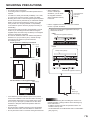
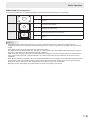
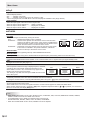
nSwitching the screen size
Even when the screen size is changed, the display may remain the same depending on the input signal.
WIDE
NORMAL
Dot by Dot
PC input
Displays image so it fills the entire screen.
AV input
An image with a 4:3 aspect ratio is stretched to fill the entire
screen.
PC input
Displays image so it fills the screen without changing the aspect
ratio of the input signals.
AV input
Displays the entire image of the aspect ratio of 4:3 without
changing the aspect ratio.
PC input
Displays the dots of the signals input from the connected PC as
the corresponding dots on the screen.
AV input
Displays at the number of panel pixels of the resolution of the input
signal.
TIPS
• Using this monitor’s screen-size switching to compress or expand the screen for commercial or public viewing in
establishments like cafes or hotels may infringe on the rights of the creators, as protected by Copyright Law, so please be
careful.
• When PbyP mode is set to ON, the screen size cannot be changed.
• The appearance of the original video may change if you select a screen size with a different aspect ratio than the original
image (e.g. TV broadcast or video input from external equipment).
• When a non-wide image (4:3) is viewed with the whole screen using the screen-size switching function of this monitor, the
edge of the image may be lost or appear distorted. If you wish to respect the creator’s intentions, set the screen size to
“NORMAL”.
• When playing commercial software, parts of the image (like subtitles) may be cropped. In this case select the optimal screen
size using the screen-size switching function of this monitor. With some software, there may be noise or distortion at the
edges of the screen. This is due to the characteristics of the software, and is not a malfunction.
• Depending on the original image size, black bands may remain at the edges of the screen.
17
E