1
3
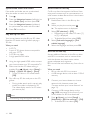
If you cannot hear the TV audio through
your home theater, set up the audio
manually. (see 'Set up the audio' on page
11)
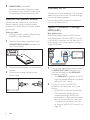
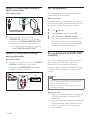
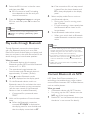
Option 2: Connect to TV through
standard HDMI
Best quality video
If your TV is not HDMI ARC compliant, connect
your home theater to the TV through a
standard HDMI connection.
TV
Note
•• If your TV has a DVI connector, you can use an HDMI/
DVI adapter to connect to TV. However, some of the
features may not be available.
Connect audio from TV and
other devices
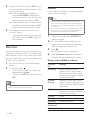
Play audio from TV or other devices through
your home theater speakers.
Use the best quality connection available on
your TV, home theater, and other devices.
Note
•• When your home theater and TV are connected
1
2
3
4
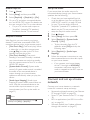
Using a High Speed HDMI cable, connect
the HDMI OUT (ARC) connector on your
home theater to the HDMI IN connector
on the TV.
Connect an audio cable to hear the TV
audio through your home theater (see
'Connect audio from TV and other devices'
on page 9).
On your TV, turn on HDMI-CEC
operations. For details, see the TV user
manual.
• HDMI-CEC is a feature that enables
CEC compliant devices that are
connected through HDMI to be
controlled by a single remote control,
such as volume control for both the
TV and the home theater. (see 'Set
up EasyLink (HDMI-CEC control)' on
page 10)
If you cannot hear the TV audio through
your home theater, set up the audio
manually. (see 'Set up the audio' on page
11)
through HDMI ARC, an audio connection is not
required (see 'Option 1: Connect to TV through HDMI
(ARC)' on page 8).
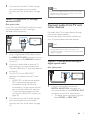
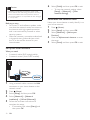
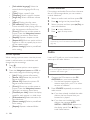
Option 1: Connect audio through a
digital optical cable
Best quality audio
TV
1
Using an optical cable, connect the
DIGITAL IN-OPTICAL connector on
your home theater to the OPTICAL OUT
connector on the TV or other device.
• The digital optical connector might be
labeled SPDIF or SPDIF OUT.
EN
9