1
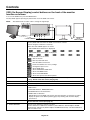
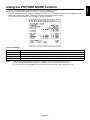
<How to use the advanced OSD>
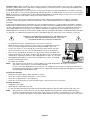
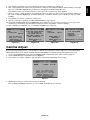
• When both OSD and Key Guide are off, push the “RESET” and “EXIT” buttons two times simultaneously.
•
You will see the Advanced OSD.
This menu is larger than the normal OSD.
<How to exit the advanced OSD>
• Push the “EXIT” button.
To make an adjustment, ensure that the tag is highlighted, then press “SELECT”.
To move to another tag, press “EXIT”, then press “LEFT” or “RIGHT” to highlight another tag.
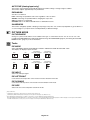
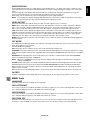
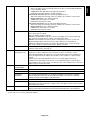
Tag1
PICTURE MODE
Selects one of two possible PICTURE MODES.
PRESET
Sets PICTURE MODE PRESET from the type of PRESET (see page 16).
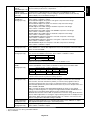
LUMINANCE
Adjusts the overall image and screen background luminance.
Press “Left” or “Right” to adjust.
When the LUMINANCE is adjusting to a new level, a numerical value will blink until the
luminance reaches the target value.
WHITE
Adjusts the white color by temperature or xy setting. A lower color temperature will make
the screen reddish and a higher color temperature will make the screen bluish. A stronger
x makes the screen reddish, a stronger y makes it greenish and weak xy makes it a
bluish white.
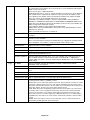
GAMMA
Manually select the desired Gamma* correction for the monitor.
The LUT is calculated based on the factory calibration data for each individual monitor.
Six choices are available:
DICOM, LOG LINEAR, L Star, CUSTOM, sRGB and PROGRAMMABLE.
DICOM: DICOM GSDF (Grayscale Standard Display Function).
LOG LINEAR: Luminance changes logarhythmically in response to a linear change of
gradation.
L Star: GAMMA setting for eciRGB_v2 and Lab color space.
CUSTOM: This is displayed as numerical value which you select. The gamma value is
selectable within a range between 1.0 and 3.0, with 0.1 intervals.
sRGB: Setting for sRGB.
PROGRAMMABLE: The Gamma correction (Display Function) can be changed by
using the NEC Display Solutions QA Software. Used for DICOM calibration according to
DICOM Part 14. This setting can be selected only by using the NEC Display Solutions
software when PICTURE MODE is set to PROGRAMMABLE1. Not selectable on the
Advanced menu.
*Gamma - The way luminance is distributed across the intensity spectrum by a monitor,
Gamma is defined by the relationship between the signal input voltage and the resulting
intensity of the monitor's light output. A perfect linear device would have a Gamma of 1.0.
A Gamma correction to DICOM Part 14 is used to alter the luminance output of a monitor
to gray steps which appear linear to the human visual system.
CUSTOM VALUE
CUSTOM VALUE can be adjusted when CUSTOM is selected as the GAMMA setting.
The gamma value is selectable within a range between 1.0 and 3.0, with 0.1 intervals.
BLACK
Adjusts the black luminance. When the selected settings are too low to be displayed,
the indicator on the OSD will turn magenta.
English-19
English
Advanced OSD